补货报告
补货报告 是一个交互式仪表板,它使用 手动重新订货规则 、前置时间和即将到来的需求,来预测需要补货的产品数量。
该仪表板上使用的重订货规则是普通重订货规则,但用户可以通过监控菜单中的额外选项来管理补货建议。
这使用户能够预测未来需求,减少库存产品,避免出现产品短缺的风险,并对订单进行规划和整合。
浏览补货报告
要访问补货报告,请进入 。
注解
此菜单中也可使用自动重订货规则,但默认处于隐藏状态。
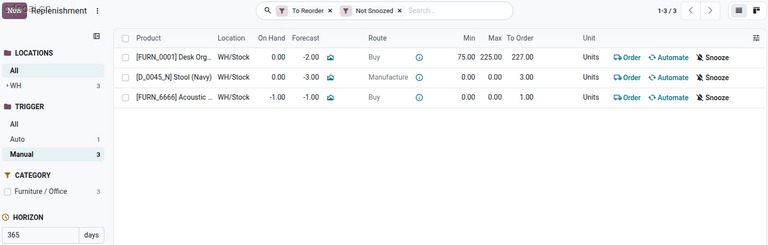
补货仪表板特有的字段和功能显示如下。有关其他字段的定义,请访问 创建重订货规则部分 。
默认情况下,待补货 字段中的数量为达到所设 Max Quantity 所需的数量。不过,可以单击该字段并修改数值来调整 待补货 数量。要手动为产品补货,请单击 Order。
单击 Snooze 可在设定期限内临时停用重订货规则,使该条目在本应显示时从补货仪表板中隐藏。
小技巧
定义 供应商 可以按供应商筛选或分组需求。这简化了确定待订购产品的过程,并可降低运输成本。单击 (adjust settings) 图标,然后从下拉列表中选择 供应商,即可在报告中查看该字段。
订购至最大量
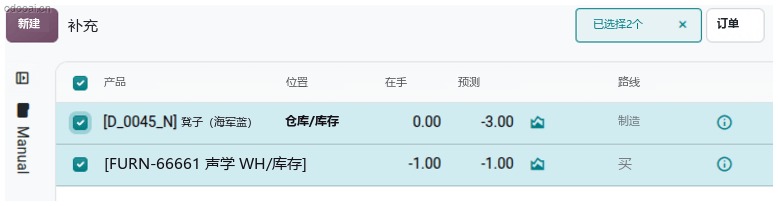
如果重订货规则预测产品不会降至最小值以下,则无法触发补货,因为这被视为 非必要。然而,某些情况下即使不被视为 必要,也需要为产品补货,例如需要最大化订单量以获得更好的折扣,或节省交货成本时。
First, select one or more products by selecting the appropriate checkbox. Then, click Order. Doing so creates a request for quotation (RFQ) for the first possible replenishment date for each product for the maximum specified in the reordering rule.
基准天数
基准天数 决定 Odoo 向前检查多少天,以判断预测数量是否会降至重订货规则的最小值以下。该功能旨在通过增大 补货报告 上的 预测日期,帮助用户提前规划补货。基准天数会向前查看指定的天数,只要预测数量在该窗口内降至最小值以下就触发重订货规则,即使今天并不需要补货。
示例
将基准天数设为 7 可确保所有将在未来七天内触发的手动重订货规则都显示在补货报告中,让用户能够提前审查并决定订购哪些产品。
To set horizon days, go to , and click the collapsed sidebar. In the menu that appears, set the number of Horizon days.
示例
Current date: October 13
On hand quantity: 16
Reordering rule: Min: 9, Max 24
Vendor lead time: 8 days
8 units are needed for an SO on October 15. That means, on October 15, there will only be 2 units in stock.
无基准天数
The demand appears on the replenishment report only on October 14, one day before the delivery date.
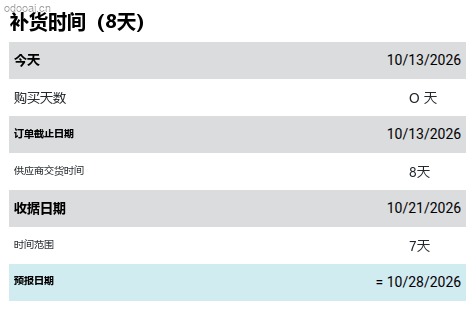
Forecasted date: October 21 (current date + vendor lead time)
有基准天数(4 天或更多)
Odoo considers demand up to October 21 as relevant today (October 13)
对另外 8 个单位的需求会立即显示在补货报告中
Forecasted date: October 28 (current date + vendor lead time + horizon days)
Recalculate minimum and maximum based on order history
Use the Suggest button to update reordering rules based on previous order history.
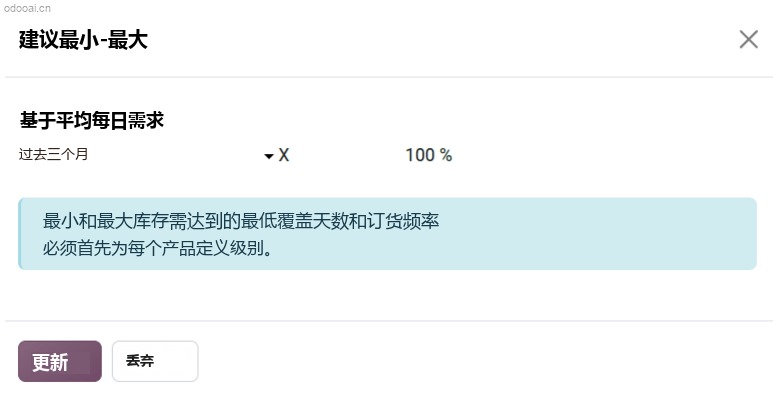
On the Replenishment report, select at least one product whose reordering rules should be recalculated. Click Suggest at the top of the screen. The Suggest Min-Max pop-up window opens.
In this window, specify the time frame that Odoo should use to calculate the minimum and maximum. This can be a period of time (for example, the past 7 days), the current month, a previous month, or a previous quarter.
Click Update.
The minimum and maximum order amount is updated for each selected product.
补货信息
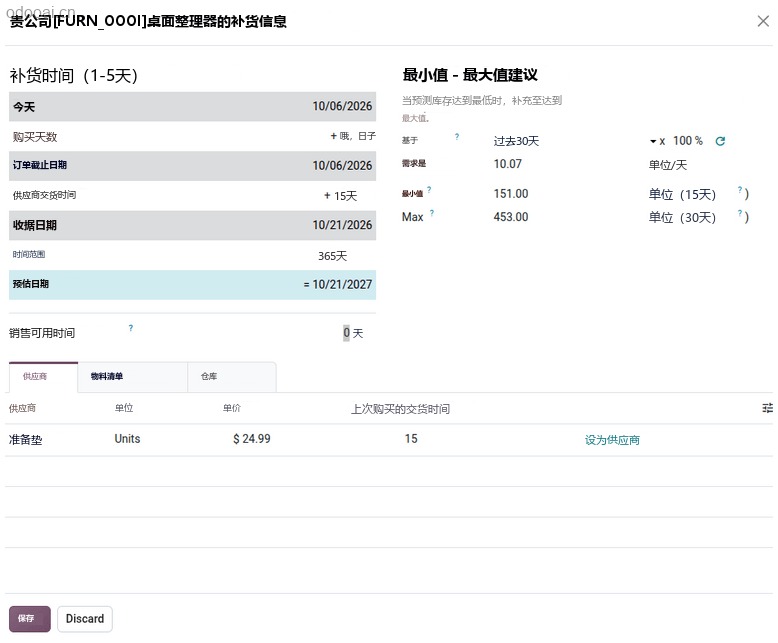
In each line of the replenishment report, clicking the (Replenishment Information) icon opens the Replenishment Information pop-up window, which displays the replenishment time and forecasted date.
Odoo also suggests a minimum and maximum order amount based on a specified period of time and a
percentage that should be purchased (e.g., a 25% sales increase is expected, so the percentage is
set to 125 %). The minimum (Min) quantity should be covered for the specified amount
of days. The maximum (Max) shows the forecasted stock level when
replenishing, along with the replenishment frequency, or number of days between replenishment
requests.
有关如何使用此功能进行补货的详细信息,请转到 准时制 章节。
选择仓库
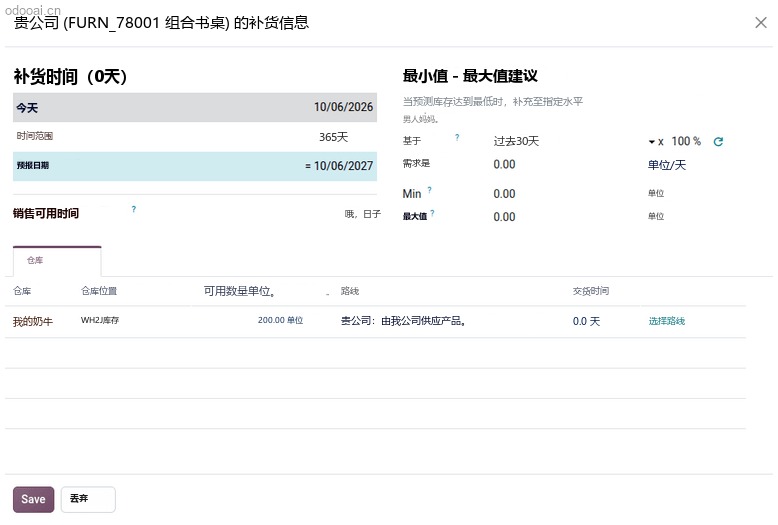
If a warehouse’s replenishment method is resupply from another warehouse, check for available product quantities in other warehouses by opening the Replenishment Information pop-up window. Warehouses that can replenish the stock are listed under the Warehouses tab, and the Available Quantity shows the on-hand stock in each warehouse.
After selecting a sourcing warehouse, click Select Route. When Order is clicked, the reordering rule will revert to its preferred route (Buy or Manufacture), and a transfer is created for the inter-warehouse move.
更多内容
本站校对说明
本篇《Odoo 20.0 documentation》翻译自 Odoo 20.0 企业版官方文档。库存与制造章节的术语统一为:location 译为「库位」、putaway 译为「上架规则」、work center 译为「工作中心」、bill of materials 译为「物料清单」。文中涉及的路线、补货与工单状态,均按 20.0 版本界面核对;开启多步收发货或多仓配置后,菜单会多出层级,与本页顺序不完全一致属于正常。制造业常见的 BOM 层级与成本归集配置,可在本站生产制造专题中查阅。如与官方英文版表述不一致,以 odoo.com 官方文档为准。
内容源自 Odoo S.A. 官方文档,依 CC BY-SA 4.0 许可翻译与校对,版权归 Odoo S.A.。本站为第三方中文文档站点,非 Odoo 官方网站。遇到与官方表述冲突之处,请以 odoo.com 官方文档 为准;版本选型可参考 社区版与企业版对比。