导入供应商价目表
In the Purchase app, users can add vendor pricelists to products to automatically populate requests for quotation (RfQs) or purchase orders (POs) with their unit price, quantity, and lead time.
Vendor pricelists can be added individually on the product form, or imported in bulk, via an XLSX or CSV file.
重要
在上传供应商价目表之前,请查看此 导入指南 。
在产品表单
要在产品表单上手动添加供应商价格,请转到 ,然后点击所需的产品。
小技巧
产品表单可通过多个应用程序访问,如 销售 、库存 和 制造 。
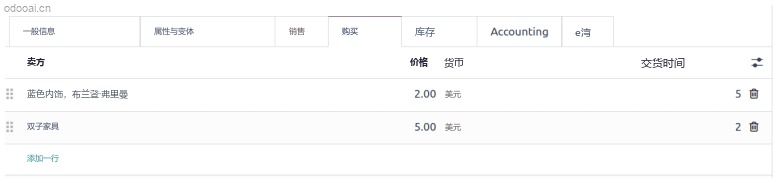
In the Purchase tab of the product form, enter the Vendor, Unit Price, and Quantity of the product to auto-populate this information on an RfQ.
注解
Confirming a PO does not automatically create a vendor pricelist line. When a vendor has no pricelist for the product, the RfQ uses the price, discount, and lead time from that vendor’s most recently confirmed PO line.
小技巧
To compare the last prices each vendor charged, click the (Purchased) smart button on the product form, or Price Comparison smart button on a PO (if applicable). Records are grouped by product, then by vendor.
更多内容
导入供应商价目表
要导入供应商价目表,请确保 XLSX 或 CSV 文件填写准确。要获得格式正确的模板(包括产品名称、引用和供应商详细信息),最好的方法是首先 从数据库导出价格表 。
Modify the exported file as needed, then import it back into the Odoo database.
导出价目表
要导出价目表,请转到 。
On the page, select the checkboxes for the desired vendor pricelists. Then, click the Actions button that appears, and choose Export from the drop-down menu.
In the resulting pop-up window, fields from the Fields to export section are included in the exported file. To add more fields, find the desired field in the Available fields section, and click the (plus) icon next to the field.
注解
Toggle the Updatable fields only option to filter the Available fields to modifiable fields only. Refer to the section on the External ID field.
有关导入供应商价目表常用字段的详细信息,请参阅 常见字段 部分。
Select the desired export Format: Excel Workbook (.xlsx) or Plain Text (csv).
最后,点击 导出 。
小技巧
To save the current list of Fields to export as a template, click the (Save as export template). In the resulting text field, set the template name, then click (save) to save or (cancel) to cancel.
注解
打开 开发者模式 后,导出文件的列名将显示 字段名称 和括号中的 技术名称 。
示例
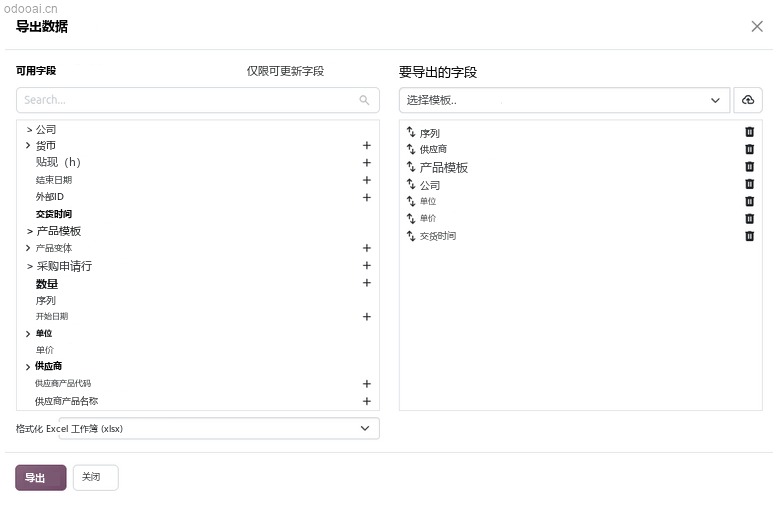
以 XLSX 格式导出供应商价目表。它包括 产品模板 和 待导出字段 部分中的其他字段。
外部ID
An External ID is a unique identifier used to update existing vendor pricelists. Without it, imported records create new entries instead of updating existing ones. Including this field in the XLSX or CSV indicates the line replaces an existing vendor pricelist in the Odoo database.
With the Updatable fields only option toggled, select the External ID field from the list of Available fields. Exporting the data creates a file with an additional column containing the external ID.
示例
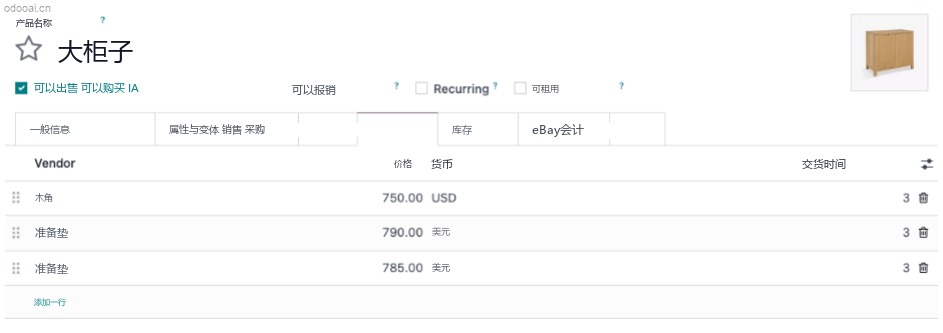
Ready Mat 出现了两次,因为在将价格从 $790 更新为 $780 时遗漏了外部ID。
常规字段
以下是在导入供应商价格表时常用的字段列表:
字段名称 |
用于 |
Odoo数据库中的字段 |
字段的技术名称 |
|---|---|---|---|
供应商 |
创建供应商价格表记录时唯一必需的字段。该字段指定与产品关联的供应商。 |
供应商 字段,位于 产品详情中的供应商价格表 中。 |
|
产品模板SPU |
供应商价目表条目相关的 Odoo 产品。 |
供应商价目表中的 产品 字段。 |
|
数量 |
以指定价格接收产品所需的最小数量。 |
供应商价目表中的 数量 字段。(如果不可见,请点击 (调整) 图标,然后勾选 数量 复选框,启用该选项) |
|
单价 |
从供应商处购买产品的价格。 |
供应商价目表中的 价格 字段。 |
|
提前期 |
供应商价格表上的提前期字段。 |
|
|
排序 |
当有多个供应商可用时,定义价格表中供应商的顺序。例如,如果 |
无 |
|
公司 |
产品的货主 |
供应商价格表中的 公司 字段。 |
|
用于更新现有供应商价格表的记录的 唯一ID。 |
无 |
|
导入记录
下载模板后,填写 XLSX 或 CSV 文件中的必要信息。输入所有内容后,通过进入 将文件导入 Odoo 数据库。
On the page, click the (Actions) icon, then select Import.
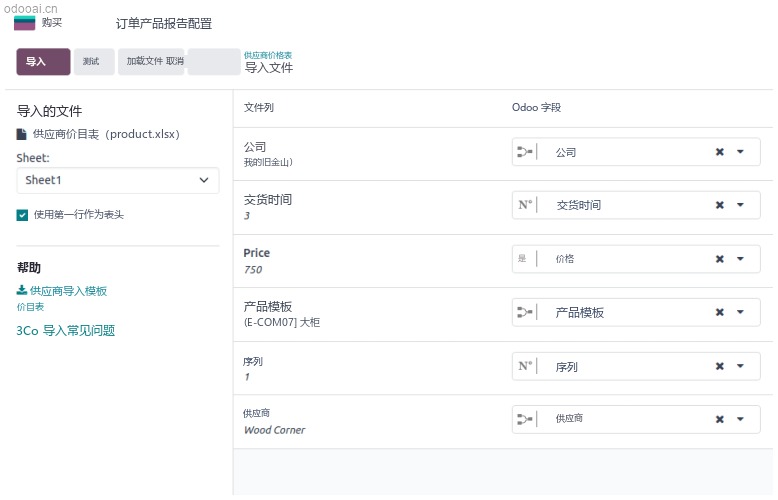
On the page, click Upload, and select the XLSX or CSV file. Verify the File Column and Odoo Field fields are correct, then click Import.
格式化导入文件
要了解如何格式化供应商价格表的导入文件,请参考以下示例。
Storage Box(参考 :E-COM08) 由Wood Corner以$10的价格出售。Large Desk(参考 :E-COM09) 在供应商价格表中没有记录。
一个导入文件将被创建,用于以下场景:
更新了此价格
Wood Corner从$10至$13。为
Storage Box添加价格表:供应商Ready Mat打算以$14的价格出售该产品。为
Large Desk添加价格表:供应商是Wood Corner,价格为$1299。为
Large Desk添加价格表:供应商是Azure Interior,价格为$1399。
id |
company_id |
delay |
price |
product_tmpl_id |
sequence |
partner_id |
|---|---|---|---|---|---|---|
product.product_supplierinfo_3 |
我的公司 (San Francisco) |
3 |
13.00 |
[E-COM08] 储存盒 |
4 |
Wood Corner |
我的公司 (San Francisco) |
3 |
14.00 |
[E-COM08] 储存盒 |
5 |
Ready Mat |
|
我的公司 (San Francisco) |
2 |
1299.00 |
[E-COM09] 大书桌 |
6 |
Wood Corner |
|
我的公司 (San Francisco) |
4 |
1399.00 |
[E-COM09] 大书桌 |
7 |
Azure Interior |
本站校对说明
本篇《Odoo 20.0 documentation》翻译自 Odoo 20.0 企业版官方文档。库存与制造章节的术语统一为:location 译为「库位」、putaway 译为「上架规则」、work center 译为「工作中心」、bill of materials 译为「物料清单」。文中涉及的路线、补货与工单状态,均按 20.0 版本界面核对;开启多步收发货或多仓配置后,菜单会多出层级,与本页顺序不完全一致属于正常。制造业常见的 BOM 层级与成本归集配置,可在本站生产制造专题中查阅。如与官方英文版表述不一致,以 odoo.com 官方文档为准。
内容源自 Odoo S.A. 官方文档,依 CC BY-SA 4.0 许可翻译与校对,版权归 Odoo S.A.。本站为第三方中文文档站点,非 Odoo 官方网站。遇到与官方表述冲突之处,请以 odoo.com 官方文档 为准;版本选型可参考 社区版与企业版对比。