正确输入银行对帐单后,至关重要的是适当地 协调 记录,并确保所有 日记帐分录 都是平衡且一致的。 为了简化和加快对帐过程,您可以配置 对帐模型 ,这对于诸如银行手续费之类的经常项目特别有用。
注解
对帐模型也可用于处理 现金折扣 。 请参阅此 :doc:[UNKNOWN NODE problematic]文档 <../../receivables/customer_invoices/cash_discounts>`了解更多信息。
对帐模型的类型
有三种类型的对帐模型:
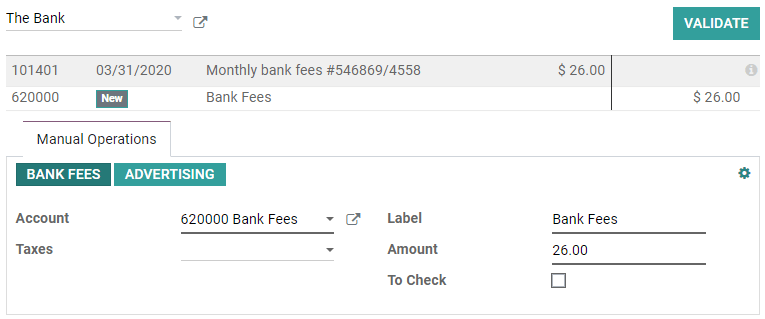
手动创建注销按钮
当您使用 未结余额 对帐单时,可以使用 手动操作 选项卡下的按钮在验证对帐之前自动预填充所有数值。 每个按钮都是不同的对帐模型。
建议对应值
这种对帐模型会立即进行建议只需要验证的对应值。 此自动化基于对帐模型中定义的一组规则。

匹配现有的发票/账单
这种类型的对帐模型会自动选择与付款匹配的正确的客户发票或供应商账单。 剩下要做的就是验证输入。 此自动化基于对帐模型中定义的一组规则。

设置
要管理或创建新的 对帐模型 ,请转到 。 另外,您也可以从会计概述中打开此菜单,方法是转到银行日记帐卡,单击三个小点,然后单击 对帐模型 。

重要
第一个条目名为 发票匹配规则 ,是负责发票和票据当前匹配的条目。 因此,建议将其保留在列表顶部,而不要删除它。
打开要修改的模型,或单击 创建 建立一个新模型,然后填写表格。
类型
请 参见 有关不同类型的对帐模型的说明
注解
如果您的数据库上安装了 文件管理 应用程序,则当选中 要检查 时,会显示一个附加的 活动类型 字段。 选择 对帐请求 意味着,每当您使用此模型时,都会弹出* 请求文档* 窗口,以向用户索取文档。
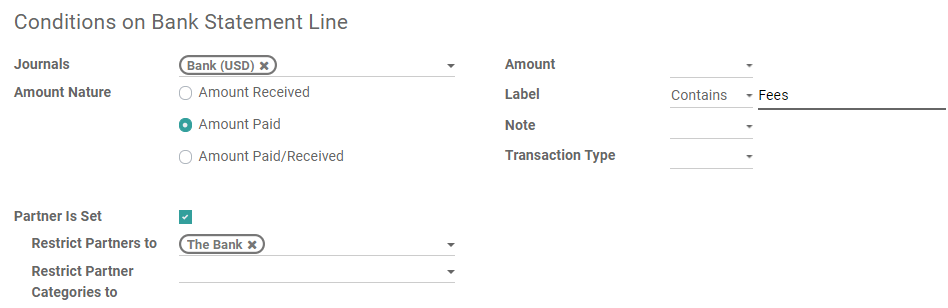
银行对账单明细条件
在此处定义应用对帐模型所需的所有条件。
重要
如果一条记录与多个对帐模型匹配,则将应用模型的 序列 中的第一个。 序列只是 列表视图 中模型的顺序。 可以通过拖放名称旁边的手柄来重新排列它们。
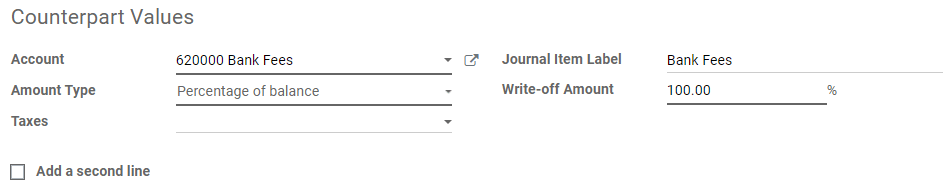
对应值
本部分包含对帐模型应用的值。
如果需要核对的值需要在两个单独的帐户中注销,请单击 添加第二行 。