Odoo Official App StoreIt is an important part of the Odoo ecosystem, providing enterprises and developers with a wealth of third-party module extensions. Countless developers from around the world have uploaded plugins covering almost all business scenarios such as ERP, CRM, finance, e-commerce, manufacturing, and human resources, and continue to contribute new modules. The market is updated frequently, keeping pace with Odoo version upgrades, and is sufficient to meet the diverse needs of enterprises.
In this ecosystem, Guangzhou Odoo Smart has the Odoo official market provided a large number of free modules, and also built China's exclusiveOdoo Chinese App Market , an Odoo module platform customized for China's localization needs. Its positioning is differentiated from the official app market, mainly serving Chinese enterprise users. It is a practical springboard for Chinese enterprises to implement Odoo. Its core value lies in "localization capabilities" and "service closed loop", significantly reducing the threshold for using Odoo in the Chinese market. It is especially suitable for "Chinese enterprises that need to quickly achieve rigid requirements such as financial and tax compliance, local payment, and social security calculation; enterprises that hope to reduce language barriers and technical communication costs and prioritize Chinese services; and users with clear needs for industry-standard solutions (such as retail and manufacturing)."
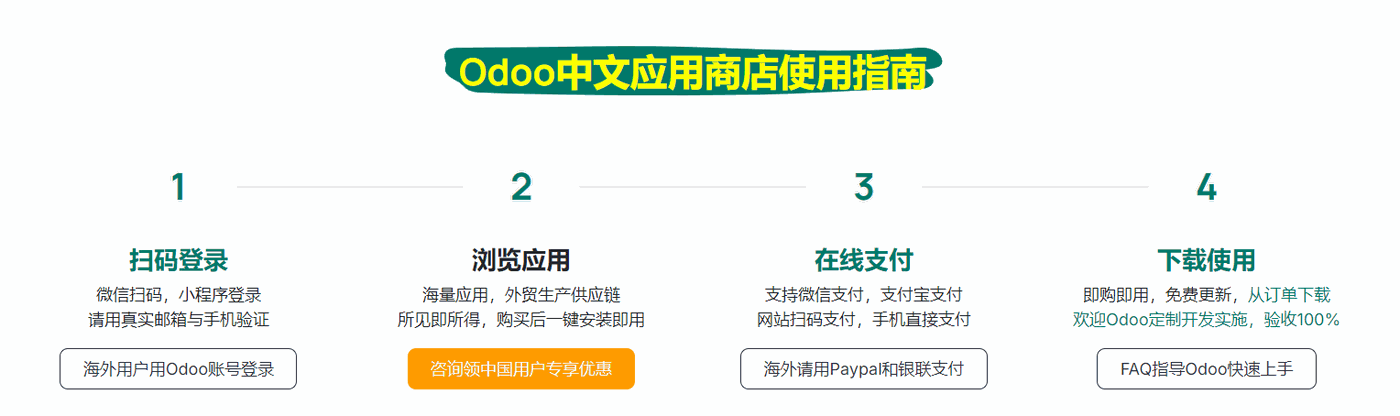
Advantages of the Chinese App Market
- Deep localization adaptation: Rich localization modules: Provides modules that comply with Chinese laws and regulations, such as Golden Tax interface, electronic invoices, WeChat/Alipay payment, WeCom integration, etc., solving the "acclimatization" problem of Odoo official market modules in China.
- Comprehensive Chinese support: Module interfaces, documentation, and technical support are all in Chinese, lowering the language barrier, especially suitable for small and medium-sized enterprises without a technical background.
- Industry-specific solutions: For popular industries such as Chinese manufacturing, retail, and cross-border e-commerce, pre-configured industry solutions (such as MES production management and cross-border logistics tracking) are launched to reduce the development cost of self-integration by enterprises.
- Service model closer to domestic needs: Supports one-time buyout (some modules) and subscription, flexibly adapting to Chinese enterprise preferences. Provides localized deployment support, training services, and technical response, solving the problem of low cross-border communication efficiency with official market developers.
- Compliance and policy adaptation: Modules have built-in functions that comply with Chinese financial standards (such as Ministry of Finance standard accounts) and tax declarations (VAT, personal income tax), avoiding operational risks caused by system non-compliance.
Comparison with the official market
Odoo Official Market | Odoo Smart (odooapp.cn) | |
Localization capability | Weak (mainly international general functions) | Strong (deep adaptation to Chinese policies, payment, and finance/tax) |
Module Quality | Uneven | All precisely checked, validated by numerous customer projects |
Number of Modules | Huge and diverse (tens of thousands of modules) | Focused (on mainstream needs) |
Technical Support | Depends on developers (primarily English communication) | Chinese service, faster response |
Price | Vendors set fixed module pricing. All payments in USD. | Rich promotions. Odoo official prices combined with exclusive optimizations for Chinese customers, member specials, regular major sales (e.g., 611, Double 11), and free modules included in service packages. WeChat/Alipay/PayPal payments. |
How to Use the Odoo App Market to Integrate ERP Yourself
Detailed Differences Between Community and Enterprise EditionsSee Details
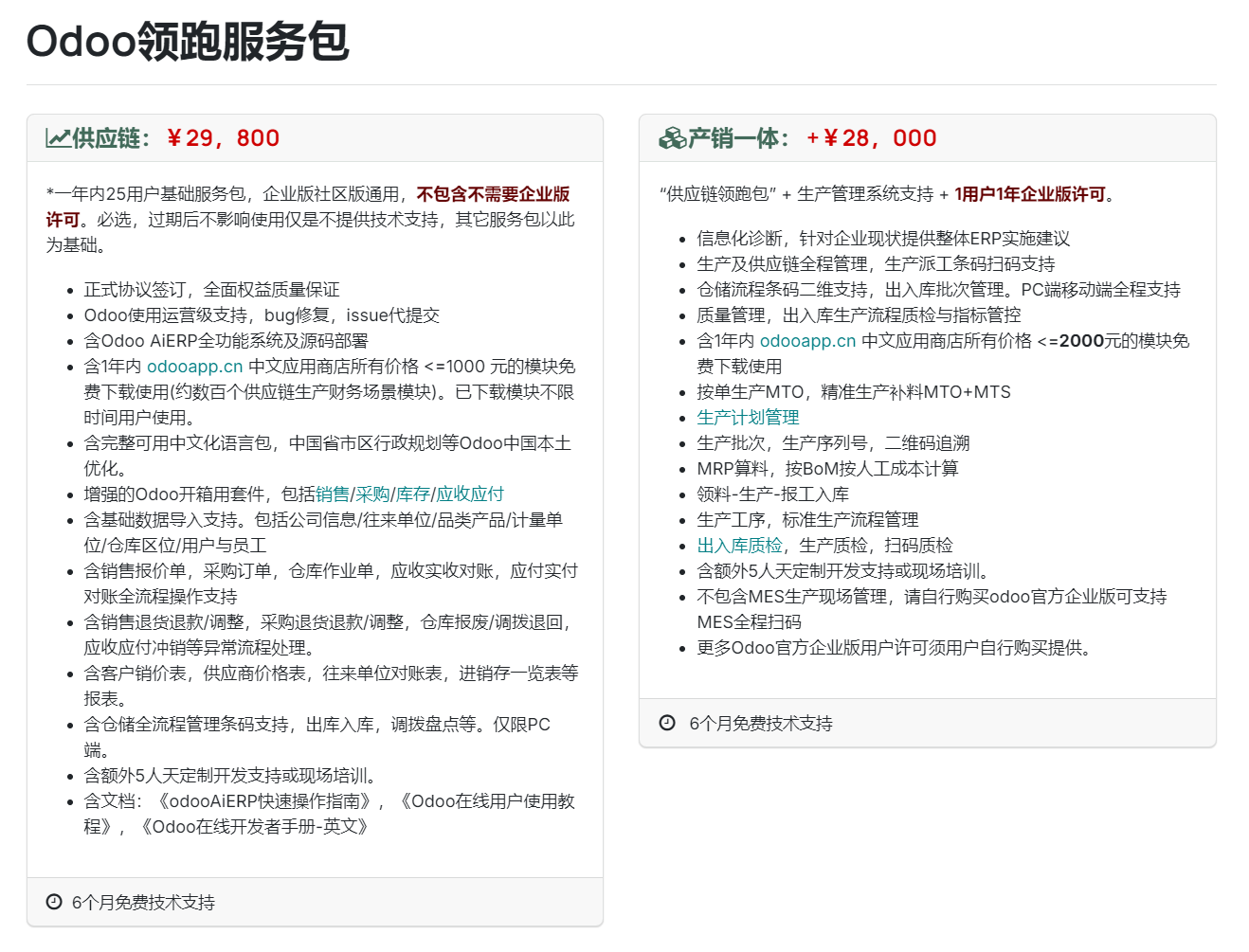
- Install Odoo Community Edition (free) / Enterprise Edition (license required). Or we recommend purchasing theOdoo Leading Service Package,The service package divides functions into modules such as "Supply Chain, Production-Sales Integration, Engineering Management, E-commerce, Offline Stores, Chinese Finance, Group Companies" according to the needs of different types of enterprises, allowing enterprises to select and combine modules to meet various needs.
- Recommended installation order: Accounting > Sales > Purchase > Inventory > Manufacturing > Industry Extensions (e.g., MES).
- Search for the required plugin:Chinese App MarketSearch for localization modules (e.g., "WeChat Pay")
- Installation order optimization: Install core functions first (e.g., accounting, inventory), then expand to peripheral modules (e.g., CRM, HR)
- Check dependencies: Some modules require other modules to be installed first (e.g., "Multi-company" depends on the "Accounting" module).
- Functional testing: Simulate end-to-end business processes (e.g., generating a production order from a sales quotation), focusing on cross-module interactions (e.g., a sales order triggers inventory reservation and synchronously updates accounting receivables).
- Performance stress testing: e.g., large data volume testing: import massive data to check inventory transfer response speed. Concurrency testing: simulate multiple users simultaneously creating orders and approving operations.
- Phased rollout: Enable finance and inventory modules first, then expand to production management after stable operation
- Data backup: Use Settings > Database > Backup. Automatically back up to the cloud daily
App Market FAQs
How to install and use Odoo third-party apps after purchasing or downloading, and how to update versions and upgrade?
1. Register and complete email verification: Please first Odoo Chinese App Store www.odooapp.cn Scan the QR code with WeChat, or log in with QQ/Odoo.com account to complete registration and login. New users need to complete email verification , email verification will protect your account security and allow you to receive our coupons and the latest Odoo solutions and information.
2. Download from the download center or order: After purchasing the app, please download from this site (WeChat Mini Program does not support downloads). You can download from App Download Center or from My Order Downloads Download the app from [Sales Order -- Click 'Order Number' to enter the download page].
Note: When placing an order, the system will automatically add dependent app modules to the cart and order. Please do not delete them. When downloading, remember to download the dependent app modules as well.
3. Upload to your Odoo: After downloading, extract the app and place it in your addons directory, including dependent apps. This directory can be found in the "addons_path" parameter in your Odoo configuration file /etc/odoo/odoo.conf, which by default points to the /addons folder where the Odoo service runs.
4. Enter developer mode: Access the Odoo backend, enter developer mode by adding debug=1 after /web?, or in Settings-->Developer Tools, click Activate the developer mode.
5. Update Apps List: Access the Odoo backend, go to Apps-->Update Apps List.
6. Install the app: Search for the app placed in step 2, usually using the [module technical name] to search, and click Install after finding it.
7. Usage: The usage of the app is generally found in the app's description or in the readme file in the app's root directory.
8. Download updates: Our modules are continuously upgraded. You can download the latest version from your order or get update information directly in Odoo.
9. Upgrade: After downloading the updated module, extract and upload it to your Odoo server. First restart your Odoo service, then go to the [Apps] menu, find the app by technical name, and click Upgrade. If it is a base module or you encounter field errors, you must stop the Odoo service and start it with the -u option, for example
10. python /usr/bin/odoo -c "/etc/odoo/odoo.conf" -d "database_name" -u "module_technical_name"
11. For more detailed information, please visit Odoo's official module installation guide。
12. That completes the installation and upgrade of the app. Please learn how to use it on your own.
Before purchasing an app module plugin, I would like to understand its features. Can I get a demo or explanation?
1. You can see the Demo URL link on the app module details page. Click it to go to our Odoo 18 demo website . In the demo website, you can log in with the Odoo official account to view as a backend business management user, or log in with the Ai pass to view as a website user.
2. Most app modules have demos; please check the module description first. However, due to version differences, some modules may not be in this demo environment, or the data may be messy because it is a shared demo environment. Please understand based on the description.
3. If you cannot find a relevant demo or do not know how to use it, please check the app module description. What you see is what you get; the description you see is the functionality you get. For features not in the description, you can search for other modules by keyword or purchase our custom development man-days.
4. If you still have questions, you can consult by email. However, for module users, we do not provide technical pre-sales support; please consult after purchase. You can also provide project information and seek project guidance from our company in the form of a project.
How can I get technical support after purchasing an app? I am an enterprise user and want efficient support.
1. If you have purchased our Odoo app, we provide free email support for 15 days from the purchase date. Please send your installation and usage questions via email to odoo@china.com or guohuadeng@hotmail.com . The relevant technical support email is listed in the module description you downloaded. When sending an email, be sure to include your purchase order number, the full Odoo version number you are using (e.g., 18.0.25.06.18), a description of your issue, and relevant screenshots.
2. The app modules are mature products; please read the relevant documentation carefully. We do not provide instant messaging support or phone support; only email support is available. The support level is equivalent to the third-party app policy on the official Odoo website.
3. Your email will be replied to within 30 days; please be patient. Our company uses Alibaba Cloud email. Please ensure that your sending mailbox will not be blocked by Alibaba Cloud's anti-spam policy. We recommend using QQ Mail, Hotmail, Alibaba Enterprise Mail, Tencent Enterprise Mail, etc.
4. For confirmed bugs in the app modules, we will complete fixes within 30 days.
5. If you are using Odoo for the first time or are a beginner, please be sure to read this article to prepare yourself before asking questions:"Must-Read for Odoo Beginners - The Wisdom of Asking Questions"。
6. If you need to quickly deploy a full-featured Odoo ERP, you can download it from our"Odoo All-Version Source Code Download Center"download. Choose the Odoo portable version to enable it with one click on your local computer or server.
7. For basic Odoo usage such as "how to set up a sales price list", we provide a complete"Odoo Official User Tutorial Center"。
8. For Odoo development knowledge, we provide a complete"Odoo Official Development Tutorial Center and Technical Reference Manual"。
9. If you want more efficient support, you can learn about or purchase our Odoo Leading Service Package , which includes supply chain, production-sales integration, e-commerce customer acquisition, Chinese finance, group companies, and other options to help you quickly get started with Odoo. The Leading Service Package also includes free provision of relevant modules from this site, allowing you to quickly gain real operational experience and support from our Odu Smart's extensive Odoo business customers.
10. We also provide consulting man-day services: if you have other needs, you can also choose our Person-day service , we can provide Odoo consulting and implementation, technical support, custom development, and other services.
11. If you still have other technical questions or project requirements after completing the training, you are welcome to contact our pre-sales consultants for advice. We will provide technical support on a person-day service basis.
What should I do if I get an error when installing the app?
1. First, check the version to make sure the Odoo version you are using matches the version of the app you purchased.
2. Please make sure you have downloaded the latest version from your order. All our Odoo modules are continuously updated, and we provide free technical support within the official Odoo EOL (End of Life) period—usually three years.
3. If you encounter the error "because the external dependency was not found: External dependency xxx not installed", just install the required library, e.g. run pip install xxx, or search for the relevant method.
4. If the problem persists, please install and test on a clean Odoo instance, i.e., one without too many third-party app modules installed. Our apps are only guaranteed to be compatible with our own apps and third-party apps that comply with Odoo development standards. App issues caused by third-party apps are not covered by our service and after-sales commitments; please contact the third-party app provider or our technical support for resolution.
5. If the problem persists, in the Odoo backend, from the top-right menu, activate "Activate the developer mode (with assets)" or "Activate the developer mode", then send us the detailed error information and screenshots. Please note that within the installation guidance technical support period—i.e., within 15 days—email us and we will diagnose and resolve it for you. If the technical support period has expired, please first purchase 1 person-day technical support. For details, refer to the previous FAQ on how to obtain technical support.
6. If diagnosis shows the issue is caused by a third-party application, technical support will be provided according to our company's man-day rate. You may also seek support from the third-party application's author directly and pay our company the man-day fees incurred for debugging.
I purchased an app for a certain version, such as Odoo 18. Can I get other versions for free?
1. No,odoo.com 's official policy is that starting from Odoo 13, each version, including Odoo 18, Odoo 17, Odoo 16, Odoo 15, Odoo 14, and Odoo 13, requires a separate purchase for different versions of the app.
2. If you need additional discounts and have special circumstances, please contact our website's pre-sales team.
Can I return and get a refund after purchasing an app?
1. Because software is an intellectual property product, it is not subject to the same 7-day return or exchange policies as electronic products.
2. odooApp.cn 's modules and themes are guaranteed to have functions consistent with the description you see when downloading. If you have any objection, you can apply for a free refund within 15 days after placing the order.
3. Please review the app module description carefully before purchasing. If the app functions as described, we do not support returns; we will also guide users on how to install and use it according to the description.
For more FAQs and answers, see odoo FAQ
Summary
The Odoo Chinese App Market is a convenient gateway to extend system functionality, especially suitable for small and medium-sized enterprises that need to quickly deploy standardized requirements, making it easy for enterprises to integrate a simple and easy-to-use dedicated ERP on their own. However, for complex scenarios or highly customized requirements, users are still advised to combine technical support for custom development when necessary. Overall, it is an efficient tool that requires rational selection; reasonable use can significantly enhance the flexibility and adaptability of the Odoo system.