Overview
Registration and login are the first steps for consumers using an e-commerce platform. A convenient and quick process can greatly increase traffic and e-commerce sales. With Odoo's full social media integration module, you can quickly enable one-click single sign-on via WeChat, Douyin, QQ, Taobao, DingTalk, Alipay, WeCom, Facebook, Google, Microsoft Azure, etc. The following is the relevant configuration guide, using our official website www.odooai.cn as an example, mainly including:
1. Unified login, WeChat multi-terminal SSO integrated login effect
2. WeChat Open Platform registration
3. Website application registration
4. WeChat Official Account configuration
5. Configure WeChat login in Odoo AiErp
6. For WeChat Pay configuration, please refer to the module app_payment_wechat
7. For WeChat Mini Program login, please refer to the module app_mobile_api_wxapp
For official WeChat documentation, please refer to
https://developers.weixin.qq.com/doc/oplatform/Website_App/WeChat_Login/Wechat_Login.html
1. Unified login, WeChat multi-terminal SSO integrated login effect
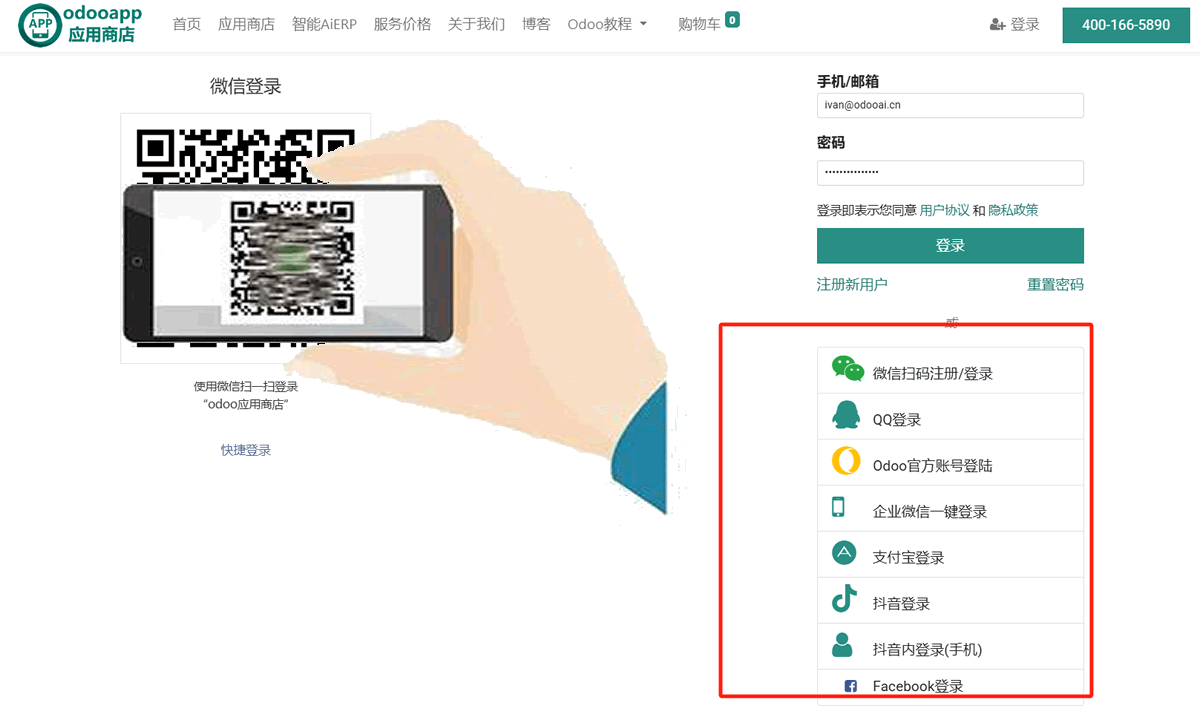
- Web login
Users can scan the QR code with WeChat to automatically log in and register. Logged-in users can directly click "WeChat Quick Login" once. Administrators can require mandatory registration of key information such as email.
First-time login and registration user
|
User already logged in with WeChat
|

- Direct registration and login via WeChat on mobile
After clicking the shared website link directly within WeChat, users can register and log in directly without entering any registration information.
- Automatic identification of unique users across multiple platforms
Users logging in from the web, within WeChat, or within WeChat Mini Programs can all be automatically identified as the same user. Administrators only need to bind them in the WeChat Open Platform.
2. WeChat Open Platform Registration
- VisitWeChat Open Platform, and click Register. https://open.weixin.qq.com
- Follow the registration process, activate your email, register the legal entity information, and complete developer qualification verification.
- The ICP certificate is very important; please complete it before registration.
3. Website Application Registration
- Create a website application

After creating the website application, wait for approval before use;
You need to pass WeChat verification. Only after passing WeChat verification can you obtain the "API permissions" for the website application; otherwise, you cannot use the API functions.
- Record the appid and appsecret

- Configure the authorized callback domain, i.e., the website where one-click login will be used
The business domain configuration is mandatory; its main purpose is to associate with Mini Programs and enable interaction between the PC and Mini Program ends.

4. WeChat Official Account Configuration
The configuration of the website application in the Open Platform mainly displays a QR code on the PC website for login by scanning with a mobile phone. If you need automatic login when directly accessing the website on a mobile phone, the following configuration is still required.
- In the WeChat Open Platform, perform "Bind Official Account".
This WeChat Official Account should preferably be a WeChat Service Account, because service accounts have more APIs and can provide more services to customers.

- In the WeChat Official Account Platform, complete the association configuration
https://mp.weixin.qq.com/ Go to Account Settings -> Function Settings. Set the business domain and JS interface domain as shown below. Then you can authorize unified login within WeChat.
|
|


5. Configure WeChat login in Odoo AiERP
- Access the operation menu
In Odoo, first with super admin privileges, go to the menu Settings -> Users & Companies -> OAuth Providers, find the provider of type WeChat Website QR Code and configure it.

- Configure unified login parameters
Mainly configure the Client ID (i.e., appid) and Client AppSecret, which have been noted and recorded in item 3 above.
Other parameters are pre-configured. You can check the detailed configurations as needed.

If you need to use the unified login big member center mode, simply fill in the associated open platform appid and the associated WeChat official account appid.
After configuration is complete, we can see the effect as in item 1, achieving registration and login without entering information.