One-sentence answer Connect WorkBuddy's 11 menu entries to a self-hosted Odoo Community Edition, and the software license fee is 0. Connectors bridge business data, skills solidify entry rules, automation runs daily reports on schedule, the knowledge base accumulates outputs, and Odoo stays in the background managing processes and accounts. This combination suits teams with technical staff who want to get lightweight processes running first while keeping data in their own hands.
Applicable versions Odoo 18 / 19 / 20 Community Edition, WorkBuddy desktop
Verification date 2026-11-07
Reading benefits A division-of-labor table for 11 entries, three MCP integration methods, a P1 to P3 implementation pace, nine pitfalls encountered in real deployments, and ten directly quotable FAQs
This article was compiled by the Odoo implementation team at Guangzhou OdooAi (odooai.cn), based on actual integration records of Odoo 18~20 Community Edition and WorkBuddy desktop. The 11 entries, three integration methods, and nine pitfalls of this free AI workbench described in the article can all be verified first in the P1 read-only phase before deciding which step to expand to.
First, align the several entities that appear repeatedly in this article and unify the terminology.
| Entity | What it refers to in this article |
|---|---|
| WorkBuddy | Tencent's all-scenario AI workbench: assign tasks in natural language, read and write local files, and deliver finished documents, spreadsheets, PPTs, and more |
| Odoo Community Edition | The open-source ERP core released by Odoo S.A., licensed under LGPLv3, self-hosted, with PostgreSQL as the database |
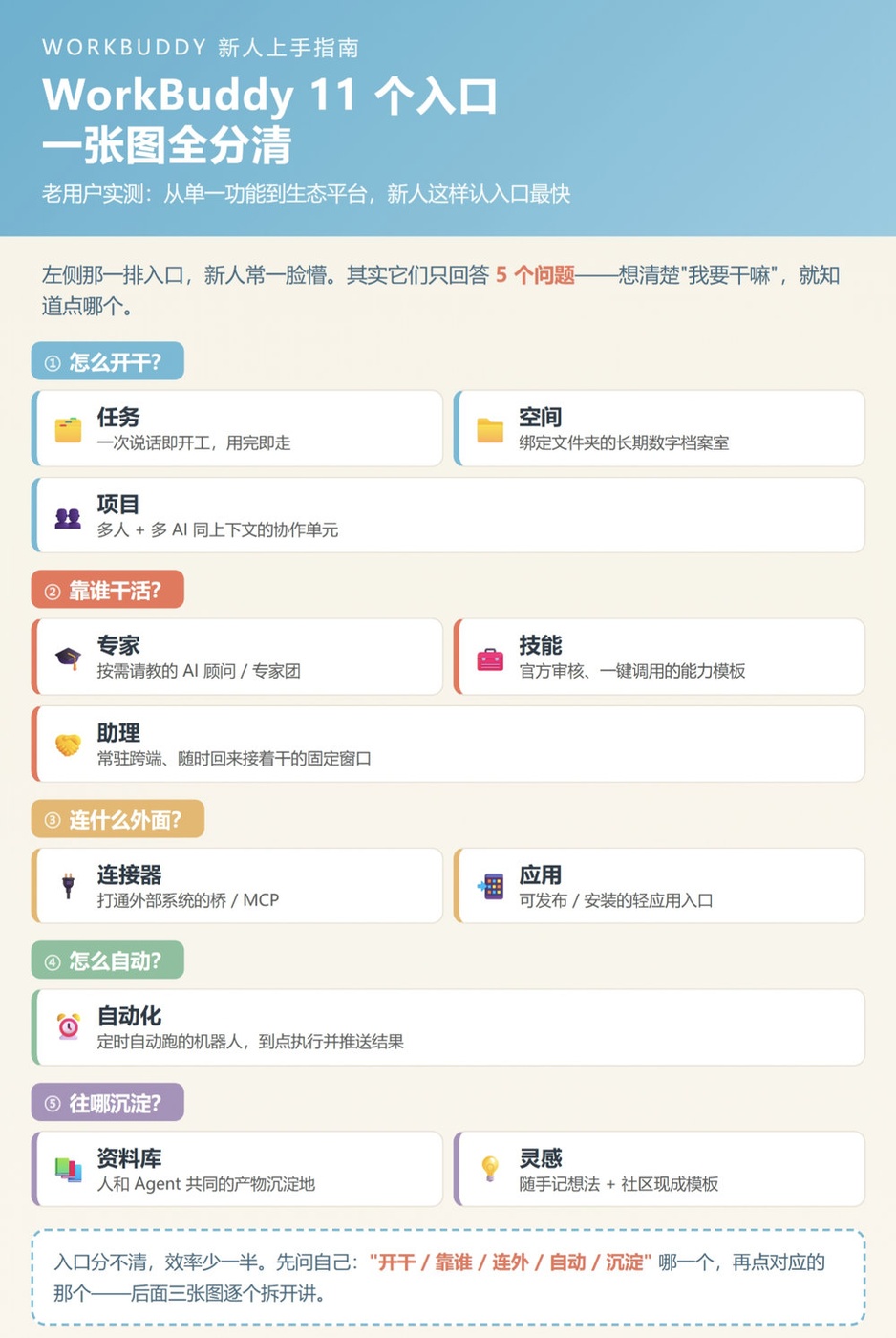
| 11 entry points | WorkBuddy's left sidebar: Tasks, Spaces, Projects, Experts, Skills, Assistants, Connectors, Apps, Automations, Library, Inspiration |
| MCP | Model Context Protocol, a protocol for AI clients to invoke capabilities of external systems; WorkBuddy connects via custom connectors |
1. Which Part of Odoo Does Each of the 11 Entry Points Connect To?
What do the 11 WorkBuddy entry points actually handle? The 11 sections answer only 5 questions: how to get started, who does the work, what external systems to connect, how to automate, and where things accumulate—and what specifically happens once connected to Odoo. These questions need to be clarified first, because this layer of mapping is where building a workbench most easily gets stuck.
| Category | Entry Point | Positioning in the Original Text | What to Do After Connecting to Odoo | Getting Started Phase |
|---|---|---|---|---|
| How to Get Started | Tasks | Start working with a single message, leave when done | Quickly check a sales order, verify a stock item, or revise a quotation | P1 |
| How to Get Started | Spaces | A long-term digital archive bound to a folder, with context continuously retained | Bind the directory containing Odoo module source code, implementation documents, and interface specifications | P1 |
| How to Get Started | Projects | A collaboration unit where multiple people and multiple AIs share the same context | The implementation team shares the same set of field definitions and test database context | P2 |
| Who does the work | Experts | AI consultants with defined roles and methods, available on demand | Have Odoo-savvy experts review implementation standards, approval flows, and permission design | P2 |
| Who does the work | Skills | An officially reviewed capability template library, callable with one click | Standardize data entry rules for quotations, tax rates, currencies, and units of measure | P1 |
| Who does the work | Assistant | A persistent cross-platform window you can return to anytime to pick up where you left off | Assign a dedicated Odoo operations assistant to keep an eye on the same set of books over the long term | P2 |
| What to connect externally | Connectors | The bridge to external systems | Deploy Odoo MCP Server, the technical starting point of the entire solution | P1 |
| What to connect externally | Apps | Publish outputs as shareable links, or install lightweight apps | Send weekly reports and dashboards as links for people who don't log into Odoo | P3 |
| How to automate | Automation | Bots that run automatically on schedule, executing and pushing daily and weekly reports when due | Daily sales reports generated on a schedule and pushed to Feishu or DingTalk | P3 |
| Where to consolidate | Knowledge Base | A shared repository for outputs from people and Agents alike, where content can be edited, collaborated on, and published | Store SOPs, field dictionaries, report templates, and lessons learned | P2 |
| Where to consolidate | Inspiration | Jot down ideas and add ready-made templates from the community—recreate the same setup with one click | Reuse ready-made Odoo playbooks from the community and avoid taking detours | P3 |
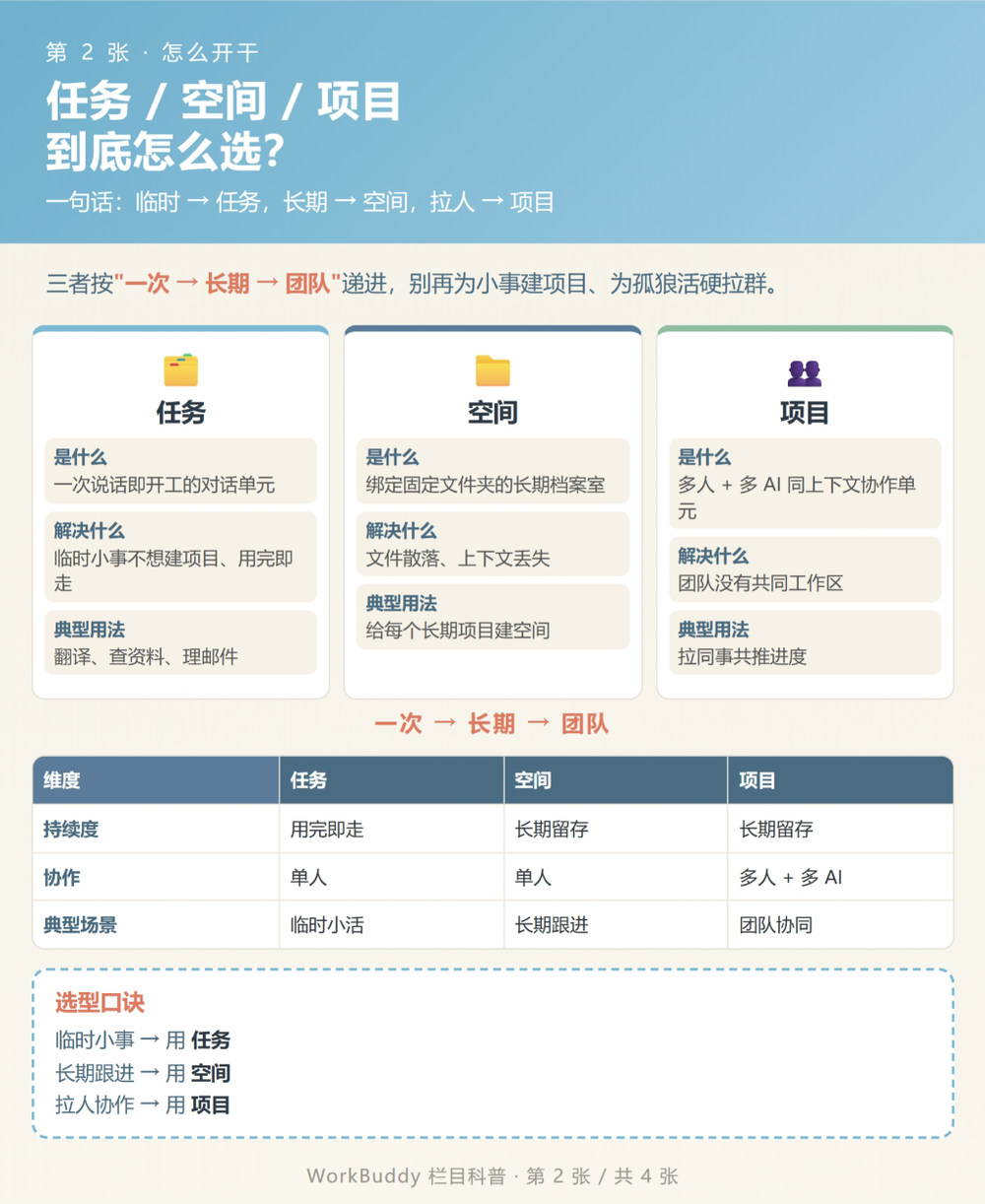
"If you can't tell the entry points apart, you lose half your efficiency." In this workbench, it can be summed up in one sentence: data goes into Odoo, decisions are made in WorkBuddy, and outputs go back to the library.
Only the Connector entry point truly handles "integration"; the other ten determine whether this workbench is easy to use and can run long-term. Many people start by asking in the task window, "Create an order for me," but without even setting up the bridge, the AI can only make things up, so the numbers naturally don't match.
If you want to connect these 11 entry points directly to your own account set, you can firstContact a consultant for a demoGet an entry mapping checklist to tick off during the P1 phase—it saves time compared to trying each one yourself.
2. Why Choose Open Source Odoo Community Edition as the Foundation
Odoo Community is open source under LGPLv3, with zero software license fees. Both the source code and PostgreSQL database remain on your own machines, making it suitable as the business data foundation for an AI workbench. What is free is the license; servers, implementation, backups, and cross-version upgrades are still your responsibility.
We value three things when choosing it as the foundation.
First, the business models are ready-made. Customers, leads, products, sales orders, purchasing, inventory, manufacturing, and projects all reside in the same ORM and the same database. When AI queries "which orders from last month have not yet been shipped," it does not need to stitch data across systems. Odoo's official website states 40k+ community apps and 28 million users, while third-party statistics from October 2026 record the number of community modules at over 50,000. Different parties use different counting methods, but the magnitude is sufficient to illustrate the point.
Second, open interfaces. /xmlrpc/2/common handles authentication, /xmlrpc/2/object uses execute_kw to call any model method, and fields_get lets you first clarify the field structure. This external API requires no paid modules; it works on a self-hosted Community instance.
Third, no vendor lock-in. Data resides in PostgreSQL, the source code is modifiable, and you can write your own modules. If you switch AI clients someday, the business system side doesn't need to change at all.
What the Community Edition lacks must also be made clear. Odoo 20, released in September 2026, still follows the dual-track Community and Enterprise model; full accounting, Studio, native mobile apps, official support, and version upgrade services are all on the Enterprise side. The Community Edition only has invoicing and basic accounting, and upgrades rely on yourself or OCA's OpenUpgrade. So the phrase "free workbench" comes with a prerequisite: someone on the team must be able to manage servers and backups.
| Dimension | Odoo Community Edition | Odoo Enterprise |
|---|---|---|
| Software License | 0, LGPLv3 | Per-user monthly subscription, pricing adjusted by country |
| Deployment | Self-hosted servers or your choice of hosting provider | Odoo Online, Odoo.sh, or on-premise deployment |
| Business core | CRM, Sales, Purchasing, Inventory, Manufacturing, Project, Website, eCommerce | All Community Edition Capabilities |
| Finance | Invoicing and Basic Accounting | Full Accounting, Bank Reconciliation, Multi-dimensional Analysis, Localized Reports |
| Low-code and Mobile | No Studio, Browser Access | Studio, Native iOS and Android Apps |
| Support and Upgrades | Community forum, partners, self-service upgrades | Official support, standard app upgrades included |
| Suitable For | Have technical staff, want data autonomy, start with lightweight processes | Need full financial compliance, don't want to handle operations yourself |
Selection recommendations are as follows:
For teams of 10 or fewer, with processes not yet finalized and wanting to first verify whether AI can actually help, the Community Edition is sufficient. When you need consolidated reports, audit compliance, or mobile approvals, don't force it—move to Enterprise or find an implementation partner. The license fees you save won't cover the operational pitfalls.
3. The Four-Layer Integration Chain
The four layers are the data layer, channel layer, capability layer, and accumulation layer. First, create an Odoo API user with minimal permissions, then use the MCP connector to enable read/write, next write business rules into skills, and finally use automation and a knowledge base to accumulate the outputs.
3.1 Data Layer: First Create a Read-Only API User
In Odoo's "Settings → Users", create a dedicated integration account, issue a key from "API Keys", and grant permissions model by model. Do not use the admin key to connect to AI clients—this is the most error-prone step in live deployments. Store credentials only in environment variables, and reference them in configuration files using variables like ${ODOO_MCP_TOKEN}.
First use common.version() to confirm the instance is reachable, then use common.authenticate(db, user, key, {}) to get the uid. Once this step works, we can talk about the rest.
3.2 Channel Layer: How to Choose Among the Three Connection Methods
| Connection Method | Deployment Location | Permission Model | Suitable For | Points to Note |
|---|---|---|---|---|
| WorkBuddy Custom MCP Connector | Client-side configuration pointing to a remote MCP endpoint | Determined jointly by the MCP Server and the Odoo user | Teams that want the fastest path to a working setup and may switch implementations later | After configuration, you must click "Trust" before enabling |
| Odoo-side MCP module | In-Odoo controller, no standalone process | Directly reuses Odoo's ACL and record rules | Emphasizes auditing, write approval, and multi-client isolation | Requires module installation, version must match |
| Script connects directly via XML-RPC / JSON-2 | Local Python script | Account permissions written entirely by ourselves | Fallback, batch data fixes, ad-hoc verification | No tool discovery; errors rely entirely on logs |
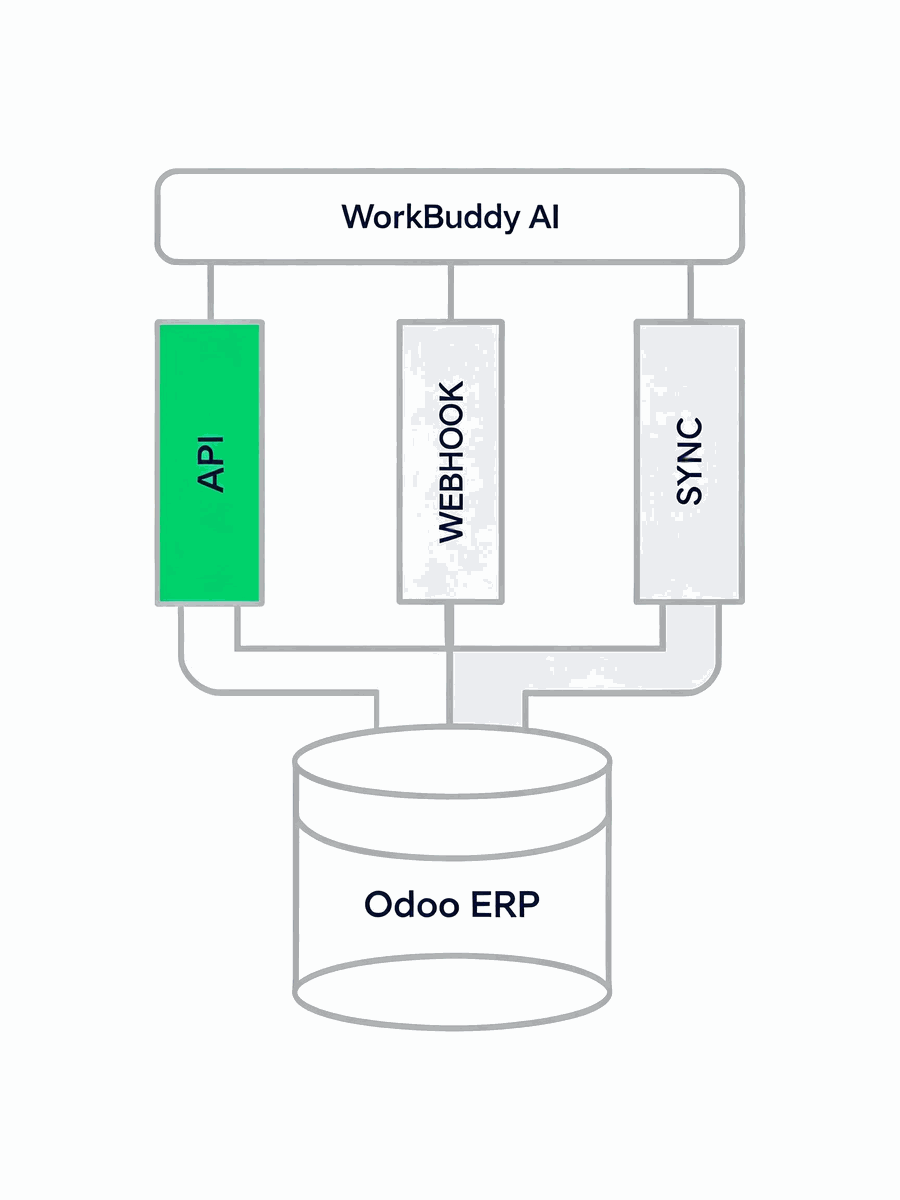
Approach A: WorkBuddy custom connector. The configuration file is at ~/.workbuddy/mcp.json, structured as an mcpServers object. Take an HTTP-type MCP Server as an example.
{
  "mcpServers": {
    "odoo-community": {
      "type": "streamableHttp",
      "url": "https://odoo.example.com/mcp/",
      "headers": {
        "Authorization": "Bearer ${ODOO_MCP_TOKEN}"
      }
    }
  }
}
Two common pitfalls. The value of type has two forms across client versions: http and streamableHttp; following the camelCase form in the built-in connector list is the most reliable. Saving the configuration does not mean it takes effect; go back to the connector management page, find the new entry, click "Trust" and enable it, and only then will the client actually load the tools. Once the tools are loaded, the common ones are list_models, search_records, get_fields, read_group, and the like; run them read-only first.
Approach B: Odoo-side MCP module. The Odoo English app store www.odooapp.cn has our OdooAi's MCP module, supporting the latest Odoo 20 and other lower versions, free for enterprises. The official Apps Store has open_mcp_server supporting 18.0 and 19.0; the idea is to make the MCP endpoint an Odoo controller instead of starting an extra bridge process. The advantage is that permissions go directly through Odoo's own ACL and record rules, and you can configure model whitelists, write approvals, and call audits per connection. When assigning accounts to multiple AI clients, this structure is hassle-free.
Approach C: direct script connection. You can get work done without installing MCP; the minimal snippet looks like this.
uid = common.authenticate(db, user, api_key, {})
orders = models.execute_kw(
    db, uid, api_key,
    "sale.order", "search_read",
    [[["state", "=", "sale"]]],
    {"fields": ["name", "partner_id", "amount_total"], "limit": 20},
)
Three tips. Always include limit in queries; unconditional searches on large Odoo tables are very taxing. Before write operations, use fields_get to check field types and required fields; don't dump hundreds of fields from the entire model to the model, or the answer will go off track. For multilingual fields (such as blog post body content), explicitly include context={'lang': 'zh_CN'} when reading or writing; otherwise, it writes to the en_US column and appears ineffective on the frontend.
There's also a timeline you need to know in advance. Starting from Odoo 19, deprecation warnings are logged for /xmlrpc, /xmlrpc/2, and /jsonrpc requests. Community module documentation relays the official removal timeline as Online 21.1 (winter 2027) and Odoo 22 (fall 2028), with the External JSON-2 API as the replacement. For new projects starting now, prioritize implementations that support JSON-2; don't tie your entire automation to an interface that will eventually be retired.
There are already several implementations in the open-source community that can be directly modified; versions are subject to their respective repositories.
| Projects | Protocol / Interface | Features |
|---|---|---|
| altinkaya-opensource/odoo-mcp | AGPL-3.0,XML-RPC | No Odoo module installation required; READONLY_MODE=true disables all write tools with one click |
| pantalytics/odoo-mcp-pro | JSON-2(19+),XML-RPC(14-18) | Six general-purpose tools, intelligent field selection, with OAuth 2.1 support |
| sameeroz/odoo-mcp-server | MIT,Python 3.12+ | Modular structure covering products, customers, orders, and invoicing workflows |
| Odoo Apps open_mcp_server | 18.0 / 19.0 | In-Odoo controllers, OAuth 2.1, write approvals, per-call auditing |
My own approach is A first, then C. Get read-only queries working through a custom connector, confirm the numbers match the Odoo interface, and then decide whether to replace a particular step with a script or an in-Odoo module. Starting with the "most complete" solution often gets stuck at deployment—two weeks pass and you still haven't retrieved the first data point.
Of the three approaches, the fastest is to use the ready-made MCP interface module directly. We include it in the implementation package together with a least-privilege configuration,Contact us on WeChatand you can get it, saving you the trouble of writing the bridge layer from scratch.
3.3 Capability Layer: Write Business Rules into Skills
Connectors answer "can it read," while skills answer "don't write carelessly after reading." This step is where real expertise shows, and it is also the easiest to skip. The following points were all learned the hard way in live deployments at real cost. Once written into skills, the AI follows them every time without anyone watching over it to correct mistakes.
- Look up products by name or code first; if found, use the existing product, and only create a new one if not found. Don't casually reuse test products left behind by others.
- For foreign currency orders, first confirm that the currency is enabled and the exchange rate is set up, then create a generic pricelist for that currency and apply it to the order. The SO currency is derived from the pricelist; directly writing
currency_idwill cause a 500 error. - Order lines for export EXW quotations should not have taxes applied; only then will the line subtotal match.
- For products priced by area, set the unit to square meters when creating them in the database, and calculate the quantity as width times height; use pieces for accessories. If the unit is set incorrectly, every subsequent report will need to be redone.
- Write customization information such as position, dimensions, and glass into the customization description field of the order line, and keep the line name as the product description.
- Changing the product on an order line triggers price recalculation and reapplies default taxes; you must include the unit price in the same update, and then clear the taxes separately afterwards.
- If the default sales tax is tax-included, verify the line subtotal by calculating quantity times unit price divided by 1.13, then multiplied by (1 minus discount). If it doesn't match, suspect the tax first and don't rush to change the data.
- Common hard limits on the MCP side, such as certain fields returning 400 on write, or order lines not being directly creatable. When you hit these, rebuild the entire order instead of struggling with error messages.
In this layer, experts manage review standards, assistants handle ongoing follow-up, and the project entry point manages shared context for multiple people. None of the three directly touch data; clear responsibilities make troubleshooting easier.
3.4 Accumulation Layer: Let the Workbench Run on Its Own
Automation sets daily and weekly reports to run on schedule, pushing results to Feishu or DingTalk. The knowledge base stores SOPs, field dictionaries, and report templates, so new colleagues don't have to ask again. The app entry point sends weekly reports as links for those who don't log into Odoo. The inspiration entry point collects ready-made Odoo templates from the community; when you see a suitable one, you can directly replicate it.
The criteria for this layer are simple. If you go on a business trip for a week and daily reports still arrive, reports still update, and no one asks "where can I find that number," then the workbench is truly established.
4. From P1 to P3: Don't Try to Do It All at Once
Proceed in phases, without fixed calendar dates. In each phase, do only the one thing that can be accepted; once it works, move to the next phase.
| Phase | What to do only | Which entry points to use | Acceptance criteria | Permissions |
|---|---|---|---|---|
| P1 | Establish read-only access, query customers, orders, and inventory, and produce a daily report | Connectors, tasks, spaces | The figures retrieved match the Odoo interface item by item | Dedicated read-only API user |
| P2 | Encode data entry rules into skills and enable low-risk writes | Skills, experts, projects, knowledge base | Written records verified on re-check, with no errors in tax, currency, or units | Only expose lead, task, and draft-type models |
| P3 | Scheduled execution, automatic distribution, output archiving | Automation, applications, inspiration | Runs for a full week without manual intervention | Narrow down using a model whitelist |
P1 Don't rush to enable write permissions. Run in read-only mode for a week to surface the basic issues first: field definitions, time zones, multilingual support, and pagination. P2 Don't rush to connect to the production database. First use a test database to verify each rule in the skill one by one. P3 Don't rush to add bells and whistles. Stability outweighs the number of features.
This rhythm is the same as creating a pre-sales proposal: first get the minimal closed loop running, let the client see something, and then expand outward. The same goes for the workbench: getting people to actually use it once a day is more reliable than planning ten automations at once.
5. Nine Pitfalls, Ranked from Highest to Lowest Cost
| Pitfall | Scenario | Consequence | Solution |
|---|---|---|---|
| Connect AI with an admin key | Taking the easy route: copying the admin API key directly | A single mistaken write could scan the entire table | Create a dedicated integration user, grant access per model, and start with read-only |
| Assuming it takes effect once configured | mcp.json is written, but no data comes back in the chat |
Tools can't be found, and you keep suspecting the configuration is wrong | Go to the connector management page, click "Trust" and enable it |
| Hardcoded keys | Tokens written in plaintext to config files and committed | Credential leakage, high rotation cost | Reference with ${ENV_VAR} variables, keep keys in environment variables |
| Dump all fields to the model | search_read without passing fields |
Context gets blown up and answers start to drift | Call fields_get first, then list fields explicitly |
Write currency_id directly |
Want to change the currency on a foreign-currency order | The API returns a 500 | Use the currency's pricelist and let the system derive the currency |
| Change product without unit price | Batch update order lines product_id |
Price recalculated to zero, default taxes reapplied | Same update includes price_unit, then taxes cleared separately |
| Multilingual field written to wrong column | Edited the blog post body, but the front end shows no change | Writes go to en_US, but the page renders in zh_CN | Reads and writes explicitly carry a lang context |
| Treating the API as a permanent asset | Binding all automation to XML-RPC | Full rework when it is officially removed | New projects should prioritize JSON-2 or the MCP module within Odoo |
| Only software license fees are counted | The budget sheet says "0" | Servers, backups, upgrades, and implementation are unaccounted for | List the TCO checklist before project approval |
The first three pitfalls have nothing to do with technology—they are purely process habits—yet they are the most likely to be hit. Teams that have actually run into trouble almost always stumble on permissions and credentials, rarely on ORM syntax.
Pitfalls around permissions, credentials, and fields have already been handled in the ready-made modules with read-only-first defaults. If needed,Contact Usgrab a copy; checking items off is faster than testing one by one.
6. What Exactly Is Free?
The Community Edition waives the software license fee, not the total cost. A server capable of running PostgreSQL and Odoo, regular backups and recovery drills, security patches, cross-version upgrades, initial implementation, and field mapping—all of these require people. Conversely, the Enterprise Edition charges a subscription fee and buys official support, upgrade services, and a complete financial module.
The algorithm I give my team has always been simple: put "one year of self-hosted labor plus servers" and "subscription fee times number of users" in one table for comparison, then add a separate row for the weight of "data must stay in our own data center." If that last row is a hard constraint, the Community Edition is basically the only choice; everything else is negotiable.
One more point that is easily overlooked: the cost on the AI client side must also be factored in. Outputs like daily reports, reports, and knowledge bases will occupy storage and context long-term. The more detailed the rules, the more controllable the token consumption—which is why it is worth spending time to write the skills solidly first.
7. Frequently Asked Questions
What are the 11 menu entries in WorkBuddy?
Tasks, Spaces, Projects, Experts, Skills, Assistants, Connectors, Apps, Automations, Library, Inspiration. According to the classification in "WorkBuddy's 11 Entries: Who's in Charge of What?", the first three answer how to get started, the middle three answer who does the work, Connectors and Apps answer what to connect externally, Automations answer how to automate, and Library and Inspiration answer where to accumulate knowledge.
Does integrating WorkBuddy with open-source Odoo require payment?
At the software licensing level, it's free. Odoo Community Edition is open source under LGPLv3, self-hosted instances incur no license fees, and WorkBuddy's custom MCP connectors are also free of charge. Actual expenses are for servers, domain names, backups, implementation hours, and subsequent upgrades; these need a separate budget.
Can Odoo Community Edition be directly read and written by AI?
Yes, but through the API. The Community Edition ships with two endpoints, /xmlrpc/2/common and /xmlrpc/2/object; after authentication, use execute_kw to call ORM methods such as search_read, create, and write. An easier approach is to connect an MCP Server and let the tool handle model discovery and field queries too, so the AI doesn't have to guess the syntax.
Which file holds the WorkBuddy custom MCP connector configuration?
The user-level configuration file is ~/.workbuddy/mcp.json. Its content is an mcpServers object, where each entry specifies type, url, headers, or, for stdio, command and args. Reference sensitive values with ${ENV_VAR} variables. Paths may differ across client versions, so rely on the configuration directory actually in effect on your machine.
The connector is configured, so why can't I see any tools?
The most common cause is saving the configuration without clicking "Trust" and enabling it on the connector management page. Next is a mismatched type value: in some versions, HTTP-type endpoints must use the camelCase form streamableHttp. Another possibility is that the remote MCP endpoint is unreachable or authentication failed; verify with a single, simplest read-only call first.
Does Odoo 20 Community still support XML-RPC?
Supported, but on the way out. Starting with Odoo 19, deprecation warnings are logged for /xmlrpc, /xmlrpc/2, and /jsonrpc requests. Community module documentation relays the official planned removal points as Online 21.1 and Odoo 22, with the External JSON-2 API as the replacement. Existing scripts don't need to be changed overnight; for new projects, it's recommended to directly choose implementations that support JSON-2.
Without development capabilities, can I set up this free workbench?
The read-only dashboard layer is fine: find an existing open-source MCP Server, configure it according to the README, and use the task entry to query data. For stable writes, approvals, and cross-version upgrades, you still need someone who can manage Linux, PostgreSQL, and backups. Don't skip this step; finding a partner is cheaper than toughing it out alone. OdooAi has a ready-built open-source AI workbench that covers business needs such as supply chain, industry and trade integration, business-finance integration, and global collaboration.
How is data security ensured?
Four gates. Dedicated integration accounts are granted minimal permissions per model, starting with read-only; MCP connections are configured with model and field whitelists, and write operations require manual approval; all calls are audited, recording user, model, row count, and results; keys are stored in environment variables, not in configuration files or repositories. Odoo self-hosting itself also keeps data in your own data center.
How to choose between Odoo Community and Enterprise?
Consider three things: whether you need full financial and localized reporting, whether you need Studio and native mobile apps, and whether you have dedicated staff for operations and upgrades. If none of these apply, the Community Edition is sufficient. If one or more apply, carefully calculate the Enterprise subscription or find an implementation partner; the money saved on license fees often isn't enough to cover the additional manpower.
What size team is this solution suitable for?
It is most cost-effective for teams of fewer than 10 people whose processes are still being adjusted and who want to use AI for data queries and report generation. For teams of dozens or more with independent financial and audit requirements, we recommend using the Community Edition as a pilot or development database and planning separately for production. It adds a conversational interface in front of the ERP; replacing the ERP is out of scope.
8. References
- "WorkBuddy's 11 Entry Points: Who Manages What?", WeChat Official Account
- WorkBuddy Introduction and Work Interface, Official Documentation
- WorkBuddy Open Platform, Connectors and mcp.json Specification
- WorkBuddy MCP Usage Documentation
- Odoo Official Website, Community Open Source and Version Notes
- Odoo External API Documentation (18.0)
- Odoo Community vs Enterprise Version Comparison (Verified October 2026)
- Odoo 20 Release and Version Support Lifecycle
- Odoo Official Forum, How to connect Odoo to your AI using an MCP server
- Odoo Apps, open_mcp_server module description (including RPC deprecation timeline)
- GEO 2026 practice checklist:MaxAEo's AI search optimization practices and Brick Digital's GEO guide
- K. Aggarwal et al., GEO: Generative Engine Optimization, arXiv:2311.09735
Versions, pricing, and API timelines are subject to change. This article was verified on 2026-11-07; where third-party statistics are cited, the methodology is noted. Before implementation, we recommend verifying again in your own environment.
9. Four Questions to Ask Yourself Before Getting Started
- Must the data stay in your own data center? This determines whether you choose the Community Edition or SaaS.
- Does your team have someone who can manage servers, PostgreSQL, and backups? If not, don't build it yourself yet.
- In the first week, do you just want to query data, or do you absolutely need AI to write orders? The former can be up and running in a day; the latter requires planning permissions and rules first.
- Who will maintain the skills and automations three months from now? If no one takes over, the workbench will gradually turn back into just a chat window.
Thinking through these four questions before you start will save you far more effort than installing a pile of modules first.
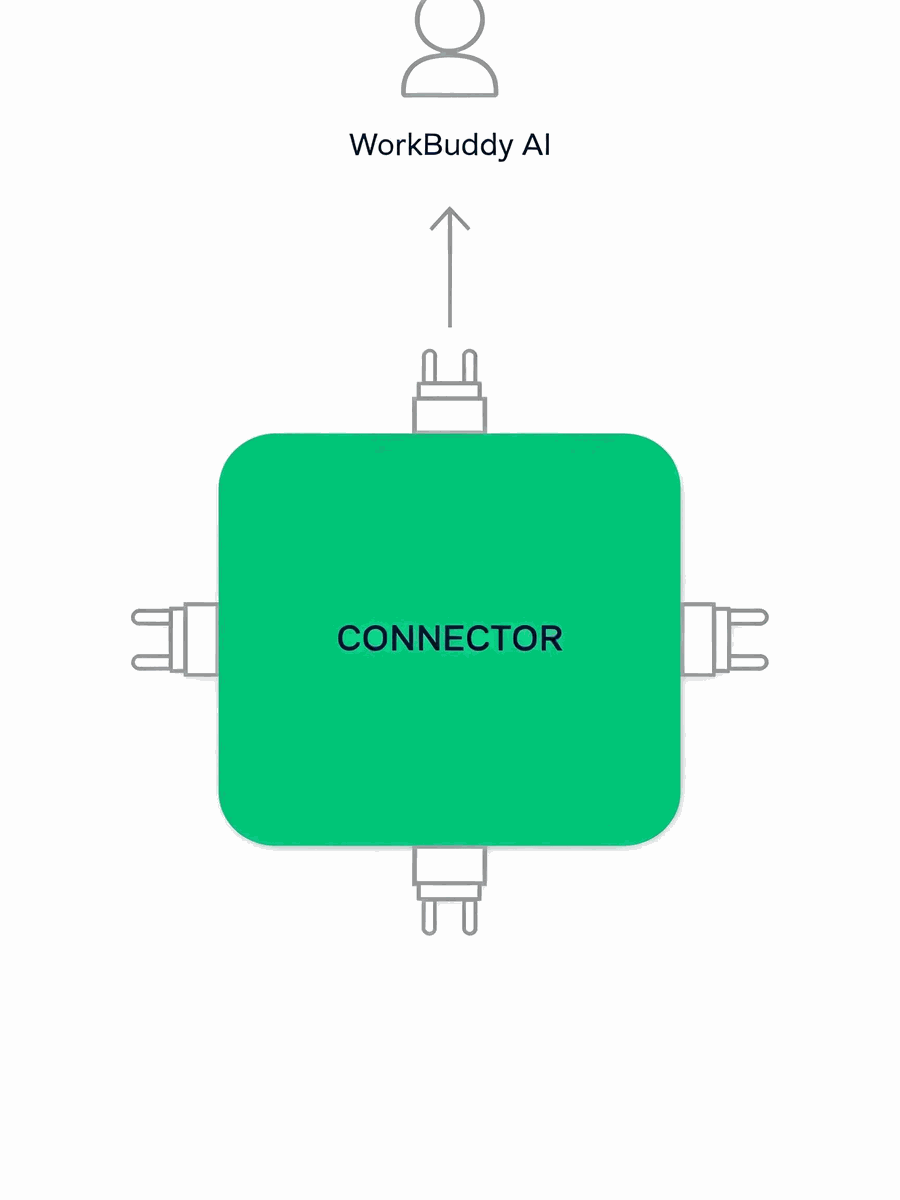
Contact us to get the free MCP interface module and quickly connect WorkBuddy to your self-hosted Odoo. The module includes a least-privilege integration account configuration, a read-only starter tool whitelist, a dictionary of common model fields, and a ready-to-copy mcp.json. Once you have it, run a read-only query following P1, and you can see real data in your own database the same day without writing a bridge process first. Guangzhou OdooAi has 11 years of Odoo implementation and development experience. Paid modules in the Chinese app store are already provided free of charge with service packages, and this MCP interface module is no exception. The plan is delivered in P1/P2/P3 phases, not scheduled by calendar, and prices are not listed here.
Contact a consultant for a demo and claim the free MCP module Chinese App Store
| How to get it | Entry Point |
|---|---|
| Contact a consultant for a demo / Contact via WeChat | https://work.weixin.qq.com/kfid/kfc86d9c4584acb9f9b |
| Phone | 18925019933 |
| Contact page | https://www.odooai.cn/contactus |
| Free Trial | https://www.odooai.cn/trial |
| Odoo Chinese App Store | https://www.odooapp.cn |
| Odoo implementation plan | https://www.odooai.cn/odoo-implement |
Think through the four questions, then click any of the options above, and we will send you the modules and checklist together.