This article is based on Odoo AiERP and analyzes its built-in native AI enterprise employee capabilities. It can also connect to mainstream AI tools and AI lobsters on the market through CLI/MCP, etc., using skills, such as work buddy, Feishu Doubao, claude code, etc. It deeply deconstructs how to use natural language (AI assistant) to connect with native Odoo ERP, operate enterprise data, and turn your existing data and digital assets into the built-in knowledge of enterprise AI employees, ultimately enabling AI employees to truly reduce costs and improve efficiency for you, and promote customer acquisition. This article starts with odooAi connecting to mainstream tools and focuses on proactive ERP data applications of AI.
- 🏢 Small business owners/entrepreneurs — One person serves as CEO, sales, finance, and warehouse manager, overwhelmed by trivial matters every day
- 💻 Odoo implementation consultants/developers — Want to deliver more competitive AI value-added solutions to customers
- 🔧 IT managers/digitalization managers — Evaluating ERP intelligent solutions and unsure which AI tool to choose
- 📊 Operations management personnel — Repeatedly querying data and making reports every day, eager to be liberated from mechanical labor
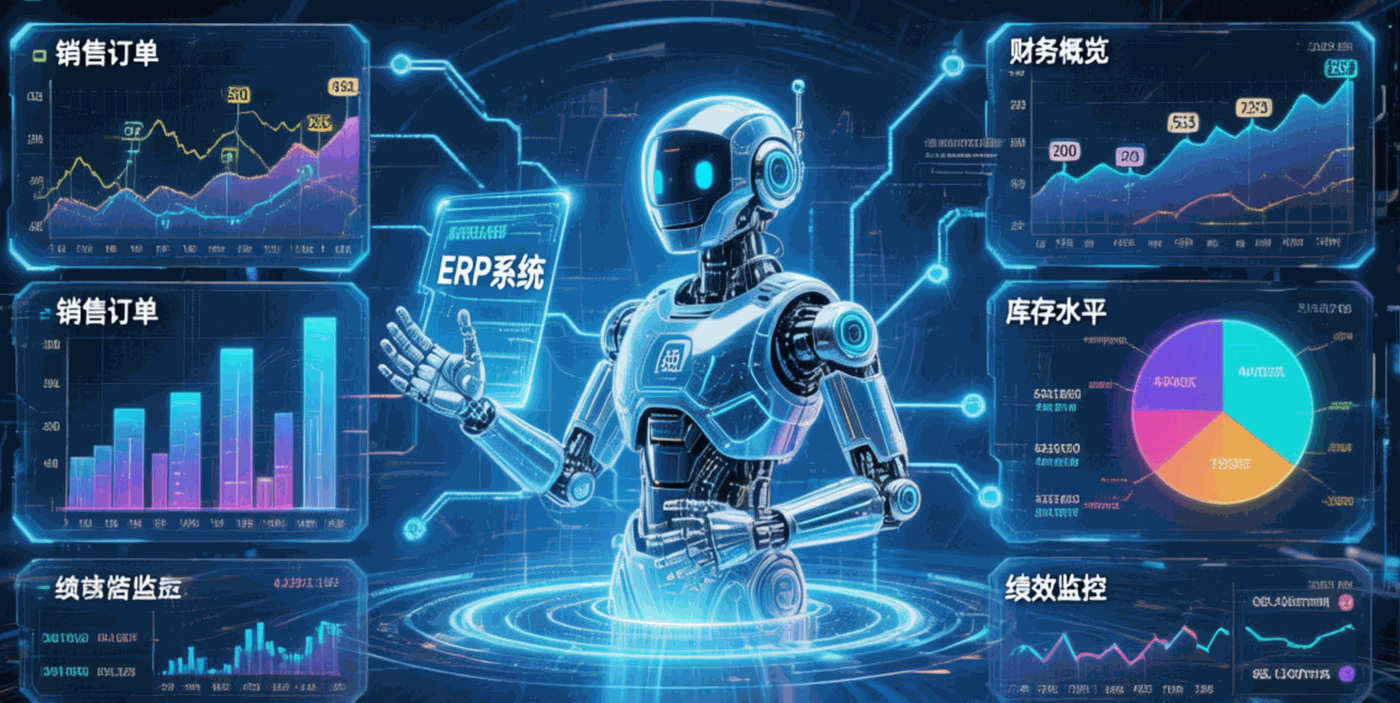
Imagine this real enterprise operation scenario: In SAP or Kingdee and other ERPs, filter all sales orders in the second quarter, sort by amount, and find the best salesperson and best product.
Traditional operation process, time-consuming: 10~15 minutes:
- Open Odoo → Click Sales menu → Find order list
- Set date filter (April 1 to June 31)
- Then set status filter (Confirmed/Shipped)
- Click sort (by amount descending)
- Wait for page loading... spinning...
- Export CSV → Open Excel → Adjust format
And this is just a simple query.What if you want the East region? Summarized by product category? Year-over-year comparison? — Congratulations, your entire afternoon is gone.
But now, there is a way to compress this process to 30 seconds:
"Second Quarter Sales Ranking"
One sentence, using natural language. AI will automatically connect to your Odoo database, execute the query, and generate Excel. This is not a sci-fi movie you watched as a child; this is a technology that has matured and been implemented in 2026.
Daily reimbursement cumbersome? Just upload the invoice and get it done
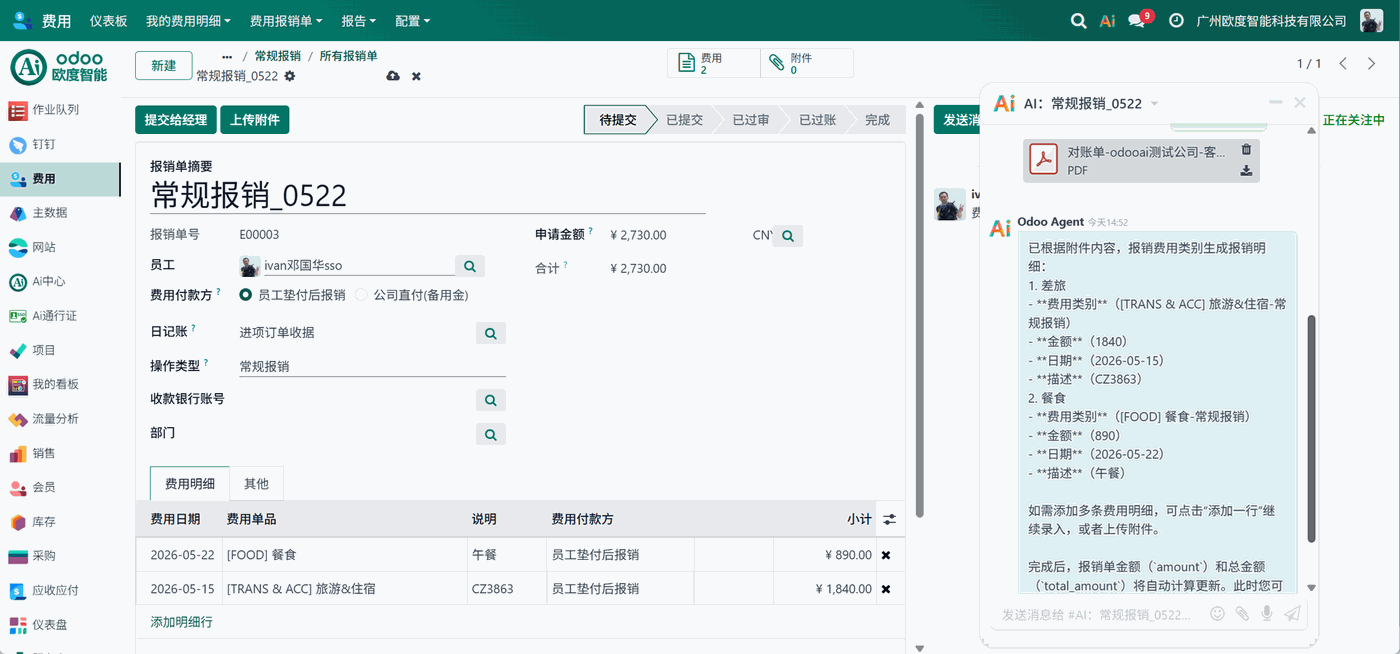
Use open-source Odoo to aggregate and invoke all AI capabilities directly in your ERP, processing every actual sales, purchasing, factory scheduling, import/export trade, financial voucher, and other document.
This article will comprehensively break down: how to use AI tools (such as Codebuddy/Workbuddy/Lobster Openclaw / ClaudeCode) to connect to Odoo native ERP and achieve true one-person enterprise management.
AiERP-Odoo + AI Agent Scenarios
1. 📄 Finance & Accounting Module
| Scenario | AI Capability | Value |
| Automatic Invoice Entry | Read PDF/image invoices, automatically extract amount, tax rate, supplier, invoice number, and generate accounting vouchers | Reduce 80% manual entry |
| Bank Statement Matching | Parse bank statement PDFs and automatically match accounts receivable and payable | Accelerate monthly closing |
| Expense Reimbursement (Done) | Read travel/meal receipts, automatically classify and fill out forms | Verified |
| Tax Filing Assistance | Summarize current period invoice data and generate tax filing drafts | Compliance and risk reduction |
2. 📦 Procurement & Supply Chain Module
| Scenario | AI Capability | Value |
| Intelligent Purchase Order Price Comparison | Upload multiple supplier quotations (PDF/Excel), AI extracts specifications, prices, and lead times to generate a price comparison table | Improved procurement decision efficiency |
| Contract Clause Review | Upload purchase contracts, AI identifies payment terms, liability for breach, and delivery schedules, highlighting risk points in red | Reduced legal workload |
| Supplier Qualification Review | Upload images of business licenses and qualification certificates, AI extracts key information and verifies validity periods | Automated admission review |
| Incoming Inspection Report Analysis | Upload supplier quality inspection report PDFs, AI extracts key metrics and compares them with procurement standards | Front-loaded quality control |
3. 🏭 Production & Manufacturing Module
| Scenario | AI Capability | Value |
AI Intelligent Scheduling | Based on delivery requirements, expected material lead times, and existing work center resource constraints, perform optimal intelligent scheduling for production lines and workers | Rapid customer response, optimal energy efficiency output |
AI Intelligent MES Planning | In ETO custom production, there are many multi-process cutting requirements, such as cutting steel, plates, paper, and fabric, which often require multiple cutting steps before processing. AI intelligent custom cutting can automatically generate multi-stage process plan configurations | One-click cutting plan, material saving, and better packaging |
| Intelligent BOM Maintenance | Upload engineering drawings/technical documents, AI extracts bill of materials, automatically generates/updates BOM | Fast response to engineering changes |
| Production Work Order Exception Analysis | Upload equipment failure photos + maintenance records, AI diagnoses root causes and recommends repair plans | Reduced downtime |
| Process Parameter Optimization Suggestions | Analyze historical production data + quality inspection reports, AI provides process parameter adjustment suggestions | Improved yield rate |
| Security Inspection Report | Upload on-site hazard photos, AI identifies risk levels, automatically dispatches rectification orders | Digital HSE management |
4. 👥 Human Resources Module
| Scenario | AI Capability | Value |
| Smart Resume Screening | Upload resume PDFs, AI extracts skills, experience, education, matches and scores against job descriptions | Improved recruitment efficiency |
| Attendance Exception Handling | Upload photos of leave requests/business trip applications, AI identifies type and dates, automatically routes for approval | Reduce HR administrative work |
| Training Material Generation | Upload product manuals/operation videos, AI generates training outlines and assessment question banks | Knowledge accumulation |
| Performance interview assistance | Analyze employee OKR completion data + 360 reviews, AI generates performance interview outlines | Reduce manager workload |
5. 🛒 Sales & CRM Module
| Scenario | AI Capability | Value |
| Intelligent customer demand analysis | Upload customer emails/chat records/tender documents, AI extracts key requirements, priorities, and budgets | Faster sales response |
| Quick quotation generation | Based on customer needs + product catalog, AI automatically combines products, calculates prices, and generates quotations | Quotation cycle from 2 days → 2 hours |
| Contract generation and review | Based on negotiation points, AI generates a sales contract draft; upload the customer's signed contract, AI compares modifications | Legal + Sales collaboration |
| Customer complaint classification and handling | Upload customer complaint recordings/screenshots, AI recognizes emotions, extracts demands, and automatically classifies and dispatches | Customer complaint response SLA compliance |
6. 📊 Inventory & Warehousing Module
| Scenario | AI Capability | Value |
| Automatic entry of inbound documents | Upload photos of delivery notes/packing lists; AI extracts SKU, quantity, and batch to generate receipt orders | Improved receiving efficiency |
| Inventory count assistance | Upload photos of count sheets; AI identifies discrepancies and automatically triggers inventory gain/loss adjustments | Shortened inventory count cycle |
| Slow-moving item identification and disposal suggestions | Analyze inventory turnover data + material images; AI identifies slow-moving items and recommends disposal plans (transfer/discount/scrap) | Reduced inventory capital occupation |
I. Why Odoo + AI is an AI intelligent employee that enterprises can quickly implement
1.1 Three major pain points of traditional ERP operations
Pain point ❶: Can't find features - hundreds of modules, menus like a maze
My current ERP is indeed powerful—sales, purchasing, inventory, finance, production, HR, CRM... but this also means:
- High training costs for new employees, "Which menu is that feature under again?"
- Cross-module operations require switching back and forth between multiple interfaces
- Advanced filter conditions require memorizing field names and logical relationships
AI's solution: Describe what you want in natural language, no need to memorize menu paths.
Traditional way: Sales → Orders → Filter (date/status) → Sort (amount) → Export
AI way: "Help me find confirmed sales orders in April, sorted by amount from high to low"
Pain point ❷: Queries too complex — multi-condition combinations are overwhelming
Queries in actual business are far more complex than examples:
"Sales orders in East China region, last quarter, amount over 50,000, status confirmed, and customer type 'distributor'"
One wrong condition and you have to start over. But AI understands the semantic level of natural language:
- "Last quarter" → automatically calculates the date range
- "Over 50,000" → automatically sets a numeric filter of > 50000
- "East China region" → automatically matches the corresponding region tag or customer group
Pain point ❸: Cross-module analysis is difficult — data silos
This is the most painful. The boss wants a report:
"Sales revenue, procurement cost, gross profit, and inventory turnover rate for each product this quarter — all in one table"
Traditional approach:
- Export order details from the sales module
- Export purchase records from the procurement module
- Export inbound data from the inventory module
- Open 3 Excel files → merge with VLOOKUP → analyze with pivot tables
- Entirely manual, error-prone, and cannot be reused
AI's solution: retrieve data across modules via a unified XML-RPC interface, automatically correlate, aggregate, and output.
1.2 Efficiency comparison: before AI vs. after AI
| Dimension | Traditional method | AI-enabled | Improvement factor |
| Single query | 8-15 steps, 10-15 minutes | 1 sentence, 30 seconds | 20-30x |
| Multi-condition filtering | Set item by item, error-prone | Natural language description, automatic parsing | 10x |
| Cross-module reports | Export 3+ files, manual merge | AI automatically correlates, one-click generation | 15x |
| Daily/weekly report generation | Half a day of manual compilation | Set up templates, scheduled automatic push | ∞ (liberate manpower) |
| Non-technical users | Requires training, slow to get started | Conversational interaction, zero barrier | From unusable to usable by everyone |
Core conclusion: AI does not replace your operation of Odoo—it makes it so you no longer need to "operate" it. You state your needs, and AI executes them.
II. Panoramic comparison of four mainstream Odoo AI tools
Currently, there are four main AI tools on the market that can deeply integrate with Odoo. Each has a different positioning, target audience, and technical approach.
2.1 Tool Overview
| Dimension | CodeBuddy ⭐Top Recommendation | Lobster LOBSTER | WorkBuddy | ClaudeCode |
| Provider | Tencent | Open Source Community (LangChain Ecosystem) | Tencent (Enterprise Edition) | Anthropic Official |
| Core Positioning | Zero-code AI assistant for general users | Open-source framework for technical teams | Enterprise-wide AI platform for all employees | Code-level AI for developers |
| Learning Curve | ★☆☆☆☆ Extremely simple | ★★★☆☆ Requires deployment | ★★☆☆☆ Simple | ★★★★☆ Requires technical background |
| Chinese Support | ✅ Perfect native Chinese | ✅ Good | ✅ Perfect | ⚠️ Average (primarily English) |
| Pricing Model | Free tier available | Completely open-source and free | Enterprise paid | Free tier available (API calls) |
| Odoo Integration Level | Built-in templates, ready to use | Requires custom Connector development | Enterprise customization | Requires building a middleware layer |
| Target Audience | Small business owners/operations | Technical teams/IT departments | Medium to large enterprises | Odoo developers |
| Recommendation Rating | 🏆⭐⭐⭐⭐⭐ | ⭐⭐⭐⭐ | ⭐⭐⭐⭐ | ⭐⭐⭐⭐ |
2.2 CodeBuddy — The Top Choice for Users with No Technical Background
Why recommend CodeBuddy first? Because its design philosophy is "no coding".
Core advantages:
- Built-in Odoo connection template — No need to write XML-RPC code yourself; just fill in the URL and database name.
- First-class Chinese conversation experience — Uses the DeepSeek v4-pro model by default, with industry-leading Chinese understanding and generation capabilities.
- Multimodal capabilities — In addition to text queries, it can automatically generate charts, images, and even videos.
- WeChat/Feishu/DingTalk integration — You can give instructions to the AI directly via WeCom, and results are pushed to your phone.
Typical workflow:
Open CodeBuddy → Enter: "Check the top 10 customers with the highest sales in our Odoo this month"
→ AI automatically connects to Odoo → Executes SQL query → Returns structured table + visualization chart
→ One-click export to Excel/PDF
Who it's for: Non-technical bosses, operations staff, salespeople—anyone who needs quick access to Odoo data without learning technical skills.
2.3 Lobster — The Open-Source Tool for Technical Teams
Lobster is an open-source Odoo AI framework built on LangChain, suitable for teams with technical capabilities to deploy and customize deeply.
Core features:
- Completely open-source and free — Code is hosted on GitHub; you can fork and develop further.
- Based on LangChain architecture — Supports integration with various LLMs (OpenAI/Anthropic/locally deployed models).
- Highly customizable — You can customize prompt templates, add industry knowledge bases, and integrate with internal systems.
- Supports private deployment — Data stays within the intranet, meeting compliance requirements for industries such as finance and healthcare.
Who it's for: Small and medium-sized enterprises with dedicated IT teams, organizations requiring private deployment, and tech companies seeking deep customization.
2.4 ClaudeCode — Developer-Level Deep Integration
ClaudeCode is an AI coding assistant for developers launched by Anthropic. It can not only write code, but also directly operate your Odoo system.
Unique advantages:
- Code-level understanding of Odoo — can read Odoo's Python model definitions, view XML, and controller logic
- Can directly modify Odoo code — create custom modules, fix bugs, add new feature fields
- Powerful reasoning ability — Claude 3.5 Sonnet/4 models perform excellently in complex logical reasoning
- Multi-file collaborative editing — understand and modify multiple related files simultaneously while maintaining consistency
Typical application scenarios:
# ClaudeCode can help you complete tasks like this:

# Scenario 1: Create a custom sales report module
"Help me create a new module in Odoo,
 including an SQL view that summarizes monthly performance by sales team,
 and add it to the sales dashboard"

# Scenario 2: Automated workflow
"When a sales order status changes to 'sale',
 automatically trigger a confirmation email to the customer,
 and create a corresponding service tracking task in the project module"

# Scenario 3: Data migration
"Import 1000 customer records from our old system into Odoo,
 field mapping as follows: old system's customer_name corresponds to Odoo's partner_name..."
Who it's for: Odoo developers, technical consultants, and teams that need deep customization of Odoo features.
2.5 WorkBuddy — Enterprise-level AI platform for all employees
WorkBuddy is an AI work platform launched by Tencent for enterprises. It is positioned as a heavier solution than CodeBuddy and is more suitable for organization-wide deployment.
Core capabilities:
- Available to all employees — not just the IT department; sales, finance, and HR can all operate Odoo using their own natural language
- Multi-system integration — in addition to Odoo, it can also integrate with Feishu, DingTalk, WeCom, and OA systems simultaneously
- Permission control — fine-grained role-based permission control, so different positions see different data and operation scopes
- Knowledge base accumulation — the enterprise's business rules, FAQs, and operation manuals can be learned and reused by AI
Who it's for: Medium to large enterprises with more than 50 employees that already have Odoo and wish to comprehensively advance AI adoption.
III. Technical Implementation: How to Integrate AI with Odoo (Using CodeBuddy as an Example)
This chapter uses CodeBuddy as an example to demonstrate the complete technical integration process. Lobster and ClaudeCode share the same core principle (both integrate via Odoo API), with slight differences in specific configuration steps.
3.1 Prerequisites: Configuration on the Odoo Side
Before integrating any AI tool, you need to ensure that API access is correctly configured on the Odoo side.
- Step 1: Obtain Odoo connection information
You need to prepare the following 4 pieces of information (based on your Odoo instance):
# Required connection parameters
ODOO_URL=https://your-odoo-instance-domain-or-IP
ODOO_DB=your-database-name
ODOO_USERNAME=dedicated-account-for-AI-access
ODOO_API_KEY=API-key-generated-in-Odoo
- Step 2: Generate API Key (Security Best Practice)
It is strongly recommended not to use the administrator password, but to create a dedicated AI service account:
- Log in to Odoo as an administrator
- Go to Preferences
- Find the Account Security section
- Click Generate API Key
- Copy and save (⚠️ displayed only once!)
- Step 3: Set permissions for the dedicated AI account (Recommended)
For security reasons, it is recommended to create a dedicated account for AI and restrict permissions:
| Permission level | Applicable Scenarios | Description |
| Read-Only | For data queries/reports only | Most secure, recommended for initial stage |
| Read-Write | Requires creating/modifying records | Medium risk, grant with caution |
| Administrator (Full Admin) | Full-featured operations (including code modifications) | Highest risk, for developer scenarios only |
Security tip: Even for AI accounts, it is recommended to enable operation log auditing to record the content, time, and results of each API call.
3.2 CodeBuddy Configuration (Three Steps)
- Step 1: Add Odoo Data Source
1. Open the CodeBuddy client/Web interface
2. Go to the "Integrations" or "Connections" page
3. Select "Odoo" as the data source type
4. Fill in the four connection details you prepared in section 3.1
5. Click "Test Connection"
6. See the ✅ green success indicator → Done!
- Step 2: Select AI Model
| Configuration Item | Recommended Option | Description |
| Default Text Model | DeepSeek v4-pro | Best Chinese comprehension, highest cost-effectiveness |
| Backup Text Model | GPT-4o / Qwen-Max | Automatically switches when the primary model is unavailable |
| Image Generation Model | Doubao Seedream 5.0-lite | Produced by Volcano Engine, excellent quality |
| Video Generation Model | Doubao Seedance 2.0-fast | Quickly generate short video materials |
Why recommend DeepSeek? Based on hands-on comparison testing, DeepSeek v4-pro achieves the highest comprehension accuracy in Chinese ERP scenarios (understanding Chinese business terms such as "sort by amount," "East China region," and "confirmed"), while also offering fast response times and low cost.
- Step 3: (Optional) Configure common query templates
Save frequently used queries as templates for one-click recall next time:
# Example template configuration
templates:
  - name: "Monthly Sales Report"
    prompt: "Query all confirmed sales orders for {{month}}, sorted by amount in descending order, including customer name, order number, amount, date"
    output_format: "excel"

  - name: "Inventory Alert"
    prompt: "List all products with current stock quantity below safety stock, including product name, current stock, safety stock, suggested replenishment quantity"
    output_format: "table"

  - name: "Customer Statement"
    prompt: "Generate all transaction records for customer {{customer_name}} in this quarter, sorted by date, including order number, amount, payment status"
    output_format: "pdf"
3.3 Technical Principle Analysis: How XML-RPC Works
Understanding the underlying principles helps you troubleshoot issues and perform advanced customization.
┌──────────────┐     Natural Language Input      ┌──────────────┐
│   User       │ ──────────────────▶   │  CodeBuddy    │
│  (You/Boss)  │                       │  AI Agent     │
└──────────────┘                       └──────┬───────┘
                                              │
                                    LLM understands intent + generates query
                                              │
                                              ▼
                                       ┌──────────────┐
                                       │  Odoo XML-RPC │ ← Standard Protocol
                                       │  API Gateway  │
                                       └──────┬───────┘
                                              │
                                     search_read() / execute_kw()
                                              │
                                              ▼
                                       ┌──────────────┐
                                       │   Odoo       │
                                       │  PostgreSQL  │
                                       └──────────────┘
                                              │
                                   Structured data returned + formatted
                                              │
                                              ▼
                                       ┌──────────────┐
                                       │  Excel/PDF/   │
                                       │  Charts/Messages    │
                                       └──────────────┘
Key Technical Points:
| Technical Component | Description | Why It Matters |
| XML-RPC 2.0 | Odoo's standard external calling protocol | Stable, mature, and compatible with all Odoo versions |
| API Key Authentication | Replaces traditional username+password | More secure, can be revoked at any time, does not expose the main password |
| search_read() | Odoo ORM's core query method | Supports domain filtering, fields selection, order sorting, and limit restriction |
| LLM Semantic Parsing | Converts natural language into structured queries | This is where the AI's "magic" lies—understanding "last month" = "date >= 30 days ago" |
IV. Real-World Scenarios: How AI Truly Helps You Manage an Enterprise
Scenario 🅰: Generate a Sales Report with One Sentence (Most Common)
"Help me check the confirmed sales orders for April this year, sorted by date and returned to me."
What AI Does (Backend):
- Parse time range → ['2026-04-01', '2026-04-30']
- Parse status condition → [('state', '=', 'sale')]
- Parse sorting rule → 'order_date asc'
- Call Odoo search_read('sale.order', ...)
- Format results as a table
- Append statistical summary (total amount, largest customer, order distribution, etc.)
Example of AI-returned result:
🔗 Connected to odooai.cn ✅
🔍 Query completed! Found 35 sales orders
• All orders in April: 81 | Confirmed: 35
• Total confirmed amount: ¥88,310.00 CNY
• Largest customer: Hangzhou XX Technology Co., Ltd. (16 orders, total ¥82,000)
• The remaining 19 are small orders from individual customers

⚙️ Backend: DeepSeek v4-pro | Odoo XML-RPC
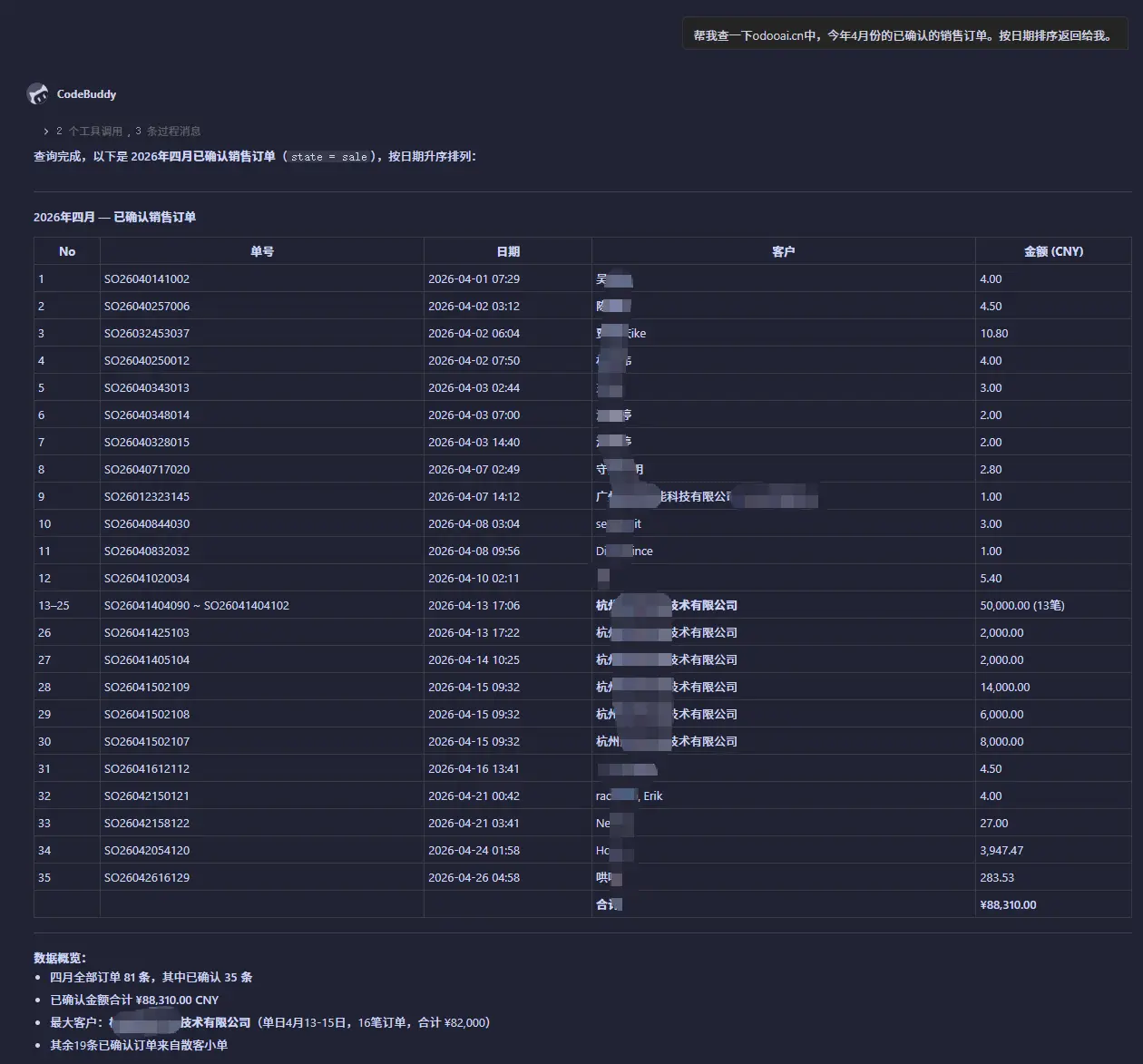
Efficiency improvement: Manual operation 15 minutes → AI query 30 seconds
Scenario 🅱: Real-time Inventory Monitoring and Alerts
"Check product inventory."
AI automatically executes:
- Query product.product model
- Compare qty_available vs reordering_max_qty (safety stock level)
- Calculate shortage = safety stock - current stock
- Sort in descending order by shortage level
- Mark suggested purchase quantity
The returned results include:
- Product name/SKU
- Current inventory quantity
- Safety stock threshold
- Shortage quantity (highlighted in red)
- Suggested purchase quantity
- Main supplier information (if any)
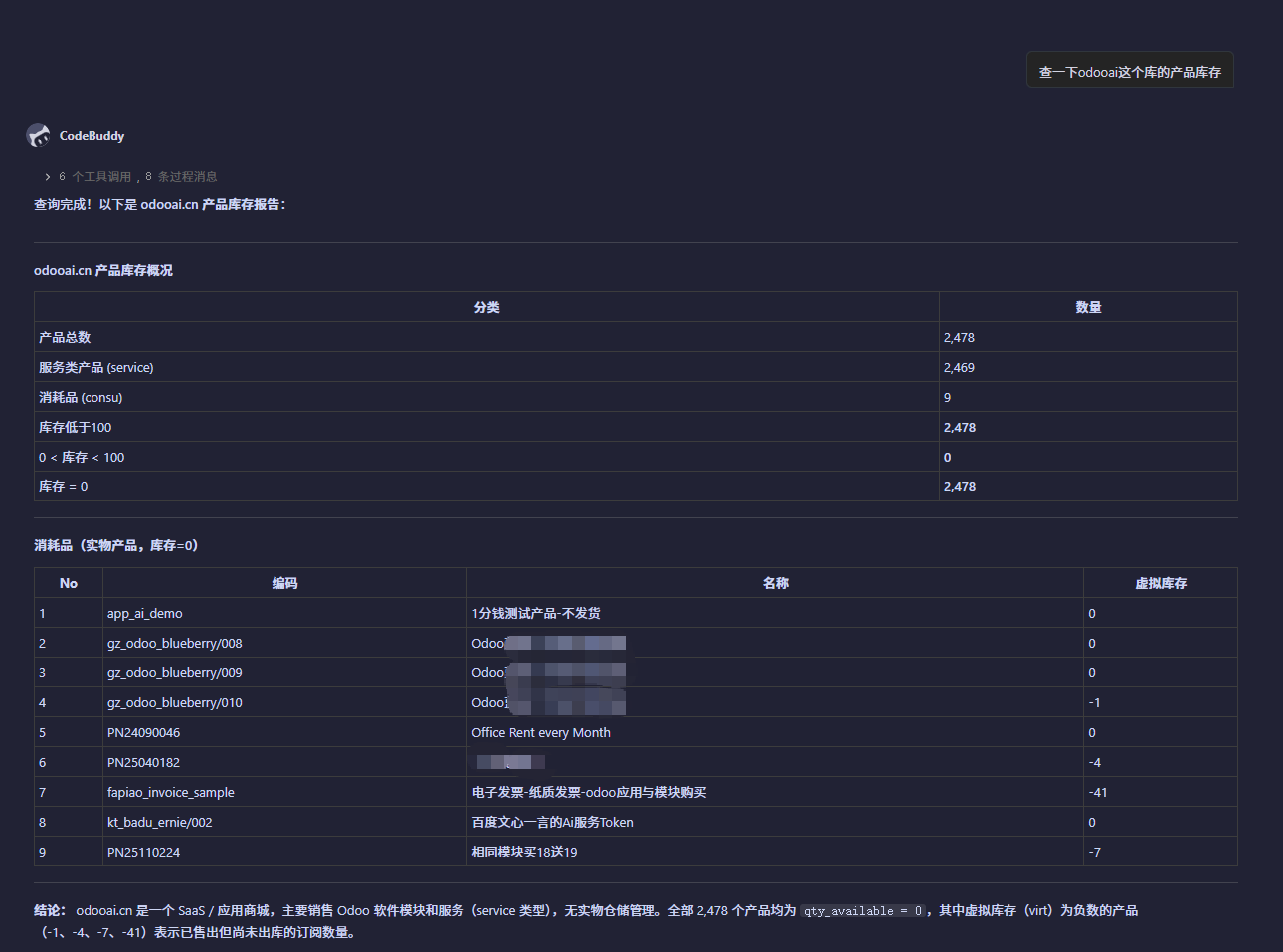
Advanced feature — Set up automatic inspection:
You can have the AI automatically check inventory on a regular basis and proactively notify you of any anomalies:
"Automatically check inventory once every day at 9 AM,
if any product falls below the safety stock,
immediately send me a message,
and generate a suggested purchase list and send it to the procurement colleague."
Scenario 🅲: Financial reconciliation — Three-way matching
Source of demand: The most headache-inducing task for finance staff every month
What you say:
"Help me reconcile the purchase orders, goods receipts, and supplier invoices for March,
and find the records where the amounts do not match among the three."
AI processing logic:
1. Retrieve March purchase orders (including amounts) from the Purchase Order module
2. Retrieve March receipt records (including amounts) from the Stock Picking module
3. Retrieve March vendor bills (including amounts) from the Accounting module
4. Perform a three-way JOIN by PO number/vendor/date
5. Flag abnormal records with amount differences > 0.01
6. Output a discrepancy report
Traditional method: 3 Excel sheets + VLOOKUP + manual line-by-line comparison = half a day
AI method: one sentence + 2 minutes = fully automated
Scenario 🅳: Customer 360° View — A Sales Follow-up Tool
Requirement source: Salespeople need to quickly understand the background before contacting a customer
What you say:
"Show me the complete profile of the customer 'Shenzhen XX Technology':
total historical order amount, outstanding payments, most recent purchase, main products purchased,
customer tier and credit limit."
AI automatically aggregates across modules:
- CRM module: basic customer information, contacts, follow-up records
- Sales module: historical order list, order amount trend chart
- Finance module: accounts receivable balance, aging analysis, payment habits
- Inventory module: current stock status of products frequently purchased by this customer
Output: A complete customer profile card that sales can use to make calls immediately.
Scenario 🅴: Odoo 19 Built-in AI Assistant (No External Tools Required)
Besides external AI tools, Odoo 19 itself already has built-in AI capabilities—a feature that many people overlook!
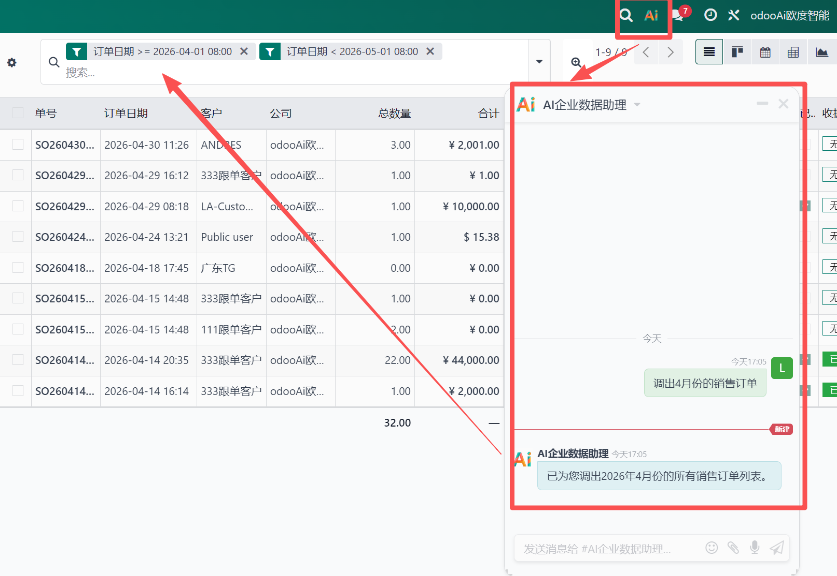
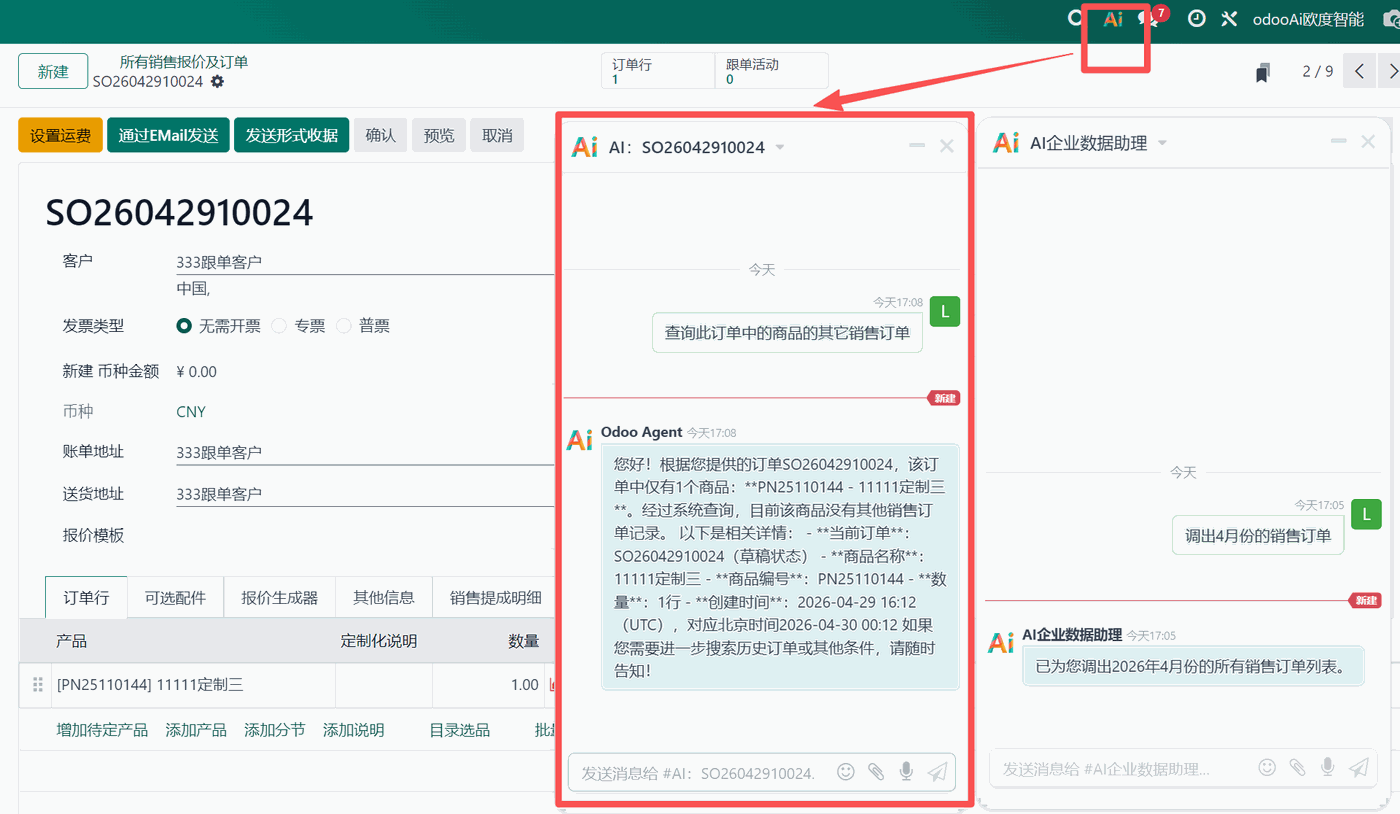
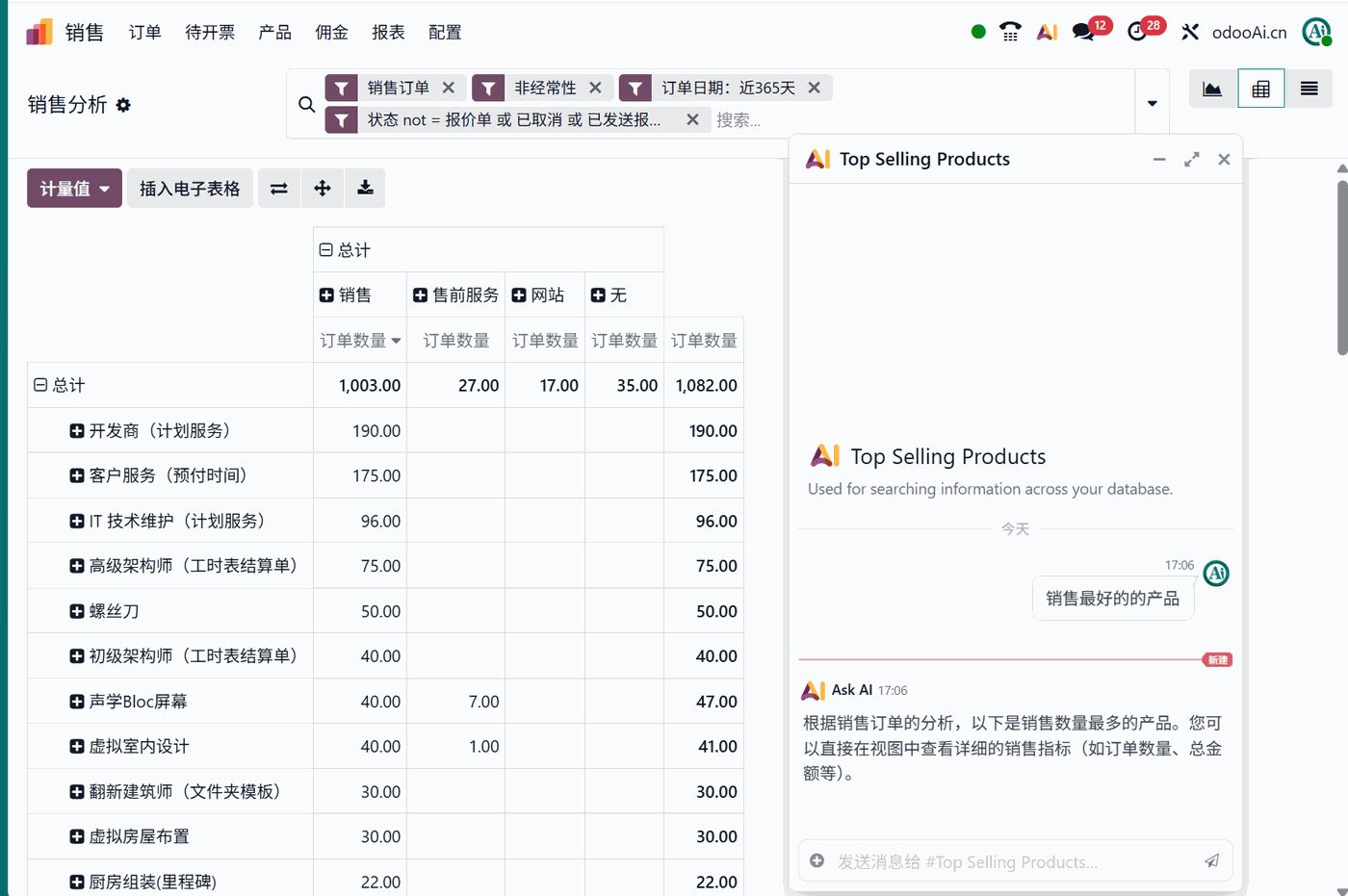
The AI assistant in Odoo 18/19 (custom development by odooAi, with full functionality available in the Community Edition) can be used directly within the system after configuration:
| Function | Location | Example Command |
| Smart Search | Top right corner of any list page | "Products with the highest sales this month" |
| Related Query | Sales order detail page | "Find other orders for this customer" |
| Product Association | Product detail page | "View other orders related to this product" |
| Sales Analysis | Sales dashboard | "View sales for a specified month" |
| Configurable Models | Settings → AI Configuration | Supports switching between multiple AI backend models |
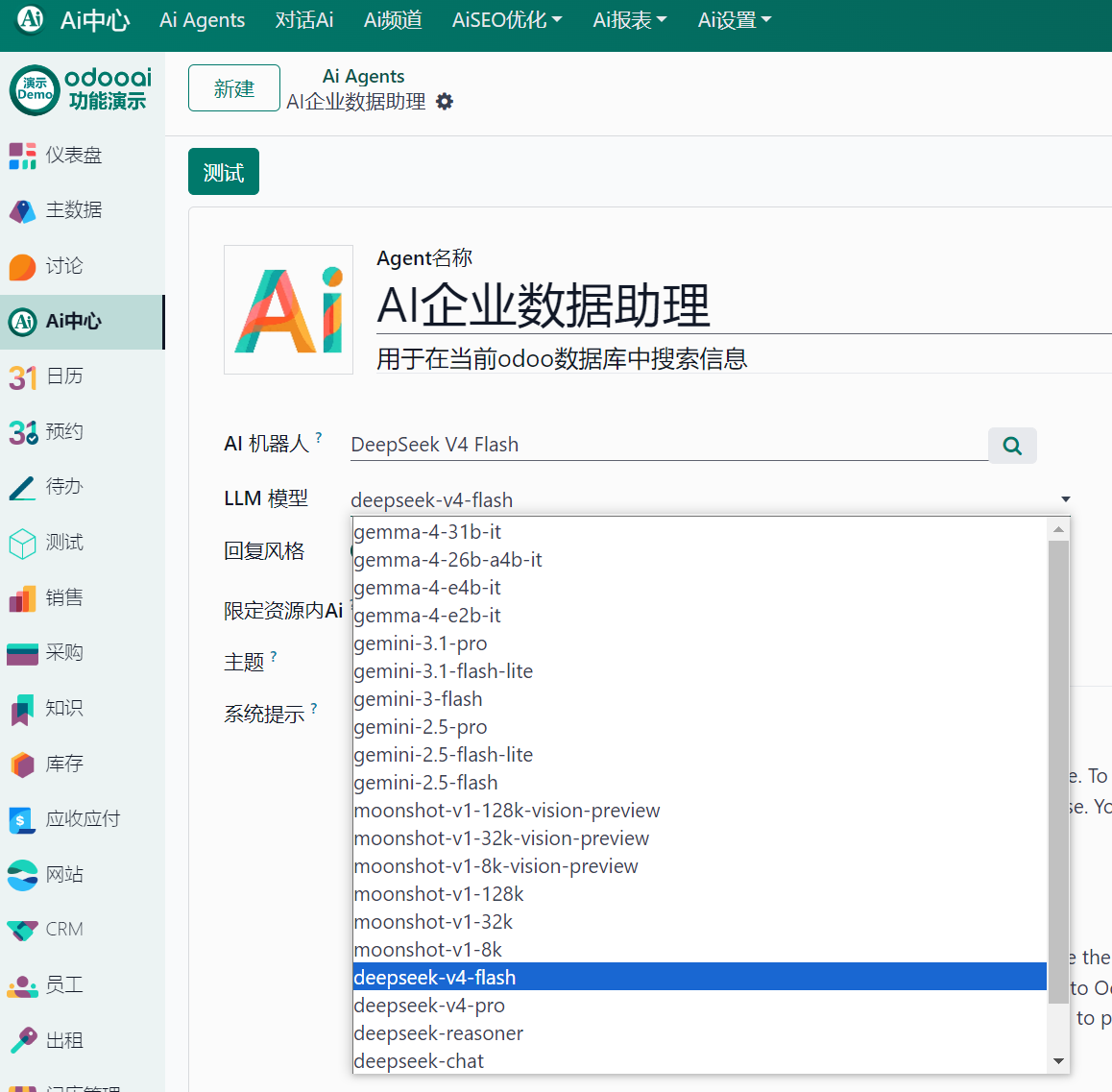
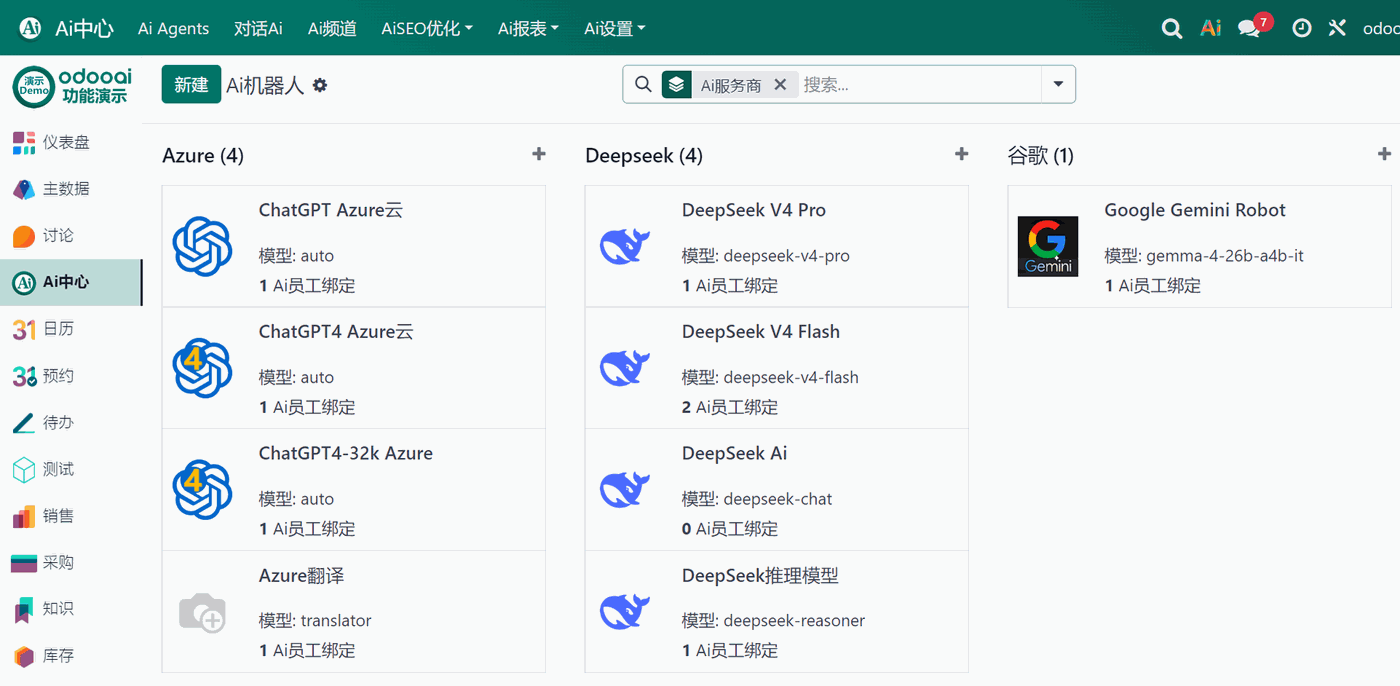
Advantages: No additional API configuration required, ready to use out of the box
Limitations: Features are relatively basic; deep customization still requires supplementary external AI tools
Best Practice: Odoo 19 built-in AI for daily lightweight queries + external AI tools for complex analysis = perfect combination.
V. In-depth Integration Guide for Lobster LOBSTER and ClaudeCode
5.1 Lobster LOBSTER Self-hosted Deployment Solution
If your team has some technical capability, Lobster is a highly cost-effective choice—completely free and fully controllable.
Deployment Architecture
# Lobster is built on LangChain, core dependencies:
pip install langchain langchain-openai xmltodict requests

# Core components:
# 1. Lobster Agent (main controller)
# 2. Odoo Connector
# 3. Prompt Template Engine
# 4. Model Router
Key Configuration File Example
# lobster_config.py

ODOO_CONFIG = {
    "url": "https://your-odoo.com",
    "db": "your_database",
    "username": "ai_user@company.com",
    "api_key": "your-api-key-here",
}

LLM_CONFIG = {
    "primary": "deepseek-chat",      # primary model
    "fallback": "gpt-4o",            # fallback model
    "temperature": 0.1,               # low temperature = more precise queries
}

SECURITY_CONFIG = {
    "allowed_modules": ["sale", "stock", "account", "crm"],  # whitelist
    "max_records": 1000,              # max records per query
    "log_all_queries": True,         # audit log
    "read_only_mode": True,          # read-only by default
}
Lobster vs CodeBuddy: When to Choose Lobster?
| Scenario | Recommended |
| For quick personal onboarding | CodeBuddy ✅ |
| Requires private deployment (data stays within intranet) | Lobster ✅ |
| Need to integrate internal knowledge base/documents | Lobster ✅ |
| Need to customize prompt logic | Lobster ✅ |
| Team <5 people, no dedicated IT | CodeBuddy ✅ |
| Has Python development capability | Lobster ✅ |
| Want out-of-the-box solution | CodeBuddy ✅ |
5.2 ClaudeCode Integration with Odoo: Development Practices
For Odoo developers, ClaudeCode offers a completely new way of working—writing code in natural language.
Typical Development Workflow
Traditional development process:
  Requirements analysis → Write Python code → Write XML views → Write access rules
  → Restart Odoo → Test → Debug → Modify → Loop...

ClaudeCode-assisted process:
  Describe requirements in Chinese → ClaudeCode generates complete module code
  → You review and adjust → Apply to Odoo → Test and verify
Practical Example: Let ClaudeCode Create a Custom Report
# Prompt you give to ClaudeCode:

I am using Odoo 18 Community Edition, please help me:

1. Create a new module named sale_analytics
2. Add an SQL View that counts for each sales team in the current fiscal year:
   - Total number of sales orders
   - Total sales amount
   - Average order amount
   - Return rate
3. Create a tree view and a pivot view for this view
4. Add it to the "Analysis" submenu under the Sales menu
5. Set visibility only for Sales Manager and above roles

# ClaudeCode will automatically:
# - Create the correct module directory structure
# - Write __manifest__.py
# - Generate models/, views/, security/ subdirectories and files
# - Write complete Python model definitions and XML views
# - Even write unit tests for you
Precautions for ClaudeCode + Odoo
| Precautions | Suggestions |
| Limited context window | Split large modules into multiple conversations, focusing on one feature at a time |
| Code must be reviewed | AI-generated code runs but may not be optimal; manual review is essential |
| Odoo version differences | Clearly tell ClaudeCode your Odoo version (v14/v15/v16/v17/v18/v19) |
| Data security | Do not run AI-generated DDL statements directly in production |
| Custom module naming | Follow Odoo naming conventions (e.g., module_name) to avoid conflicts |
VI. "One-Person Business" Management Model: From Concept to Implementation
6.1 What is "One-Person Business" Management?
"One-Person Business" does not mean literally one person—it means:
With AI tools, one person can complete management work that originally required a team.
Staffing of traditional small and micro enterprises vs after AI empowerment:
| Function | Traditional Setup (5-10 Employee Company) | AI-enabled |
| Data Query/Reports | 1 Full-time Clerk/Operations | AI Automates |
| Inventory Management | 1 Warehouse Manager + 1 Assistant | AI Monitoring + Alerts |
| Financial Reconciliation | 1 Accountant + Month-end Overtime | AI Automated Three-way Matching |
| Sales Order Tracking | 1 Sales Assistant | AI 360° Customer View |
| Customer Service Response | 2-3 Customer Service Reps | AI Auto-reply for FAQs |
| Scheduling and Dispatching | 1 Production Planner | AI Intelligent Scheduling |
Result: The workload of 5-8 people → 1 person + AI can cover most of it.
This is not about layoffs—it's about freeing up your valuable human resources from low-value repetitive work to do what truly creates value: talk to customers, build products, and think strategy.
6.3 Implementation Roadmap: A 4-Week Plan from 0 to 1
| Week | Objective | Specific Actions | Deliverables |
| Week 1 | Environment Setup | Register CodeBuddy + Prepare Odoo API Key + Complete First Connection Test | AI Can Connect to Your Odoo |
| Week 2 | Core Scenarios Up and Running | Configure the 3 Most Common Queries (Sales/Inventory/Customers) and Repeatedly Optimize | All Daily High-Frequency Queries AI-Powered |
| Week 3 | Team Expansion (Optional) | Create Accounts for Colleagues + Share Query Templates + Simple Training | Team Members Can Also Use AI to Query Data |
| Week 4 | Advanced Automation | Configure scheduled tasks + set alert rules + integrate WeCom/Feishu notifications | AI proactively pushes, no more passive querying |
VII. Frequently Asked Questions (FAQ)
Q1: Will AI "make up" data (hallucination problem)?
Answer: This is the most frequently asked question. The good news is—
The data source for Odoo AI queries is your real database, not something "fabricated" by AI. The AI's role is to translate your natural language into structured query statements, and then Odoo returns real data.
Your words: "April sales"
    ↓ AI translation (where errors may occur)
Odoo query: SELECT ... FROM sale_order WHERE date >= '2026-04-01'
    ↓ Odoo execution
Returned result: ✅ 100% real database records
The real risk lies in the "translation layer"—that is, whether the AI accurately understands your intent. Measures to reduce risk:
- Use specific expressions ("confirmed sales orders" is better than "orders")
- Verify key data (spot-check a few records after the first query)
- Set read-only permissions (even if AI misunderstands, it won't corrupt data)
Q2: How secure is it? Will my business data be leaked?
Answer: It depends on your choice:
| Solution | Data security level | Description |
| CodeBuddy(SaaS) | ⭐⭐⭐⭐ | Transmission encrypted, but data passes through third-party servers |
| Lobster (private deployment) | ⭐⭐⭐⭐⭐ | Data stays entirely within the intranet, never leaves the domain |
| ClaudeCode | ⭐⭐⭐⭐ | Anthropic's enterprise-grade security, but with API transmission |
| WorkBuddy (Enterprise Edition) | ⭐⭐⭐⭐⭐ | Private Deployment + Tencent Cloud Security System |
For sensitive industries (finance, healthcare, defense), we strongly recommend the Lobster private deployment solution.
Q3: Do I need programming skills?
| Tool | Programming Required |
| CodeBuddy | ❌ Not at all, if you can type, you can use it |
| WorkBuddy | ❌ No, graphical interface operation |
| Lobster LOBSTER | ⚠️ Deployment requires Python basics, usage does not |
| ClaudeCode | ✅ Requires Odoo development basics |
Q4: Which Odoo versions support AI integration?
Answer: Actually almost all versions support it—because AI tools connect to Odoo through the standard XML-RPC/JSON-RPC interface, which is a standard protocol that has existed since the earliest versions of Odoo.
| Version | Support Status | Remarks |
| Odoo 14-17 | ✅ Fully supported | Access via external AI tools |
| Odoo 18 | ✅ Fully supported | Same as above |
| Odoo 19 | ✅✅ Best | External AI + built-in AI assistant dual support |
So don't worry about version issues—no matter which version of Odoo you are using, you can start using AI immediately.
Q5: What are the approximate costs?
| Tool | Cost | Estimated Monthly Average (SMEs) |
| CodeBuddy | Free quota + pay-as-you-go | ¥0-200/month (almost free for light use) |
| Lobster LOBSTER | Completely free (open source) | ¥0 + own server costs |
| WorkBuddy | Enterprise subscription | ¥2000-8000/month (based on number of users) |
| ClaudeCode | API call fees | ¥100-500/month (developer usage) |
| AI model fees | DeepSeek/GPT, etc. | ¥50-300/month (based on call volume) |
For most small and micro enterprises: CodeBuddy free quota + DeepSeek model = monthly average < ¥100.
VIII. Summary and Action Checklist
Review of Key Points
| # | Key Point | One-sentence summary |
| 1 | Why Use AI to Manage Odoo | Compress a 15-minute manual query into a 30-second sentence |
| 2 | Which Tool to Choose | Zero foundation → CodeBaddy, technical team → Lobster, large enterprise → WorkBuddy, developer → ClaudeCode |
| 3 | How to Do It | Prepare API Key → Configure connection → Start asking questions in natural language |
| 4 | What We Can Do | Sales reports, inventory alerts, financial reconciliation, customer profiles, automated inspections... |
| 5 | Is it safe? | Data comes from your real database; the key is choosing the right deployment method and permissions |
3 Things You Can Do Today
- Register a CodeBuddy account (free) and try "querying Odoo in natural language"
- Generate an API Key in your Odoo (Preferences → Account Security → Generate API Key)
- Try your first query: "Help me look up the confirmed sales orders for this month"
Future Outlook
"In the future, business competition won't be about who has more employees, but about who can make better use of AI."
As a highly open ERP platform, Odoo's standard API interface makes it one of the enterprise management systems best suited for "intelligentization" in the AI era. Whether through zero-code tools like CodeBuddy or in-depth solutions like Lobster/ClaudeCode, the barrier to integrating AI has never been so low.
Starting today, make your Odoo smarter.