In the apparel and footwear industry, especially in shoe manufacturing, in order to adapt to rapid changes in seasonal styles and personalized production demands, companies generally face the following problems: numerous materials and processes, complex supply chain processes. Product life cycles and production cycles are shortened, and order delivery dates are inaccurate. Serious duplication of labor, poor information communication between departments. Poor accuracy of procurement and production plans. Outdated management methods. Difficult material management, excessive material overconsumption, resulting in high costs and low profits. Difficult and chaotic batch number management.
Faced with the above issues, most apparel and footwear enterprises need a comprehensive and detailed software—an integrated platform that encompasses global supply chain SCM, foreign trade production ERP, production floor management MES, and localized financial production cost management systems. It should fully meet industry-specific needs, be convenient and practical, and serve to improve enterprise management efficiency and integrate related operational requirements. It should expand enterprise competitive advantages and make management and production clearer, more effective, controllable, and accurate. Odoo's full functionality and open-source controllability well meet these needs.
Related articles for reference:
ODOO Fashion Industry Lean Production System for Footwear and Apparel - Overview
ODOO Fashion Industry Footwear and Apparel Lean Production System - Custom Production PLM
Odoo Implementation of Logistics and Distribution Management Functions
By synthesizing the pain points of footwear and apparel enterprises, Odoo Smart has developed a comprehensive lean production system for footwear, apparel, and luggage enterprises based on the ODOO 16~13 framework for customers.

We will publish a series of articles to explain the system's functions and usage.
Comprehensively streamline business processes.
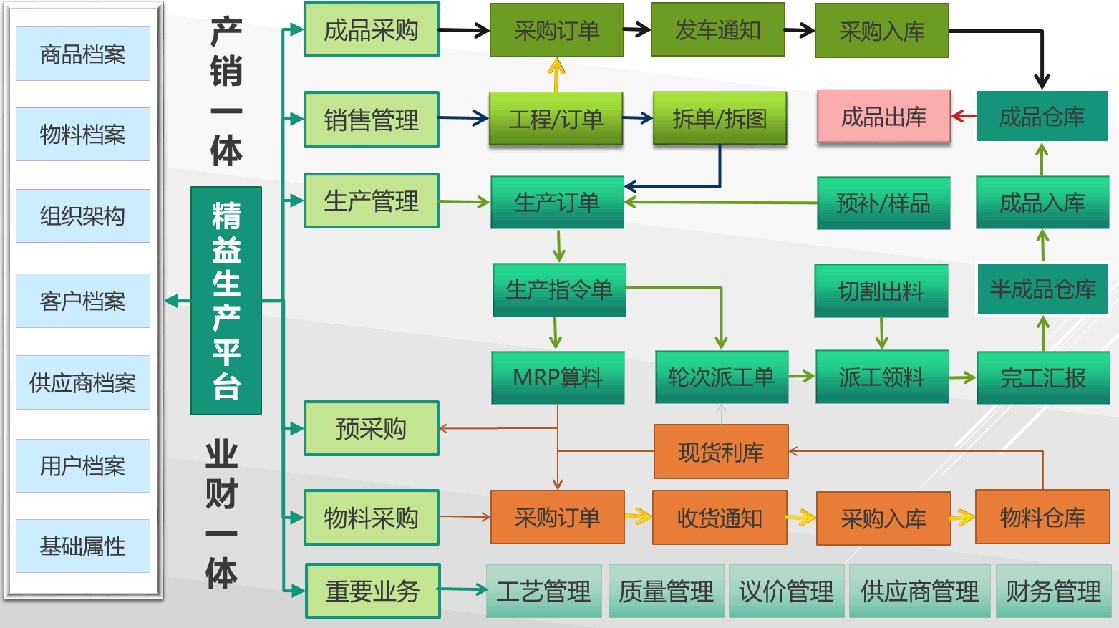
At the same time, we will also release the general functions from our launched footwear and apparel ERP platform as independent modules, such as
- Product multi-specification/color/size management, different specifications for different categories, Odoo specification variant flattened PLM
- Basic data management, production master data management
This article is one of the series, the overview.
One: Data Center Dashboard
Quickly and comprehensively view production and supply chain related data

Two: Basic Archives

Three: Sales Management

Four: Process Management

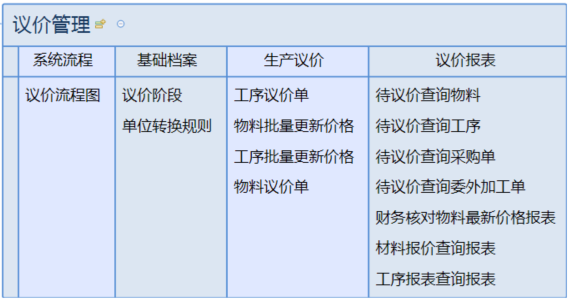
Five: Price Negotiation Management
Six: Purchasing Management

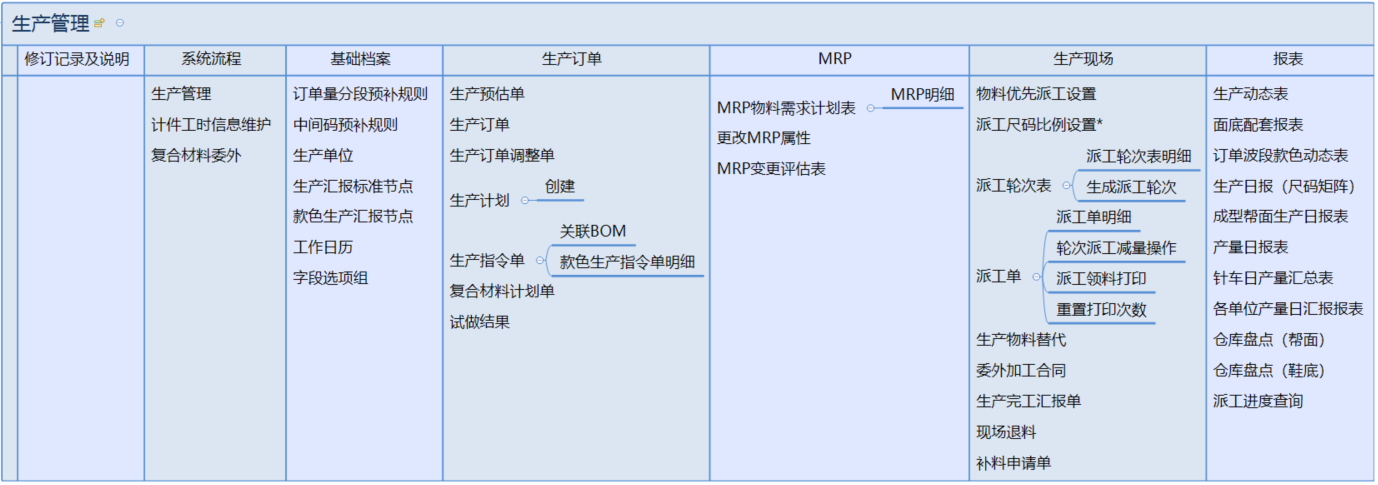
Seven: Production Management
VIII: Finished Goods Procurement

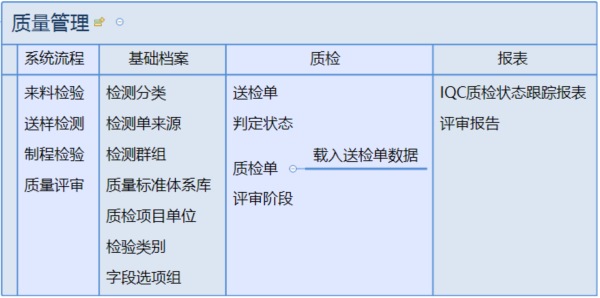
IX: Quality Management
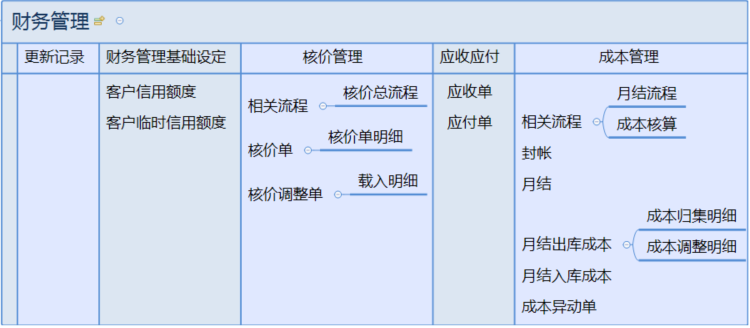
X: Financial Management
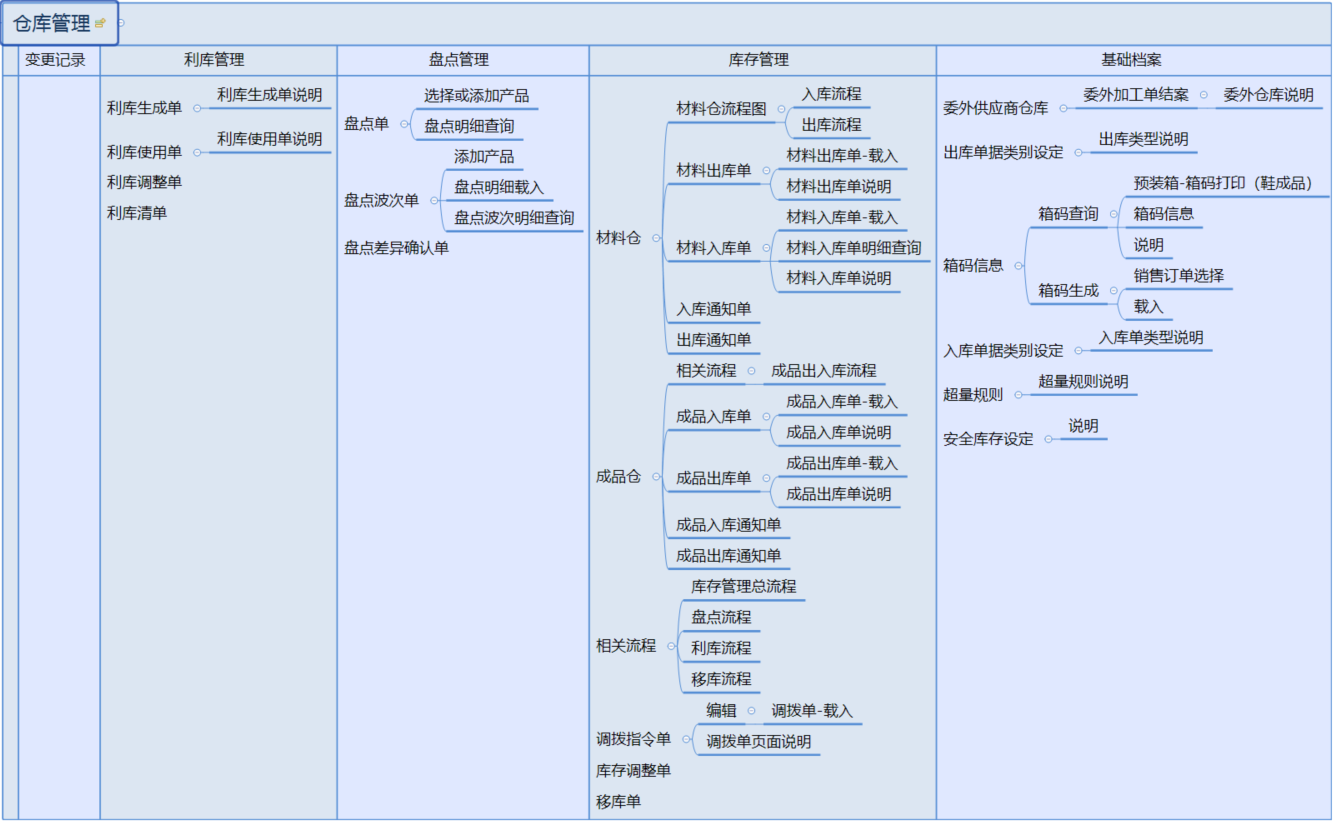
XI: Warehouse Management
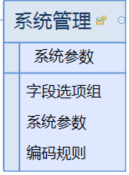
XII: System Management
1. Home
2. Basic Records
2.1. Location Basics
2.1.1. Country
2.1.2. Province
2.1.3. City
2.2. Suppliers
2.2.1. Supplier Nature
2.2.2. Supplier Category
2.2.3. Supplier
2.3. Customers
2.3.1. Customer
2.4. Warehouses
2.4.1. Warehouse Attributes
2.4.2. Warehouse Records
2.4.3. Warehouse Locations
2.5. Product Information
2.5.1. Product Attributes
2.5.2. Color
2.5.3. Size
2.5.4. Size Group
2.5.5. Style Number
2.5.6. Style Color
2.5.7. Box Type
2.5.8. Style Numbering System
2.5.9. Size Assortment
2.5.10. Barcode
2.6. Personnel Information
2.6.1. User
2.6.2. Company
2.6.3. Department
3. Process Management
3.1. Version Change Description
3.2. Flowchart
3.2.1. Process Management Flowchart
3.2.2. Development BOM
3.2.3. Technical BOM
3.3. Basic Files
3.3.1. Material Attributes
3.3.2. Maintain Material Library
Create/
Color Options
Image 1
Image 2
3.3.3. Development Material Attribute Maintenance
3.3.4. Color Library
3.3.5. Material Code Generation Rules
Business Rules
3.3.6. Material Name Generation Rules
3.3.7. Seasonal Material Library
3.3.8. Loss Rules
Order Process Loss Rules
User Source File
Order Material Loss Rules
Process Loss Rules
Material Loss Rules
3.3.9. Operation Library
3.3.10. Initialize Operation Library Process Settings
3.3.11. Process Library
3.3.12. Component Library
3.3.13. Material Delivery Warehouse Settings
Business Rules
3.3.14. WIP Delivery Warehouse Settings
3.3.15. Secondary Category Warehouse Keeper Settings
3.3.16. Secondary Category Negotiator Settings
3.3.17. Secondary Category Buyer Settings
3.4. Development BOM
3.4.1. BOM Maintenance
3.4.2. Maintain Usage
3.4.3. BOM Change Request Form
3.5. BOM
3.5.1. BOM Framework
Create/
3.5.2. BOM Maintenance
Create/
Component Loading Window
Consumption Maintenance Window
Substitute Table Detail Maintenance
Details_All_Copy Interface
3.5.3. Material Size Substitution Table
3.5.4. Outsole Database
Load Initial Outsole Data
3.5.5. Maintain Usage
Create/
3.5.6. BOM Change Request Form
3.5.7. Order-Related Change Request Form
3.6. Cost Estimation
3.6.1. Cost Estimation Form
Image 1
Image 2
3.7. Reports
3.7.1. Material Inquiry Report
3.7.2. Bill of Materials (Development BOM)
3.7.3. Bill of Materials (Technical BOM incl. Work Orders)
3.7.4. Unit Consumption Table
3.7.5. Material Usage Inquiry
3.7.6. Color Card Label Printing
3.7.7. Production Notification
3.7.8. Purchase Plan (Technical Department)
3.7.9. Purchase Plan (Purchasing Department)
4. Sales Management
4.1. System Process
4.1.1. Sales Forecast Form
4.1.2. Sales Order Taking
4.1.3. Sales Shipment
4.1.4. Sales Return
4.2. Order Forecast
4.2.1. Sales Forecast Order
4.3. Sales Order
4.3.1. Sales Order
4.3.2. Sales Order Scheduling
Schedule-
Source Sales Order Query Criteria Box
4.3.3. Sales Order Delivery Configuration
4.3.4. Sales Order Packaging Configuration
Sales Order Selection
4.3.5. Sales Order Adjustment
Adjustment-
4.4. Sales Shipment
4.4.1. Sales Shipment Order
Shipment-
Sales Order Query Criteria Box
4.4.2. Sales Return Order
Returns-
4.5. Sales Reports
4.5.1. Sales Summary Report
4.5.2. Shipment Order Progress Inquiry
5. Price Negotiation Management
5.1. System Process
5.1.1. Price Negotiation Flowchart
5.2. Basic Records
5.2.1. Price Negotiation Stages
/
5.2.2. Unit Conversion Rules
/
5.3. Production Price Negotiation
5.3.1. Material Price Negotiation Form
/
Load Data Form
5.3.2. Operation Price Negotiation Form
/
5.3.3. Batch Update Material Prices
Material Price
5.3.4. Batch Update Operation Prices
Operation Price
5.4. Price Negotiation Reports
5.4.1. Materials Pending Price Negotiation Inquiry
5.4.2. Pending Price Negotiation Inquiry by Operation
5.4.3. Pending Price Negotiation Inquiry by Purchase Order
5.4.4. Pending Price Negotiation Inquiry by Subcontracting Order
5.4.5. Finance Verification of Latest Material Price Report
5.4.6. Material Quotation Inquiry Report
5.4.7. Operation Quotation Inquiry Report
6. Purchasing Management
6.1. Purchasing Process
6.1.1. Purchasing Department Material Pre-Purchase Order
6.1.2. Purchase Order Placement
6.1.3. Material Replenishment Request
6.1.4. Purchase Return
6.1.5. Purchase Adjustment
6.2. Basic Records
6.2.1. Material Gift Rules
6.2.2. Purchase Request Category
6.2.3. Material Buyer Configuration
6.3. Purchase Forecast
6.3.1. Purchase Forecast Order
6.4. Purchase Order
6.4.1. Purchase Requisition
Requisition-
Data Loading
6.4.2. Purchase Material Substitution Request
Select Production Order
6.4.3. Inventory Utilization Release Request
Requisition-
6.4.4. Purchase Plan
Load Page
Update Delivery Date
Update Vendor
6.4.5. Purchase Order
Purchase Order Details
6.4.6. Purchase Order Adjustment
Adjustment-
6.5. Purchase Receipt
6.5.1. Purchase Receipt Notice
Load Page
6.5.2. Purchase Return Notice
6.6. Purchase Reports
6.6.1. Purchase Order Query Report
6.6.2. Purchase Progress Report
6.6.3. Purchase Contract
6.6.4. Purchase Order Printing
6.6.5. Outsole Delivery Date Statistics Report
6.6.6. Material Readiness Check Report
6.6.7. Purchase Plan Inquiry Report
6.6.8. Purchase Order Placement Check Report
6.6.9. National Standard Code Report
7. Production Management
7.1. Revision History and Description
7.2. System Process
7.2.1. Production Management
7.2.2. Piece-rate Work Hour Information Maintenance
7.2.3. Composite Material Outsourcing
7.3. Basic Files
7.3.1. Order Quantity Segmentation Pre-replenishment Rules
Create
7.3.2. Intermediate Code Pre-replenishment Rules
Create
7.3.3. Production Unit
Create
7.3.4. Production Reporting Standard Nodes
Create
7.3.5. Style-Color Production Reporting Nodes
Create
7.3.6. Work Calendar
7.3.7. Field Option Group
7.4. Manufacturing Order
7.4.1. Production Forecast Order
7.4.2. Manufacturing Orders
Create
7.4.3. Production Order Adjustment
Create
7.4.4. Production Planning
Create
7.4.5. Production Order
Associated BOM
Style/Color Production Instruction Details
7.4.6. Composite Material Plan Order
Create
7.4.7. Trial Run Results
7.5. MRP
7.5.1. MRP Material Requirements Plan
MRP Details
7.5.2. Change MRP Attributes
7.5.3. MRP Change Assessment Form
7.6. Production Floor
7.6.1. Material Priority Dispatch Settings
Create
7.6.2. Dispatch Size Ratio Settings*
7.6.3. Dispatch Round Table
Dispatch Round Table Details
Generate Dispatch Rounds
7.6.4. Dispatch Order
Dispatch Order Details
Round Dispatch Reduction Operation
Dispatch Material Requisition Printing
Reset Print Count
7.6.5. Production Material Substitution
Create
7.6.6. Outsourcing Processing Contract
7.6.7. Production Completion Report
Create
7.6.8. On-site Material Return
Create
7.6.9. Material Replenishment Request
Create
7.7. Reports
7.7.1. Production Status Report
7.7.2. Upper and Sole Matching Report
Reference Interface
7.7.3. Order Wave Style-Color Status Report
Reference Interface
7.7.4. Daily Production Report (Size Matrix)
Reference Interface
7.7.5. Daily Production Report for Formed Uppers
Reference Interface
7.7.6. Daily Output Report
Reference Interface
7.7.7. Daily Stitching Output Summary
Reference Interface
7.7.8. Daily Production Report by Unit
Reference Interface
7.7.9. Warehouse Inventory Count (Upper)
Reference Interface
7.7.10. Warehouse Inventory Count (Sole)
Reference Interface
7.7.11. Work Assignment Progress Inquiry
8. Finished Goods Procurement
8.1. System Process
8.1.1. Cost Accounting
8.1.2. Finished Goods Procurement
8.1.3. Finished Goods Procurement Receipt
8.1.4. Finished Goods Procurement Return
8.2. Cost Management
8.2.1. Finished Goods Costing Sheet
Cost Accounting Document
8.2.2. Price Agreement Inquiry
8.3. Finished Goods Procurement
8.3.1. Finished Goods Procurement Plan
Update Vendor
Update Delivery Date
Production Procurement Order Options
Update Warehouse
8.3.2. Finished Goods Purchase Order
Load Purchase Plan
Order Contract
8.3.3. Update Delivery Date
8.3.4. Finished Goods Purchase Adjustment
Adjustment-
8.4. Purchase Receipt
8.4.1. Finished Goods Purchase Receipt Notice
Load Purchase Order
8.4.2. Finished Goods Purchase Return Notice
8.5. Purchase Reports
8.5.1. Production Notice
8.5.2. Statement of Account
8.5.3. Contract Print Query
8.6. Factory Production Section To Be Designed
8.6.1. Production Monitoring
Quarterly Plan
Fabric Matching Progress
Production Schedule
8.6.2. Inspection Application
8.6.3. Reports
Finished Goods Inspection Record
Finished Product National Inspection Record Sheet
Production Progress Tracking Sheet
Styles Pending Cost Calculation
Quarterly Plan Inquiry
Quarterly Material Matching Inquiry
9. Quality Management
9.1. System Process
9.1.1. Incoming Inspection
9.1.2. Sample Submission Testing
9.1.3. In-Process Inspection
9.1.4. Quality Review
9.2. Basic Records
9.2.1. Inspection Classification
Create
9.2.2. Inspection Order Source
Create
9.2.3. Inspection Group
Create
9.2.4. Quality Standards System Library
Create
9.2.5. Quality Inspection Item Unit
Create
9.2.6. Inspection Category
Create
9.2.7. Field Option Group
9.3. Quality Inspection
9.3.1. Inspection Request
Create
9.3.2. Judgment Status
9.3.3. Quality Inspection Order
Create
Load Inspection Request Data
9.3.4. Review Stage
Create
9.4. Reports
9.4.1. IQC Inspection Status Tracking Report
9.4.2. Review Report
10. Financial Management
10.1. Update Log
10.2. Basic Financial Management Settings
10.2.1. Customer Credit Limit
10.2.2. Customer Temporary Credit Limit
10.3. Price Approval Management
10.3.1. Related Processes
Overall Price Approval Process
10.3.2. Price Approval Order
Price Approval Order Details
10.3.3. Price Adjustment Order
Load Details
10.4. Accounts Receivable and Payable
10.4.1. Receivable Document
10.4.2. Payable Document
10.5. Cost Management
10.5.1. Related Processes
Month-End Closing Process
Cost Accounting
10.5.2. Period Closing
10.5.3. Month-End Closing
10.5.4. Month-End Outbound Cost
Cost Collection Details
Cost Adjustment Details
10.5.5. Month-End Inbound Cost
10.5.6. Cost Change Document
11. Warehouse Management
11.1. Change Records
11.2. Inventory Utilization Management
11.2.1. Inventory Utilization Generation Document
Inventory Utilization Generation Document Description
11.2.2. Inventory Utilization Usage Document
Inventory Utilization Order Instructions
11.2.3. Inventory Adjustment Order
11.2.4. Inventory Utilization List
11.3. Inventory Count Management
11.3.1. Inventory Count
Select or Add Product
Inventory Count Details Query
Query
11.3.2. Inventory Count Wave Order
Add Product
Load Inventory Count Details
Inventory Count Wave Details Query
Query
11.3.3. Inventory Count Variance Confirmation Form
11.4. Inventory Management
11.4.1. Material Warehouse
Material Warehouse Flowchart
Inbound Process
Outbound Process
Material Outbound Order
Material Outbound Order - Load
Material Issue Note Description
Material Receipt Note
Material Receipt Note - Load
Material Receipt Note Detail Query
Material Receipt Note Description
Receipt Notification
Issue Notification
11.4.2. Finished Goods Warehouse
Related Processes
Finished Goods Receipt and Issue Process
Finished Goods Receipt Note
Finished Goods Receipt Note - Load
Finished Goods Receipt Note Description
Finished Goods Issue Note
Finished Goods Issue Note - Load
Finished Goods Issue Note Description
Finished Goods Receipt Notification
Finished Goods Issue Notification
11.4.3. Related Processes
Overall Inventory Management Process
Inventory Count Process
Stock Utilization Process
Stock Transfer Process
11.4.4. Transfer Order
Transfer Order - Load
Transfer Order Page Description
11.4.5. Inventory Adjustment
11.4.6. Stock Transfer Order
11.5. Master Data
11.5.1. Subcontractor Warehouse
Subcontracting Order Closure
Subcontractor Warehouse Description
11.5.2. Outbound Document Category Setup
Outbound Type Description
11.5.3. Carton Code Information
Carton Code Inquiry
Pre-packing - Carton Code Printing (Finished Shoes)
Carton Code Information
Description
Carton Code Generation
Sales Order Selection
Load
11.5.4. Receipt Document Type Setup
Receipt Type Description
11.5.5. Over-receipt Rules
Over-receipt Rule Description
11.5.6. Safety Stock Setup
Description
12. System Management
12.1. System Parameters
12.1.1. Field Option Groups
Field Option Group Content
12.1.2. System Parameters
System Parameter Content
12.1.3. Coding Rules
Style-color-size codes are the core of management; the system includes global style numbers, colors, size groups, and size management.
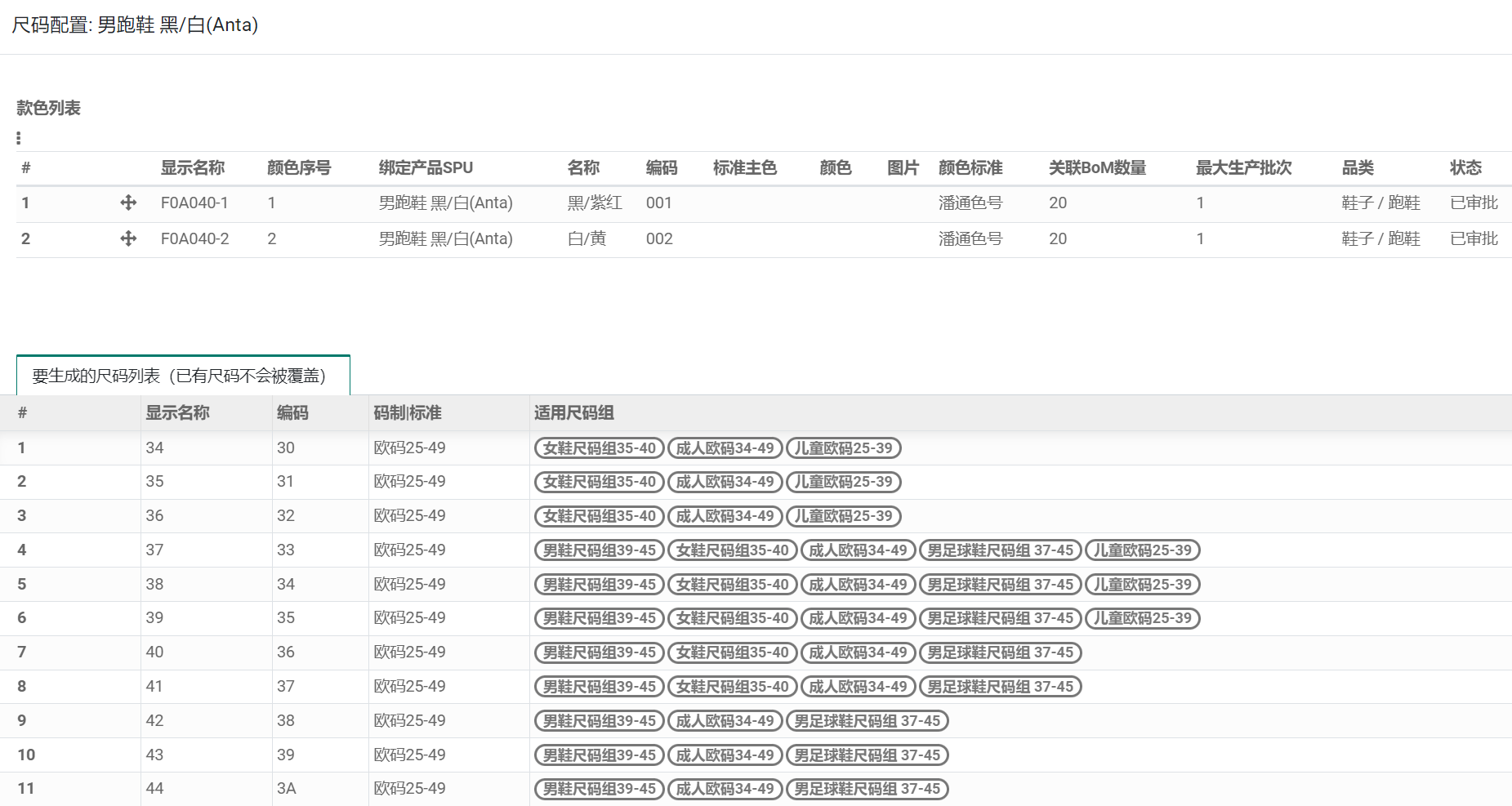
Small-batch quick response is also non-standard: style-color-size codes, processes, and lead times must be managed together.
In the footwear and apparel industry, non-standard does not mean single pieces, but rather many style-color-size combinations and fast reorders. Under one style number, there can be dozens of color-size codes, each with potentially different processes and consumption, and sales orders must be split by size matrix.
The system puts style-color-size codes, routings, BOMs, and lead times on the same chain, so after receiving an order, it can immediately calculate which materials are missing and which process is the bottleneck. The value of a non-standard manufacturing ERP is not in having more reports, but in enabling business, planning, and the shop floor to see the same set of data.