Article No. 10103
Description This article provides a complete explanation of how foreign trade enterprises set up their overseas customer and supplier record systems, multi-currency exchange rate management, and global customs and port parameter configuration, providing foundational record support for subsequent import/export orders, customs declarations and inspections, and multi-currency settlement
System Platform Odoo 18~20 native architecture + foreign-trade-specific AiErp intelligent platform
Implementation Notes Covers the setup of four core parameter systems: overseas customers, overseas suppliers, multi-currency, and global customs and ports, paired with the Documents intelligent document library built into AiErp, enabl ing automatic archiving of all business documents and consistency across all documents
Full Feature Overview
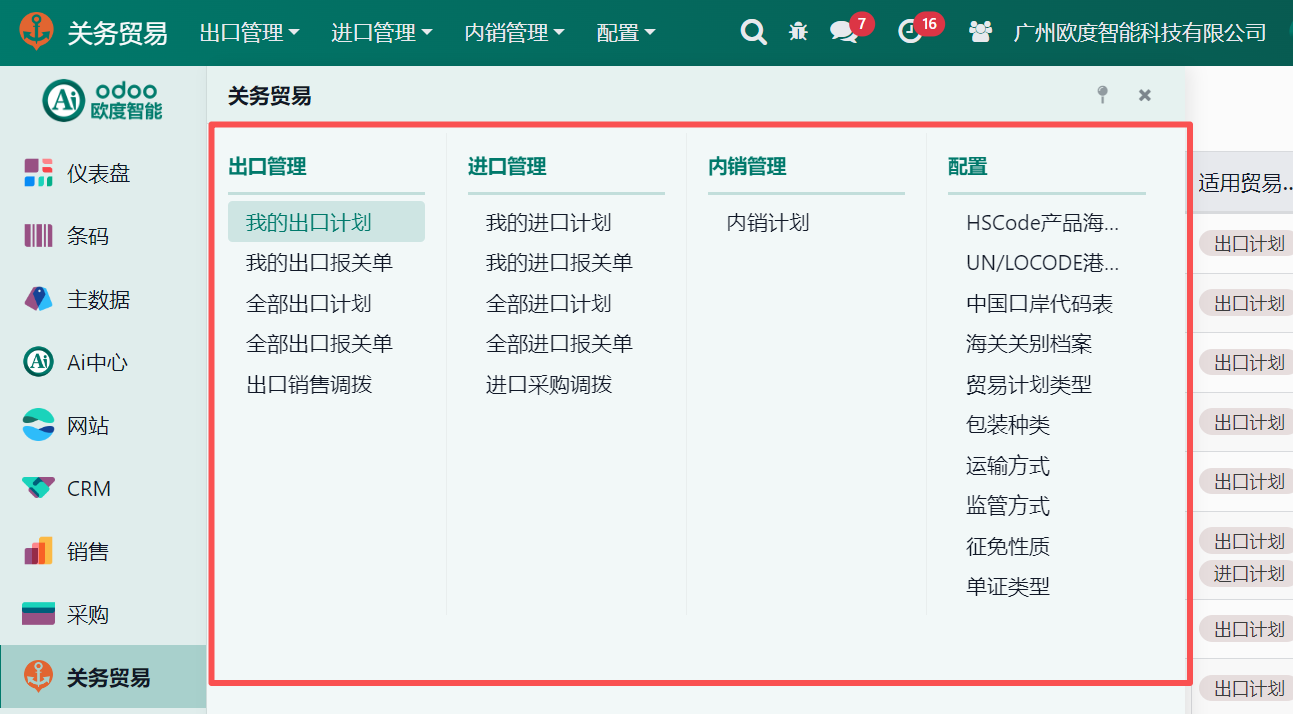
Main Text
1.1 Key Theoretical Points from the Textbook
In international trade practice, the identification and management of counterparties is the fundamental prerequisite for contract signing, performance execution, and financial accounting. The textbook "International Trade Practice" clearly states that each cross-border transaction must clearly define the following four types of basic profiles:
(1) Overseas Customers (Export Targets) The core counterparty of export business; it is necessary to record the overseas customer's full company name, registered address, tax ID (such as EU VAT number, US EIN), bank name, and SWIFT code. The textbook emphasizes that customer profiles should distinguish between the "contracting entity" and the "receiving entity," because scenarios such as group purchasing and subsidiary receiving often occur in foreign trade.
(2) Overseas Suppliers (Import Sources) The core counterparty of import business; in addition to basic information, it is also necessary to record supply capacity (minimum order quantity MOQ, delivery cycle), country of origin declaration, and whether most-favored-nation tariff rates apply. The textbook points out that the level of detail in supplier profile management directly affects import cost accounting and customs clearance compliance.
(3) Multi-Currency Settlement System In international trade, quotations, contracts, and payments all involve multiple currencies. The textbook stipulates that export contracts are usually denominated in US dollars (USD) or euros (EUR); import procurement may involve multiple currencies such as Japanese yen (JPY) and Australian dollars (AUD). Each foreign currency transaction must record three key points: "exchange rate on the transaction date," "bookkeeping exchange rate," and "settlement exchange rate." Accurate calculation of exchange gains and losses depends on the complete configuration of currency parameters.
(4) Customs Port Codes and Transportation Routes Port of Loading and Port of Discharge are core fields in international transportation contracts, ocean bills of lading, and customs declarations. The textbook requires that port codes must align with the internationally accepted UN/LOCODE standard and correspond to the customs broker's "customs district code"; otherwise, customs declaration will fail.
The core viewpoint of the textbook theory is: the completeness of basic parameter configuration determines the upper limit of foreign trade business systematization. If a customer/supplier profile is missing a VAT number, subsequent EU orders cannot automatically calculate taxes; if a currency exchange rate is missing one entry, month-end exchange gains and losses will deviate; if port codes are not mapped to customs declarations, customs data will always be disconnected. This is why Odoo/AiErp foreign trade initialization places these four major sections at the core of the "General Introduction Foundation" chapter.
1.2 Pre-System Configuration
Before formally entering customer/supplier profiles and currency parameters, the following global configurations need to be completed in Odoo/AiErp:
(1) Enable Required Modules
| Module | Purpose | Installation Path |
|---|---|---|
| Contacts | Unified customer/supplier profile management | Apps → Contacts → Install |
| Sales | Customer credit limit, price list, quotation management | Apps → Sales → Install |
| Purchase | Supplier purchase terms, RFQ management | Apps → Purchase → Install |
| Accounting & Finance | Multi-currency, exchange rates, accounts receivable/payable | Apps → Accounting → Install |
| Inventory | Delivery address hierarchy, warehouse association | Apps → Inventory → Install |
After installing the above modules, the contact form will automatically activate the "Sales & Purchase" tab.
(2) Configure Customer/Supplier Coding Rules
Go to Settings → Technical → Sequences & Identifiers → Sequences and create the following sequences respectively:
- Customer Code Sequence: Prefix
CUST-, padded to 6 digits (e.g.,CUST-000001) - Supplier Code Sequence: Prefix
SUPP-, padded to 6 digits (e.g.,SUPP-000001)
Foreign Trade Recommendation: It is best to segment overseas customer codes by region. For example,
CUST-EU-0001(European customers),CUST-NA-0001(North American customers),CUST-AS-0001(Asian customers), to facilitate subsequent generation of accounts receivable reports and BI dashboards by region.
(3) Set Up Payment Terms Templates
Go to Accounting → Configuration → Payment Terms and create the following commonly used foreign trade payment terms:
| Payment Terms | Description | Typical Scenario |
|---|---|---|
| T/T 30% advance payment + 70% after bill of lading | 30% upon order, 70% against copy of bill of lading | Standard export |
| L/C at sight | Sight letter of credit | Large-scale export |
| D/P at sight | Documents against payment at sight | Collection method |
| Net 30 Days | Full payment within 30 days | Overseas supplier procurement |
| 100% Advance Payment | 100% prepayment | First order from new customer |
(4) Enable multi-currency and automatic exchange rate updates
Go to Accounting → Configuration → Settings → Defaults, set the default currency to the base currency (Chinese Yuan CNY), then:
- Check "Allow multi-currency"
- Automatic exchange rate update service (key configuration):
- Path: Accounting → Configuration → Currencies → Select target currency → Check "Automatic rate fetching"
- Update frequency: recommended "Daily" (foreign trade exchange rates fluctuate greatly)
- Service provider: Odoo has built-in support for the European Central Bank (ECB) exchange rate source; domestic users can configure the central bank exchange rate interface in AiErp
1.3 AiErp step-by-step practice
After completing the prerequisite configuration, follow the steps below to build the four major parameter systems one by one.
Step 1: Create overseas customer profiles
Locally customized features specifically for the foreign trade industry
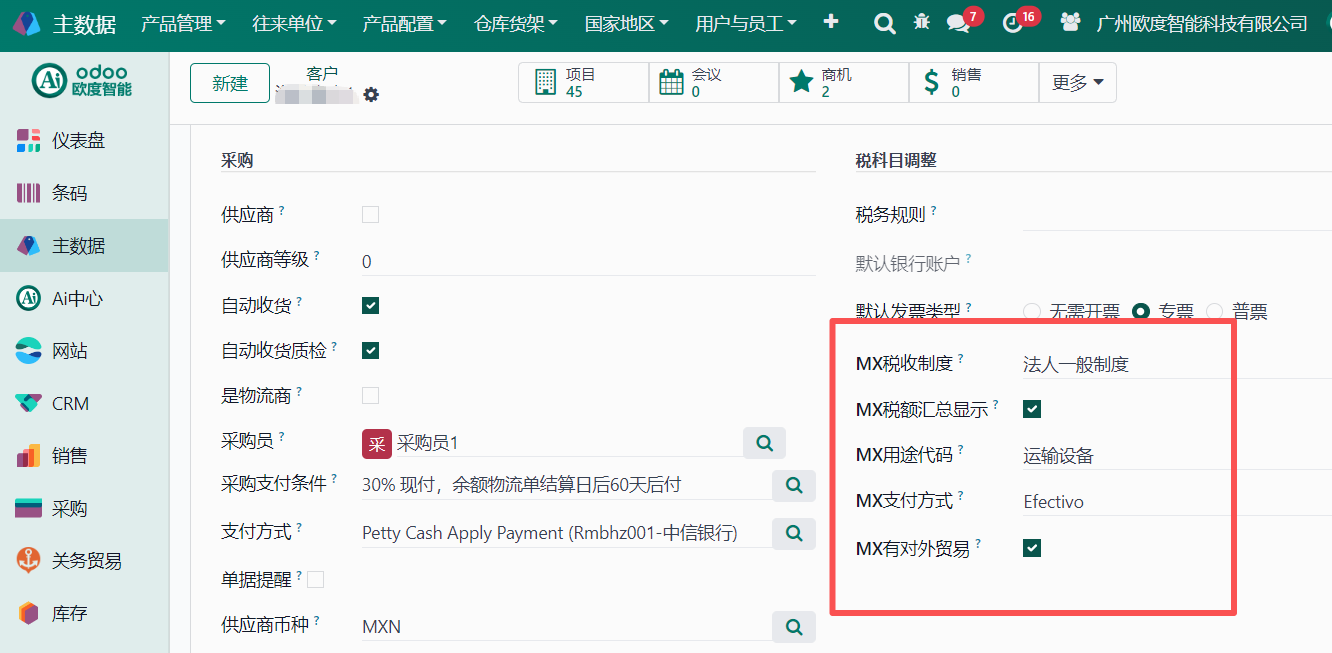
Menu path: Contacts → New
Key field entry guidelines:
| Field | Entry guidelines | Example |
|---|---|---|
| Company name | Full English name of overseas customer (consistent with contract) | ABC Trading Co., Ltd. |
| Customer code | System-generated or manually specified (according to regional segmentation rules) | CUST-EU-0001 |
| VAT number | EU customers must fill in VAT number, US customers fill in EIN | DE123456789 |
| Address type | Must create "Invoice Address" and "Delivery Address", which may be different | Invoice Address / Delivery Address |
| Country | Must be selected from the drop-down list, cannot be manually entered | Germany → automatically brings up EU identifier |
Sales & Purchases tab configuration:
| Field | Setup suggestions |
|---|---|
| Credit limit | Set according to customer's historical order volume (e.g., $100,000); the system automatically locks orders when the limit is exceeded |
| Payment terms | Select a configured template from the dropdown list (e.g., T/T 30% advance payment + 70% after bill of lading) |
| Pricelist | Assign different quotation strategies to different customers (USD price/EUR price/tiered pricing) |
| Salesperson | Assign a follow-up salesperson |
| Receivable Account | Link to an accounting account (e.g., 1122 Accounts Receivable - Overseas Customers) |
Advanced Tip: For group customers (e.g., subsidiary procurement, headquarters payment), use Odoo's contact hierarchy feature. Create multiple child contacts under the main customer record, marked as "Invoice Address", "Delivery Address", and "Other Address". This way, the system automatically matches the correct address during invoicing and shipping, avoiding customs clearance delays caused by address errors.
Step 2: Create Overseas Supplier Records
Menu Path: Contacts → Create (check the "Supplier" checkbox)
Key field entry guidelines:
| Field | Entry guidelines | Example |
|---|---|---|
| Company name | Overseas Supplier Full English Name | XYZ Manufacturing Sdn Bhd |
| Supplier Code | Automatically generated by the system | SUPP-EU-0001 |
| Payment terms | Net 30 / Net 60 / 100% advance payment | Net 60 Days |
| Default Currency | Supplier quotation currency | USD |
| Minimum Order Quantity | Record in "Internal Notes" for purchaser reference | MOQ: 500 pcs |
| Country of Origin | Maintain in the address, linked to import tariff rates | Malaysia |
"Purchasing" Tab Configuration:
- Payment Terms: Must match the purchase contract; directly affects accounts payable due dates and cash outflow forecasts.
- Currency: Default quotation currency; automatically populated when creating a purchase order.
- Lead Time: Record the average number of days from order acceptance to shipment for the supplier, used for MRP calculations.
AiErp Highlight: Supplier profiles support uploading qualification certificates (such as ISO certifications and certificates of origin), which are centrally archived in the Documents smart document library and can be retrieved with one click during customs inspections.
Step 3: Multi-currency Configuration and Exchange Rate Management
Menu Path: Accounting → Configuration → Currencies
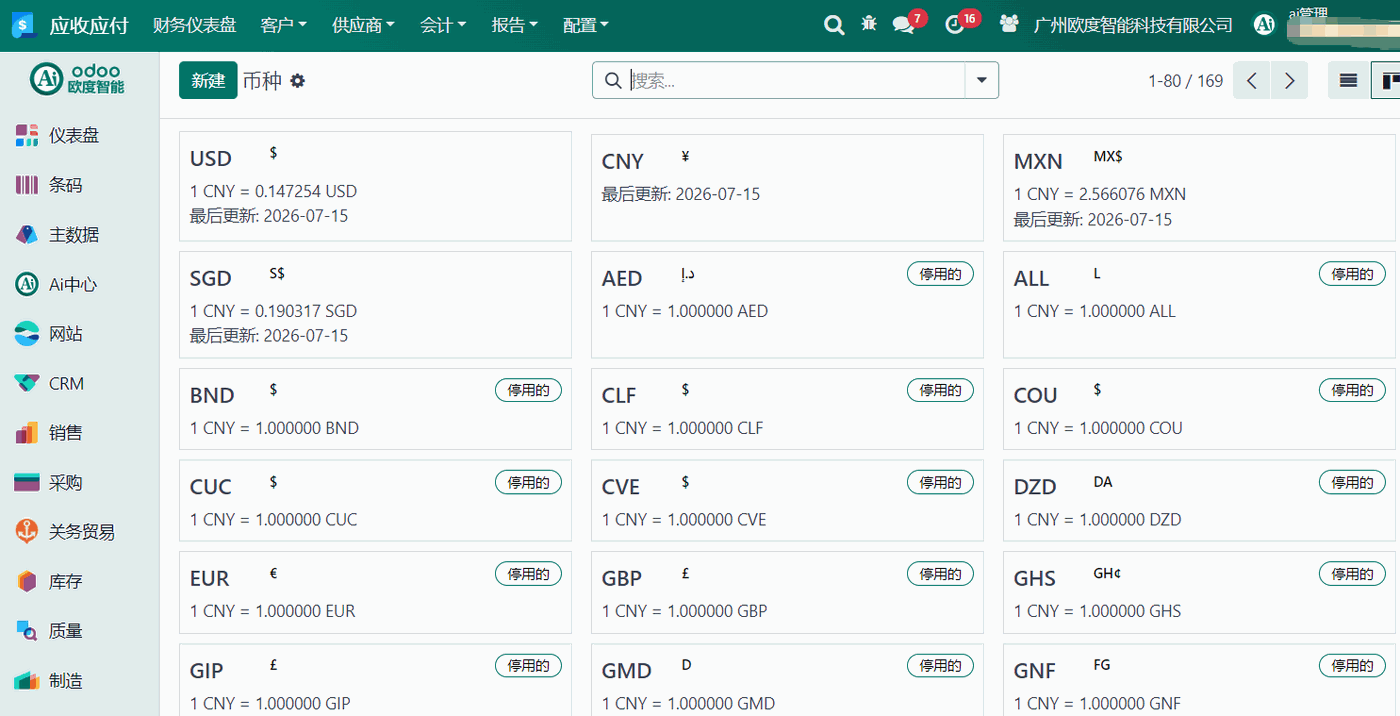
Step 3.1: Enable Commonly Used Foreign Trade Currencies
In the currency list, set the following commonly used currencies to "Active":
| Currency Code | Name | Foreign Trade Scenario |
|---|---|---|
| USD | US Dollar | Main currency for export quotations and foreign exchange receipts |
| EUR | Euro | Settlement with EU customers |
| GBP | British Pound | Settlement with UK customers |
| JPY | Japanese Yen | Payment to Japanese suppliers |
| AUD | Australian Dollar | Australian Customer/Supplier |
| KRW | South Korean Won | South Korean Supplier |
| VND | Vietnamese Dong | Vietnamese Supplier (Manufacturing Relocation Hotspot) |
Step 3.2: Configure Automatic Exchange Rate Updates
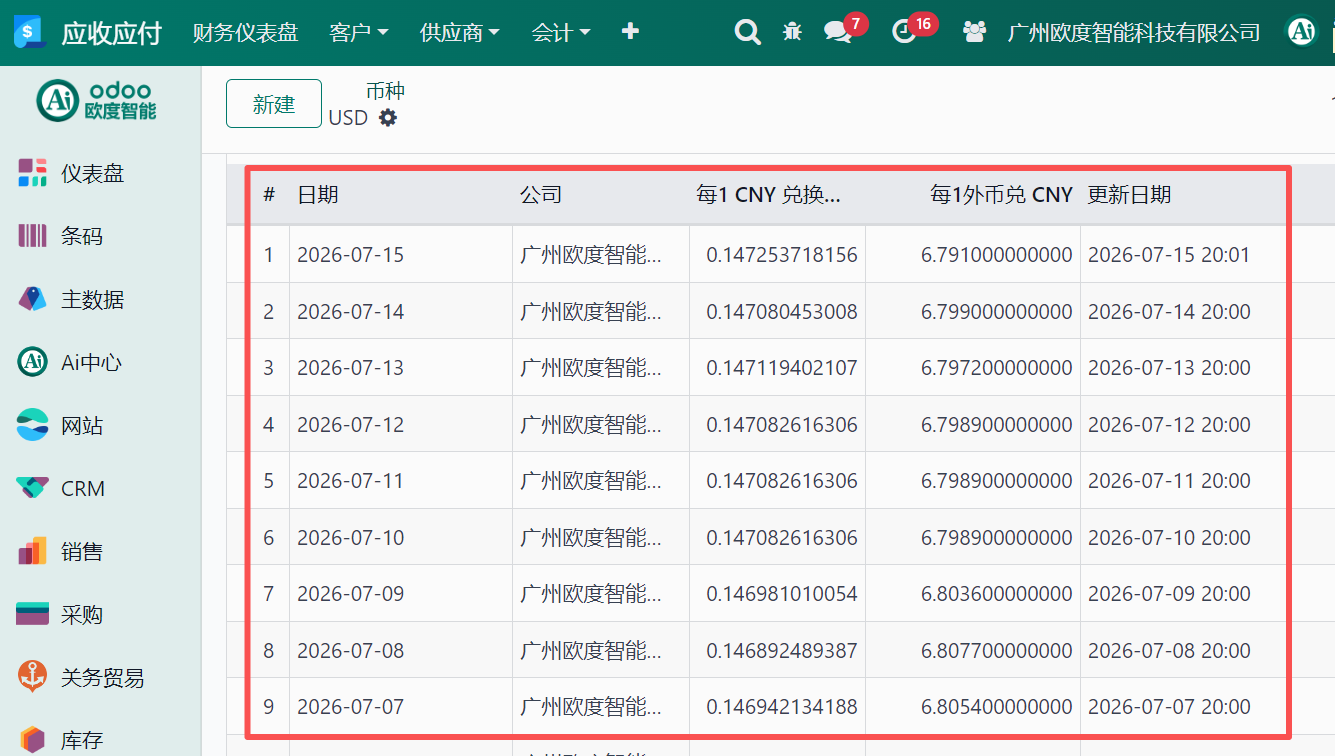
For each enabled foreign currency, enter the form edit:
- Check "Automatic Rate Acquisition"
- Update Interval: Select "Daily" (foreign exchange quotes fluctuate frequently)
- Exchange Rate Type: The system defaults to "Spot Rate". If you need to use "Month-End Rate" for financial reports, you can create a second exchange rate type in AIErp advanced settings.
Step 3.3: Exchange Rate Precision Settings
- USD/EUR/GBP: Recommended precision 0.000001 (6 decimal places) to avoid cent differences due to rounding in large orders.
- JPY/KRW/VND: Set precision to 0.01 (2 decimal places) because these currency units are smaller.
Pitfall Alert: Exchange rate precision directly affects month-end exchange gain/loss calculations. When processing million-dollar orders, the difference between 6 decimal places and 2 decimal places can be as high as thousands of yuan. Be sure to standardize this during the initialization phase.
Step 4: Build Customs Port Parameter System
Customs port parameters are a unique requirement of foreign trade ERP. Odoo natively does not have a "port" dictionary table. In AiErp, this is implemented through the following methods:
Option 1: Use the "Destination" field (Odoo native)
In the contact's delivery address, fill in the destination port information in the Address Line 2 and City fields:
| Address Field | How to Fill | Example |
|---|---|---|
| Address Line 1 | Consignee Detailed Address | 123 Harbor Blvd, Suite 500 |
| Address Line 2 | Destination Port Name + UN/LOCODE | Port of Los Angeles (USLAX) |
| Cities | Port City | Los Angeles |
| Country | Destination Country | United States |
Option 2: AiErp Custom Port Dictionary (Recommended)
In AiErp's Settings → Technical → Models → Custom Fields, add a "Destination Port" dropdown field to the "Contact Address" model, linked to the port dictionary table:
The port dictionary recommends presetting the following high-frequency ports:
| UN/LOCODE | Port Name | Country | Type |
|---|---|---|---|
USLAX |
Port of Los Angeles | United States | Destination Port |
USLGB |
Port of Long Beach | United States | Destination Port |
NLRTM |
Port of Rotterdam | Netherlands | Destination Port |
DEHAM |
Port of Hamburg | Germany | Destination Port |
GBSOU |
Port of Southampton | United Kingdom | Destination Port |
JPYOK |
Port of Yokohama | Japan | Port of Loading |
KRPUS |
Port of Busan | South Korea | Port of Loading |
CNYTN |
Yantian Port | China | Port of Loading |
CNSGH |
Port of Shanghai | China | Port of Loading |
CNNGB |
Port of Ningbo | China | Port of Loading |
Integration with INCOTERMS:
Port configuration must be integrated with the trade terms system already established in article 10102. For example:
- Contract is FOB Yantian → Port of loading automatically selected as CNYTN, port of destination brought from the port field in the customer delivery address
- Contract is CIF Hamburg → On the delivery order, port of loading is CNSGH, port of destination is DEHAM
AiErp Smart Integration: When the port field is maintained in the customer delivery address, the system automatically infers the port of loading and port of destination according to INCOTERMS rules during document creation, greatly reducing customs declaration failures caused by manual port selection errors.
1.4 Key Pitfalls to Avoid in Foreign Trade
Pitfall 1: Customer codes lack room for expansion, leading to code system collapse when cross-border e-commerce business explodes
Many foreign trade companies initially encode only by the "overseas customer" dimension (e.g., CUST-001). When later expanding to cross-border platform businesses such as Amazon, Shopify, TikTok Shop, the platform itself is also a "customer" (reconciliation and payment recipient), but the coding system cannot distinguish them. It is recommended to reserve channel identifiers in the coding rules, for example:
CUST-B2B-EU-0001(B2B European customer)CUST-B2C-AMZ-0001(Amazon platform customer)CUST-B2C-SHF-0001(Shopify platform customer)
Pitfall 2: Forgetting to enable automatic currency exchange rate updates, causing huge differences in month-end exchange gains and losses
Odoo's exchange rate update is enabled "per currency", not a global switch. If you forget to check "Automatic Rate Update" after enabling a new currency, the exchange rate will remain at its initial value forever. A foreign trade company once failed to update the EUR exchange rate for 3 months, resulting in an exchange gain/loss deviation of over 200,000 RMB on accounts receivable. It is recommended to confirm currency by currency in the system go-live checklist.
Pitfall 3: Customer VAT number not entered, EU order tax calculation fails
Exports to EU customers are subject to the "Reverse Charge" mechanism, and enterprises must indicate the customer's VAT number on the invoice. If the customer profile does not have a VAT number, the EU tax rules will not be triggered when the invoice is automatically generated, and subsequent European tax audits will result in fines. During the initialization phase, be sure to confirm the VAT number for each customer.
Pitfall 4: Mixed use of Chinese and English port names, customs declaration returned
The destination port is entered in the system as "Los Angeles Port" (in Chinese), but the customs declaration requires the UN/LOCODE standard format (USLAX). If the two types of data are not unified, the customs declarant must manually translate and cross-check each time a document is prepared, which is inefficient and error-prone. Use UN/LOCODE uniformly as the primary key of the port dictionary table, with the Chinese name and English name serving only as auxiliary display fields.
Pitfall 5: Forgetting to distinguish between the contracting entity and the receiving entity of suppliers
Overseas suppliers often have situations such as "Hong Kong company signs the contract, mainland factory receives payment" or "group headquarters signs the contract, branch receives payment". Odoo's Contacts module supports a parent + child contact structure: set the contracting entity as the parent, link the receiving bank account to the corresponding child contact, clearly distinguish the legal responsible entity and the flow of funds, and avoid international payments being intercepted by bank risk control.
II. Related Articles Navigation
| Location | Number | Article | Connection Point |
|---|---|---|---|
| ← Previous | 10102 | INCOTERMS 2020 Trade Term Standardization Implementation and Business Control | Trade terms determine the choice of port of departure/destination; this article's port configuration is an extension of 10102. |
| → Next | 10104 | Foreign Trade Product Master Data Setup (Product Name, Quality, Packaging, Batch/Serial Number Traceability) | After customers and suppliers are ready, proceed to product master data setup; only with products + customers can quotations be generated. |
| ↔ Cross-Mainline | 10602 | Multi-Currency Enablement, Automatic Exchange Rate Synchronization, and Foreign Currency Accounting Rule Configuration | This article's currency configuration directly affects the financial foreign currency accounting in 10602. |
| ↔ Cross-Mainline | 10801 | Foreign Currency Purchase Invoices from Overseas Suppliers and Accounts Payable Entry | Vendor profile + currency determine the posting logic for import purchase invoices |
Supporting Materials
- Port dictionary template: UN/LOCODE global port standard code list (Excel), including port of loading/port of discharge classification, can be imported directly into AiErp
- Currency configuration parameter table: recommended values for exchange rate precision and update frequency of common foreign trade currencies
- Customer/Vendor coding rule template: coding design document segmented by region + business type