Article ID 10104
Description This article provides a complete explanation of building a product master data system for foreign trade enterprises, covering multilingual product name standards, quality parameter standardization, packaging hierarchy management, and full-chain batch/serial number traceability, providing accurate master data support for import/export order entry, customs declaration and inspection, and after-sales traceability
System Platform Odoo 18~20 native architecture + foreign trade-specific AiErp intelligent platform
Implementation Notes Covers four core modules: multilingual product name standards, quality parameter standardization, packaging hierarchy management, and full-chain batch/serial number traceability, paired with AiErp's built-in Documents intelligent document library to achieve automatic archiving and one-to-one batch number correspondence for quality inspection reports, packing lists, certificates of origin, and other documents
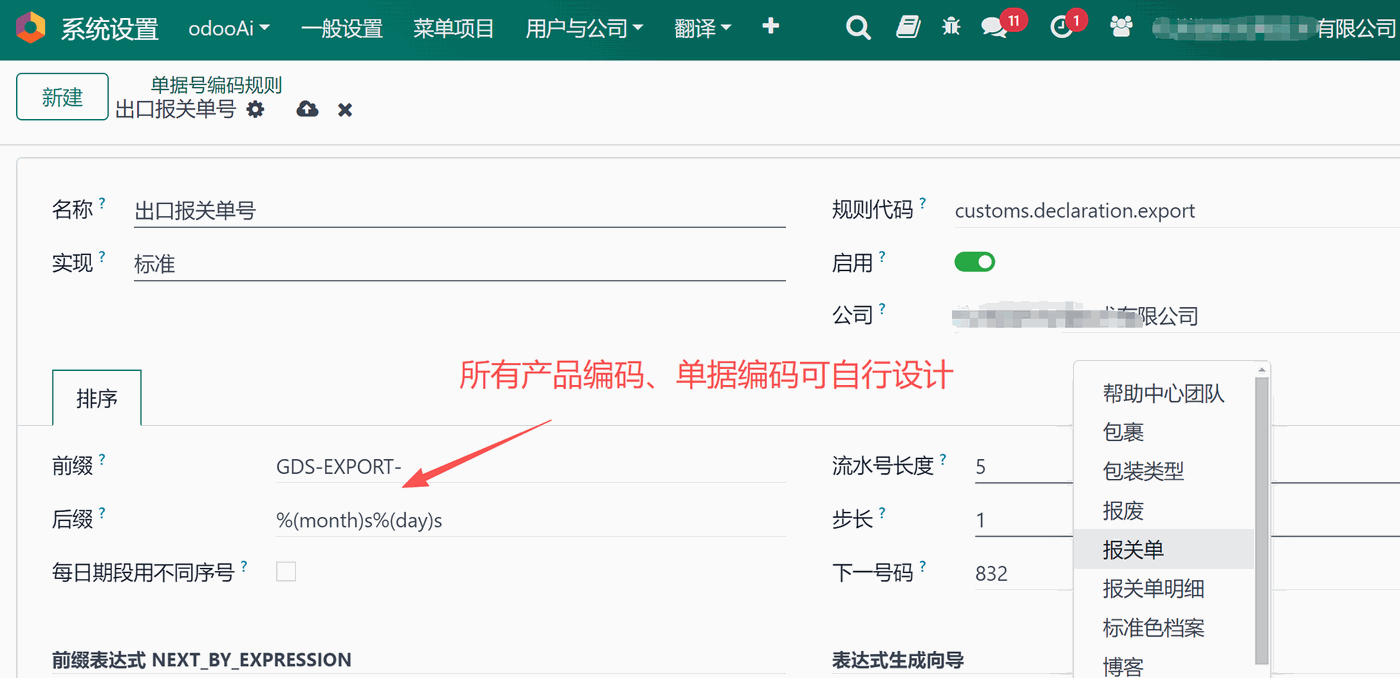
Odoo supports customizable coding rules
Main Text
1.1 Key Theoretical Points from the Textbook
Chapter 3 of Li Xiaoxian's "International Trade Practice" systematically elaborates on the four core clauses of the "subject matter" in international sales contracts: name of commodity, quality, quantity, and packaging. In an ERP system, these four are not isolated data fields but an interlocking master data system—the product name determines customs classification, quality parameters determine pricing strategy, quantity units determine more or less tolerance, and packaging hierarchy determines logistics cost accounting. The following are the theoretical points from this chapter that need to be mastered for implementation in Odoo:
(1) Name of Commodity Clause—Legal Significance of Commodity Naming and Customs Compliance
The Name of Commodity in an international trade contract is not only a commercial description but also the legal basis for customs classification and tariff determination. The Harmonized Commodity Description and Coding System (HS Convention) requires all import and export commodities to be classified under a six-digit international code, extended domestically to eight or ten digits. Improper product name filling can lead to minor consequences such as document amendments and shipping delays, or serious consequences such as being deemed false declaration and facing penalties. In Odoo, the "Name" field in the product master data must carry both Chinese and English product names and be linked to the HS Code via a custom field to ensure complete consistency of the product name across sales orders, customs declarations, and invoices.
(2) Quality Clause—Six Methods of Expressing Quality
The textbook explicitly lists six methods of expressing quality in international trade:
| Method | Applicable Commodities | Odoo Corresponding Configuration |
|---|---|---|
| Sale by Sample | Clothing, handicrafts, toys | Product variants + image attachments + quality inspection parameters |
| Sale by Specification | Steel, chemicals, electronic products | Product attributes + specification parameter table |
| Sale by Grade | Agricultural products, mineral products | Product Variants + Custom Grade Fields |
| Sale by Standard | Mechanical Parts, Electrical Appliances | Product Attributes + International Standard Numbers (ISO/ASTM) |
| Sale by Description | Large Equipment, Complete Production Lines | Internal Product Notes + Documents Attachment Management |
| Sale by Brand | Branded Consumer Goods | Product Brand Field + Supplier Association |
Different representation methods have different implementation paths in Odoo, but there is only one core principle: the vaguer the quality clause, the greater the buyer's initiative to reject goods. Systematic product attribute configuration can transform quality disputes from "subjective descriptions" into "objective parameter comparisons".
(3) Quantity Clause—Measurement Unit System and More or Less Clause
Common measurement pitfalls in foreign trade contracts fall into three categories: first, conversion between metric and imperial systems (e.g., 1 metric ton = 1000kg vs 1 long ton = 1016kg); second, inconsistency between packaging units and pricing units (e.g., "carton" as a packaging unit and "piece/set" as a pricing unit); third, the tolerance ratio of the More or Less Clause is not solidified as a validation rule in the system. Odoo supports dual units (sales unit + purchase unit) and fixed conversion ratios, but in foreign trade scenarios, additional attention is required: customs declarations must be declared in legal measurement units (kilograms/meters/liters, etc.), not contract pricing units.
(4) Packaging Clause—Transport Packaging, Sales Packaging, and Shipping Mark Specifications
The textbook divides packaging into two major categories: transport packaging (outer packing) and sales packaging (inner packing). The core function of transport packaging is to protect goods and facilitate loading and unloading, and it requires shipping marks; sales packaging directly faces end consumers. Odoo implements multi-level packaging management through "Package Type" and "Packaging", but standardized templates for foreign trade shipping marks (consignee abbreviation, reference number, port of destination, package number) require user-defined configuration.
Theoretical Takeaway : The degree of standardization in product records directly determines the accuracy of subsequent customs declaration filings, the pass rate of commodity inspection spot checks, the efficiency of tax rebate document matching, and the traceability of customer quality claim handling—the more detailed the records, the more confident the risk control, and the more evident the value of full-chain digitalization.
1.2 Pre-System Configuration
Before formally starting to create foreign trade product records, four basic configurations need to be completed first to ensure that there are unified standards to follow when entering product data later.
(1) Enable Required Modules
| Module | Purpose | Installation Path |
|---|---|---|
| Sales (sale) | Product Pricing, Sales Order Association | Apps → Sales → Install |
| Purchase (purchase) | Supplier product linkage, purchase inquiries | Apps → Purchase → Install |
| Inventory (stock) | Packaging levels, lot/serial numbers, dual-unit conversion | Apps → Inventory → Install |
| Quality (quality) | Quality inspection parameters, incoming inspection, outgoing inspection | Apps → Quality → Install |
| Product (product) | Product variants, attributes, multi-language | Built-in by default, no separate installation required |
Foreign trade recommendation: If a multi-company structure is involved (e.g., a domestic trading company + an overseas offshore company), you need to additionally install the "Multi-Company" module, and pay attention to the sharing strategy of product records between companies—whether SKUs are reused across companies and whether pricing is maintained independently.
(2) Configure international units of measure
Odoo only has metric units by default. In foreign trade scenarios, you need to manually add imperial/US units:
| Unit category | Standard unit | Foreign trade units to add | Conversion relationship |
|---|---|---|---|
| Weight | kg (kilogram) | LB (pound), OZ (ounce), MT (metric ton), LT (long ton) | 1 kg = 2.2046 LB |
| Length | m (meter) | FT (feet), IN (inch), YD (yard) | 1 m = 3.2808 FT |
| Volume | m³ (cubic meter) | CFT (cubic feet), CBM (cubic meter) | 1 m³ = 35.315 CFT |
| Packaging | Unit(s) (piece) | CTN (carton), PAL (pallet), BAG (bag), DRM (drum) | Define according to actual packaging |
Menu path: Inventory → Configuration → Units of Measure → Unit of Measure Categories
Pitfall reminder: The legal unit of measure on the customs declaration (kg/m/liter, etc.) must be consistent with the "Customs Declaration Unit" field in the product master data; otherwise, the customs pre-entry will return an error.
(3) Configure product category system
For foreign trade products, it is recommended to build a classification tree based on HS code chapters rather than internal SKU management habits:
Product Category
├── Chapter 1: Live Animals/Animal Products (HS 01-05)
├── Chapter 2: Vegetable Products (HS 06-14)
├── Chapter 6: Chemical Products (HS 28-38)
├── Chapter 7: Plastics and Articles Thereof (HS 39-40)
├── Chapter 11: Textile Materials and Articles (HS 50-63)
├── Chapter 15: Base Metals and Articles (HS 72-83)
├── Chapter 16: Machinery and Electrical Products (HS 84-85)
├── Chapter 20: Miscellaneous Manufactured Articles (HS 94-96)
└── Service Products: Ocean Freight/Insurance/Port Charges (Non-HS, see 10105)
Design rationale: The advantage of classifying by HS chapters is that when generating export customs declaration drafts or applying for certificates of origin, products within the same HS code range can be filtered directly by category, significantly reducing manual classification errors.
(4) Configure lot/serial number rules
In foreign trade scenarios, lot numbers need to carry more information (supplier batch number, production date, import date, customs declaration number). It is recommended to use a combined naming rule:
| Product Type | Lot Number Naming Rule | Example | Interpretation |
|---|---|---|---|
| Finished Export Products | {Product Code}-{Production Date}-{Serial No.} |
LED-2503-A01 |
LED Lighting Fixtures March 2025 Batch A01 |
| Imported Raw Materials | {Supplier Code}-{Arrival Date}-{Serial Number} |
SUP035-250315-002 |
Supplier 035 arrived on 2025.3.15, Batch 2 |
| General Trade Goods | {YearMonth}-{Last 4 Digits of Purchase Order Number} |
2503-P038 |
March 2025 Purchase Order 0038 |
Menu Path: Inventory → Configuration → Lots/Serial Numbers → Set Product Traceability
Advanced Tip: AiErp supports embedding custom field values (such as supplier code, customs declaration number) in batch numbers, making the batch number equal to the traceability index. It is recommended to link batch number rules with purchase order/receipt templates to enable automatic generation instead of manual entry.
1.3 AiErp step-by-step practice
The following uses a typical foreign trade enterprise—mainly exporting LED lighting fixtures and also importing electronic components—as an example to fully demonstrate the entire process from creating a product to enabling traceability.
Step 1: Create Foreign Trade Product Master Data
Menu Path: Sales → Products → Products → Create
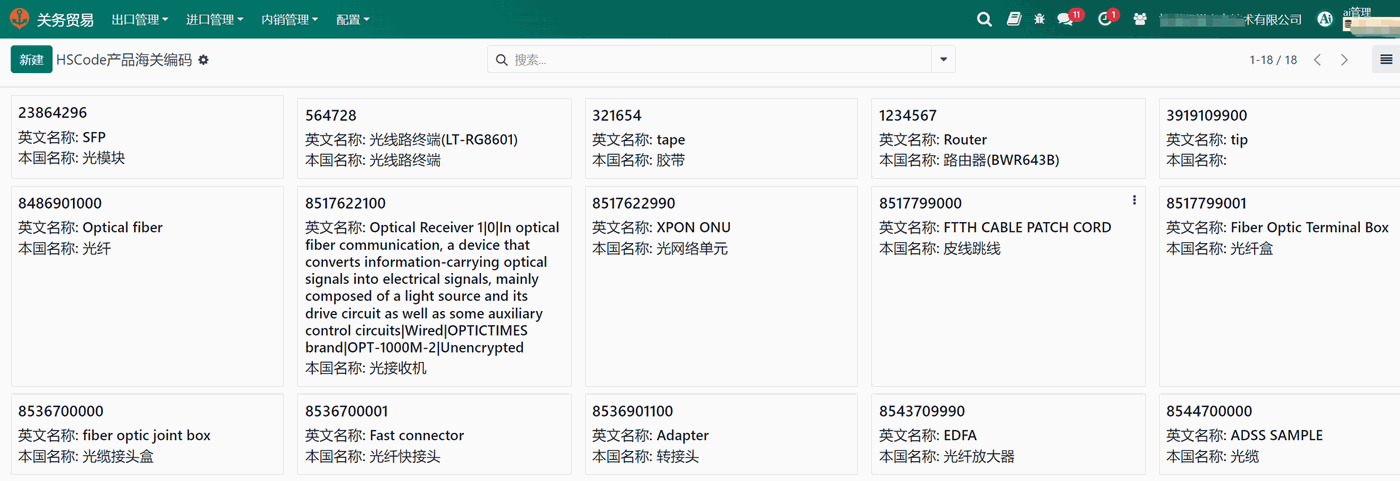
Key field entry guidelines:
| Field | Entry guidelines | Example |
|---|---|---|
| Product Name | English name first, Chinese name in parentheses; if only for domestic market, Chinese name can be first | LED Panel Light 600×600mm (LED Flat Panel Light) |
| Product Type | For trade goods, select "Stocked Product"; for service fees, select "Service" | Stocked Product |
| Sales Price | First fill in the base price (FOB); prices for other trade terms are derived through the pricelist | ¥ 85.00 |
| Cost | Used for profit analysis, does not directly determine the selling price | ¥ 52.00 |
| Product Category | Select the corresponding HS major category | Chapter 16: Mechanical and Electrical Products |
| HS Code | Custom field (must be added first in Settings → Technical → Fields) | 9405.40.9000 |
| Country of Origin | For export products, fill in "China"; for import products, fill in the actual country of origin | China |
"Sales" tab configuration:
| Field | Setup suggestions |
|---|---|
| Unit of Sale | Pieces (PCS) |
| Sales Price List | It is recommended to create multiple price lists: FOB price list (baseline), CIF price list (including landed costs), EXW price list |
| Customer Tax | For export products, usually select 0% VAT (export tax rebate scenario) |
AiErp Highlight: AiErp has a built-in intelligent HS code recommendation engine—enter product name keywords, and the system automatically matches the top 3 most likely HS code segments, and highlights the corresponding export tax rebate rate and regulatory conditions (such as export license / commodity inspection requirements), avoiding customs declaration rejections caused by incorrect HS classification.
Step 2: Configure Product Variants and Quality Specifications
Taking LED panel lights as an example, export products usually have two core variant dimensions: wattage and color temperature.
Operation path: Product form → Variants tab → Attributes → Create new attribute value
Product Variant Configuration
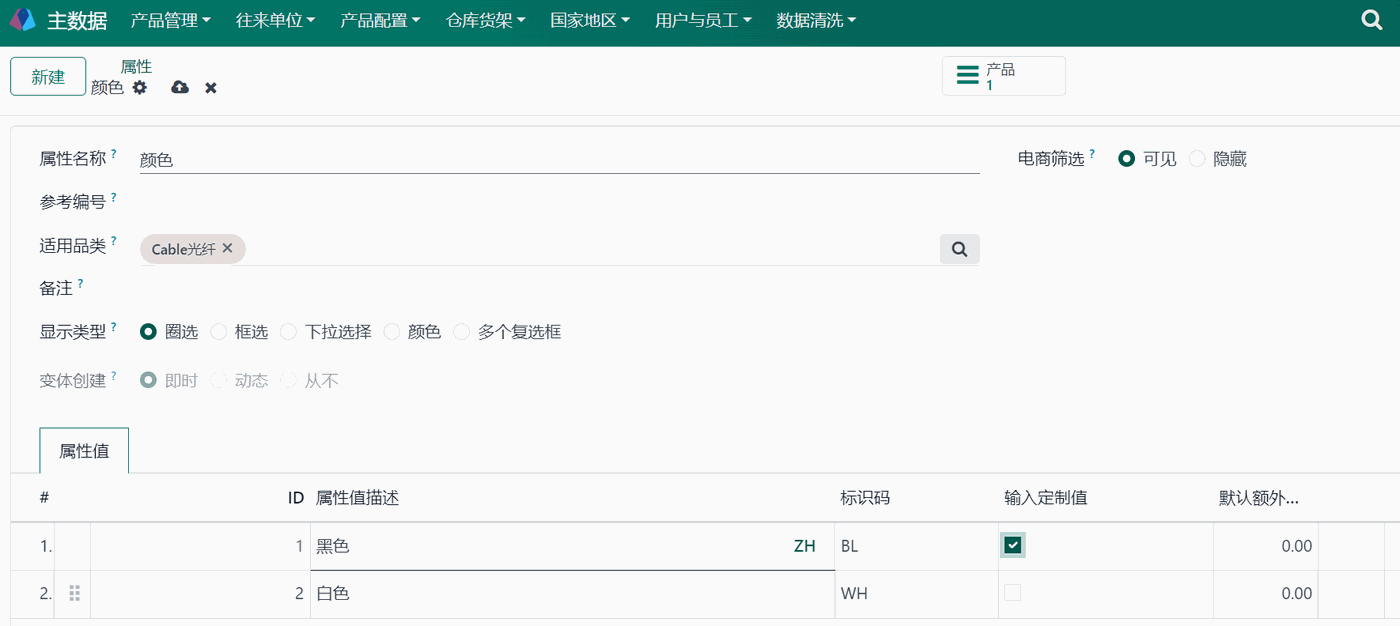
Attribute Configuration Example:
| Attribute | Attribute Value | Description |
|---|---|---|
| Wattage | 36W、48W、60W、72W | Affects price and packing specifications |
| Color Temp | 3000K (Warm White), 4000K (Natural White), 6000K (Cool White) | Affects target market preferences |
| Certification | CE、UL、SAA、CB | Affects exportable countries/regions |
| IP Rating | IP20、IP44、IP65 | Affects applicable scenarios (indoor/outdoor) |
| Field | Setup suggestions |
|---|---|
| Variant Naming Template | {Product Name} {Wattage}W {Color Temp}K {Certification} (e.g., LED Panel Light 600×600mm 48W 4000K CE) |
| Variant Price | Can be priced independently; for higher wattage with higher price, a tiered formula can be set |
Foreign Trade Quality Management Tip: It is recommended to associate a "Quality Specification Sheet" (PDF) as an attachment under the product's Documents tab for each variant, including: technical parameter table, packaging drawings, and copies of certification certificates. When a customer claims that "quality does not match the approved sample," these archived documents are the most direct basis for resolving disputes.
Step 3: Configure Packaging Levels
In foreign trade shipping scenarios, a product involves multiple layers of packaging from factory to container loading. The unit conversion relationships for each packaging layer must be solidified in the system as validation rules.
Menu Path: Inventory → Configuration → Packaging → Create
Packaging Level Configuration Table (Example: LED Panel Light 48W):
| Level | Packaging Name | Quantity Included | Conversion | Dimensions (mm) | Gross Weight (kg) |
|---|---|---|---|---|---|
| Level 1 | PCS (pieces) | 1 piece | Unit of Sale | 600×600×12 | 0.8 |
| Level 2 | CTN (inner carton) | 4 pieces | 1 CTN = 4 PCS | 630×630×60 | 3.5 |
| Level 3 | MCTN (outer carton) | 12 pieces | 1 MCTN = 3 CTN = 12 PCS | 650×650×200 | 11.0 |
| Level 4 | PAL (pallet) | 240 pieces | 1 PAL = 20 MCTN = 240 PCS | 1200×1000×1100 | 235 |
Automatic packaging conversion logic in sales orders:
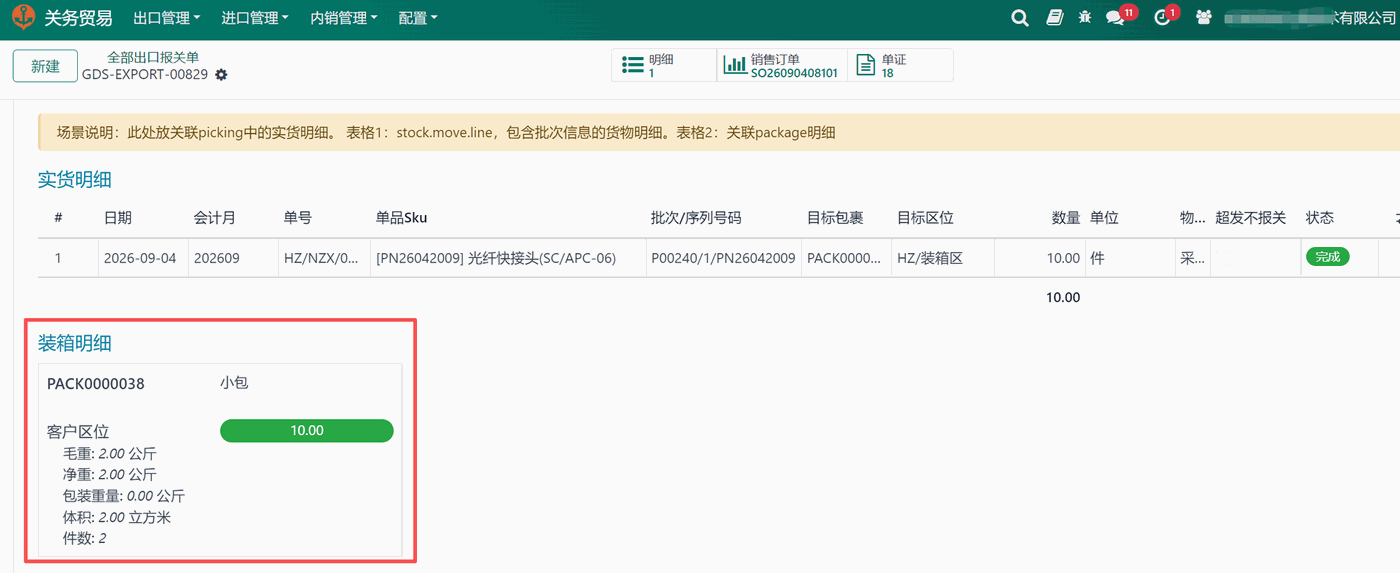
- The system automatically calculates the packaging quantity for each level based on sales quantity ÷ packaging conversion ratio
- When the customer requests "Full Container" shipment, the delivery wizard automatically rounds up to the nearest full container quantity.
- Packing data can be directly exported to a Packing List template.
Advanced Tip: Odoo's "Pick by Pack" feature combined with "Replenishment Rules" can automatically trigger unpacking replenishment when loose item stock is insufficient but full container stock is sufficient. This is especially important for mixed business models that "accept both loose orders and full containers".
Step 4: Enable Lot and Serial Number Traceability
Menu Path: Product Form → Inventory Tab → Traceability → Select "By Unique Serial Number" or "By Lot"
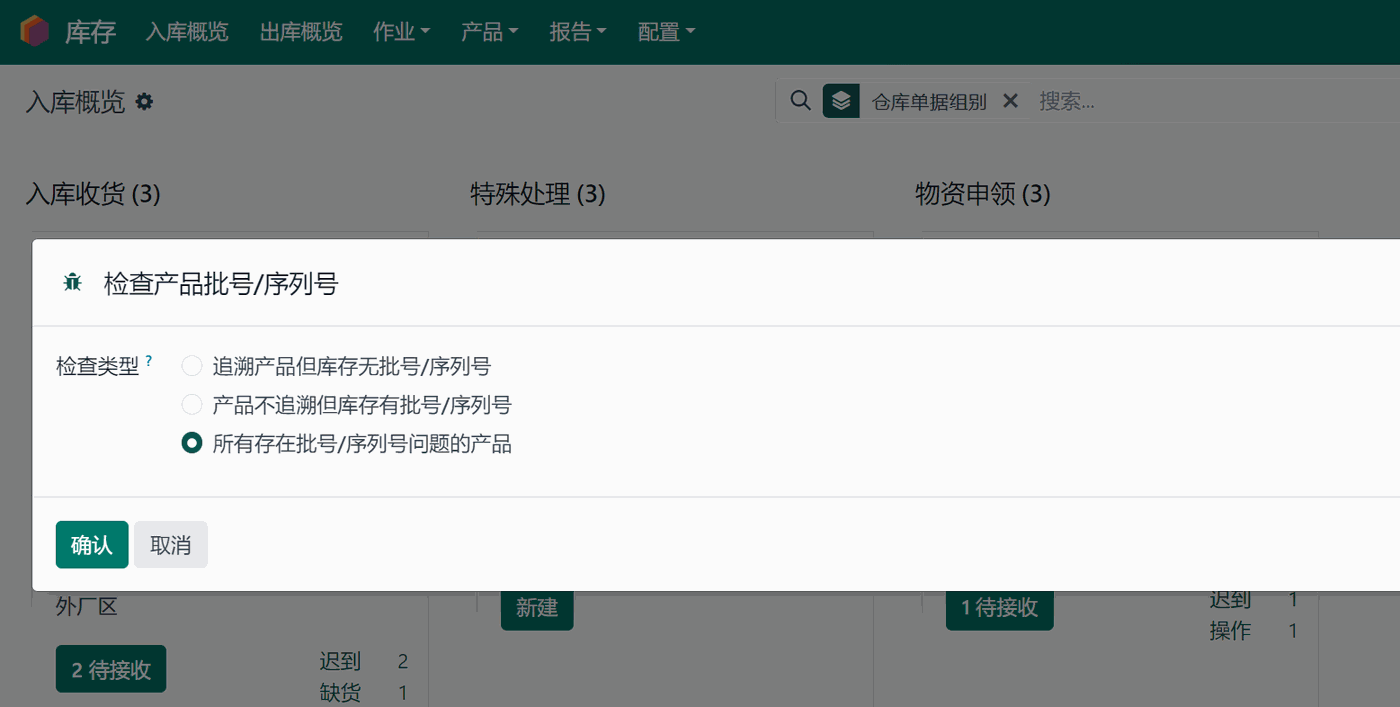
Comparison of Two Traceability Modes:
| Dimension | By Lot | By Unique Serial Number |
|---|---|---|
| Applicable Scenarios | Raw materials, consumables, general parts, food/chemicals | High-value finished products, electronic equipment, medical devices |
| Traceability Granularity | All products in the same batch share one lot number | Each product has a unique number |
| Typical Foreign Trade Scenarios | Imported ABS plastic pellets (500kg per batch) | Export LED lighting serial number traceability (one SN per light) |
| Delivery Validation | No mandatory serial number scan; lot number ≥1 is sufficient | Specific serial numbers must be scanned for delivery |
Lot Number Configuration Steps:
- After enabling "Lot/Serial Number" tracking, the system forces generation of a lot number upon receipt.
- Batch number generation rule: select "Auto-generate (based on server action)", enter a Python expression to concatenate the name.
- Each purchase receipt, production receipt, and return receipt will generate a new batch.
- You can view the complete movement chain of the batch through the "Batch/Serial Number → Traceability" view: Purchase Receipt → Internal Transfer → Sales Delivery → Customer Sign-off.
AiErp Highlight: AiErp enhances the standard Odoo traceability view by automatically aggregating all documents associated with a batch number (customs declaration, quality inspection report, certificate of origin, packing list) into the Documents smart document library, enabling "scan a batch number → retrieve all documents in the chain". This can reduce response time from half a day to 5 minutes when dealing with customs audits or customer quality complaints.
Serial Number Traceability Chain Example:
SN: LED-48W-20250315-00123
├── Production Order: MO/2025/03/0015 (2025-03-15)
├── Raw Material Batch: LED-CHIP-LOT2503A (chip batch)
├── Quality Inspection Report: QC-LED-20250315-001 (factory inspection passed)
├── Sales Order: SO2025/0456 → Customer: ABC GmbH, Germany
├── Packing List: PL-SO0456-01 → Carton No. CTN-0456-03
├── Customs Declaration: ED20250318000012 → Released by Yantian Customs on 2025-03-18
└── Bill of Lading: B/L COSCO20250318 → ETA Hamburg 2025-04-12
1.4 Key Pitfalls to Avoid in Foreign Trade
Pitfall 1: Mismatch between product name and HS code leading to customs inspection
A lighting export company, when declaring "LED Panel Light", used the broad category code "Luminaires (HS 9405.40)" for convenience, without distinguishing between "panel lights (9405.40.9000)" and "downlights (9405.40.1000)". Customs X-ray found that the product appearance did not match the declared code, triggering a manual inspection—7 days of detention, 800 yuan amendment fee, and 3,200 yuan port storage fee.
Solution: Establish a "product name → HS code → regulatory conditions" validation table. Before each new product's first export, customs personnel fill in the "Export Pre-review Status" field (Approved/Pending/Requires Commodity Inspection) in the Odoo product record. Only after approval can a customs declaration draft be generated. At the same time, use AiErp's HS code intelligent recommendation engine for initial screening, followed by manual review and confirmation.
Pitfall 2: Inconsistency between Chinese and English product names causing letter of credit discrepancies
A machinery parts export company entered the Chinese product name as "Precision Bearing" and the English abbreviation as "Bearing Set" in the Odoo product record. The letter of credit issued by the customer required the product name to exactly match "Deep Groove Ball Bearing 6205-2RS". The company did not check name consistency before the L/C was issued, resulting in the bank refusing payment due to "name discrepancy" at document presentation.
Solution: Maintain the L/C product name as a separate field ("L/C Product Name") in the product record, and automatically read this field when generating commercial invoices, instead of using the default product name field. Also set a validation rule: IF invoice product name ≠ L/C product name THEN generate alert.
Pitfall 3: Unit of measure confusion leading to more/less shipment disputes and freight errors
A chemical raw material import company priced its purchase contract in "MT (metric tons)", but the supplier's delivery note and ocean bill of lading indicated weight in "LT (long tons)". The company received goods in metric tons in the system, and the actual arrival quantity was 1.6% more than the contract quantity. Coinciding with a market price drop, this resulted in a loss.
Solution: The unit of measure in the product record needs to be distinguished in three dimensions: ① Purchase contract unit (for inquiry/ordering), ② Receipt unit (for inventory management), ③ Customs declaration unit (for legal declaration). Odoo supports dual-unit conversion with "purchase unit ≠ inventory unit", but the conversion ratio must be accurately filled in the product record, and the "validate unit consistency upon receipt" option must be enabled.
Pitfall 4: Missing packaging marks leading to inability to identify goods at destination port
A furniture export company loaded a 40HQ high-cube container with mixed orders for 3 customers. Because the logistics department did not enter the mark information for each pallet in the system, the consignees could not distinguish which batch belonged to them after the goods arrived at the destination port—resulting in cumulative container inspection fees and distribution storage fees exceeding 10,000 yuan.
Solution: Odoo's "packaging marks" can be implemented in three ways: ① Add a custom "mark identifier" field to the "Packaging" object; ② Embed a mark printing area in the picking report template; ③ AiErp supports scanning package barcodes to directly link to the corresponding sales order line, enabling "scan carton code → display customer + order + marks". It is recommended to integrate methods ① and ②, with ③ as an advanced option.
Pitfall 5: Batch number not linked to customs declaration number causing mismatch in export tax rebate documents
An electronic product export company was found during a tax audit that in the export tax rebate filing documents—the customs declaration showed that the shipment batch of 100 "power adapters" was LOT2503-A, but the VAT special invoice was linked to the receipt batch LOT2503-B (a different supplier batch). The product name/specifications of the two batches were completely identical, but because there was no batch-to-customs declaration linkage validation, the tax bureau determined it as "document mismatch" and suspended the tax rebate qualification for 3 months.
Solution: Build a linked field chain in Odoo from "lot number → sales order → customs declaration → tax refund filing." Each time a customs draft declaration is generated, the system automatically verifies whether the lot numbers of the listed products match the lots on the sales delivery order; if they do not match, submission is blocked and a prompt is displayed. AiErp's "document consistency" validation engine has this rule built in.
Pitfall 6: Broken serial number traceability makes it impossible to identify the responsible party in overseas customer complaints
A drone export company received a complaint from a European customer: "SN:UAV-2504-0089 motor abnormal noise after 20 hours of flight." Because serial number management was not enabled when the motors (purchased components) of this batch of drones were received into inventory, only the serial numbers of the complete units were recorded, making it impossible to trace which supplier's batch the problematic motor came from. Ultimately, they had to perform preventive replacement of motors for all customers in that batch, resulting in a six-figure loss.
Solution: Establish a complete parent-child serial number mapping for high-value products from raw materials/components to the finished unit. Odoo's "Bill of Materials (BoM) + serial number traceability" can bidirectionally link the finished unit SN with component SNs. In the Quality → "Customer Complaint Handling" module, enter the SN of the complained finished unit, and the system automatically expands the supplier + batch number + quality inspection records of all sub-components, transforming problem identification from "3 days of manual investigation" to "instant system response."
II. End Section
Related Articles
| Location | Number | Article | Connection Point |
|---|---|---|---|
| ← Previous | 10103 | Foreign Trade ERP Practical Tutorial: Full Process Setup of Customer/Supplier Profiles, Multi-currency Exchange Rates, and Customs Ports | Before creating product profiles, complete the basic customer/supplier and port profiles |
| → Next | 10105 | Foreign Trade ERP Practical Tutorial: Creating Service Products such as Ocean Freight, Insurance, Tariffs, and Port Charges (Compatible with Landed Cost) | Trade goods and service products constitute the complete price elements of an export quotation |
| ↔ Cross-Mainline | 10201 | Foreign Trade ERP Practical Tutorial: Full Process of Export Sales Orders (Quotation → Order → Shipment → Customs Declaration) | Product profiles are the core data source for selecting sales order lines |
| ↔ Cross-Mainline | 10801 | Foreign Trade ERP Practical Tutorial: Import Purchase Payables Accounting—Purchase Receipt, Price-Tax Separation of Customs VAT Invoice (Accrual + Settlement) | The batch number of imported goods must correspond one-to-one with the purchase receipt |
Supporting Materials
- Foreign Trade Product Master Data Import Template: Includes fields such as Chinese and English product names, HS codes, legal units of measurement, country of origin, and export tax refund rates. Supports Excel batch import into Odoo, eliminating the repetitive work of creating records one by one;
- HS Code Quick Reference Table: Major categories → detailed codes of common foreign trade commodities, corresponding export tax refund rates, and regulatory conditions (commodity inspection/license/3C certification), facilitating collaborative verification between customs and business departments;
- Standard Packing Mark Template: Shipping mark designs compliant with international maritime standards (ISO 780), including consignee abbreviation, order number/contract number, port of destination, and package number/total packages. Can be directly embedded into Odoo picking lists and packing list reports;