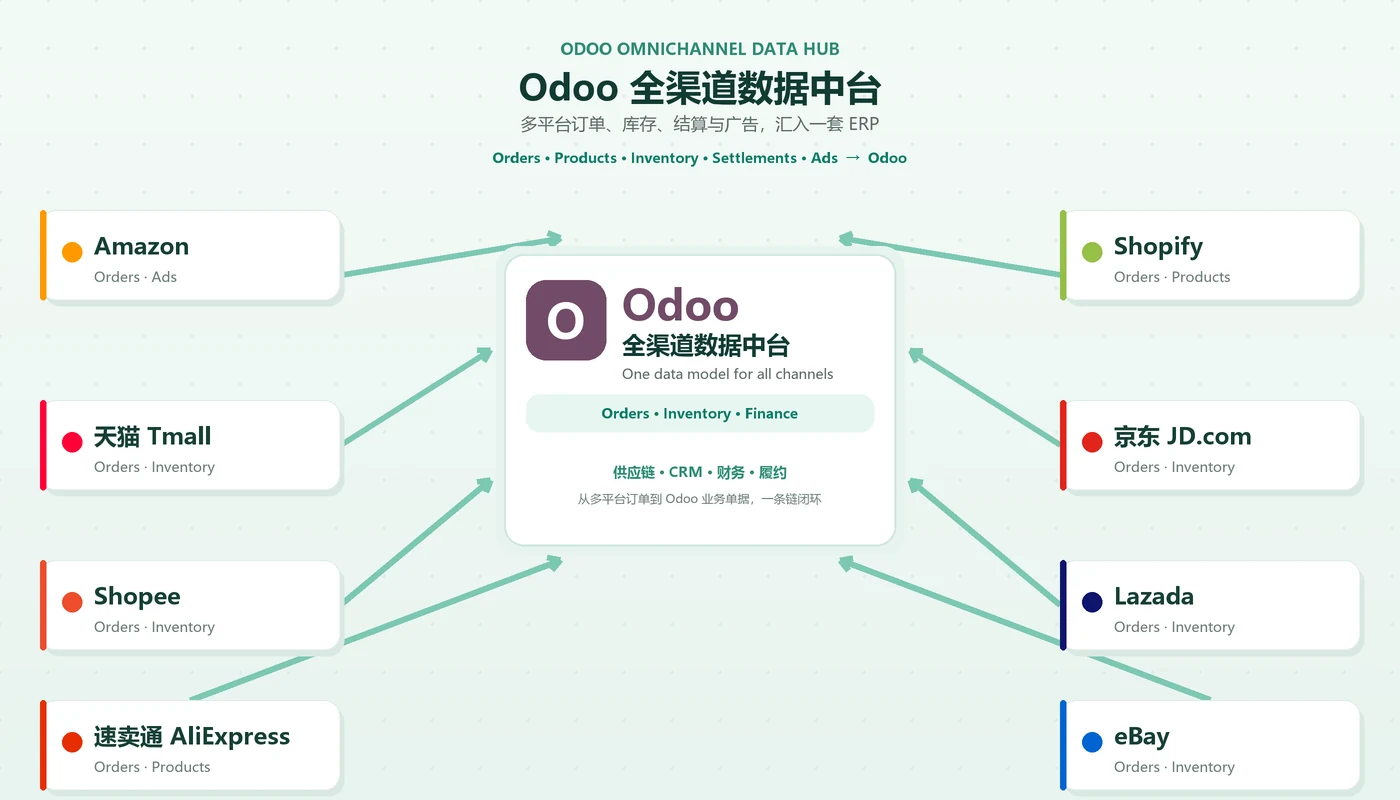
Daily Life of Cross-border Operations
The more platforms, the more it feels like working for Excel
Daily Reports Rely on Piecing Together Tables
Orders are on Amazon, ads are on another backend, and exchange rates change daily. The first thing operations does in the morning is download 6 reports and piece them into one Excel sheet.
Inventory Shortages on Both Ends
Platform warehouses, FBA, and domestic warehouses are calculated separately; hot-selling items are out of stock, slow-moving items pile up, and replenishment relies entirely on experience.
Month-end Reconciliation is Difficult
Platform settlement statements, commissions, refunds, and advertising fees are mixed together; finance and operations each have their own books, and even after reconciling until dawn, there's still a discrepancy of thousands.
Profits Cannot Be Calculated Clearly
FBA storage fees, CPC advertising costs, and return losses cannot be allocated to SKUs. It looks like you're selling a lot, but at the end of the year, you find you haven't made a profit.
How does platform data enter Odoo? Two paths, ultimately leading to the same set of accounts
Platforms with open APIs are connected directly, while platforms without open APIs use standard Excel templates for import. Raw data is first recorded as store orders, store products, store customers, store returns, FBA inventory, storage fees, and CPC advertising costs, and then generated into Odoo's sales orders, invoices, reimbursement forms, and replenishment plans according to mapping rules.

| Platform | Integration Method | Main Synchronized Content |
|---|---|---|
| Amazon | API (MWS / Platform Reports) | Orders, settlement and monthly sales reports, listings, inventory, FBA shipments, returns, advertising |
| Tmall | API | Orders, products, inventory, customers |
| JD | API | Orders, products, inventory, customers |
| Lazada | Excel Import | Orders, products |
| AliExpress | Excel Import | Orders, products |
| Shopee / Other Platforms | API or Excel (subject to platform's open capabilities) | Orders, Products, Inventory |
The data that can be synchronized is based on what the platform API actually provides.
Six Modules
From viewing and retrieving data to reconciliation and replenishment, the entire chain is covered.
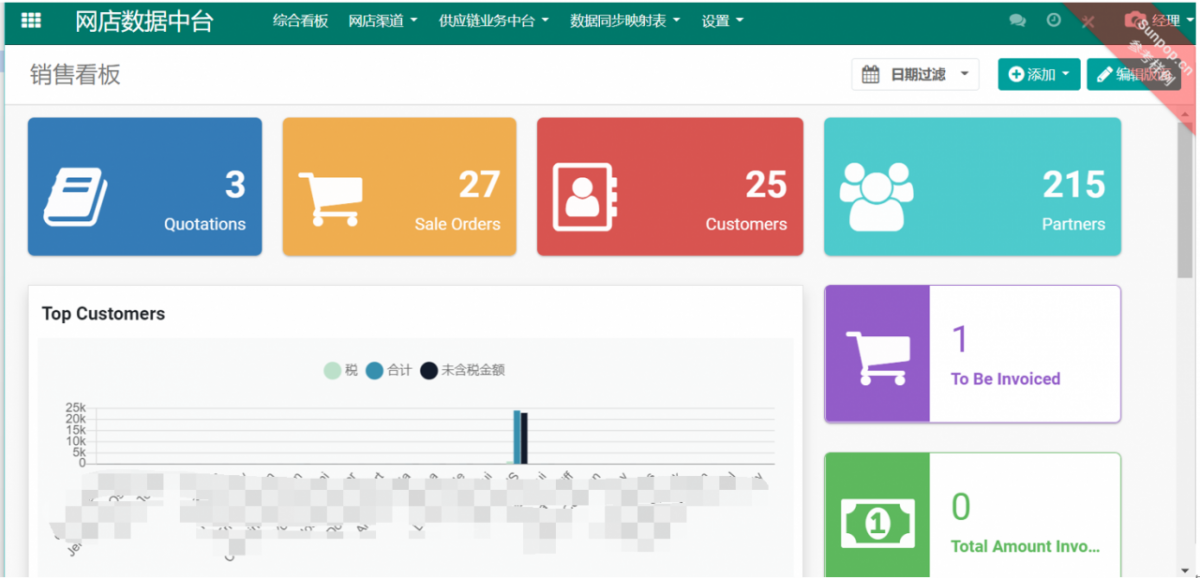
1 · Business Overview
Statistics for orders, customers, shipping fees, and payments, sliced by time, channel, and store; click a number to drill down to details.
View Business Dashboard2 · Store Overview
One card per store, clearly showing products, orders, categories, customer counts, and API status at a glance.
View Store Cards3 · Store Data Management
Raw ledgers for Amazon reports, orders, products, returns, FBA inventory, storage fees, and CPC advertising costs.
View Data Ledgers4 · Data Synchronization Configuration
8 types of mapping tables plus scheduled tasks determine how platform data becomes Odoo documents.
View Mapping Rules5 · Supply Chain Business Middle Platform
MPS replenishment, sales analysis, reconciliation statements, and inventory reports connect front-end sales to procurement and production.
View Replenishment Closed Loop6 · Middle Platform Settings
Online store parameters, global scheduled tasks, and sync logs—when issues arise, you can trace exactly which step failed.
View Settings1 · Business Overview: Open the backend and first see how much you earned today
Administrators can customize the metrics and styles to be displayed. By default, four types of statistics are provided, all filterable by time, channel, and store. Click a number to view details without jumping back to the platform backend.
- Order Statistics: Order quantity and order amount by different time periods, channels, and stores
- Customer Statistics: New customers and repurchase situations
- Shipping Fee Statistics: Summarize shipping expenses by channel and store
- Payment Statistics: Platform receipts and receivables
- Quick Action Entry: One-click access to commonly used documents
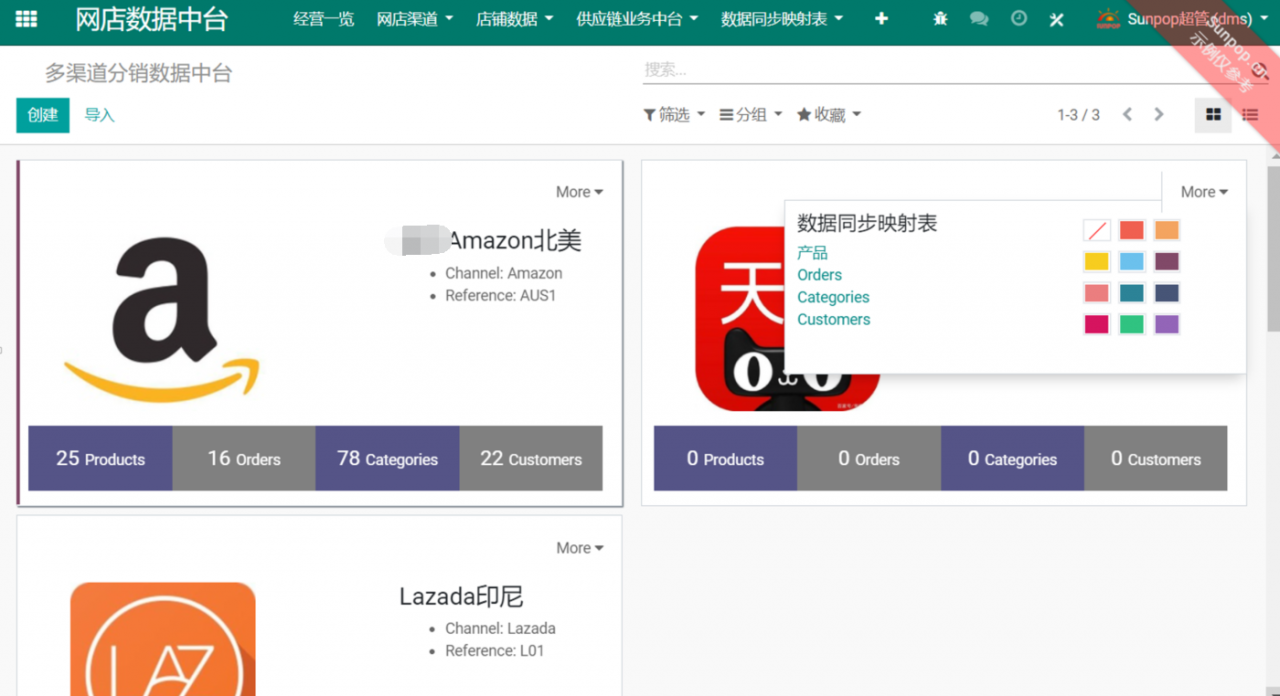
2 · Store Overview: The health of each store at a glance in one card
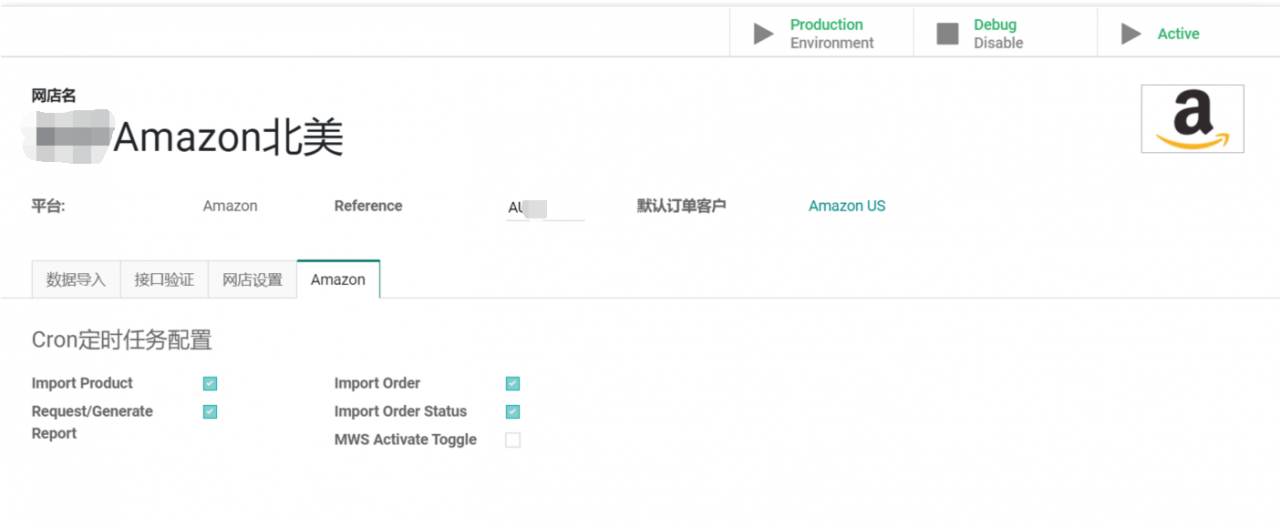
Grouped by site and channel. Each card displays the store's product, order, category, and customer counts. Click More to directly access the corresponding data or mapping table. API parameters and scheduled synchronization are also configured within the store card.
- Store Orders / Products / Categories / Customers: These four numbers are the store's health indicators
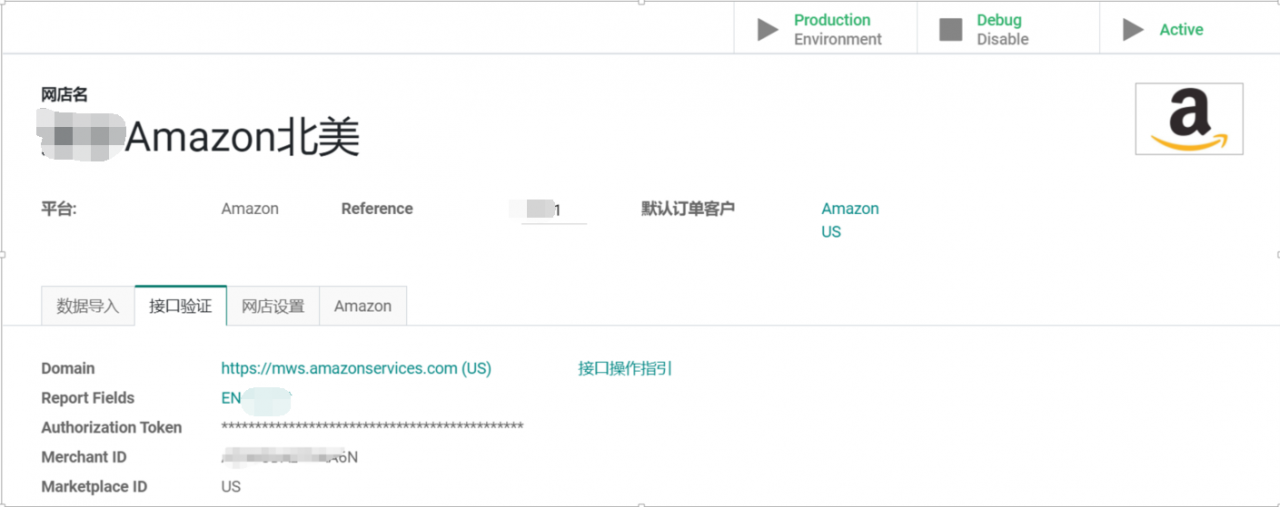
- API Parameters: Domain, Report Fields, Authorization Token, Merchant ID, Marketplace ID
- Scheduled Synchronization: Independent switches for tasks such as products, orders, order status, and report generation; manual synchronization is also available
3 · Store data management: every type of Amazon data has its place
Raw data is pulled into the middle platform via interfaces, allowing search, grouping, and export by conditions. This data is first stored as-is in ledgers, then Odoo documents are generated according to mapping rules, enabling layer-by-layer traceback when issues arise.
Supported reports and documents
Settlement reports, monthly sales revenue reports, Listing reports, inventory reports, FBA shipment reports, logistics cost reports, return reports, advertising reports, sales tax reports, etc.; reports are linked to related store orders and can be directly used for reconciliation.
Automatically runs daily, automatically summarizes at the beginning of each month
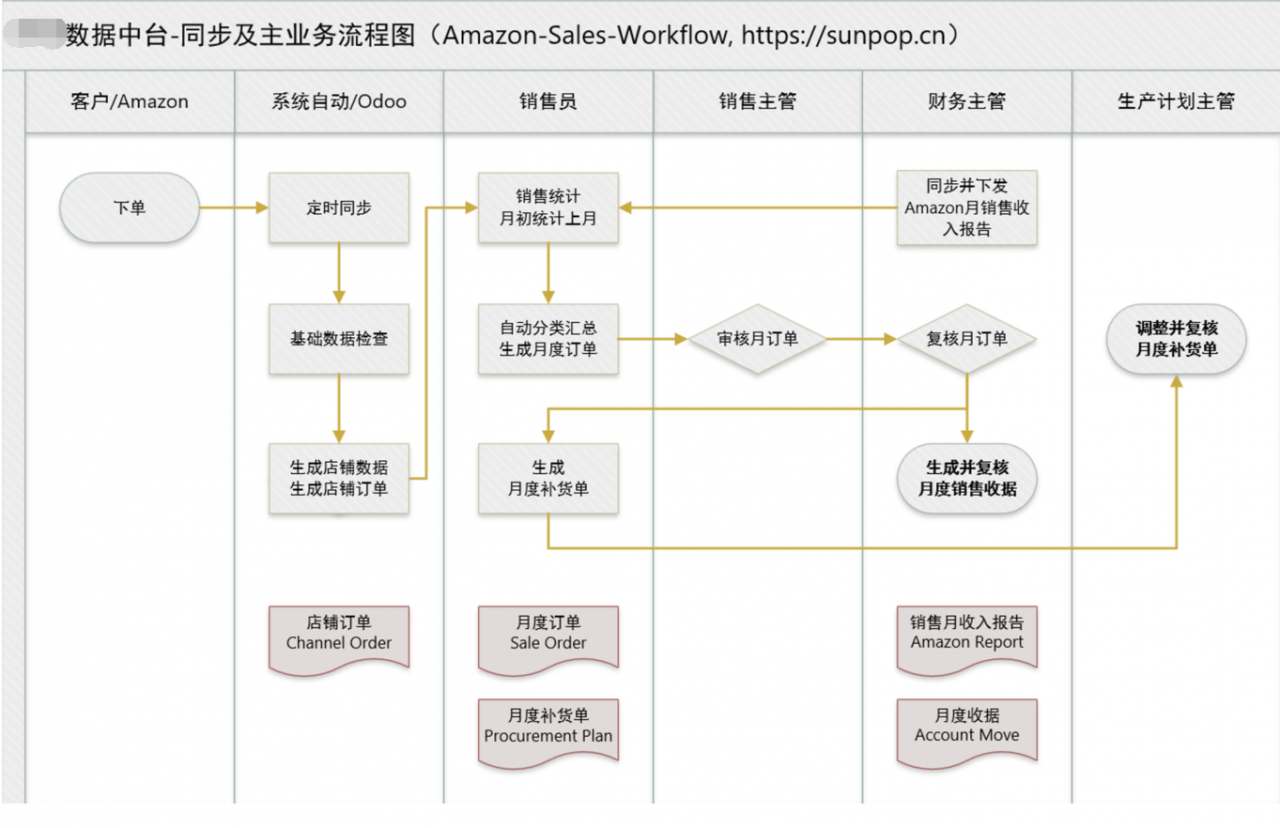
Sales and financial data synchronization is the core of the entire system, and the standard process is as follows:
- Consumers place orders on Amazon, forming store orders
- The system automatically synchronizes the previous day's Amazon sales orders daily
- The finance supervisor synchronizes the previous month's sales report at the beginning of the month, checks it, and then distributes statistics
- The salesperson summarizes the previous month's store orders at the beginning of the month and generates company monthly orders
- One monthly order per store per month, with details merged by SKU quantity
- The salesperson adjusts the monthly order and submits it to the sales supervisor for review
- The sales supervisor reviews the monthly order
- The finance supervisor rechecks the reconciliation and generates company monthly receipts
- Based on the reviewed monthly order, generate a draft monthly replenishment order
- Production Planning Supervisor Reviews Replenishment Orders
- When a document is abnormal, cancel or clear the entire document and regenerate it.
- After synchronization and the main process are completed, proceed to the procurement and production processes.
Order Merging Algorithm: Unified Standards Ensure Financial Recognition
- In each monthly sales report, generate 1 company monthly order for each market and each store.
- In the details, each SKU is one line; sales quantities of the same SKU are merged.
- The SKU sales unit price is the average tax-inclusive unit price for the period; sales tax is no longer calculated separately.
- Shipping fees and sales discounts are each merged into 1 line, with quantity 1 and unit price equal to the total price.
- The order total equals the sum of all related store order totals; the customer is Amazon or configured per store.
FBA, Returns, and Advertising Fees
- FBA Inventory: Three statuses: sellable, transferring, and unsellable; shipment statuses are processing, shipped, in transit, and receiving; view only, not synchronized to Odoo actual inventory.
- Returns: Obtain return information from the interface, generate return orders, and offset sales revenue and sales shipments.
- FBA Storage Fees / CPC Advertising Fees: Generate expense reimbursement forms so that expenses are properly recorded.
- Customers and Categories: Customers can be imported and distinguished by source store; platform categories are not synchronized to Odoo, and the company's internal category rules are used.
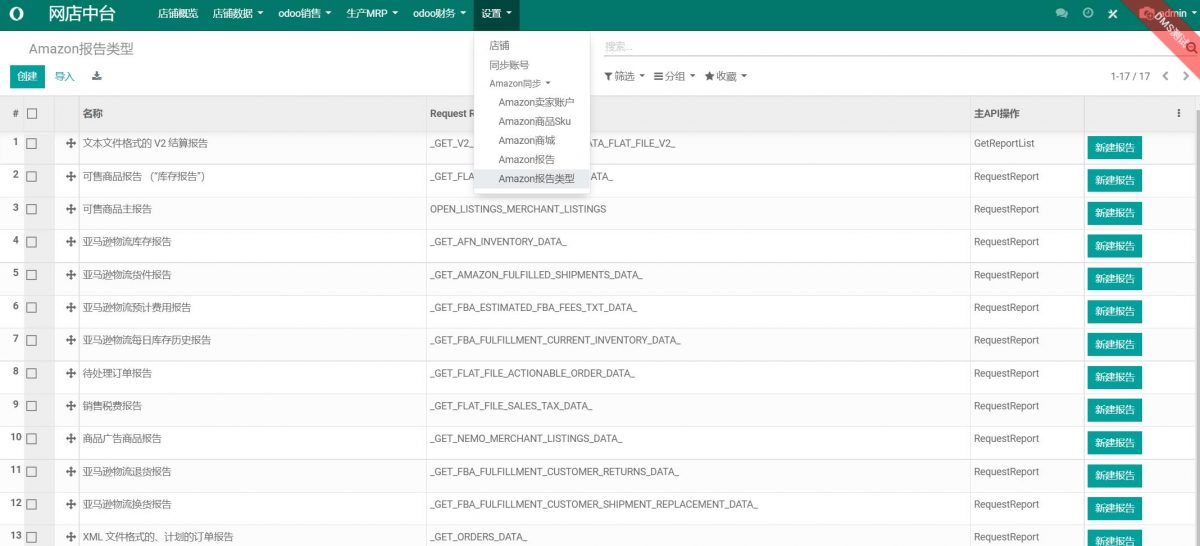
Amazon Report Type: To pull any report, click "New Report".
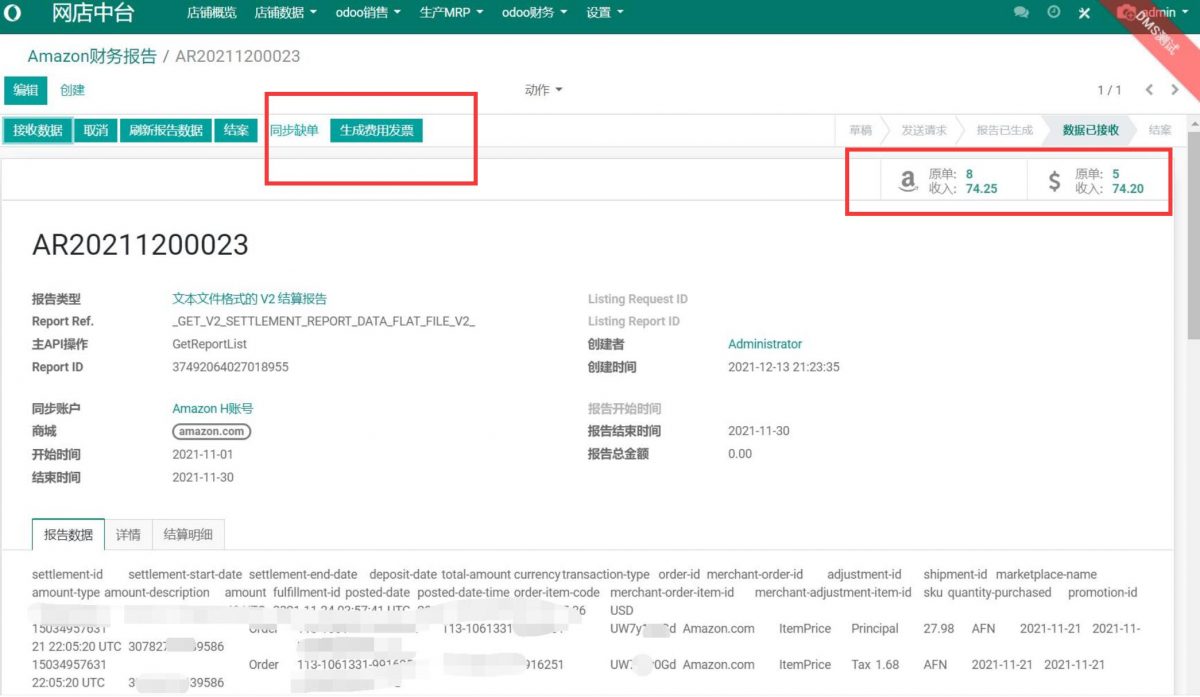
Reports are linked to store orders, providing evidence for monthly reconciliation.
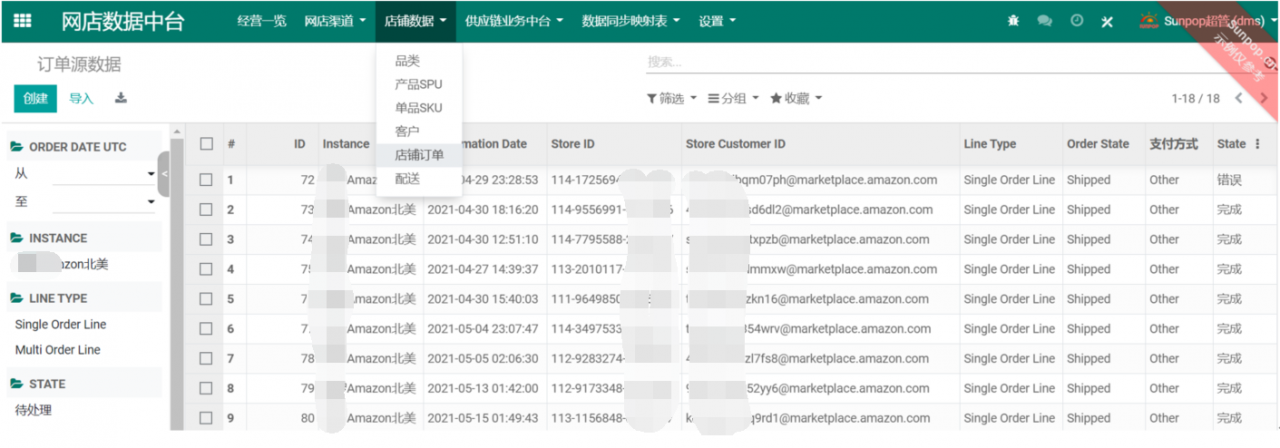
Order source data: filter by date, store, and status
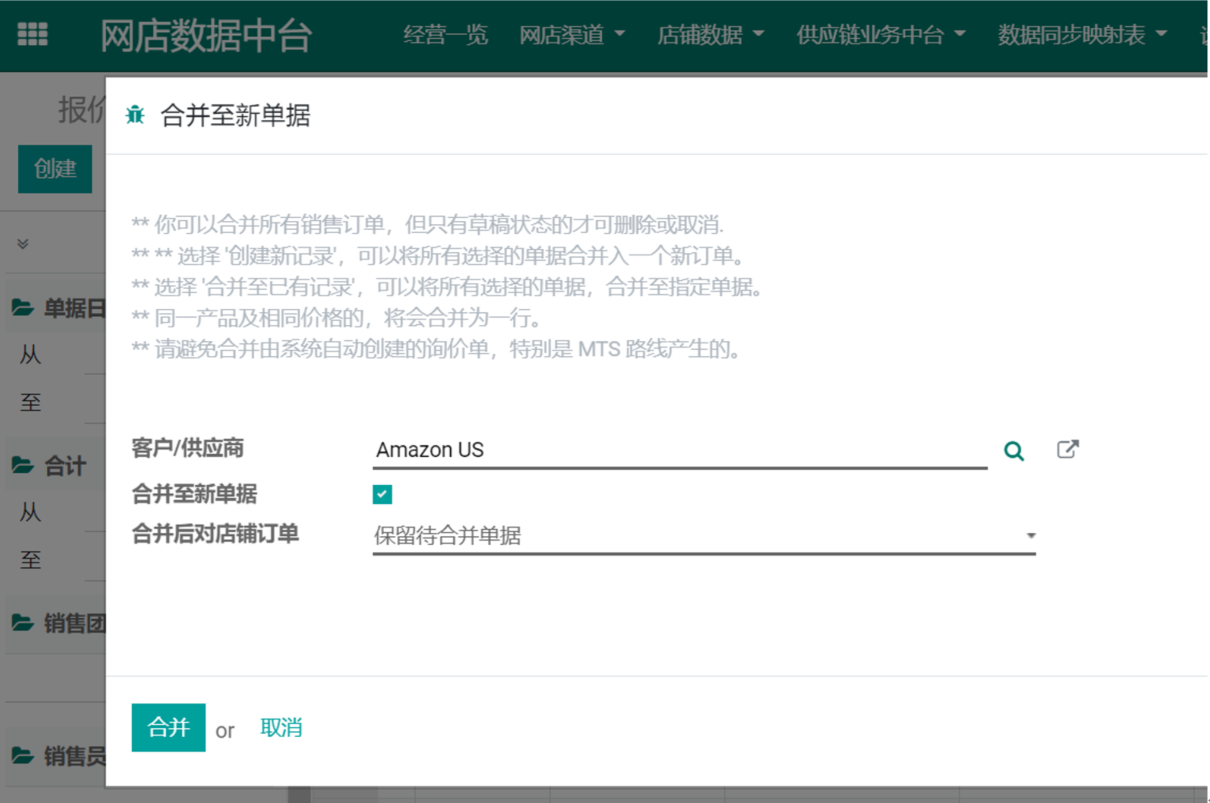
Order merging: consolidate by store, customer, and SKU
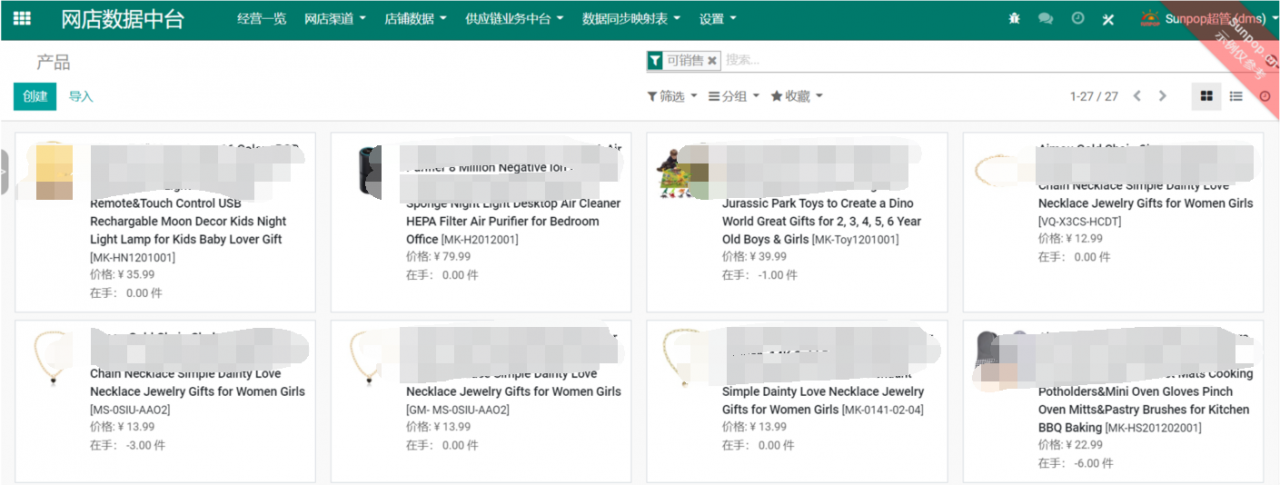
Store products: map platform SKUs to Odoo products
4 · Data sync configuration: 8 mapping tables determine whether data can be automatically posted
Most mappings are automatically matched by the system, and technical administrators can adjust them. The following uses Amazon as an example; other platforms work the same way.
| Mapping table | Function |
|---|---|
| Item SKU mapping | Platform SKU / ASIN corresponds to Odoo product, determining whether orders can become sales order lines |
| Store order mapping | Platform order fields and statuses correspond to Odoo document fields |
| Customer mapping | Platform buyers correspond to Odoo customers; they can be consolidated into a single platform customer |
| Category mapping | Platform categories correspond to internal company categories |
| Tax rate mapping | Platform tax rates correspond to Odoo taxes, affecting tax-included prices and tax amounts |
| Payment Method Mapping | Platform payment methods correspond to Odoo payment methods |
| Delivery Mapping | Platform delivery methods correspond to Odoo delivery methods |
| Currency Mapping | Multi-currency stores correspond to Odoo currencies and exchange rates |
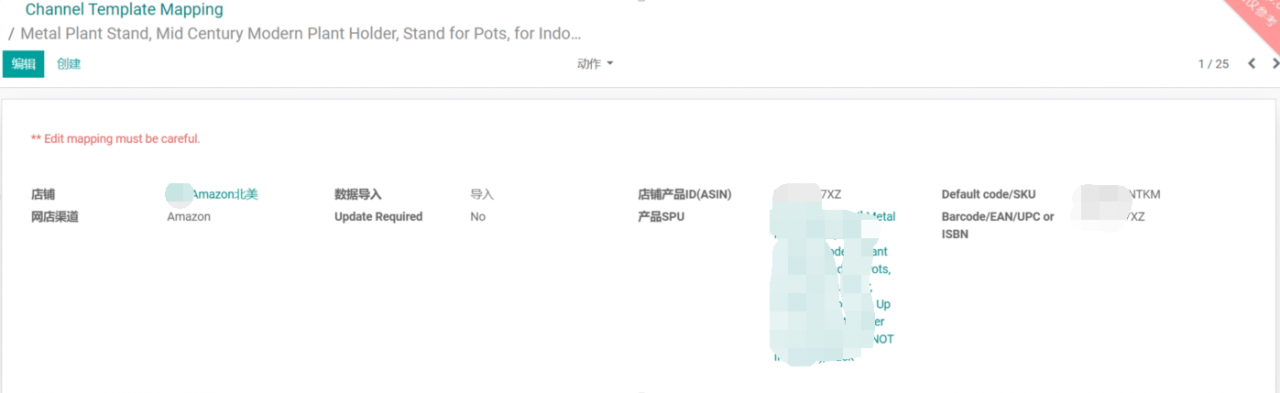
5 · Supply Chain Middle Platform: Sales come in, replenishment and purchasing connect
After front-end sales are recorded in Odoo, sales analysis, reconciliation statements, MPS replenishment plans, purchasing and production form a closed loop in the same system, eliminating the need to export Excel for planners.
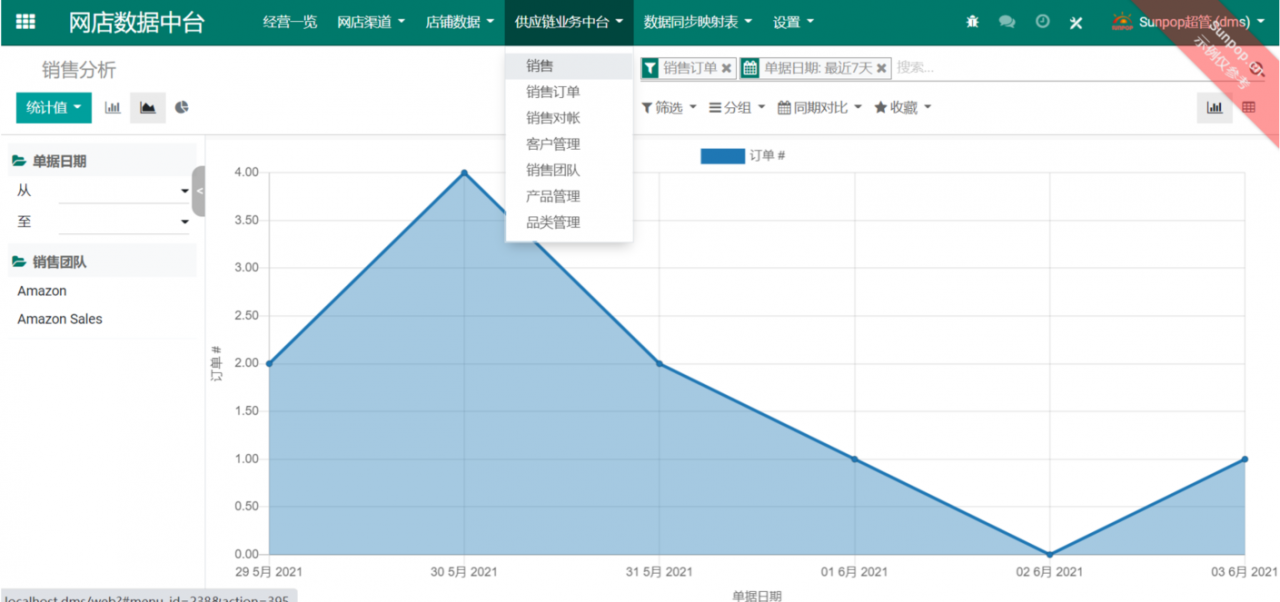
MPS Replenishment Plan: Calculate purchasing demand directly from sales orders
Salesperson creates a replenishment plan, selects sales orders as the data source, can filter by platform, sales team, time range, store (multiple selection), then "Add Details" for finer filtering; the system consolidates calculations by SKU and by warehouse.
- Period Sales: Total sales quantity of the SKU in the warehouse across all orders
- Pending Purchase Quantity: Quantity not yet delivered by the supplier in confirmed purchase orders
- On-hand Quantity: Actual inventory of the SKU in the replenishment warehouse
- Adjustment Quantity: Manual correction; enter a negative number to decrease
- Planned Order Date = Planned Delivery Date − Lead Days, where lead days are taken from the supplier price list's purchase lead days
- Automatically match the most suitable supplier price list based on demand quantity and order date
After confirming the plan, submit for approval; the production planning administrator can adjust line quantities and approve, or reject and return to the salesperson for modification. After approval, specify the replenishment method (leave blank to follow the advanced route, purchase, or production); executing replenishment will generate purchase orders or production orders. Lines support export to Excel, modification, and re-import.
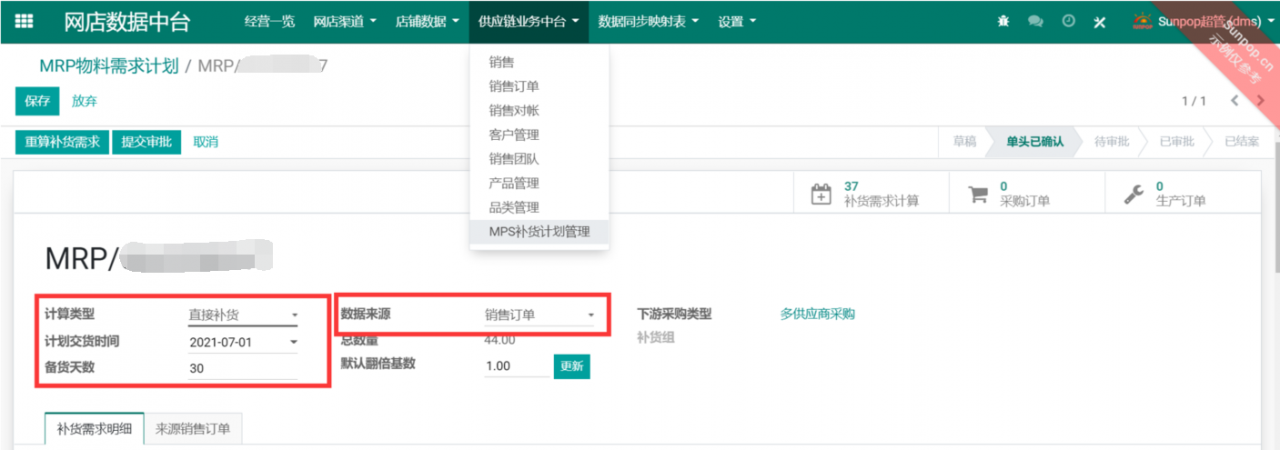
Create order: select data source, planned delivery time, stocking days
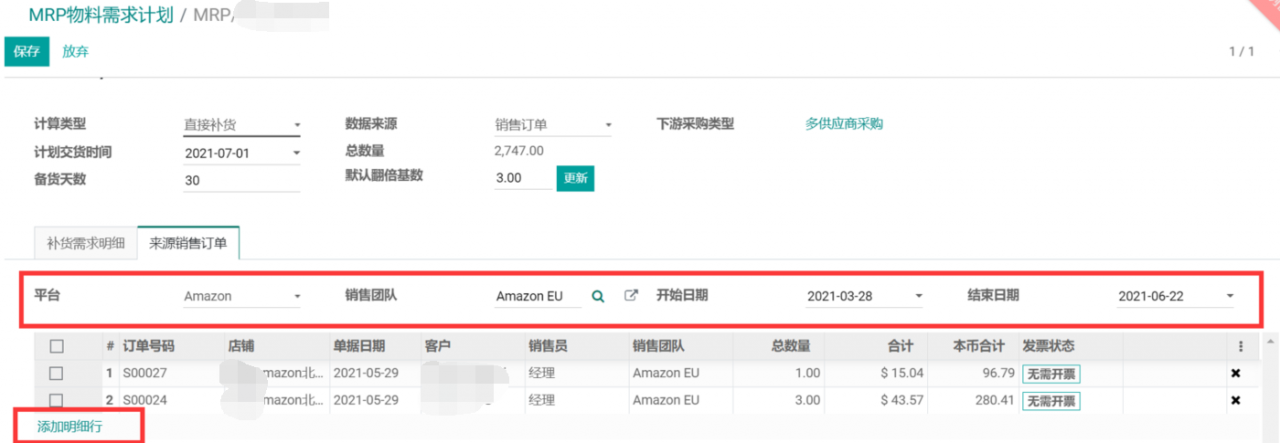
Import raw data from confirmed sales orders
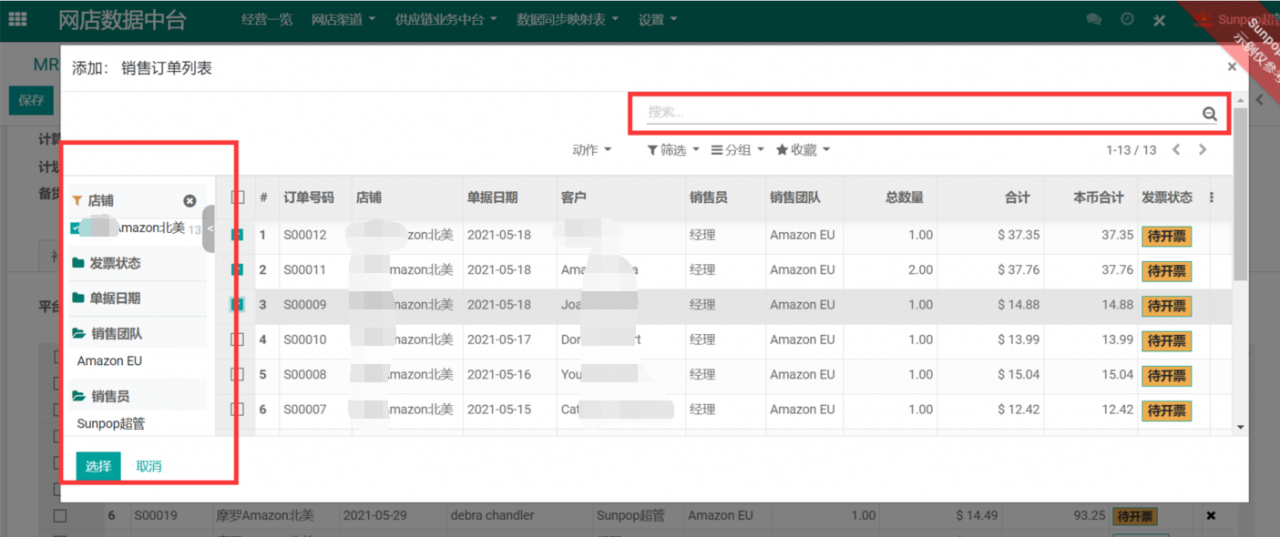
Add lines: filter by platform, sales team, store
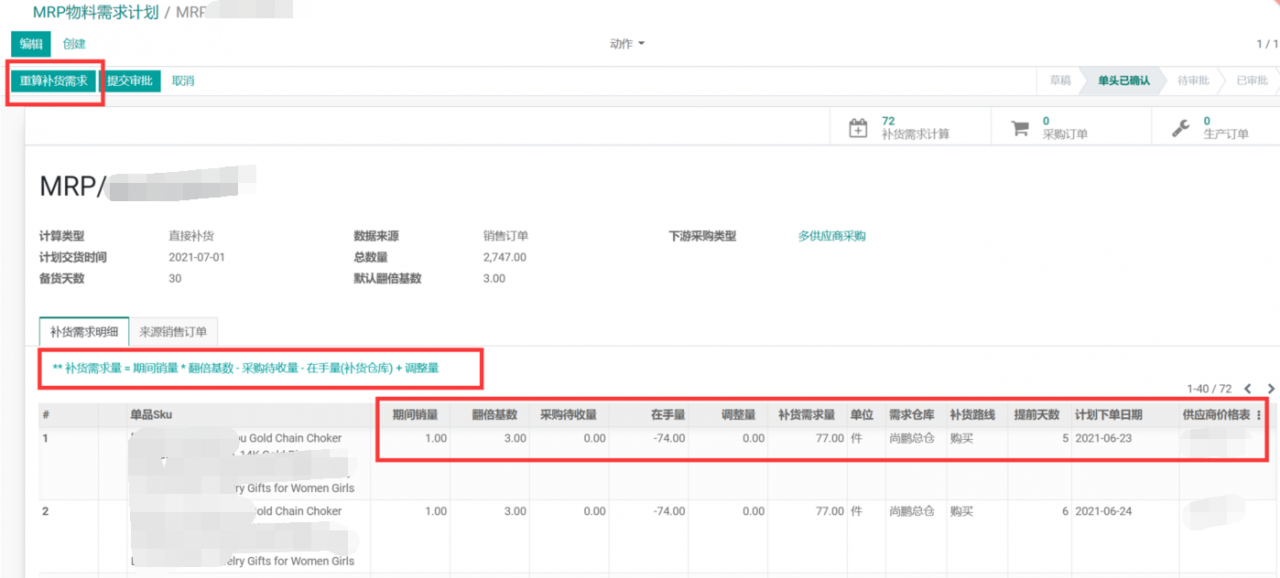
Calculate replenishment demand; the system merges by SKU and warehouse
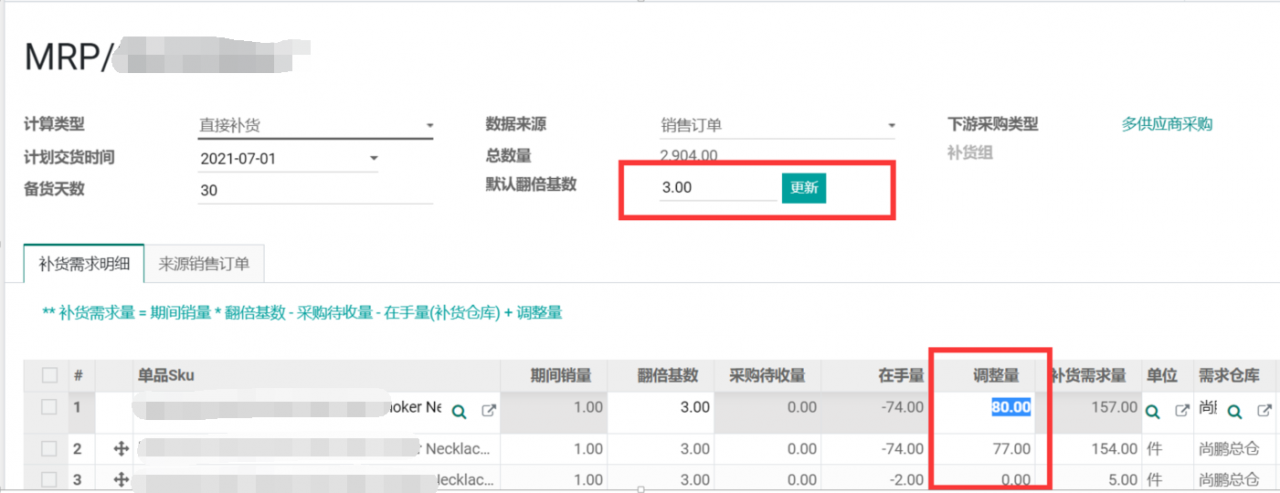
Adjust doubling factor or adjustment quantity, click update to recalculate
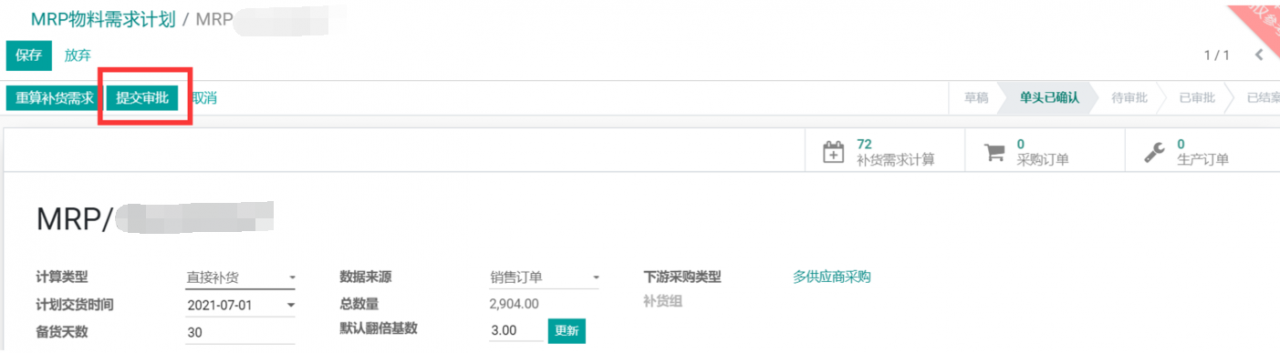
Confirm plan and submit for approval
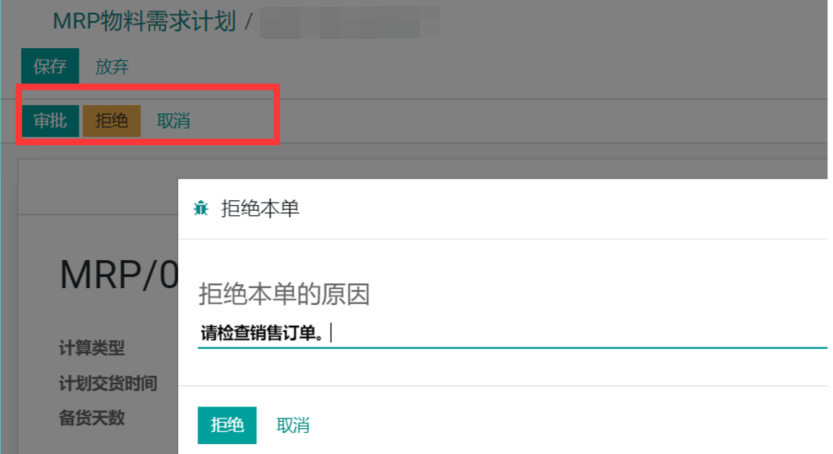
Production planning administrator approves or rejects
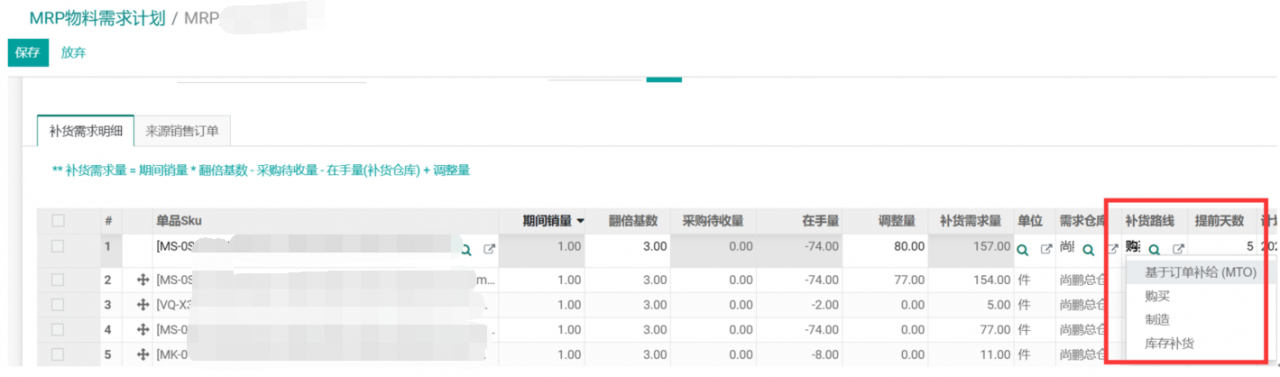
After approval, specify purchase, production, or follow advanced route
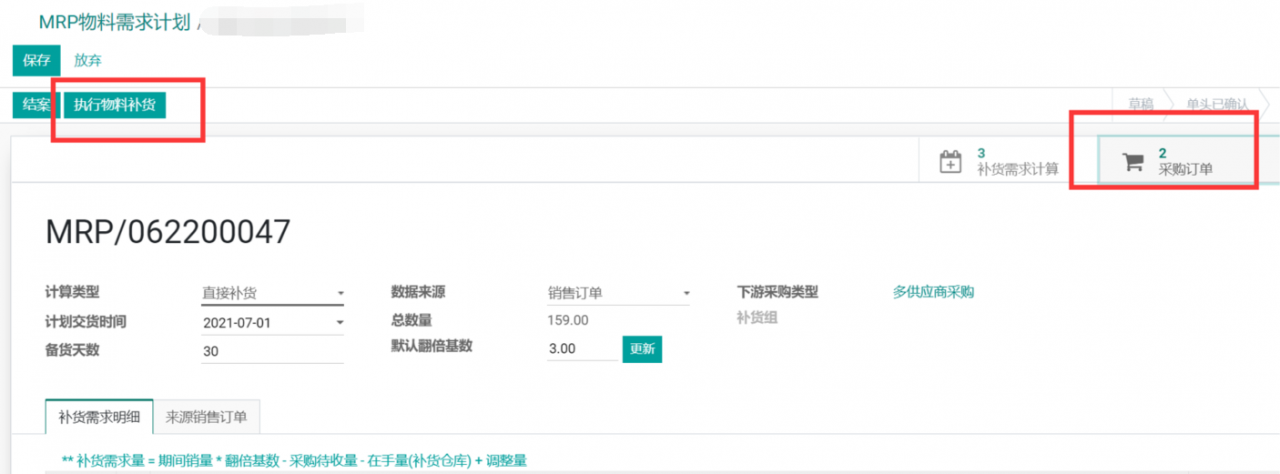
Execute replenishment, generate purchase orders
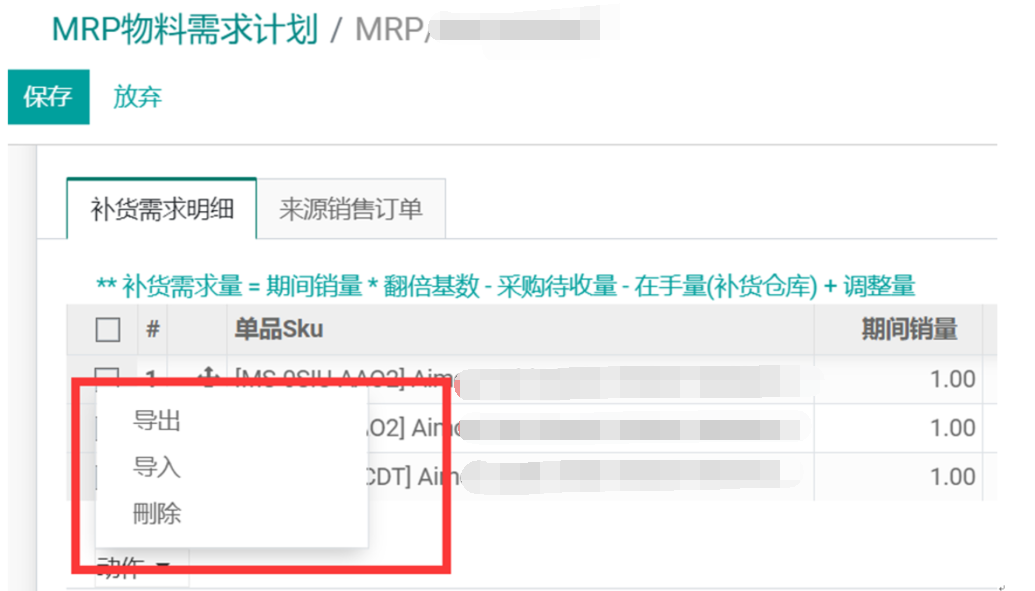
Details can be exported to Excel, modified, and re-imported
View Sales and Inventory in One Place
Sales reports, sales orders, sales statements, customers, sales teams, products, categories, and inventory reports are all within the supply chain middle platform, sharing the same set of customers, products, and inventory with store data.
Permissions Can Be Refined to Store Level
Permission enhancement supports refinement to sales teams: designated people can only see store orders of specified stores, avoiding multiple teams sharing accounts and fully open data.
6 · Middle Platform Settings: Parameters, Scheduled Tasks, Synchronization Logs
- Online Store Settings: Basic interface parameters and interface parameters for Amazon and other platforms
- Global Configuration: Scheduled automatic tasks to uniformly control the synchronization pace of each store
- Synchronization Logs: Record exceptions during synchronization with platforms, pinpointing the store and data type
When synchronization fails, first check the logs, then check the mapping tables and basic data; most problems can be located without logging into the server.
What's the Difference Before and After Going Live?
| Comparison Item | Multiple Backends + Excel | Odoo Omnichannel Data Middle Platform |
|---|---|---|
| Order Aggregation | Manual export and table merging every day | Scheduled automatic synchronization, directly generating store orders |
| Inventory | Each platform calculates separately, overselling and overstocking occur simultaneously | View FBA inventory and domestic warehouse on one screen, with linked replenishment plans |
| Monthly Sales | Manual aggregation, with inconsistent standards | Automatically generate company monthly orders, merging quantities by SKU |
| Financial Reconciliation | Settlement statements don't match accounts, leading to all-nighters at month-end | Link reports with orders, automatically generate invoices and red-letter invoices |
| Expenses and Profit | FBA and CPC costs cannot be allocated to individual products | Generate reimbursement forms for storage and advertising fees, ensuring expenses are recorded |
| Data Permissions | Shared accounts, fully open data | Restrict visible store orders by sales team |
Frequently Asked Questions
The original feature list is retained for detailed comparison. For daily reference, the structured description above shall prevail.
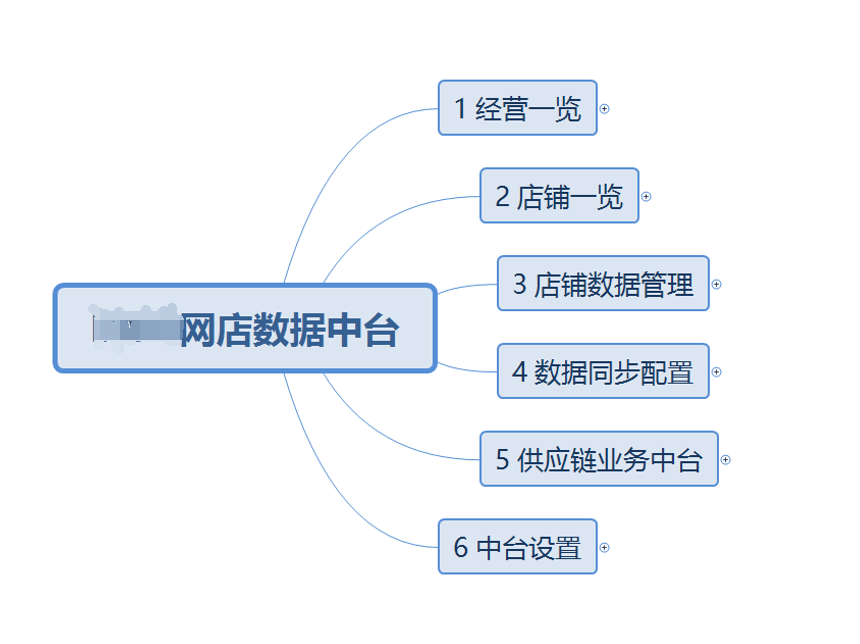
Function Overview
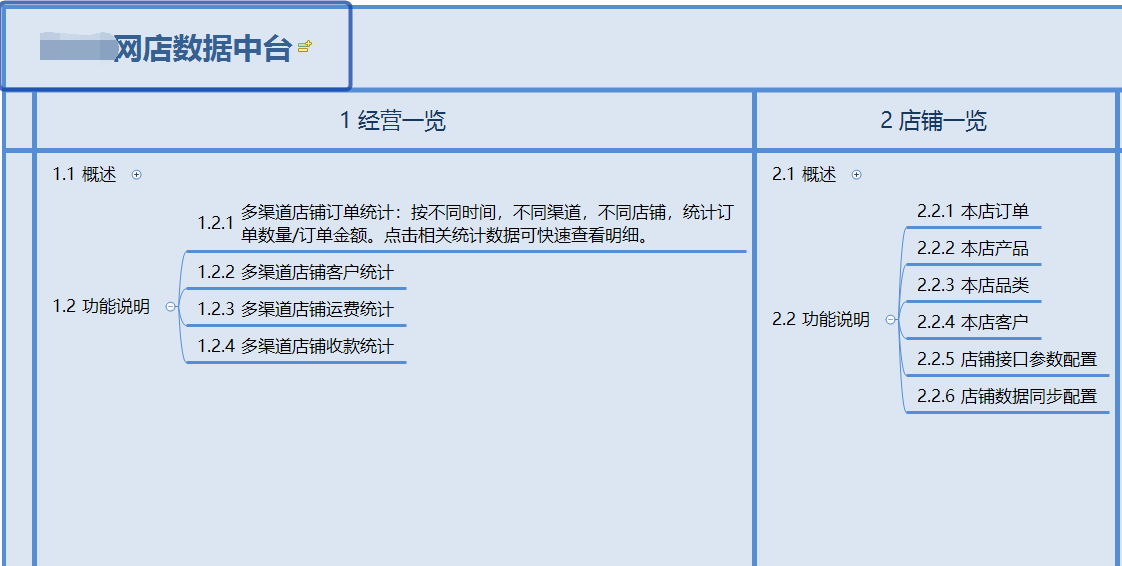
Business Overview, Store Overview
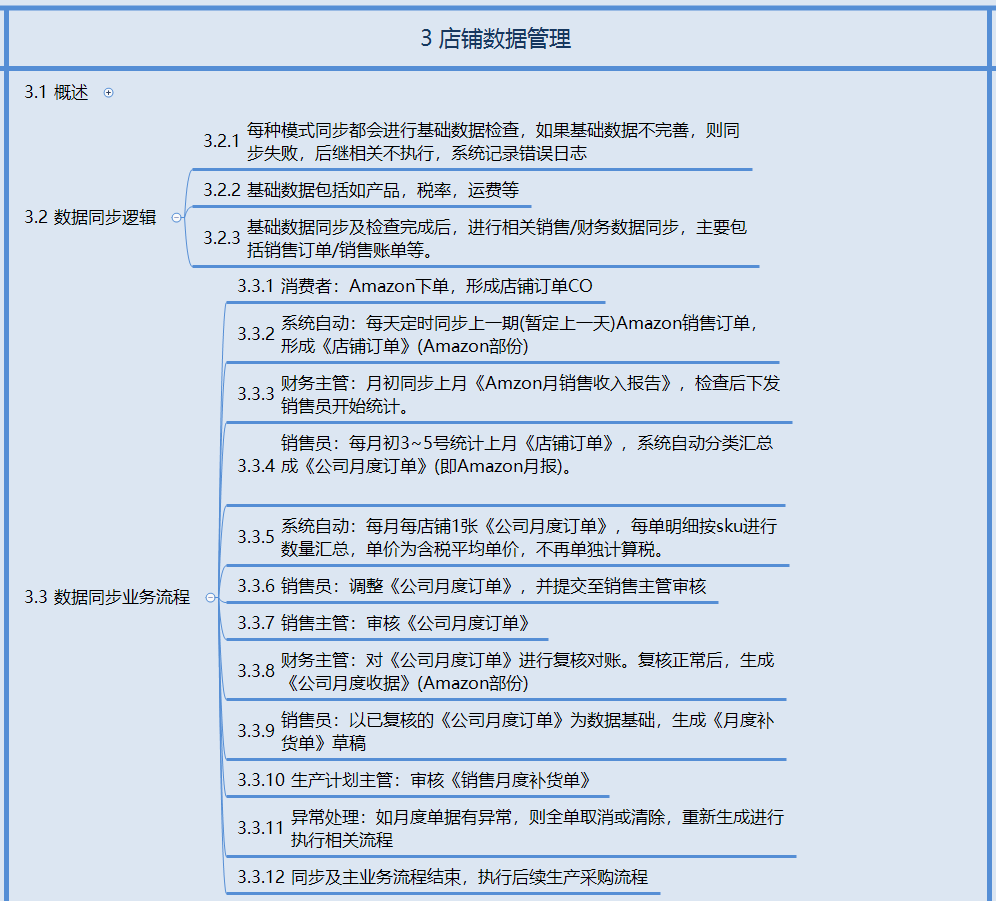
Store Data Management and Synchronization Logic
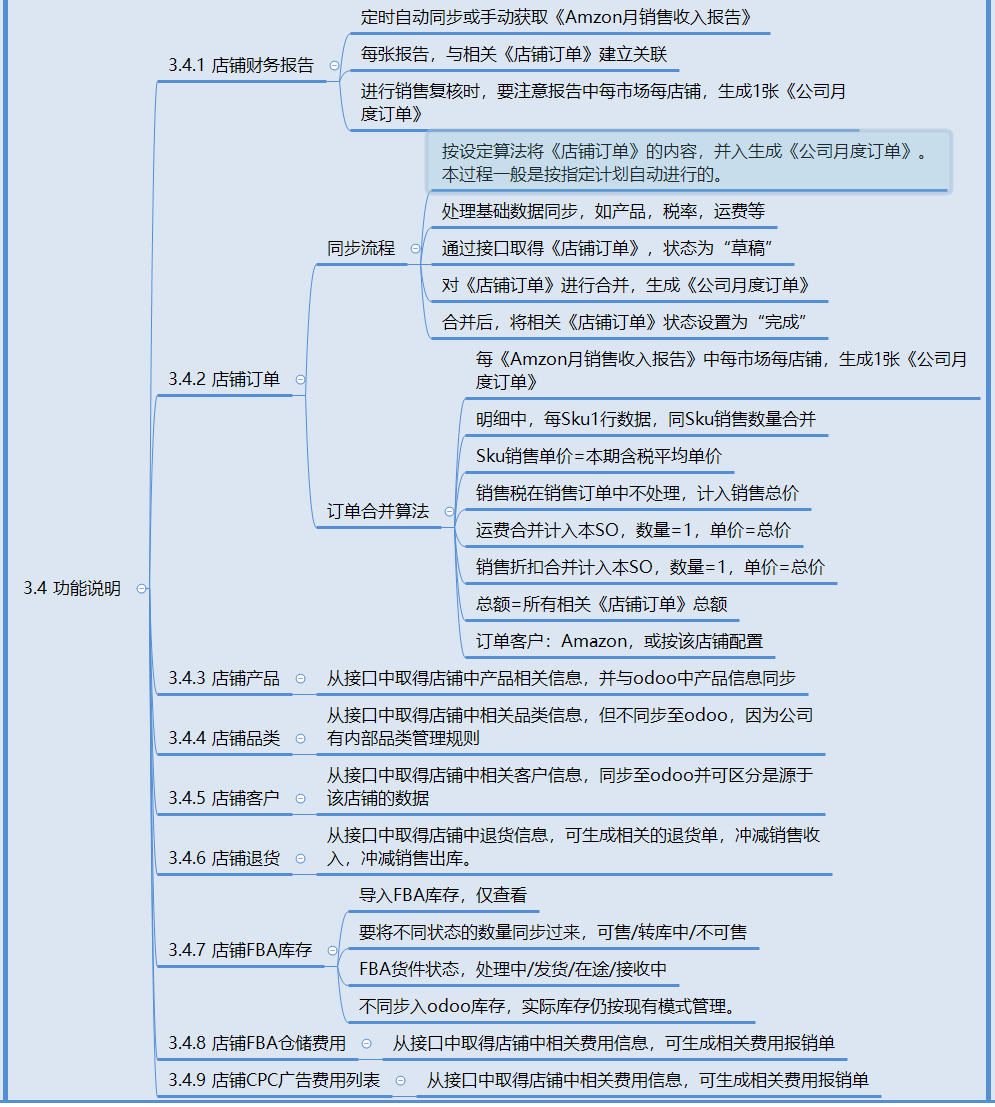
Function Description and Order Merging Algorithm
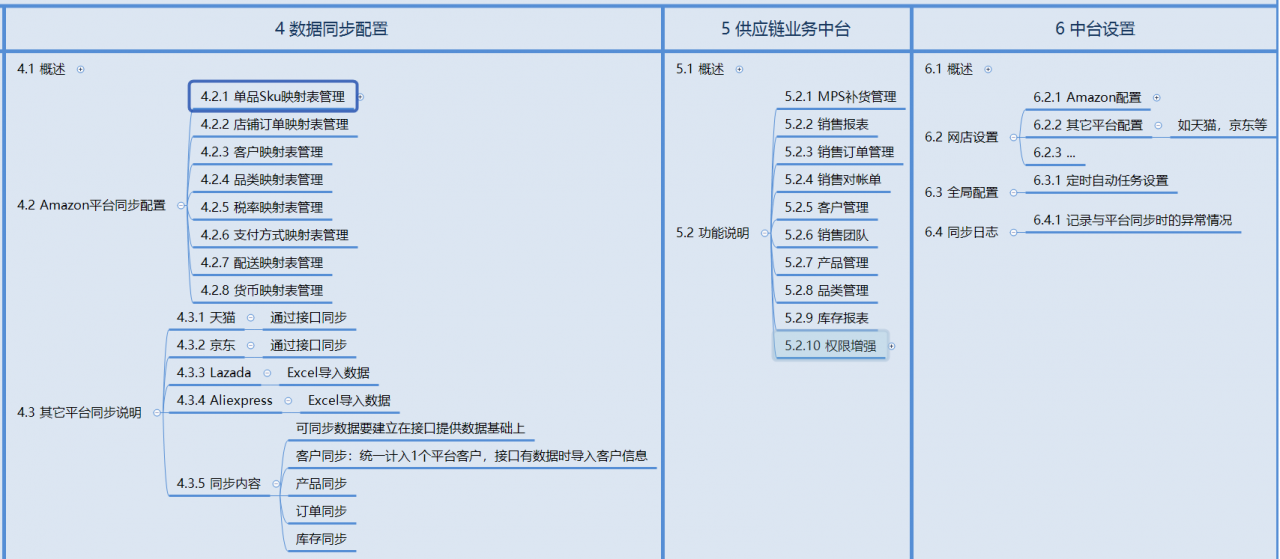
Data Synchronization, Supply Chain Middle Platform and Settings
Why Choose Odoo Smart
Not selling software, but helping you get your data running
11 years dedicated to Odoo
Source code delivery, controllable and lock-free; complex customizations are advanced through a standardized engineering system, not by forcing changes to the core.
Trusted by 1000+ enterprises
100% successful project delivery; from selection and implementation to go-live and upgrades, the same team follows through to the end.
Multi-language and multi-currency
Based in the Greater Bay Area, covering Asia, America, and Europe; Amazon multi-site and multi-company accounting can be implemented under the same standards.
Start with one store and run through real data
Import one month of orders, settlement reports, and inventory from your existing Amazon store, and generate monthly orders, reconciliation statements, and replenishment suggestions according to your standards. See the differences, then discuss go-live.
Book a solution demo400-166-5890 · 18925019933 · sales@odooai.cn