Accessory products
The use of accessory products is a marketing strategy that involves the cross-selling of related products alongside a desired core product. In Odoo, accessory products can be added to a core product’s product form to integrate them into the customer’s shopping experience and help drive increased sales.
Example
An electronics business has configured their products with an eye on cross-selling accessories whenever customers purchase big-ticket items. After a customer adds a tablet to their shopping cart, they are automatically suggested useful accessories like cases, screen protectors, and extra cables because of the accessory products that have been configured. This helps to drive sales by creating opportunities for impulse purchases, as well as reminding customers of useful accessories that they may have intended to purchase but forgot about while shopping.
Note
Accessory products are differentiated from optional products and alternative products by where they appear in the customer’s shopping experience.
Accessory products appear as suggestions when viewing an eCommerce cart with an associated core product in it. This creates an opportunity for cross-selling during the checkout process.
Optional products are suggested when a core product has been added to a cart or a quotation. This creates an opportunity for cross-selling during the shopping process.
Alternative products are suggested at the bottom of an eCommerce product page whenever the product page is viewed. This creates an opportunity for upselling during the shopping process.
Configuring accessory products
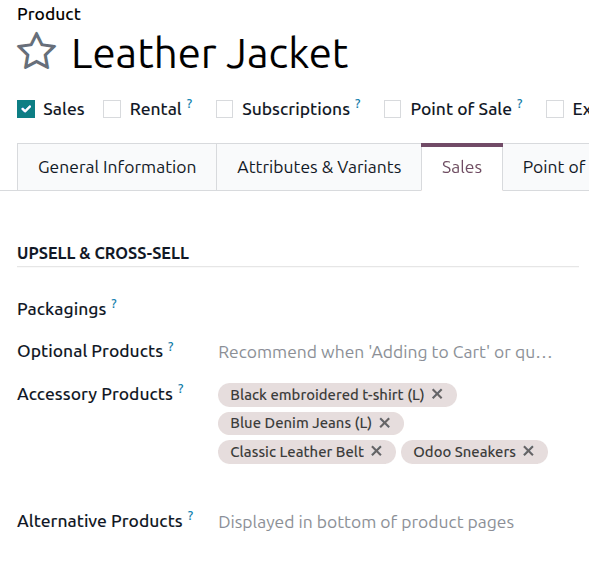
To add an accessory product to a product form, navigate to and choose a product. Ensure that the product’s Sales checkbox is ticked and click the Sales tab. Under Upsell & Cross-sell heading, the Accessory Products drop-down menu allows for accessory products to be set. Products will be displayed in alphabetical order. If the desired product isn’t readily visible, type its name in the field to bring it up, then select it to add it as an accessory product.
How accessory products appear to customers
Accessory products appear alongside core products prior to checkout. They are automatically suggested based on what accessory products have been configured and what core products the customer has added to their shopping cart.
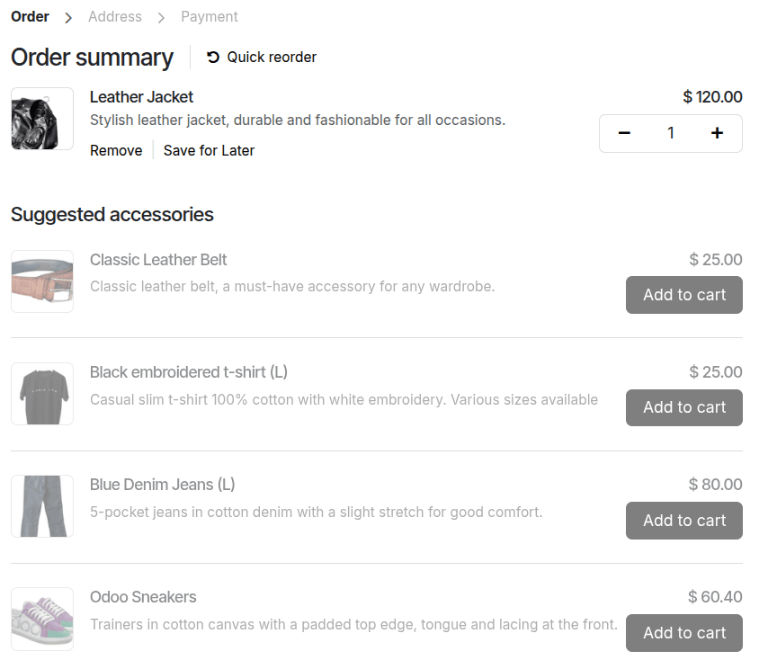
In this example, the core product, “Leather jacket”, has several associated accessory products. Once a customer adds the core product to their shopping cart, the accessory products will appear as suggestions during the checkout process.
See also
