外部 API
Odoo 通常通过模块在内部进行扩展,但其许多功能和所有数据也可以从外部获取,用于外部分析或与各种工具集成。模型 API 的一部分可以通过 XML-RPC 轻松使用,并支持多种语言访问。
Important
从 PHP8 开始,XML-RPC 扩展可能默认不可用。请查阅 手册 了解安装步骤。
Note
通过外部 API 访问数据仅在 Custom 定价方案的 Odoo 上提供。One App Free 或 Standard 方案不支持访问外部 API。更多信息请访问 Odoo 定价页面 或联系您的客户成功经理。
更多内容
连接
配置
如果您已经安装了 Odoo 服务器,可以直接使用其参数。
Important
对于 Odoo Online 实例(<domain>.odoo.com),用户在创建时没有 本地 密码(作为个人用户,您是通过 Odoo Online 身份验证系统登录的,而不是通过实例本身)。要在 Odoo Online 实例上使用 XML-RPC,您需要为要使用的用户帐户设置密码:
使用管理员帐户登录您的实例。
前往 。
点击您要用于 XML-RPC 访问的用户。
点击 Action 并选择 Change Password。
设置 New Password 的值,然后点击 Change Password。
服务器 URL 是实例的域名(例如 https://mycompany.odoo.com),数据库名称 是实例的名称(例如 mycompany)。用户名 是已配置用户的登录名,如 Change Password 屏幕所示。
url = <insert server URL>
db = <insert database name>
username = 'admin'
password = <insert password for your admin user (default: admin)>
url = <insert server URL>
db = <insert database name>
username = "admin"
password = <insert password for your admin user (default: admin)>
$url = <insert server URL>;
$db = <insert database name>;
$username = "admin";
$password = <insert password for your admin user (default: admin)>;
final String url = <insert server URL>,
              db = <insert database name>,
        username = "admin",
        password = <insert password for your admin user (default: admin)>;
var (
    url = <insert server URL>
    db = <insert database name>
    username = "admin"
    password = <insert password for your admin user (default: admin)>
)
API 密钥
New in version 14.0.
Odoo 支持 API 密钥,并且(取决于模块或设置)可能会 要求 使用这些密钥来执行 Web 服务操作。
在脚本中使用 API 密钥的方法很简单,只需用密钥替换您的 密码 即可。登录名仍需照常使用。您应当像保管密码一样谨慎保管 API 密钥,因为它们实际上对您的用户帐户提供相同的访问权限(尽管它们不能用于通过界面登录)。
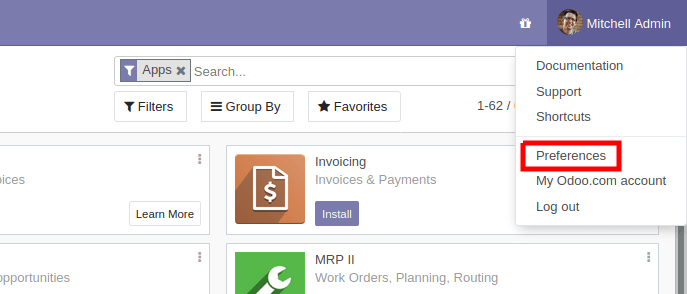
要为您的帐户添加密钥,只需前往您的 Preferences (或 My Profile ):
然后打开 Account Security 选项卡,并点击 New API Key:

输入密钥的描述,该描述应尽可能清晰完整:这是您日后识别密钥并决定应删除还是保留它们的唯一方式。
点击 Generate Key,然后复制所提供的密钥。请妥善保管此密钥:它等同于您的密码,并且与密码一样,系统之后将无法找回或再次显示该密钥。如果您丢失了此密钥,就必须创建一个新密钥(并可能删除丢失的那个)。
一旦您的帐户上配置了密钥,它们将显示在 New API Key 按钮上方,您可以将其删除:
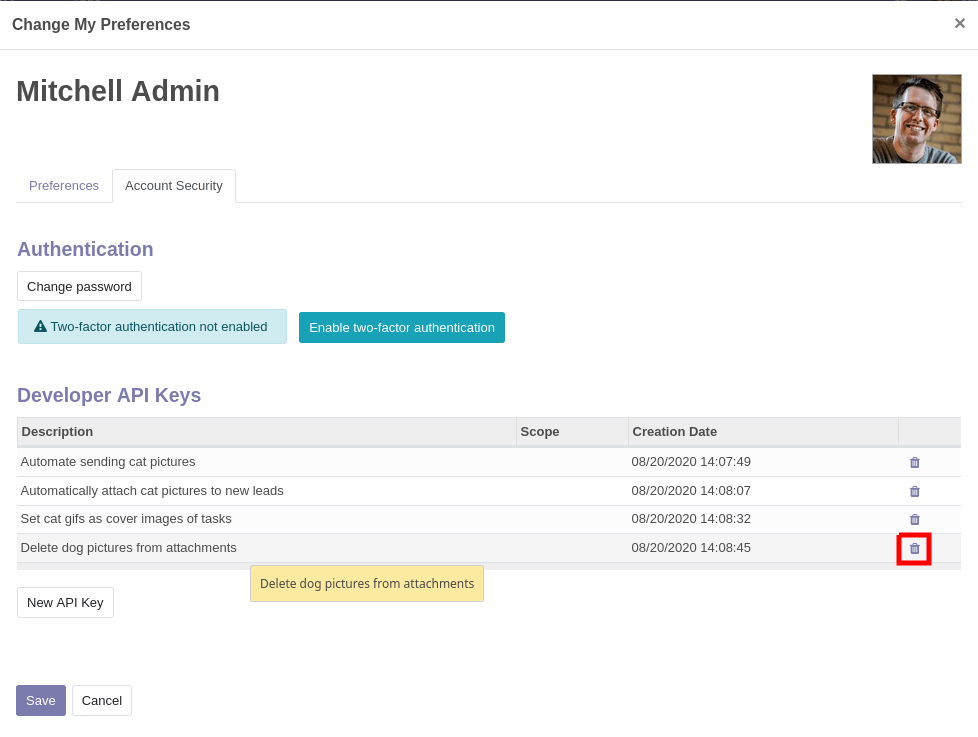
已删除的 API 密钥无法恢复或重设。您必须生成一个新密钥,并更新所有使用旧密钥的地方。
测试数据库
为了让探索更简单,您还可以向 https://demo.odoo.com 请求一个测试数据库:
import xmlrpc.client
info = xmlrpc.client.ServerProxy('https://demo.odoo.com/start').start()
url, db, username, password = info['host'], info['database'], info['user'], info['password']
require "xmlrpc/client"
info = XMLRPC::Client.new2('https://demo.odoo.com/start').call('start')
url, db, username, password = info['host'], info['database'], info['user'], info['password']
require_once('ripcord.php');
$info = ripcord::client('https://demo.odoo.com/start')->start();
list($url, $db, $username, $password) = array($info['host'], $info['database'], $info['user'], $info['password']);
Note
这些示例使用 Ripcord 库,它提供了一个简单的 XML-RPC API。Ripcord 要求在您的 PHP 安装中 启用 XML-RPC 支持。
由于调用是通过 HTTPS 进行的,因此还需要 启用 OpenSSL 扩展。
final XmlRpcClient client = new XmlRpcClient();

final XmlRpcClientConfigImpl start_config = new XmlRpcClientConfigImpl();
start_config.setServerURL(new URL("https://demo.odoo.com/start"));
final Map<String, String> info = (Map<String, String>)client.execute(
    start_config, "start", emptyList());

final String url = info.get("host"),
              db = info.get("database"),
        username = info.get("user"),
        password = info.get("password");
client, err := xmlrpc.NewClient("https://demo.odoo.com/start", nil)
if err != nil {
    log.Fatal(err)
}
info := map[string]string{}
client.Call("start", nil, &info)
url = info["host"].(string)
db = info["database"].(string)
username = info["user"].(string)
password = info["password"].(string)
登录
Odoo 要求 API 用户先通过身份验证,然后才能查询大多数数据。
xmlrpc/2/common 端点提供无需身份验证的元调用,例如身份验证本身或获取版本信息。要在尝试进行身份验证之前确认连接信息是否正确,最简单的调用就是询问服务器的版本。身份验证本身通过 authenticate 函数完成,并返回一个用户标识符(uid),在经过验证的调用中用它代替登录名。
common = xmlrpc.client.ServerProxy('{}/xmlrpc/2/common'.format(url))
common.version()
common = XMLRPC::Client.new2("#{url}/xmlrpc/2/common")
common.call('version')
$common = ripcord::client("$url/xmlrpc/2/common");
$common->version();
final XmlRpcClientConfigImpl common_config = new XmlRpcClientConfigImpl();
common_config.setServerURL(new URL(String.format("%s/xmlrpc/2/common", url)));
client.execute(common_config, "version", emptyList());
client, err := xmlrpc.NewClient(fmt.Sprintf("%s/xmlrpc/2/common", url), nil)
if err != nil {
    log.Fatal(err)
}
common := map[string]any{}
if err := client.Call("version", nil, &common); err != nil {
    log.Fatal(err)
}
结果:
{
    "server_version": "13.0",
    "server_version_info": [13, 0, 0, "final", 0],
    "server_serie": "13.0",
    "protocol_version": 1,
}
uid = common.authenticate(db, username, password, {})
uid = common.call('authenticate', db, username, password, {})
$uid = $common->authenticate($db, $username, $password, array());
int uid = (int)client.execute(common_config, "authenticate", asList(db, username, password, emptyMap()));
var uid int64
if err := client.Call("authenticate", []any{
    db, username, password,
    map[string]any{},
}, &uid); err != nil {
    log.Fatal(err)
}
调用方法
第二个端点是 xmlrpc/2/object。它用于通过 execute_kw RPC 函数调用 Odoo 模型的方法。
每次调用 execute_kw 都需要提供以下参数:
要使用的数据库,字符串
用户 ID(通过
authenticate获取),整数用户的密码,字符串
模型名称,字符串
方法名称,字符串
按位置传递的参数数组/列表
按关键字传递的参数映射/字典(可选)
Example
例如,要查看我们是否可以读取 res.partner 模型,可以调用 check_access_rights,其中 operation 按位置传入,raise_exception 按关键字传入(以得到 true/false 结果而非 true/error):
models = xmlrpc.client.ServerProxy('{}/xmlrpc/2/object'.format(url))
models.execute_kw(db, uid, password, 'res.partner', 'check_access_rights', ['read'], {'raise_exception': False})
models = XMLRPC::Client.new2("#{url}/xmlrpc/2/object").proxy
models.execute_kw(db, uid, password, 'res.partner', 'check_access_rights', ['read'], {raise_exception: false})
$models = ripcord::client("$url/xmlrpc/2/object");
$models->execute_kw($db, $uid, $password, 'res.partner', 'check_access_rights', array('read'), array('raise_exception' => false));
final XmlRpcClient models = new XmlRpcClient() {{
    setConfig(new XmlRpcClientConfigImpl() {{
        setServerURL(new URL(String.format("%s/xmlrpc/2/object", url)));
    }});
}};
models.execute("execute_kw", asList(
    db, uid, password,
    "res.partner", "check_access_rights",
    asList("read"),
    new HashMap() {{ put("raise_exception", false); }}
));
models, err := xmlrpc.NewClient(fmt.Sprintf("%s/xmlrpc/2/object", url), nil)
if err != nil {
    log.Fatal(err)
}
var result bool
if err := models.Call("execute_kw", []any{
    db, uid, password,
    "res.partner", "check_access_rights",
    []string{"read"},
    map[string]bool{"raise_exception": false},
}, &result); err != nil {
    log.Fatal(err)
}
结果:
true
列出记录
可以通过 search() 列出和过滤记录。
search() 接受一个必需的 domain 过滤器(可以为空),并返回匹配该过滤器的所有记录的数据库标识符。
Example
例如,要列出客户公司:
models.execute_kw(db, uid, password, 'res.partner', 'search', [[['is_company', '=', True]]])
models.execute_kw(db, uid, password, 'res.partner', 'search', [[['is_company', '=', true]]])
$models->execute_kw($db, $uid, $password, 'res.partner', 'search', array(array(array('is_company', '=', true))));
asList((Object[])models.execute("execute_kw", asList(
    db, uid, password,
    "res.partner", "search",
    asList(asList(
        asList("is_company", "=", true)))
)));
var records []int64
if err := models.Call("execute_kw", []any{
    db, uid, password,
    "res.partner", "search",
    []any{[]any{
        []any{"is_company", "=", true},
    }},
}, &records); err != nil {
    log.Fatal(err)
}
结果:
[7, 18, 12, 14, 17, 19, 8, 31, 26, 16, 13, 20, 30, 22, 29, 15, 23, 28, 74]
分页
默认情况下,搜索会返回匹配该条件的所有记录的 ID,这可能是一个庞大的数量。可以使用 offset 和 limit 参数仅检索所有匹配记录中的一个子集。
Example
models.execute_kw(db, uid, password, 'res.partner', 'search', [[['is_company', '=', True]]], {'offset': 10, 'limit': 5})
models.execute_kw(db, uid, password, 'res.partner', 'search', [[['is_company', '=', true]]], {offset: 10, limit: 5})
$models->execute_kw($db, $uid, $password, 'res.partner', 'search', array(array(array('is_company', '=', true))), array('offset'=>10, 'limit'=>5));
asList((Object[])models.execute("execute_kw", asList(
    db, uid, password,
    "res.partner", "search",
    asList(asList(
        asList("is_company", "=", true))),
    new HashMap() {{ put("offset", 10); put("limit", 5); }}
)));
var records []int64
if err := models.Call("execute_kw", []any{
    db, uid, password,
    "res.partner", "search",
    []any{[]any{
        []any{"is_company", "=", true},
    }},
    map[string]int64{"offset": 10, "limit":  5},
}, &records); err != nil {
    log.Fatal(err)
}
结果:
[13, 20, 30, 22, 29]
统计记录
与其检索可能非常庞大的记录列表再进行计数,不如使用 search_count() 仅检索匹配查询的记录数量。它接受与 search() 相同的 domain 过滤器,不接受其他参数。
Example
models.execute_kw(db, uid, password, 'res.partner', 'search_count', [[['is_company', '=', True]]])
models.execute_kw(db, uid, password, 'res.partner', 'search_count', [[['is_company', '=', true]]])
$models->execute_kw($db, $uid, $password, 'res.partner', 'search_count', array(array(array('is_company', '=', true))));
(Integer)models.execute("execute_kw", asList(
    db, uid, password,
    "res.partner", "search_count",
    asList(asList(
        asList("is_company", "=", true)))
));
var counter int64
if err := models.Call("execute_kw", []any{
    db, uid, password,
    "res.partner", "search_count",
    []any{[]any{
        []any{"is_company", "=", true},
    }},
}, &counter); err != nil {
    log.Fatal(err)
}
结果:
19
Note
如果其他用户正在使用服务器,先调用 search 再调用 search_count (或顺序相反)可能得到不一致的结果:两次调用之间存储的数据可能已经发生了变化。
读取记录
记录数据可通过 read() 方法访问,该方法接受一个 ID 列表(由 search() 返回),并可选地接受一个要获取的字段列表。默认情况下,它会获取当前用户可读取的所有字段,这往往数量巨大。
Example
ids = models.execute_kw(db, uid, password, 'res.partner', 'search', [[['is_company', '=', True]]], {'limit': 1})
[record] = models.execute_kw(db, uid, password, 'res.partner', 'read', [ids])
# count the number of fields fetched by default
len(record)
ids = models.execute_kw(db, uid, password, 'res.partner', 'search', [[['is_company', '=', true]]], {limit: 1})
record = models.execute_kw(db, uid, password, 'res.partner', 'read', [ids]).first
# count the number of fields fetched by default
record.length
$ids = $models->execute_kw($db, $uid, $password, 'res.partner', 'search', array(array(array('is_company', '=', true))), array('limit'=>1));
$records = $models->execute_kw($db, $uid, $password, 'res.partner', 'read', array($ids));
// count the number of fields fetched by default
count($records[0]);
final List ids = asList((Object[])models.execute(
    "execute_kw", asList(
        db, uid, password,
        "res.partner", "search",
        asList(asList(
            asList("is_company", "=", true))),
        new HashMap() {{ put("limit", 1); }})));
final Map record = (Map)((Object[])models.execute(
    "execute_kw", asList(
        db, uid, password,
        "res.partner", "read",
        asList(ids)
    )
))[0];
// count the number of fields fetched by default
record.size();
var ids []int64
if err := models.Call("execute_kw", []any{
    db, uid, password,
    "res.partner", "search",
    []any{[]any{
        []any{"is_company", "=", true},
    }},
    map[string]int64{"limit": 1},
}, &ids); err != nil {
    log.Fatal(err)
}
var records []any
if err := models.Call("execute_kw", []any{
    db, uid, password,
    "res.partner", "read",
    ids,
}, &records); err != nil {
    log.Fatal(err)
}
// count the number of fields fetched by default
count := len(records)
结果:
121
反过来,只选取三个被认为值得关注的字段。
models.execute_kw(db, uid, password, 'res.partner', 'read', [ids], {'fields': ['name', 'country_id', 'comment']})
models.execute_kw(db, uid, password, 'res.partner', 'read', [ids], {fields: %w(name country_id comment)})
$models->execute_kw($db, $uid, $password, 'res.partner', 'read', array($ids), array('fields'=>array('name', 'country_id', 'comment')));
asList((Object[])models.execute("execute_kw", asList(
    db, uid, password,
    "res.partner", "read",
    asList(ids),
    new HashMap() {{
        put("fields", asList("name", "country_id", "comment"));
    }}
)));
var recordFields []map[string]any
if err := models.Call("execute_kw", []any{
    db, uid, password,
    "res.partner", "read",
    ids,
    map[string][]string{
        "fields": {"name", "country_id", "comment"},
    },
}, &recordFields); err != nil {
    log.Fatal(err)
}
结果:
[{"comment": false, "country_id": [21, "Belgium"], "id": 7, "name": "Agrolait"}]
Note
即使未请求 id 字段,它也总是会被返回。
列出记录字段
fields_get() 可用于检查模型的字段,并确定哪些字段看起来值得关注。
由于它返回大量元信息(客户端程序也会使用它),因此在打印之前应对其进行过滤,对人类用户来说最值得关注的项目是 string (字段的标签)、help (帮助文本,如果有的话)和 type (用于了解应预期哪些值,或在更新记录时应发送哪些值)。
Example
models.execute_kw(db, uid, password, 'res.partner', 'fields_get', [], {'attributes': ['string', 'help', 'type']})
models.execute_kw(db, uid, password, 'res.partner', 'fields_get', [], {attributes: %w(string help type)})
$models->execute_kw($db, $uid, $password, 'res.partner', 'fields_get', array(), array('attributes' => array('string', 'help', 'type')));
(Map<String, Map<String, Object>>)models.execute("execute_kw", asList(
    db, uid, password,
    "res.partner", "fields_get",
    emptyList(),
    new HashMap() {{
        put("attributes", asList("string", "help", "type"));
    }}
));
recordFields := map[string]string{}
if err := models.Call("execute_kw", []any{
    db, uid, password,
    "res.partner", "fields_get",
    []any{},
    map[string][]string{
        "attributes": {"string", "help", "type"},
    },
}, &recordFields); err != nil {
    log.Fatal(err)
}
结果:
{
    "ean13": {
        "type": "char",
        "help": "BarCode",
        "string": "EAN13"
    },
    "property_account_position_id": {
        "type": "many2one",
        "help": "The fiscal position will determine taxes and accounts used for the partner.",
        "string": "Fiscal Position"
    },
    "signup_valid": {
        "type": "boolean",
        "help": "",
        "string": "Signup Token is Valid"
    },
    "date_localization": {
        "type": "date",
        "help": "",
        "string": "Geo Localization Date"
    },
    "ref_company_ids": {
        "type": "one2many",
        "help": "",
        "string": "Companies that refers to partner"
    },
    "sale_order_count": {
        "type": "integer",
        "help": "",
        "string": "# of Sales Order"
    },
    "purchase_order_count": {
        "type": "integer",
        "help": "",
        "string": "# of Purchase Order"
    },
搜索并读取
由于这是一项非常常见的任务,Odoo 提供了 search_read() 快捷方式,顾名思义,它等效于先执行 search() 再执行 read(),但省去了执行两次请求并保存 ID 的麻烦。
其参数与 search() 的类似,但它还可以接受一个 fields 列表(与 read() 类似,如果未提供该列表,它将获取匹配记录的所有字段)。
Example
models.execute_kw(db, uid, password, 'res.partner', 'search_read', [[['is_company', '=', True]]], {'fields': ['name', 'country_id', 'comment'], 'limit': 5})
models.execute_kw(db, uid, password, 'res.partner', 'search_read', [[['is_company', '=', true]]], {fields: %w(name country_id comment), limit: 5})
$models->execute_kw($db, $uid, $password, 'res.partner', 'search_read', array(array(array('is_company', '=', true))), array('fields'=>array('name', 'country_id', 'comment'), 'limit'=>5));
asList((Object[])models.execute("execute_kw", asList(
    db, uid, password,
    "res.partner", "search_read",
    asList(asList(
        asList("is_company", "=", true))),
    new HashMap() {{
        put("fields", asList("name", "country_id", "comment"));
        put("limit", 5);
    }}
)));
var recordFields []map[string]any
if err := models.Call("execute_kw", []any{
    db, uid, password,
    "res.partner", "search_read",
    []any{[]any{
        []any{"is_company", "=", true},
    }},
    map[string]any{
        "fields": []string{"name", "country_id", "comment"},
        "limit":  5,
    },
}, &recordFields); err != nil {
    log.Fatal(err)
}
结果:
[
    {
        "comment": false,
        "country_id": [ 21, "Belgium" ],
        "id": 7,
        "name": "Agrolait"
    },
    {
        "comment": false,
        "country_id": [ 76, "France" ],
        "id": 18,
        "name": "Axelor"
    },
    {
        "comment": false,
        "country_id": [ 233, "United Kingdom" ],
        "id": 12,
        "name": "Bank Wealthy and sons"
    },
    {
        "comment": false,
        "country_id": [ 105, "India" ],
        "id": 14,
        "name": "Best Designers"
    },
    {
        "comment": false,
        "country_id": [ 76, "France" ],
        "id": 17,
        "name": "Camptocamp"
    }
]
创建记录
模型的记录使用 create() 创建。该方法创建单条记录并返回其数据库标识符。
create() 接受一个字段到值的映射,用于初始化记录。对于任何具有默认值且未通过映射参数设置的字段,将使用其默认值。
Example
id = models.execute_kw(db, uid, password, 'res.partner', 'create', [{'name': "New Partner"}])
id = models.execute_kw(db, uid, password, 'res.partner', 'create', [{name: "New Partner"}])
$id = $models->execute_kw($db, $uid, $password, 'res.partner', 'create', array(array('name'=>"New Partner")));
final Integer id = (Integer)models.execute("execute_kw", asList(
    db, uid, password,
    "res.partner", "create",
    asList(new HashMap() {{ put("name", "New Partner"); }})
));
var id int64
if err := models.Call("execute_kw", []any{
    db, uid, password,
    "res.partner", "create",
    []map[string]string{
        {"name": "New Partner"},
    },
}, &id); err != nil {
    log.Fatal(err)
}
结果:
78
Warning
虽然大多数值类型与预期一致(Integer 使用整数,Char 或 Text 使用字符串),
Date、Datetime和Binary字段使用字符串值One2many和Many2many使用一种特殊的命令协议,详见write 方法的文档。
更新记录
记录可以使用 write() 更新。它接受一个要更新的记录列表以及一个与 create() 类似的更新字段到值的映射。
可以同时更新多条记录,但所有被设置的字段都将获得相同的值。无法执行“计算式”更新(即所设置的值依赖于记录的现有值)。
Example
models.execute_kw(db, uid, password, 'res.partner', 'write', [[id], {'name': "Newer partner"}])
# get record name after having changed it
models.execute_kw(db, uid, password, 'res.partner', 'name_get', [[id]])
models.execute_kw(db, uid, password, 'res.partner', 'write', [[id], {name: "Newer partner"}])
# get record name after having changed it
models.execute_kw(db, uid, password, 'res.partner', 'name_get', [[id]])
$models->execute_kw($db, $uid, $password, 'res.partner', 'write', array(array($id), array('name'=>"Newer partner")));
// get record name after having changed it
$models->execute_kw($db, $uid, $password,
    'res.partner', 'name_get', array(array($id)));
models.execute("execute_kw", asList(
    db, uid, password,
    "res.partner", "write",
    asList(
        asList(id),
        new HashMap() {{ put("name", "Newer Partner"); }}
    )
));
// get record name after having changed it
asList((Object[])models.execute("execute_kw", asList(
    db, uid, password,
    "res.partner", "name_get",
    asList(asList(id))
)));
var result bool
if err := models.Call("execute_kw", []any{
    db, uid, password,
    "res.partner", "write",
    []any{
        []int64{id},
        map[string]string{"name": "Newer partner"},
    },
}, &result); err != nil {
    log.Fatal(err)
}
// get record name after having changed it
var record []any
if err := models.Call("execute_kw", []any{
    db, uid, password,
    "res.partner", "name_get",
    []any{
        []int64{id},
    },
}, &record); err != nil {
    log.Fatal(err)
}
结果:
[[78, "Newer partner"]]
删除记录
可以通过将记录的 ID 提供给 unlink() 来批量删除记录。
Example
models.execute_kw(db, uid, password, 'res.partner', 'unlink', [[id]])
# check if the deleted record is still in the database
models.execute_kw(db, uid, password, 'res.partner', 'search', [[['id', '=', id]]])
models.execute_kw(db, uid, password, 'res.partner', 'unlink', [[id]])
# check if the deleted record is still in the database
models.execute_kw(db, uid, password, 'res.partner', 'search', [[['id', '=', id]]])
$models->execute_kw($db, $uid, $password, 'res.partner', 'unlink', array(array($id)));
// check if the deleted record is still in the database
$models->execute_kw(
    $db, $uid, $password, 'res.partner', 'search', array(array(array('id', '=', $id)))
);
models.execute("execute_kw", asList(
    db, uid, password,
    "res.partner", "unlink",
    asList(asList(id))));
// check if the deleted record is still in the database
asList((Object[])models.execute("execute_kw", asList(
    db, uid, password,
    "res.partner", "search",
    asList(asList(asList("id", "=", 78)))
)));
var result bool
if err := models.Call("execute_kw", []any{
    db, uid, password,
    "res.partner", "unlink",
    []any{
        []int64{id},
    },
}, &result); err != nil {
    log.Fatal(err)
}
// check if the deleted record is still in the database
var record []any
if err := models.Call("execute_kw", []any{
    db, uid, password,
    "res.partner", "search",
    []any{[]any{
        []any{"id", "=", id},
    }},
}, &record); err != nil {
    log.Fatal(err)
}
结果:
[]
检查与自省
虽然我们之前使用 fields_get() 来查询模型,并且从一开始就一直在使用一个任意模型,但 Odoo 将大多数模型元数据存储在少数几个元模型中,这些元模型既可以查询系统,也可以(在有一定限制的情况下)通过 XML-RPC 即时修改模型和字段。
ir.model
通过其各种字段提供有关 Odoo 模型的信息。
name模型的人类可读描述
model系统中每个模型的名称
state模型是在 Python 代码中生成(
base),还是通过创建ir.model记录生成(manual)field_id通过指向 ir.model.fields 的
One2many列出模型的字段view_idsOne2many指向为该模型定义的 视图access_ids与模型上设置的 访问权限 的
One2many关系
ir.model 可用于:
查询系统中已安装的模型(作为对模型执行操作的前提条件,或用于探索系统的内容)。
获取特定模型的信息(通常通过列出与其关联的字段)。
通过 RPC 动态创建新模型。
Important
自定义模型名称必须以
x_开头。必须提供
state并将其设置为manual,否则该模型将不会被加载。无法向自定义模型添加新的 方法,只能添加字段。
Example
自定义模型最初只包含所有模型都具备的“内置”字段:
models.execute_kw(db, uid, password, 'ir.model', 'create', [{
    'name': "Custom Model",
    'model': "x_custom_model",
    'state': 'manual',
}])
models.execute_kw(db, uid, password, 'x_custom_model', 'fields_get', [], {'attributes': ['string', 'help', 'type']})
$models->execute_kw($db, $uid, $password, 'ir.model', 'create', array(array(
    'name' => "Custom Model",
    'model' => 'x_custom_model',
    'state' => 'manual'
)));
$models->execute_kw($db, $uid, $password, 'x_custom_model', 'fields_get', array(), array('attributes' => array('string', 'help', 'type')));
models.execute_kw(db, uid, password, 'ir.model', 'create', [{
    name: "Custom Model",
    model: 'x_custom_model',
    state: 'manual'
}])
fields = models.execute_kw(db, uid, password, 'x_custom_model', 'fields_get', [], {attributes: %w(string help type)})
models.execute(
    "execute_kw", asList(
        db, uid, password,
        "ir.model", "create",
        asList(new HashMap<String, Object>() {{
            put("name", "Custom Model");
            put("model", "x_custom_model");
            put("state", "manual");
        }})
));
final Object fields = models.execute(
    "execute_kw", asList(
        db, uid, password,
        "x_custom_model", "fields_get",
        emptyList(),
        new HashMap<String, Object> () {{
            put("attributes", asList(
                    "string",
                    "help",
                    "type"));
        }}
));
var id int64
if err := models.Call("execute_kw", []any{
    db, uid, password,
    "ir.model", "create",
    []map[string]string{
        {
            "name":  "Custom Model",
            "model": "x_custom_model",
            "state": "manual",
        },
    },
}, &id); err != nil {
    log.Fatal(err)
}
recordFields := map[string]string{}
if err := models.Call("execute_kw", []any{
    db, uid, password,
    "x_custom_model", "fields_get",
    []any{},
    map[string][]string{
        "attributes": {"string", "help", "type"},
    },
}, &recordFields); err != nil {
    log.Fatal(err)
}
结果:
{
    "create_uid": {
        "type": "many2one",
        "string": "Created by"
    },
    "create_date": {
        "type": "datetime",
        "string": "Created on"
    },
    "__last_update": {
        "type": "datetime",
        "string": "Last Modified on"
    },
    "write_uid": {
        "type": "many2one",
        "string": "Last Updated by"
    },
    "write_date": {
        "type": "datetime",
        "string": "Last Updated on"
    },
    "display_name": {
        "type": "char",
        "string": "Display Name"
    },
    "id": {
        "type": "integer",
        "string": "Id"
    }
}
ir.model.fields
提供有关 Odoo 模型字段的信息,并允许在不使用 Python 代码的情况下添加自定义字段。
model_id指向该字段所属的 ir.model 的
Many2onename字段的技术名称(用于
read或write)field_description字段的用户可读标签(例如
fields_get中的string)ttype要创建的字段的 类型
state字段是通过 Python 代码创建(
base),还是通过ir.model.fields创建(manual)required,readonly,translate启用字段上相应的标志
groups字段级访问控制,指向
res.groups的Many2manyselection,size,on_delete,relation,relation_field,domain类型特定的属性和自定义,详见 字段文档
Important
与自定义模型一样,只有以
state="manual"创建的新字段才会作为模型上的实际字段被激活。无法通过
ir.model.fields添加计算字段,某些字段元信息(默认值、onchange)也无法设置。
Example
id = models.execute_kw(db, uid, password, 'ir.model', 'create', [{
    'name': "Custom Model",
    'model': "x_custom",
    'state': 'manual',
}])
models.execute_kw(db, uid, password, 'ir.model.fields', 'create', [{
    'model_id': id,
    'name': 'x_name',
    'ttype': 'char',
    'state': 'manual',
    'required': True,
}])
record_id = models.execute_kw(db, uid, password, 'x_custom', 'create', [{'x_name': "test record"}])
models.execute_kw(db, uid, password, 'x_custom', 'read', [[record_id]])
$id = $models->execute_kw($db, $uid, $password, 'ir.model', 'create', array(array(
    'name' => "Custom Model",
    'model' => 'x_custom',
    'state' => 'manual'
)));
$models->execute_kw($db, $uid, $password, 'ir.model.fields', 'create', array(array(
    'model_id' => $id,
    'name' => 'x_name',
    'ttype' => 'char',
    'state' => 'manual',
    'required' => true
)));
$record_id = $models->execute_kw($db, $uid, $password, 'x_custom', 'create', array(array('x_name' => "test record")));
$models->execute_kw($db, $uid, $password, 'x_custom', 'read', array(array($record_id)));
id = models.execute_kw(db, uid, password, 'ir.model', 'create', [{
    name: "Custom Model",
    model: "x_custom",
    state: 'manual'
}])
models.execute_kw(db, uid, password, 'ir.model.fields', 'create', [{
    model_id: id,
    name: "x_name",
    ttype: "char",
    state: "manual",
    required: true
}])
record_id = models.execute_kw(db, uid, password, 'x_custom', 'create', [{x_name: "test record"}])
models.execute_kw(db, uid, password, 'x_custom', 'read', [[record_id]])
final Integer id = (Integer)models.execute(
    "execute_kw", asList(
        db, uid, password,
        "ir.model", "create",
        asList(new HashMap<String, Object>() {{
            put("name", "Custom Model");
            put("model", "x_custom");
            put("state", "manual");
        }})
));
models.execute(
    "execute_kw", asList(
        db, uid, password,
        "ir.model.fields", "create",
        asList(new HashMap<String, Object>() {{
            put("model_id", id);
            put("name", "x_name");
            put("ttype", "char");
            put("state", "manual");
            put("required", true);
        }})
));
final Integer record_id = (Integer)models.execute(
    "execute_kw", asList(
        db, uid, password,
        "x_custom", "create",
        asList(new HashMap<String, Object>() {{
            put("x_name", "test record");
        }})
));

client.execute(
    "execute_kw", asList(
        db, uid, password,
        "x_custom", "read",
        asList(asList(record_id))
));
var id int64
if err := models.Call("execute_kw", []any{
    db, uid, password,
    "ir.model", "create",
    []map[string]string{
        {
            "name":  "Custom Model",
            "model": "x_custom",
            "state": "manual",
        },
    },
}, &id); err != nil {
    log.Fatal(err)
}
var fieldId int64
if err := models.Call("execute_kw", []any{
    db, uid, password,
    "ir.model.fields", "create",
    []map[string]any{
        {
            "model_id": id,
            "name":     "x_name",
            "ttype":    "char",
            "state":    "manual",
            "required": true,
        },
    },
}, &fieldId); err != nil {
    log.Fatal(err)
}
var recordId int64
if err := models.Call("execute_kw", []any{
    db, uid, password,
    "x_custom", "create",
    []map[string]string{
        {"x_name": "test record"},
    },
}, &recordId); err != nil {
    log.Fatal(err)
}
var recordFields []map[string]any
if err := models.Call("execute_kw", []any{
    db, uid, password,
    "x_custom", "read",
    [][]int64{{recordId}},
}, recordFields); err != nil {
    log.Fatal(err)
}
结果:
[
    {
        "create_uid": [1, "Administrator"],
        "x_name": "test record",
        "__last_update": "2014-11-12 16:32:13",
        "write_uid": [1, "Administrator"],
        "write_date": "2014-11-12 16:32:13",
        "create_date": "2014-11-12 16:32:13",
        "id": 1,
        "display_name": "test record"
    }
]