动画
Odoo 使用了引人注目的动画,可以让您的网站生动起来。默认情况下,我们可以使用两类动画:
出现时动画
滚动时动画
出现时
在标准情况下,借助网站构建器,您可以为列、文本和图像元素添加出现时的动画。Odoo 会检测您的元素何时位于视口中,并启动动画。可选用大量动画效果:
淡入
弹入
旋转进入
放大
…
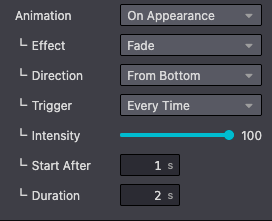
在自定义主题中,您可以轻松地为某一列定义动画。您需要添加两个类:o_animate 和 o_anim_fade_in。第二个类会随您要使用的动画类型而变化。
添加 o_animate_both_scroll 类,以便该列每次出现在屏幕上时都启动动画。默认情况下,动画只启动一次。
您还应该直接在 style 属性中定义 animation-duration 和 animation-delay。
此外,您还可以添加动画方向。例如,要让元素从屏幕底部开始动画,请添加 o_anim_from_bottom 类,并在 style 属性中设置 --wanim-intensity,以控制动画方向的强度。
用法
<div class="col-lg-6 o_animate o_anim_fade_in o_animate_both_scroll o_anim_from_bottom" style="--wanim-intensity: 100; animation-duration: 2s; animation-delay: 1s;">
    <h2>A Section Subtitle</h2>
    <p>Write one or two paragraphs describing your product or services.</p>
</div>
滚动时
与上面看到的方式相同,当视口滚动经过带有动画的元素时,您可以为列、文本和图像元素添加滚动动画。
我们可以添加 6 种滚动动画效果:
淡化
滑动
弹跳
旋转
缩小
放大
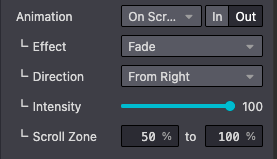
此外,我们还可以设置 in 或 out 效果、动画 direction、动画 intensity 以及 scroll zone。
用法
<div class="col-lg-6 o_animate o_animate_on_scroll o_animate_out o_anim_fade_in o_anim_from_right" data-scroll-zone-start="50" data-scroll-zone-end="100" style="--wanim-intensity: 100;">
    <h2>A Section Subtitle</h2>
    <p>Write one or two paragraphs describing your product or services.</p>
</div>
更多内容