服务
服务是提供某种功能的长期存活的代码片段。它们可以被组件(通过 useService)或其他服务导入,也可以声明一组依赖项。从这个意义上说,服务基本上就是一个 DI 依赖注入 系统。例如,notification 服务提供显示通知的方式,rpc 服务则是向 Odoo 服务器发起请求的正确方式。
下面的示例注册了一个每隔 5 秒显示一条通知的简单服务:
import { registry } from "@web/core/registry";

const myService = {
    dependencies: ["notification"],
    start(env, { notification }) {
        let counter = 1;
        setInterval(() => {
            notification.add(`Tick Tock ${counter++}`);
        }, 5000);
    }
};

registry.category("services").add("myService", myService);
启动时,网页客户端会启动 services 注册表中存在的所有服务。注意,注册表中使用的名称即为服务的名称。
Note
大多数不是组件的代码都应 打包 为服务,尤其是当它会产生某些副作用时。这对测试非常有用:测试可以选择哪些服务处于激活状态,从而减少不必要的副作用干扰被测代码的机会。
定义服务
服务需要实现以下接口:
- dependencies
可选的字符串列表。它是该服务所需的全部依赖项(其他服务)的列表
- start(env, deps)
- 参数
env (
Environment()) – the application environmentdeps (
Object()) – all requested dependencies
- 返回
value of service or Promise<value of service>
这是服务的主要定义。它可以返回一个值或一个 Promise。在后一种情况下,服务加载器只需等待该 Promise 解析为一个值,该值即为服务的值。
有些服务不导出任何值。它们可能只是执行自己的工作,而不需要被其他代码直接调用。在这种情况下,它们的值会在
env.services中被设为null。
- async
可选值。如果提供,应为
true或一个字符串列表。有些服务需要提供异步 API。例如,
rpc服务是一个异步函数,或者orm服务提供一组调用 Odoo 服务器的函数。在这种情况下,使用该服务的组件可能会在异步函数调用结束之前被销毁。大多数时候,异步函数调用应当被忽略。否则可能非常危险,因为底层组件已不再活动。
async标志正是为此而设:它向服务创建者发出信号,表示来自组件的所有异步调用在组件被销毁后应保持挂起。
使用服务
依赖其他服务并正确声明了 dependencies 的服务,只需在 start 方法的第二个参数中接收相应服务的引用即可。
useService 钩子是在组件中使用服务的正确方式。它简单地返回服务值的引用,组件随后可以使用该引用。例如:
import { useService } from "@web/core/utils/hooks";

class MyComponent extends Component {
  setup() {
    const rpc = useService("rpc");

    onWillStart(async () => {
      this.someValue = await rpc(...);
    });
  }
}
参考列表
技术名称 |
简介 |
|---|---|
读取或修改 cookie |
|
显示图形效果 |
|
执行低层级的 http 调用 |
|
显示通知 |
|
管理浏览器 URL |
|
向服务器发送请求 |
|
处理锚点元素上的点击 |
|
读取或修改窗口标题 |
|
提供与当前用户相关的一些信息 |
概述
技术名称:
cookie依赖项:无
提供操作 cookie 的方式。例如:
cookieService.setCookie("hello", "odoo");
API
- current
表示各 cookie 及其值(如有)的对象(或空字符串)
- setCookie(name[, value, ttl])
- 参数
name (
string()) – the name of the cookie that should be setvalue (
any()) – optional. If given, the cookie will be set to that valuettl (
number()) – optional. the time in seconds before the cookie will be deleted (default=1 year)
将 cookie
name设为值value,最大有效期为ttl
- deleteCookie(name)
- 参数
name (
string()) – name of the cookie
删除 cookie
name。
Effect 服务
概述
技术名称:
effect依赖项:无
特效(effect)是可以临时显示在页面顶层的图形元素,通常用于向用户反馈发生了值得注意的事情。
一个典型的例子是彩虹人(rainbow man):
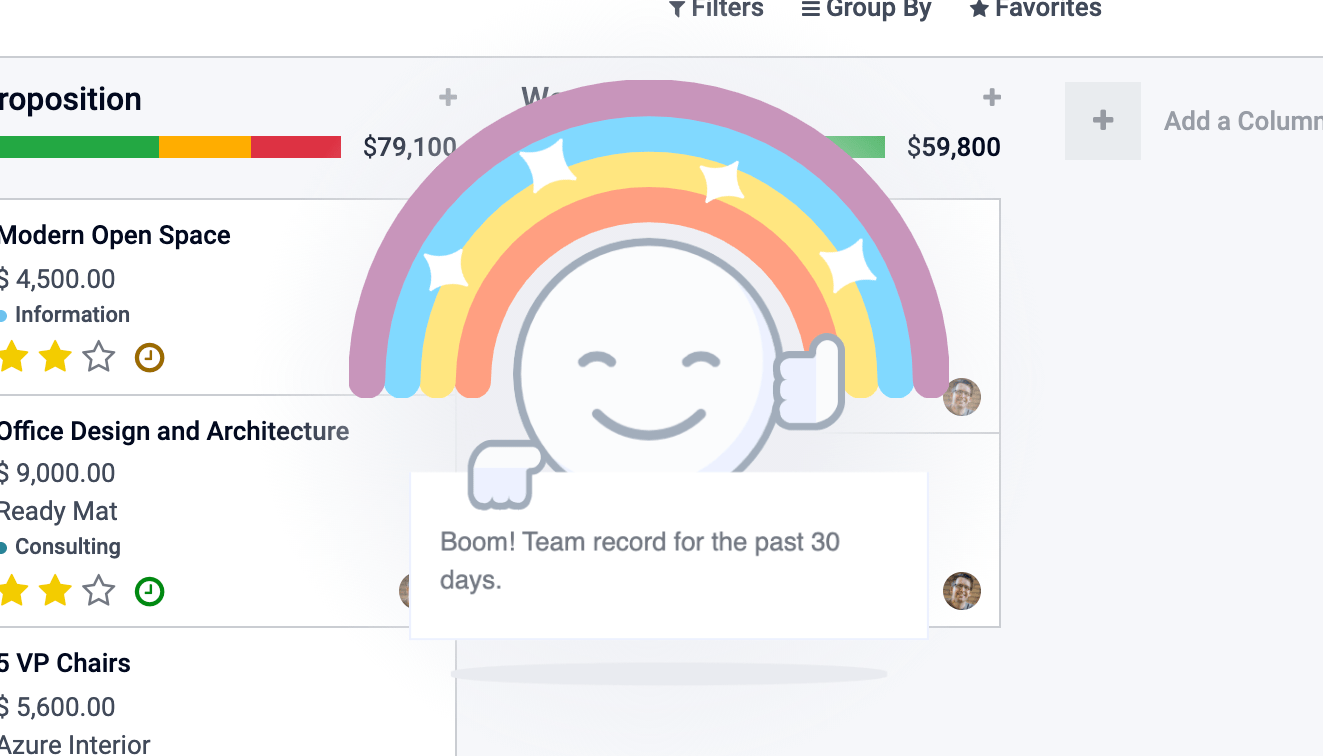
下面是显示它的方法:
const effectService = useService("effect");
effectService.add({
  type: "rainbow_man", // can be omitted, default type is already "rainbow_man"
  message: "Boom! Team record for the past 30 days.",
});
Warning
钩子 useEffect 与 effect 服务无关。
API
- effectService.add(options)
- 参数
options (
object()) – the options for the effect. They will get passed along to the underlying effect component.
显示一个特效。
选项定义如下:
interface EffectOptions {
  // The name of the desired effect
  type?: string;
  [paramName: string]: any;
}
可用特效
目前唯一的特效是彩虹人。
RainbowMan
effectService.add({ type: "rainbow_man" });
名称 |
类型 |
说明 |
|---|---|---|
|
|
要在 RainbowMan 中实例化的组件类(将替代消息)。 |
|
|
如果给定了 params.Component,可通过此参数传入其 props。 |
|
|
message 是彩虹人显示的提示信息。 如果用户禁用了特效,彩虹人将不会出现,取而代之会显示一条简单通知作为回退。 如果启用了特效且给定了 params.Component,则不会使用 params.message。 message 是一个简单字符串或表示 html 的字符串(如果需要在 DOM 中进行交互,建议使用 params.Component)。 |
|
|
如果 message 表示 html,则设为 true,以便将其正确插入 DOM。 |
|
|
在彩虹中显示的图片的 URL。 |
|
|
彩虹人消失前的延迟时间。
|
如何添加特效
特效存储在一个名为 effects 的注册表中。您可以通过提供一个名称和一个函数来添加新的特效。
const effectRegistry = registry.category("effects");
effectRegistry.add("rainbow_man", rainbowManEffectFunction);
该函数必须遵循以下 API:
- <newEffectFunction>(env, params)
- 参数
env (
Env()) – the environment received by the serviceparams (
object()) – the params received from the add function on the service.
- 返回
({Component, props} | void)A component and its props or nothing.
该函数必须创建一个组件并将其返回。该组件会被挂载到特效组件容器内。
示例
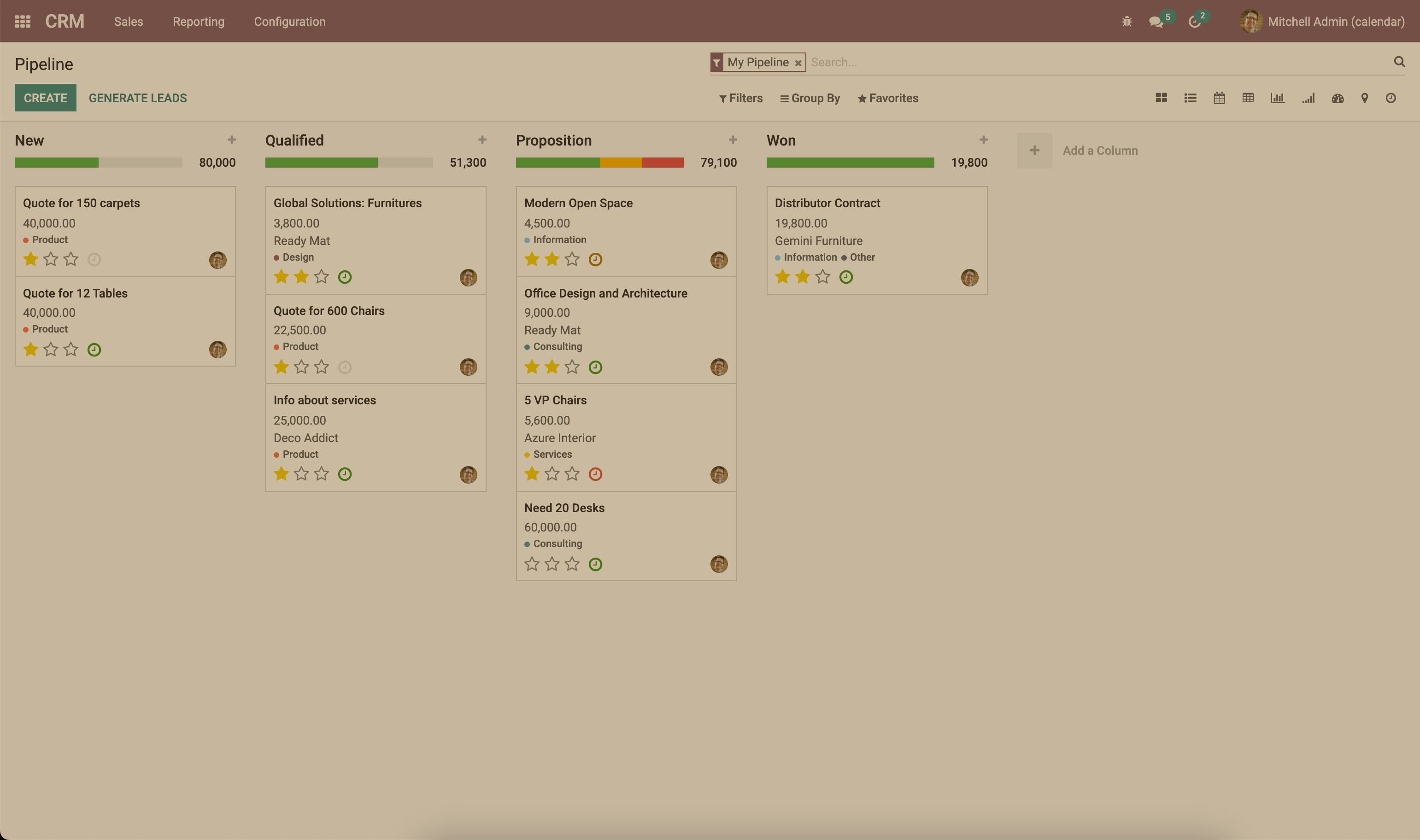
假设我们想添加一个为页面添加棕褐色(sepia)效果的特效。
/** @odoo-module **/

import { registry } from "@web/core/registry";
const { Component, tags } = owl;

class SepiaEffect extends Component {}
SepiaEffect.template = tags.xml`
    <div style="
        position: absolute;
        left: 0;
        top: 0;
        width: 100%;
        height: 100%;
        pointer-events: none;
        background: rgba(124,87,0, 0.4);
    "></div>
`;

export function sepiaEffectProvider(env, params = {}) {
    return {
        Component: SepiaEffect,
    };
}

const effectRegistry = registry.category("effects");
effectRegistry.add("sepia", sepiaEffectProvider);
然后,在您想要的地方调用它,就能看到结果。本例中它在 webclient.js 中被调用,以便示例效果在各处可见。
const effectService = useService("effect");
effectService.add({ type: "sepia" });
Http 服务
概述
技术名称:
http依赖项:无
虽然 odoo 中客户端与服务器之间的大多数交互都是 RPCs (XMLHTTPRequest),但有时可能需要对请求进行更底层的控制。
该服务提供发送 get 和 post http requests 请求的方式。
API
- async get(route[, readMethod = "json"])
- 参数
route (
string()) – the url to send the request toreadMethod (
string()) – the response content type. Can be “text”, “json”, “formData”, “blob”, “arrayBuffer”.
- 返回
the result of the request with the format defined by the readMethod argument.
发送 get 请求。
- async post(route[, params = {}, readMethod = "json"])
- 参数
route (
string()) – the url to send the request toparams (
object()) – key value data to be set in the form data part of the requestreadMethod (
string()) – the response content type. Can be “text”, “json”, “formData”, “blob”, “arrayBuffer”.
- 返回
the result of the request with the format defined by the readMethod argument.
发送 post 请求。
示例
const httpService = useService("http");
const data = await httpService.get("https://something.com/posts/1");
// ...
await httpService.post("https://something.com/posts/1", { title: "new title", content: "new content" });
Notification 服务
概述
技术名称:
notification依赖项:无
notification 服务允许在屏幕上显示通知。
const notificationService = useService("notification");
notificationService.add("I'm a very simple notification");
API
- add(message[, options])
- 参数
message (
string()) – the notification message to displayoptions (
object()) – the options of the notification
- 返回
a function to close the notification
显示一条通知。
选项定义如下:
名称
类型
说明
titlestring
为通知添加标题
typewarning|danger|success|info根据类型更改背景色
sticky布尔值
通知是否应一直保留直到被关闭
classNamestring
将添加到通知上的额外 css 类
onClose函数
通知关闭时执行的回调
buttonsbutton[](见下文)
要在通知中显示的按钮列表
按钮定义如下:
名称
类型
说明
namestring
按钮文本
onClick函数
点击按钮时执行的回调
primary布尔值
按钮是否应设置为主要按钮样式
示例
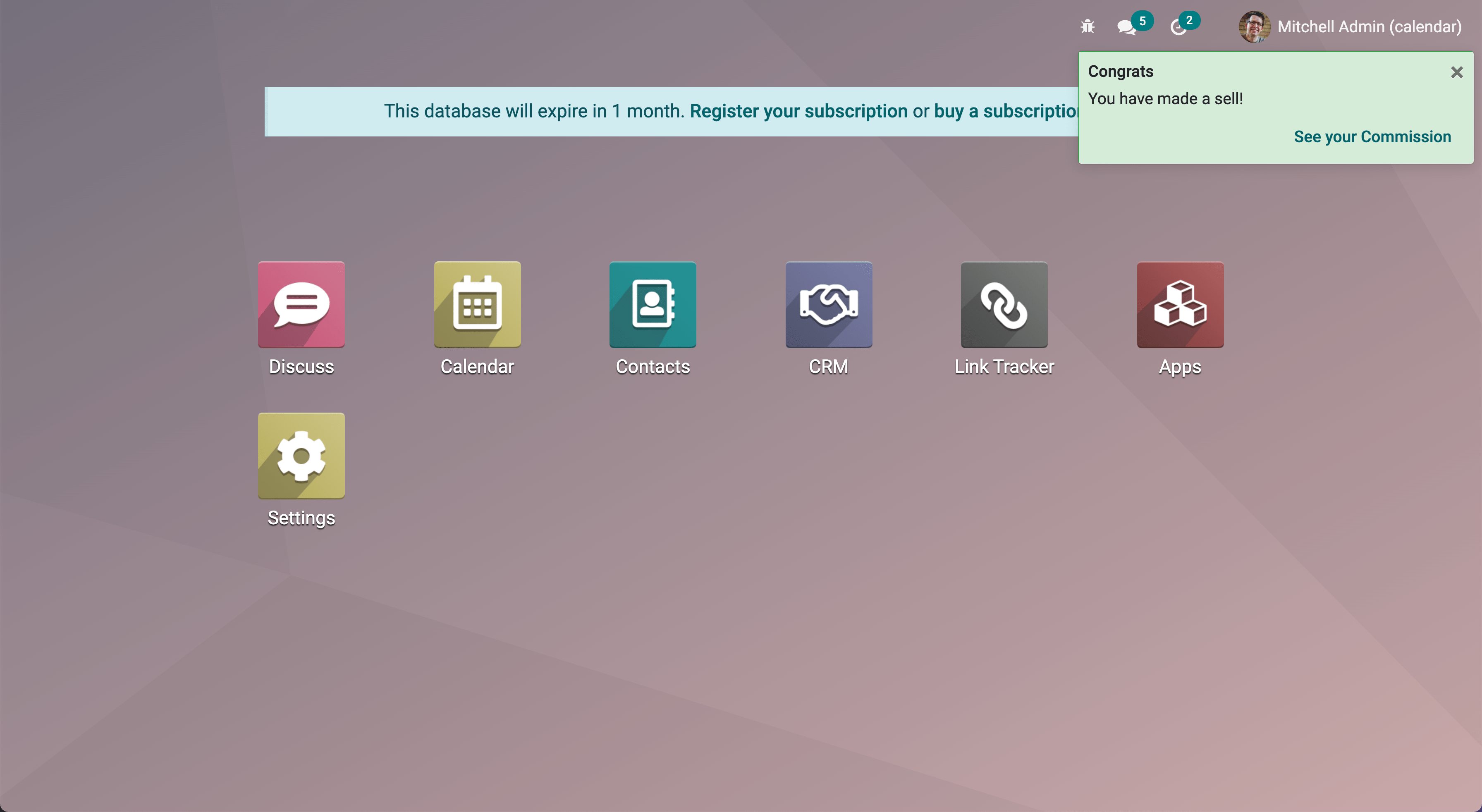
一条销售成交时的通知,带有跳转至佣金页面的按钮。
// in setup
this.notificationService = useService("notification");
this.actionService = useService("action");

// later
this.notificationService.add("You closed a deal!", {
  title: "Congrats",
  type: "success",
  buttons: [
      {
          name: "See your Commission",
          onClick: () => {
              this.actionService.doAction("commission_action");
          },
      },
  ],
});
一秒后自动关闭的通知:
const notificationService = useService("notification");
const close = notificationService.add("I will be quickly closed");
setTimeout(close, 1000);
路由服务
概述
技术名称:
router依赖项:无
router 服务提供三项功能:
当前路由的信息
应用根据自身状态更新 URL 的方式
监听每一次哈希变化,并通知应用的其他部分
API
- current
可以通过
current键访问当前路由。它是一个包含以下信息的对象:pathname (string):当前地址的路径(很可能是/web)search (object):一个字典,将 URL 中的每个搜索关键字(查询字符串)映射到其对应的值。如果未明确给出值,则为空字符串hash (object):与上面相同,但针对的是哈希中描述的值。
例如:
// url = /web?debug=assets#action=123&owl&menu_id=174
const { pathname, search, hash } = env.services.router.current;
console.log(pathname); //   /web
console.log(search); //   { debug="assets" }
console.log(hash); //   { action:123, owl: "", menu_id: 174 }
更新 URL 可通过 pushState 方法完成:
- pushState(hash: object[, replace?: boolean])
- 参数
hash (
Object()) – object containing a mapping from some keys to some valuesreplace (
boolean()) – if true, the url will be replaced, otherwise only key/value pairs from thehashwill be updated.
使用
hash对象中的每个键/值对更新 URL。如果某个值被设置为空字符串,则该键会以不带对应值的形式添加到 URL 中。若为 true,
replace参数会告知路由器应完全替换 URL 哈希(因此hash对象中不存在的值将被移除)。此方法调用不会重新加载页面,也不会触发
hashchange事件,也不会在 main bus 中触发ROUTE_CHANGE。这是因为该方法的目的仅在于更新 URL。调用此方法的代码有责任确保屏幕也得到相应更新。
例如:
// url = /web#action_id=123
routerService.pushState({ menu_id: 321 });
// url is now /web#action_id=123&menu_id=321
routerService.pushState({ yipyip: "" }, replace: true);
// url is now /web#yipyip
最后,redirect 方法会将浏览器重定向到指定的 URL:
- redirect(url[, wait])
- 参数
url (
string()) – a valid urlwait (
boolean()) – if true, wait for the server to be ready, and redirect after
将浏览器重定向到
url。该方法会重新加载页面。wait参数很少使用:它在某些情况下很有用,比如我们已知服务器将在短时间内不可用,通常是在插件更新或安装操作之后。
Note
每当当前路由发生变化时,路由器服务就会在 main bus 上发出 ROUTE_CHANGE 事件。
RPC 服务
概述
技术名称:
rpc依赖项:无
rpc 服务提供一个异步函数,用于向服务器发送请求。调用控制器非常简单:路由应作为第一个参数,也可以将 params 对象作为第二个参数传入。
// in setup
this.rpc = useService("rpc");

// somewhere else, in an async function:
const result = await this.rpc("/my/route", { some: "value" });
Note
请注意,rpc 服务被视为底层服务。它只应用于与 Odoo 控制器交互。若要与模型打交道(这是迄今最重要的用例),应改用 orm 服务。
API
- rpc(route, params, settings)
- 参数
route (
string()) – route targeted by the requestparams (
Object()) – (optional) parameters sent to the serversettings (
Object()) – (optional) request settings (see below)
settings对象可以包含:xhr,应为XMLHTTPRequest对象。在这种情况下,rpc方法将直接使用它,而不是创建一个新的。这在需要访问XMLHTTPRequestAPI 的高级功能时很有用。silent (boolean)如果设置为true,Web 客户端将不会提示存在待处理的 rpc。
rpc 服务通过 XMLHTTPRequest 对象与服务器通信,该对象配置为使用 application/json 内容类型。因此,请求的内容显然必须可进行 JSON 序列化。该服务发出的每个请求都使用 POST HTTP 方法。
服务器错误实际上会以 HTTP 代码 200 返回响应。但 rpc 服务会将其视为错误。
错误处理
rpc 失败主要有两个原因:
要么是 Odoo 服务器返回了错误(我们称之为
server错误)。在这种情况下,HTTP 请求会以 HTTP 代码 200 返回,但响应对象中包含error键。要么是某种其他类型的网络错误
当 rpc 失败时:
代表该 rpc 的 Promise 被拒绝,因此调用代码会崩溃,除非它处理了这种情况
主应用总线上会触发
RPC_ERROR事件。事件负载包含对错误原因的描述:如果是服务器错误(服务器代码抛出了异常)。在这种情况下,事件负载将是一个包含以下键的对象:
type = 'server'message(string)code(number)name(string)可选,错误服务在处理错误时用它查找合适的对话框)subType(string)可选,常用于确定对话框标题)data(object)可选对象,可包含各种键,其中debug是主要的调试信息,包含调用堆栈)
如果是网络错误,则错误描述只是对象
{type: 'network'}。当发生网络错误时,会显示一条 notification,并定期联系服务器直到其响应。服务器一旦响应,该通知就会关闭。
Scroller 服务
概述
技术名称:
scroller依赖项:无
每当用户在 Web 客户端中点击锚点时,该服务都会自动滚动到目标位置(如果合适)。
该服务添加了一个事件监听器来获取文档上的 click 事件。服务会检查其 href 属性中包含的选择器是否有效,以区分锚点和 Odoo 动作(例如 <a href="#target_element"></a>)。如果不是这种情况,则不执行任何操作。
如果点击似乎指向某个元素,主应用总线上会触发 SCROLLER:ANCHOR_LINK_CLICKED 事件。该事件包含一个自定义事件,其中包含匹配的 element 及其 id 作为引用。这可以让其他部分自行处理与锚点相关的行为。原始事件也会一并给出,因为可能需要阻止它。如果该事件未被阻止,用户界面将滚动到目标元素。
API
上面解释的 anchor-link-clicked 自定义事件包含以下值。
名称 |
类型 |
说明 |
|---|---|---|
|
|
href 所指向的锚点元素 |
|
|
href 中包含的 id |
|
|
原始的点击事件 |
Note
Scroller 服务会在 main bus 上发出 SCROLLER:ANCHOR_LINK_CLICKED 事件。若要避免 Scroller 服务的默认滚动行为,必须对传递给监听器的事件调用 preventDefault(),这样才能在监听器中正确实现您自己的行为。
Title 服务
概述
技术名称:
title依赖项:无
title 服务提供了一个简单的 API,可用于读取/修改文档标题。例如,如果当前文档标题为 “Odoo”,我们可以使用以下命令将其更改为 “Odoo 15 - Apple”:
// in some component setup method
const titleService = useService("title");

titleService.setParts({ odoo: "Odoo 15", fruit: "Apple" });
API
title 服务操作以下接口:
interface Parts {
    [key: string]: string | null;
}
每个键代表标题某一部分的标识,每个值是显示的字符串,如果已被移除则为 null。
其 API 为:
- current
这是一个表示当前标题的字符串。它的结构如下:
value_1 - ... - value_n,其中每个value_i是Parts对象(由getParts函数返回)中找到的一个(非空)值
- getParts()
- 返回
Parts the current
Partsobject maintained by the title service
- setParts(parts)
- 参数
parts (
Parts()) – object representing the required change
setParts方法允许添加/替换/删除标题的多个部分。删除某个部分(值)的方法是将对应的键值设置为null。请注意,可以只修改单个部分而不影响其他部分。例如,如果标题由以下部分组成:
{ odoo: "Odoo", action: "Import" }
且
current值为Odoo - Import,那么setParts({ action: null, });
会将标题更改为
Odoo。
User 服务
概述
技术名称:
user依赖:
rpc
user 服务提供与当前登录用户相关的一批数据和若干辅助函数。
API
名称 |
类型 |
说明 |
|---|---|---|
|
|
|
|
|
数据库相关信息 |
|
|
作为用户主页使用的动作的 ID |
|
|
用户是否为管理员(属于 |
|
|
用户是否属于系统群组( |
|
|
所使用的语言 |
|
|
用户名称 |
|
|
用户对应业务伙伴记录的 ID |
|
|
用户的时区 |
|
|
用户的 ID |
|
|
用户的备用昵称 |
- updateContext(update)
- 参数
update (
object()) – the object to update the context with
使用给定的对象更新 user context
userService.updateContext({ isFriend: true })
- removeFromContext(key)
- 参数
key (
string()) – the key of the targeted attribute
从 user context 中移除给定键的值
userService.removeFromContext("isFriend")
- hasGroup(group)
- 参数
group (
string()) – the xml_id of the group to look for
- 返回
Promise<boolean>is the user in the group
检查用户是否属于某个群组
const isInSalesGroup = await userService.hasGroup("sale.group_sales")