根据预测的销售业务来分配商机
The Odoo CRM app can automatically assign leads/opportunities to sales teams and salespeople. A standard practice is to assign leads based on the probability of winning each lead. Companies can prioritize the leads that are more likely to result in successful deals by quickly assigning them to the appropriate salespeople.
Odoo 采用一种称为 预测销售线索评分 的方法,自动计算赢得销售线索的概率。
预测销售线索评分
Predictive lead scoring is a machine-learning model that uses historical data from Odoo CRM to score open leads/opportunities.
当公司通过 CRM 管道处理商机时,Odoo 会收集有关赢得和丢失商机的数据。预测销售线索评分利用这些数据来预测赢得每个新销售线索或商机的概率。
通过 CRM 管道发送的商机越多,Odoo 收集的数据就越多,从而准确率更高。
具体来说,Odoo 的预测销售线索评分使用的是 naive Bayes 概率模型:
分解方程:
\(P(A|B)\) = probability of a successful lead in this case
\(P(A)\) = overall probability of a lead being successful, regardless of the conditions
\(P(B|A)\) = probability of this being the case, given a lead is successful
\(P(B)\) = probability of this being the case
The term case refers to the variables that can affect a lead being successful in Odoo. This can include variables, such as the assigned salesperson, the source of the lead, the language of the lead, and other historical and demographic data.
The variables considered in this calculation can be configured to tailor the calculation to each business’s needs.
The probability of success for each opportunity is displayed on the opportunity form, and updates automatically, as the opportunity progresses through the CRM pipeline.
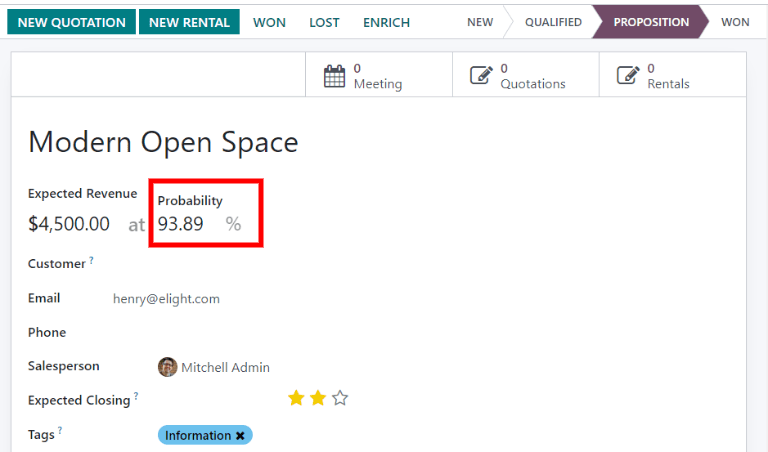
When an opportunity moves to the next stage, its probability of success automatically increases, according to the predictive lead scoring algorithm.
配置
Predictive lead scoring is always active in Odoo CRM. However, the variables used to calculate the probability of success can be customized in the settings.
To customize the variables used by predictive lead scoring, go to . Under Predictive Lead Scoring, click the Update Probabilities button.
然后,点击下拉菜单,选择预测性潜在客户评分功能将考虑哪些变量。
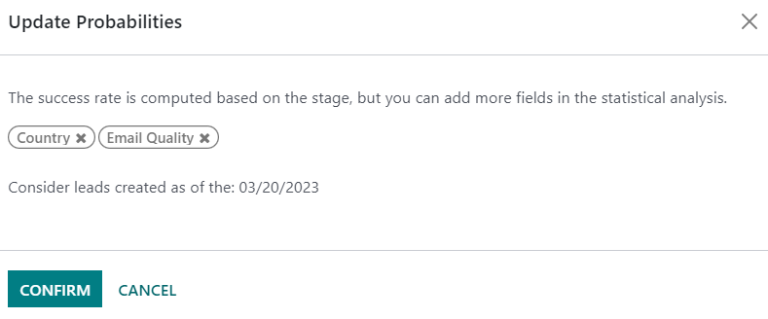
可以激活以下任意数量的变量:
州/省: 商机来源的州/省
国家/地区: 商机来源的国家/地区
电话质量: 是否列出了该商机的电话号码
电子邮件质量: 是否列出了该商机的电子邮件地址
来源: 商机的来源(例如搜索引擎、社交媒体)
语言: 商机指定的交流语言
标签: 商机上的标签
注解
变量“阶段”和“团队”始终有效。阶段是指商机所处的 CRM 管道阶段。团队是指分配给商机的销售团队。无论选择了哪个可选变量,预测销售线索评分*总是*考虑这两个变量。
接下来,点击选项旁边的日期字段 从指定日期开始考虑已创建的销售线索: ,选择预测销售线索评分开始计算的日期。
最后,点击 确认 保存更改。
手动更改概率
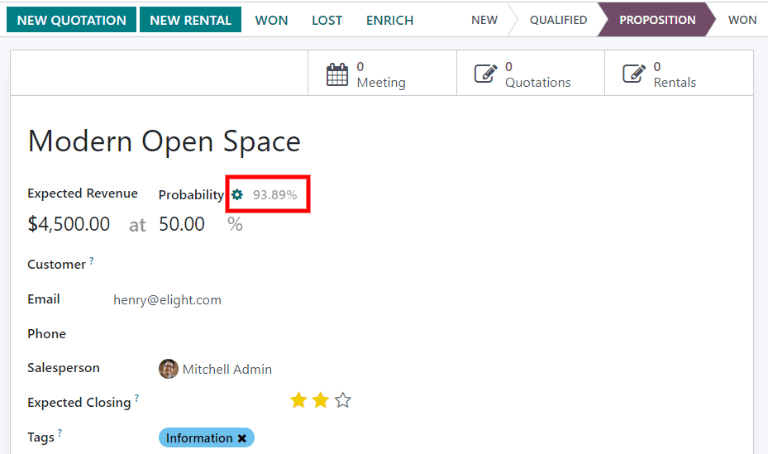
可在商机表单中手动更改商机的成功概率。点击概率数字进行编辑。
重要
Manually changing the probability removes the automatic probability updates for that opportunity. The probability no longer updates automatically, as the opportunity moves through each stage of the pipeline.
To reactivate automatic probability, click on the :icon:`fa-cog` (gear) icon next to the :guilabel:`Probability percentage.
根据概率分配销售线索
Odoo CRM can assign leads/opportunities to sales teams and salespeople, based on specified rules. Create assignment rules, based on the leads’ probability of success, to prioritize those that are more likely to result in deals.
配置基于规则的任务分配
To activate Rule-Based Assignment, navigate to , and tick the Rule-Based Assignment checkbox. Then, click Save.
The Rule-Based Assignment` feature can be set to run Manually, meaning an Odoo user must manually trigger the assignment, or Repeatedly, meaning Odoo will automatically trigger the assignment according to the chosen time period.
To set up automatic lead assignment, select Repeatedly for the Running section. Then, customize how often Odoo will trigger the automatic assignment in the Repeat every section.
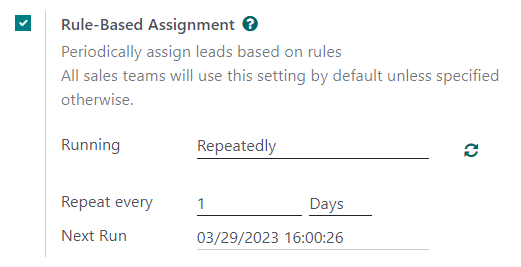
If Rule-Based Assignment is set to run Repeatedly, the assignment can still be triggered manually using the circular arrow icon in the Rule-Based Assignment settings (or using the Assign Leads button on the sales team configuration page).
配置分配规则
Next, configure the assignment rules for each sales team and/or salesperson. These rules determine which leads Odoo assigns to which people. To get started, navigate to , and select a sales team.
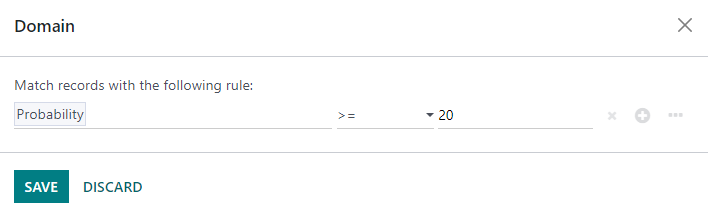
On the sales team configuration form, under Assignment Rules, click Edit Domain to configure the rules that Odoo uses to determine lead assignment for this sales team. The rules can include anything that may be relevant for this company or team, and any number of rules can be added.
单击 添加筛选器 开始创建分配规则。点击赋值规则右侧的 + 符号,添加另一行。点击 x 符号删除该行。
要根据商机的成功概率创建分配规则,请单击分配规则行最左侧的下拉菜单,然后选择 概率 。
从中间的下拉菜单中,选择所需的等式符号–很可能是*大于*、小于、*大于等于*或*小于等于*的符号。
In the far right space, enter the desired number value of the probability. Finally, click Save to save changes.
Example
To configure an assignment rule such that a sales team receives leads that have a probability of
success of 20% or greater, create a Domain line that reads: Probability >= 20.
也可以为单个团队成员配置单独的分配规则。在销售团队配置页面,点击 成员 选项卡中的团队成员,然后编辑 域名 部分。点击 保存 ,以保存更改。
If automatic lead assignment is configured in the settings, both the sales team and individual team members have the option to Skip auto assignment. Check this box to omit a particular sales team or salesperson from being assigned leads automatically by Odoo’s Rule-Based Assignment feature. If Skip auto assignment is activated, the sales team or salesperson can still be assigned leads manually.
要将潜在客户手动分配给该销售团队,请单击销售团队配置页面顶部的 分配潜在客户 按钮。这将分配任何当前未分配且符合该团队指定域的潜在客户。
