根据预测的销售业务来分配商机
Odoo CRM 应用程序可以自动将商机分配给销售团队和销售人员。标准做法是,根据每个商机的获胜可能性来分配商机。公司可以通过快速分配商机至对应销售员,来优先处理可能产生成功交易的商机。
Odoo 采用一种称为 预测销售线索评分 的方法,自动计算赢得销售线索的概率。
预测销售线索评分
预测销售线索评分是一种使用 Odoo CRM 历史数据进行评分的机器学习模型。
当公司通过 CRM 管道处理商机时,Odoo 会收集有关赢得和丢失商机的数据。预测销售线索评分利用这些数据来预测赢得每个新销售线索或商机的概率。
通过 CRM 管道发送的商机越多,Odoo 收集的数据就越多,从而准确率更高。
具体来说,Odoo 的预测销售线索评分使用的是 naive Bayes 概率模型:
分解方程:
P(A|B) = 此情况下 线索成功的概率
P(A) = 不考虑条件的情况下,线索成功的总体概率
P(B|A) = 在线索成功的情况下,这种情况发生的概率
P(B) = 这种情况发生的概率
此情况下 这个术语指的是可能影响线索在 Odoo 中成功的各种变量。这些变量可以包括分配的销售员、线索来源、线索语言以及其他历史和人口统计数据。
在此计算中考虑哪些变量可以进行 配置 ,以满足每个企业的特定需求。
每个商机的成功概率都显示在机会表单上,并随着商机在 CRM 管道中的进展而自动更新。
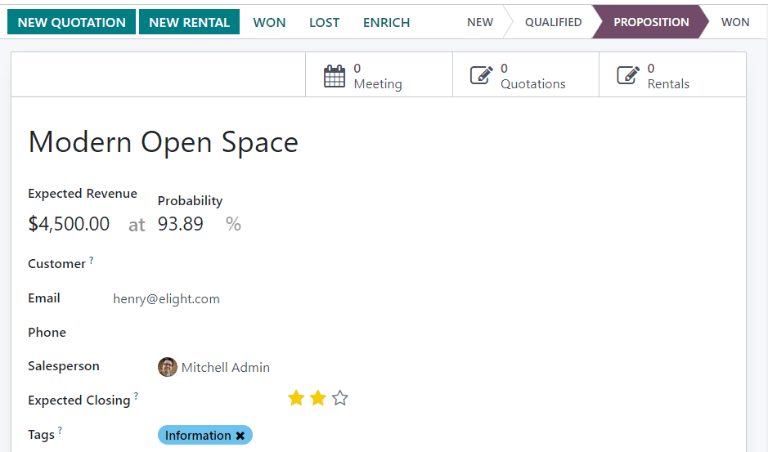
当商机进入下一阶段时,其成功概率会根据预测性潜在客户评分算法自动增加。
配置
Predictive lead scoring is always active in Odoo CRM. However, the variables used to calculate the probability of success can be customized in the settings.
要自定义预测潜在客户评分使用的变量,请访问 。在 预测性潜在客户评分 下,点击 更新概率 按钮。
Then, click on the drop-down menu to choose which variables the predictive lead scoring feature takes into account.
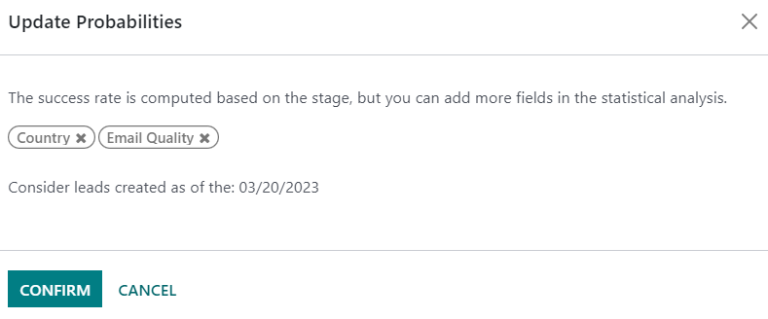
可以激活以下任意数量的变量:
州/省: 商机来源的州/省
国家/地区: 商机来源的国家/地区
电话质量: 是否列出了该商机的电话号码
电子邮件质量: 是否列出了该商机的电子邮件地址
来源: 商机的来源(例如搜索引擎、社交媒体)
语言: 商机指定的交流语言
标签: 商机上的标签
Note
变量“阶段”和“团队”始终有效。阶段是指商机所处的 CRM 管道阶段。团队是指分配给商机的销售团队。无论选择了哪个可选变量,预测销售线索评分*总是*考虑这两个变量。
Next, click on the date field next to the option Consider leads created as of the: to select the date from which predictive lead scoring begins its calculations.
最后,点击 确认 保存更改。
手动更改概率
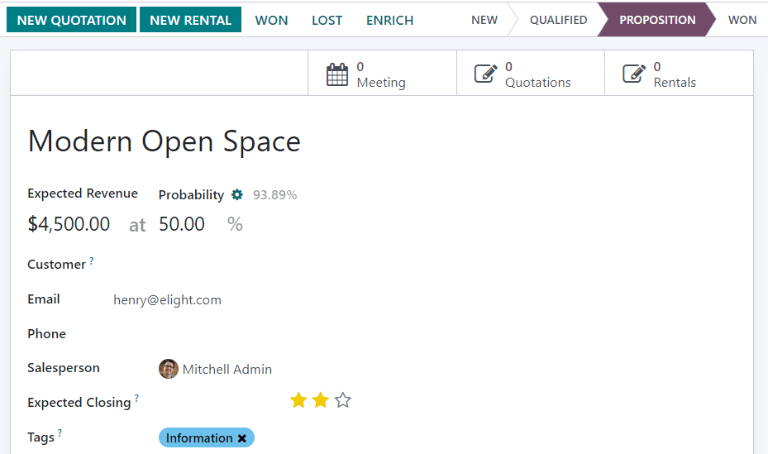
可在商机表单中手动更改商机的成功概率。点击概率数字进行编辑。
Important
Manually changing the probability removes the automatic probability updates for that opportunity. The probability no longer automatically updates as the opportunity moves through each stage of the pipeline.
要重新激活自动概率,请点击概率百分比旁边的齿轮图标。
根据概率分配销售线索
Odoo CRM can assign leads/opportunities to sales teams and salespeople based on specified rules. Create assignment rules based on the leads’ probability of success to prioritize those that are more likely to result in leads and opportunities.
配置基于规则的任务分配
要激活 * 基于规则的任务分配*,请导航至 ,然后激活 基于规则的任务分配 。
The rule-based assignment feature can be set to run Manually, meaning an Odoo user must manually trigger the assignment, or Repeatedly, meaning Odoo automatically triggers the assignment according to the chosen time period.
To configure automatic lead assignment, select Repeatedly for the Running section. The frequency of this automatic assignment is customized within the Repeat every section. Enter a specific number and select a corresponding time period to establish the desired interval. Time periods range from Minutes to Weeks.
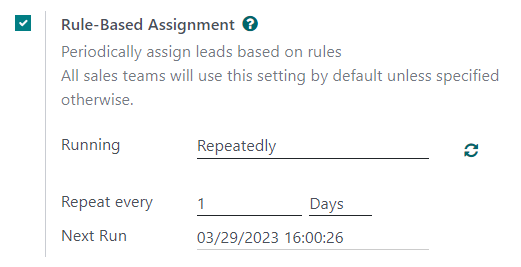
If rule-based assignment is set to run Repeatedly, the assignment can still be triggered manually using the circular arrow icon in the Rule-Based Assignment settings, or using the Assign Leads button on the sales team configuration page. Once a lead has been assigned to a salesperson via this rule, the leads are automatically converted into an opportunity by the system.
配置分配规则
Next, configure the assignment rules for each sales team or salesperson. These rules determine which leads Odoo assigns to which people. To get started, navigate to , and select a sales team.
在销售团队配置表单中,在 任务规则 下,单击 编辑域名 以配置 Odoo 用于确定此销售团队的潜在客户分配规则。规则可包括与该公司或团队相关的任何内容,并可添加任意数量的规则。
Click Add Filter to start creating assignment rules. Click on the sign on the right of the assignment rule to add another line. Click on the x symbol to remove the line.
要根据商机的成功概率创建分配规则,请单击分配规则行最左侧的下拉菜单,然后选择 概率 。
从中间的下拉菜单中,选择所需的等式符号–很可能是*大于*、小于、*大于等于*或*小于等于*的符号。
In the far right space, enter the desired number value of the probability. Finally, click Save to save changes.
Example
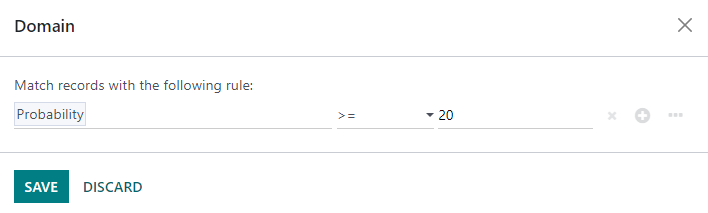
To configure an assignment rule such that a sales team receives leads that have a probability of
success of 20% or greater, create a Domain line that reads: Probability >= 20.
也可以为单个团队成员配置单独的分配规则。在销售团队配置页面,点击 成员 选项卡中的团队成员,然后编辑 域名 部分。点击 保存 ,以保存更改。
如果在设置中配置了自动分配潜在客户,则销售团队和团队成员均可选择 跳过自动分配 。选中此复选框可省略特定销售团队或销售人员被 Odoo 基于规则的分配功能自动分配潜在客户。如果激活 跳过自动分配 ,销售团队或销售人员仍可手动潜在客户。
To manually assign leads to this sales team, click on the Assign Leads button at the top of the sales team configuration page. This assigns any leads that are currently unassigned and match this team’s specified domain.
