ESG多维评估
ESG(环境、社会和治理)应用程序通过与会计、制造、车队物流、工资单和员工等应用程序集成,帮助您自动收集ESG数据。它从您的运营中提取数据以构建ESG报告,基于法律和可持续性报告要求,同时为您提供排放和其他关键ESG指标的实时视图。
碳排放日志
碳排放日志工具通过从会计记录(采购、费用等)和员工通勤活动中收集数据,并支持手动输入,来自动跟踪排放。排放数据实时更新,允许持续监控和报告。您可以:
跟踪每日的 environmentally impact。
评估您的直接减量效果。
优先级化目标更改。
不断监控和优化您的减量策略。
排放(kgCO₂e)公式
活动数据 × 排放因子
活动数据源
使用以下数据源:
ref:
会计 <esg/accounting>ref:
运输管理 <esg/fleet>ref:
手动输入 <esg/manual>
会计
Odoo 从支出和资产账户中收集活动数据。这些包括:
固定资产
费用报销
其他费用
收入成本
只有这些账户类型被用于碳足迹计算,基于 Bilan Carbone 方法。
车队
Odoo 使用 车队 和员工应用中的数据来计算通勤排放。
员工通勤排放公式
天数 × 家-工作距离 × 2 × (办公天数 / 7) × 车辆型号CO₂排放
确保准确的计算:
定义每周员工前往办公地点的 通勤排放 天数,通过 并填写 每周办公室签到人 。
为每辆车型号设置排放量,请进入 :menuselection:` Fleet –> 配置 –> 型号` ,选择一个型号,并输入它的 CO₂ 排放量 。
为每位员工设置家到工作距离,请进入 :menuselection:` Human Resources –> 配置 –> 员工` ,选择一个员工,并输入员工的 家到工作距离 。
Note
员工车的 开始日期 和, 如果有, 结束日期 用于计算排放。请确保它们已通过打开
要访问员工通勤排放表, 请转到 。
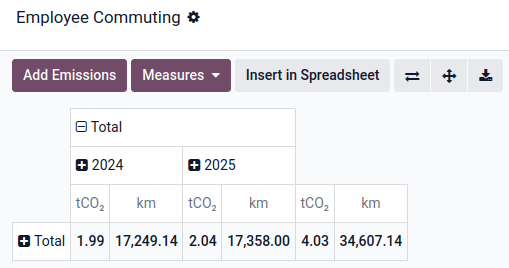
要添加数据到排放数据中,请单击 增加通勤排放,定义要覆盖的 通勤排放周期 ,然后单击 :guilabel:`保存” 。
手动输入
您可以手动输入活动所产生排放(例如,员工午餐、垃圾等)。要执行此操作,请转到 并点击 New,然后:
Name the activity.
Select a Date.
Select an Emission factor.
Enter a Quantity.
Once saved, the entry appears under and is included in the carbon footprint report.
排放因子
An emission factor is a coefficient that indicates the rate at which a specific activity emits greenhouse gases into the atmosphere.
Source database
Import the data from a certified emission factors database by going to . Click Download on the ADEME database to import its emission factors and sources.
Main components of an emission factor
来源
Each emission factor is assigned to a scope, following the GHG Protocol:
Scope 1 – Direct emissions (e.g., fuel burned on-site or in company vehicles)
Scope 2 – Indirect emissions from purchased energy (e.g., electricity or heat)
Scope 3 – All other indirect emissions across the value chain (e.g., purchased goods, travel, waste)
Scopes can be structured hierarchically (parent-child) for more detailed categorization, such as “Scope 3: Others Indirect > Purchased Goods > Electronics”.
Uncertainty
Uncertainty represents the potential margin of error in an emission factor. It reflects how precise or reliable the factor is when estimating emissions for a given activity, based on the quality of data, assumptions used, and calculation methodology.
It helps you assess the confidence level of the emissions data used in the reporting.
Compute method
The compute method determines whether emissions are calculated using physical quantities (e.g., kg, liters, units) or monetary values (e.g., € spent). In physical mode, the system uses the quantity from the transaction (e.g., 10 units × EF per unit). In monetary mode, it uses the transaction amount (e.g., €500 × EF per €).
Gas emissions lines
Each emission factor can include multiple gas emission lines, representing the different greenhouse gases involved in the activity. The ESG app includes the six main gases from the Kyoto Protocol — CO₂, CH₄, N₂O, HFCs, PFCs, SF₆ — each with a predefined Global Warming Potential (GWP) used to convert them into a common unit: CO₂-equivalent (kgCO₂e).
Tip
Add more specific gases by going to .
Each gas line can be linked to an activity type such as production, transport, or use, allowing for detailed breakdowns in your emissions reporting.
The final emission factor value is the sum of all these gases’ emissions converted into CO₂-equivalents.
Assignation rules
Assignation rules allow emission factors to be automatically applied to relevant activity data based on specific criteria: the product, partner, and/or account involved in the transaction.
Example
You have assigned an emission factor to the Zenith Pro Computer product and later receive a vendor bill for 150 units; the system automatically applies the assigned emission factor, multiplying the emission factor’s emissions (kgCO₂e) by 150.
To define assignation rules on emissions factors, go to and select an emission factor. Under the Assignations tab, click Add a line, and select a record for one or more of the following attributes: Product, Partner, and Account.
All attributes have to match for the rule to be applied.
Important
Ensure the unit of measure set next to the product’s Cost matches the emission factor’s Unit of Measure.

If the field is not displayed, go to and enable the Units of Measure & Packagings option.
Tip
Accounting journal entries with a missing emission factor can be found by clicking Emissions to define under the Collect Emissions card on the dashboard.
Rules priority
When multiple assignation rules match, Odoo prioritizes the most specific rule based on the following criteria:
Attribute specificity: Odoo first evaluates rules by the most precise attribute, following this priority hierarchy (from most to least specific):
产品
往来账
科目
Attribute count: if multiple rules share the same level of attribute specificity, Odoo then considers the number of attributes in the rule. The rule with more attributes defined will take priority.
Example
Example 1
Emission factor #1 assignation rule
科目 |
往来账 |
产品 |
|---|---|---|
Any Account |
Any Partner |
Zenith Pro Computer |
Emission factor #2 assignation rule
科目 |
往来账 |
产品 |
|---|---|---|
Any Account |
Digital Den |
Any Product |
Given the assignation rules above, all products purchased from Digital Den will be assigned emission factor #2, except the Zenith Pro Computer product, which will be assigned emission factor #1.
Example 2
Emission factor #1 assignation rule
科目 |
往来账 |
产品 |
|---|---|---|
Any Account |
Any Partner |
Zenith Pro Computer |
Emission factor #2 assignation rule
科目 |
往来账 |
产品 |
|---|---|---|
Any Account |
Digital Den |
Zenith Pro Computer |
Given the assignation rules above, any purchased Zenith Pro Computer will be assigned emission factor #1, except if purchased from the Digital Den, which will be assigned emission factor #2.
Apply retroactively
Once your emission factors are configured with assignation rules, you can also apply them retroactively to past activity data.
To do so, go to , select an emission factor, and click Assign. Select an Application Period, and, if desired, enable the Replace existing assignations option.
Tip
Apply emission factors in bulk by selecting multiple emission factors in list view and clicking (Actions) .
男女平等与薪酬差距
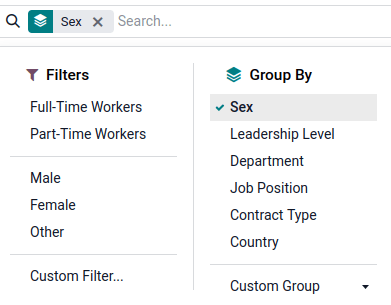
性别比例统计分析追踪了员工队伍中的性别分布情况,例如:比较女性和男性在技术与行政岗位、长期与临时合同、不同办公地点、以及管理与非管理职位中的占比差异。
基于员工数据的这些洞察,对于依据《欧洲可持续发展报告标准》(ESRS)S1部分进行的企业可持续发展报告指令(CSRD)披露至关重要,并将为未来的中小型企业自愿标准(VSME)提供支持。
要查看公司的性别比例和薪酬差距统计,请为每位员工设置性别:打开 员工 应用并选择员工,在 个人信息 标签页下选择员工的 性别 。
薪酬差距是根据员工薪资合同中对相同岗位设置的工资来计算的
薪酬差距单元格
((男性平均工资 – 女性平均工资) / 男性平均工资) × 100
点击 即可查看相关数据。
倡议
前往 即可使用所有 项目 功能,并开始落实您的影响力行动。您可估算每项任务的二氧化碳减排量、跟踪进度,并为团队成员分配任务并设定截止日期。
Note
预估的二氧化碳减排量不会立即降低您的碳足迹。只有当这些减排量在实际运营中得到体现时,其真实影响才会显现。
