入职录用
After an applicant has successfully passed the various interview stages, the recruitment team is ready to send an offer for employment. The first step when offering a job position is to send the applicant a contract.
更多内容
有关招聘过程各个阶段的详细信息,请参阅 招聘 文档。
合同提案
当准备发送录用通知时,首先通过导航到 打开申请人的卡片,然后点击所需的职位卡片。
在生成的 工作职位 看板视图中,可将相应的申请人卡片拖放到 合同提案 阶段。或者,点击所需的申请人卡片,然后点击申请人表单右上方状态栏中的 合同提案 阶段。
下一步是向申请人发出邀请。首先选择所需的申请人卡片,打开其申请人表格。
On the applicant’s form, click the Generate Offer button to load the Offer for (applicant’s email) page.
Important
If the applicant does not have an email address listed on their applicant card, an Invalid Operation pop-up window warning appears, stating: Offer link can not be send. The applicant needs to have a name and email.
Click Close, then enter an email on the applicant’s card. Once an email is entered, click the Generate Offer button, and the Offer for (applicant’s email) page loads.
大多数字段已预先填入职位信息。如果任何必要的字段为空白,或任何信息需要更新,请在相应的字段中输入或更新相关信息。
Note
Depending on the localization setting for the company, and which applications are installed, some fields may not appear on the Offer for (applicant’s email) page.
For example, if the Fleet application is not installed, any fields related to vehicles do not appear.
通用字段
The following fields appear in the Offer for (applicant’s email) page, regardless of the localization.
Title: The name for the contract appears in a default
Offer for (applicant's email)format.Contract Template: The template currently being used to populate the Offer for (applicant’s email) page. Use the drop-down menu to select a different Contract Template, if desired.
Note
To modify the template, hover over the current template name, and click the (Internal link) icon that appears to the right of the field. Make any desired changes, then click Save & Close.
Employer Budget: The salary being offered to the applicant.
Job Title: The selected Employee Job populates this field, by default. The title can be modified to suit the specific applicant’s position and provide more details.
Example
一家鞋业公司向应聘者提供了一份营销经理的工作,专门负责儿童产品线。
The Employee Job selected from the drop-down menu is
Marketing Manager, and the Job Title is modified for their specific responsibilities,Marketing Manager: Children's Shoes.Employee Job: The name of the Job Title being offered to the applicant. The selections available in the drop-down menu correspond to the job position configured on the main Recruitment app dashboard.
Department: The department the job position falls under.
Contract Start Date: The date the proposed contract takes effect. The default date is the current date. To modify the date, click on the displayed date to reveal a calendar popover window. Navigate to the desired month, then click the day to select the date.
Offer Create Date: The day the offer is created, By default, the current date populates this field and cannot be modified.
Offer Validity Date: The last day the offer is valid. After this date the contract cannot be signed.
Link: The link to the contract being sent to the candidate.
Validity Days Count: The number of days the contract is valid. The default expiration date is
30days. Modify the expiration date, if desired.Applicant: The name of the applicant appears in this field, and cannot be modified.
发送聘用通知
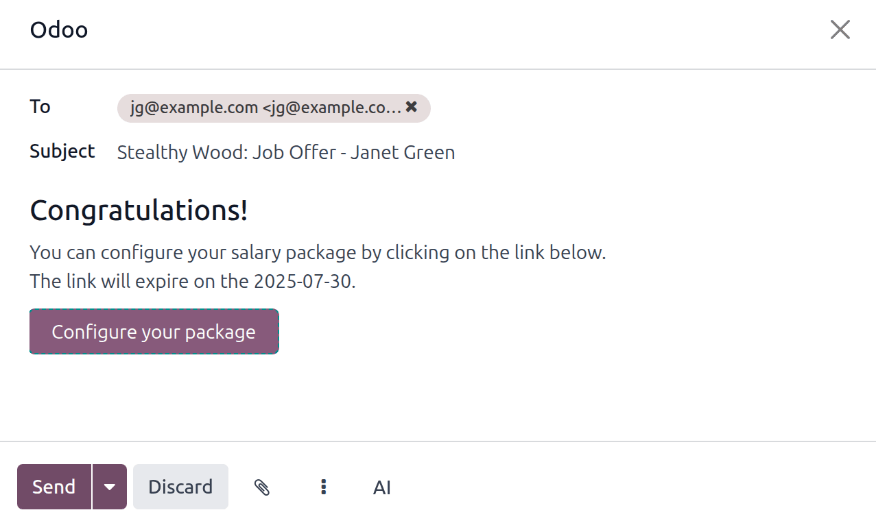
Once all desired modifications have been made to the Offer for (applicant’s email) page, click the Send By Email button to reveal an email pop-up window.
The default Recruitment: Your Salary Package email template is used, and the To,
Subject, and email body are pre-populated based on the email template.
If any attachments need to be added, click the (paperclip) button, and a file explorer window appears. Navigate to the desired file, then click Open to attach it to the email. The attachment loads, and is listed at the bottom of the email body.
Once the email is ready to send, click Send. The email pop-up window closes, and an Offers smart button appears at the top of the applicant’s card.
Note
To send an offer, ensure the Sign application is installed. This is necessary, so the offer can be sent to the applicant by the recruiter, and they can actually sign the offer. The applicant does not need any software installed to sign the offer.
配置您的软件套装
如果适用,申请人可以修改其薪酬待遇。并非所有本地化公司都提供此选项。根据公司所在地的不同,可能无法使用此选项。
电子邮件模板包括一个 :guilabel:` 配置您的薪酬套餐` 按钮。该链接会将申请人带入一个网页,申请人可以在该网页上修改建议的薪酬方案并输入个人信息。
一旦申请人被录用,在网页上输入的个人信息就会被导入其创建的雇员记录中。
Once all the information is completed, the applicant can then accept the offer by clicking the Review Contract & Sign button to accept the contract, and sign it using the Sign application.
Management signatures
Once the applicant has signed the contract, the next step is for the person responsible within the company (the HR Responsible) must then sign the contract.
The person responsible for signing the contract receives an activity alert that their signature is requested of them in the Sign app.
已签署合同
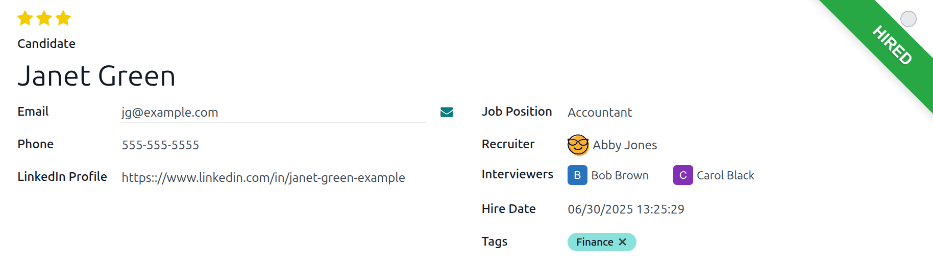
Once all parties have fully signed the contract, the applicant is automatically moved to the Contract Signed stage, and a green HIRED banner appears in the top-right of both the applicant’s card and form.
创建员工
申请人被录用后,下一步就是创建雇员记录。点击被录用申请人表单左上角的 创建员工 按钮。
出现一份员工表格,上面有申请人的信息卡和员工合同。
填写员工表的其余部分。有关字段的详细信息,请参阅 新员工 文档。
Once completed, the employee record is saved in the Employees app.
