IoT物联网连接
要将POS与 IoT物联网系统 连接:
确保您的数据库中已安装销售点和物联网(IoT)应用程序。
设置 物联网盒子 或 Windows 虚拟物联网 。
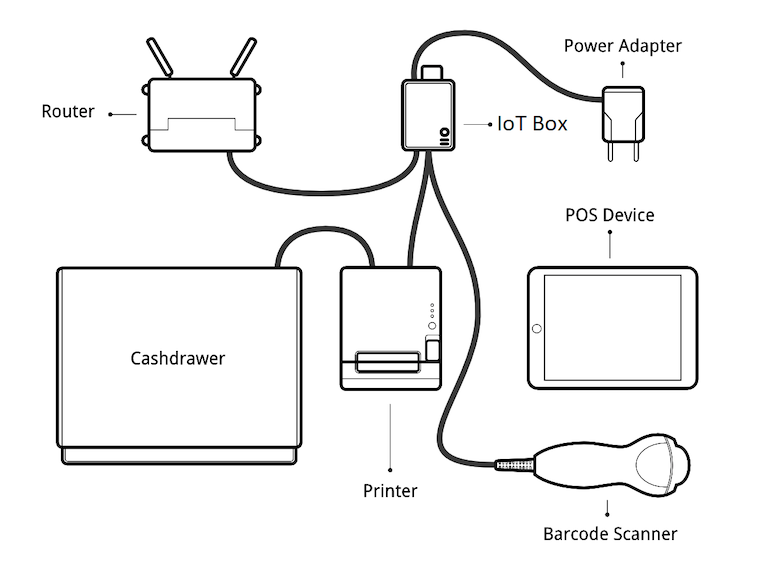
将外围设备连接到物联网系统:
设备
指令
打印机
Connect a supported receipt printer to a USB port or to the network, and power it on. Refer to Order printing.
钱箱
应使用 RJ25 电缆将钱箱连接到打印机。
条形码扫描器
条码扫描器必须以
ENTER字符(键码 28)结束条码,以便与系统兼容。这很可能是条码扫描器的默认配置。比例
客户显示器
Connect a screen to the IoT box to display the PoS order.
支付终端
连接过程取决于终端。请参阅 :doc:` 支付终端文档</applications/sales/point_of_sale/payment_methods>` 。
:doc:`将物联网系统连接到您的 Odoo 数据库 ` 。
In the Connect to a Point of Sale popup that opens, select the Associated POS and click Continue. The IoT system and its devices are automatically linked to the POS.
Tip
Alternatively, access the POS settings and select the POS, or click the vertical ellipsis button (⋮) on a POS card and click Edit. Then, enable IoT Box, select the devices to use with the POS, and click Save.
设置示例