任务关联与依赖
Odoo 项目允许您将项目分解为任务并建立任务之间的关系,以确定它们应该按什么顺序执行。任务依赖项确保某些任务仅在前面的任务完成时才开始。
转到 项目 ,单击 项目 的 ( 垂直省略号 )图标,然后单击 设置 。点击 设置 。点击 设置 标签,查找 任务管理 ,并确保 任务依赖 已启用。
设置任务依赖
Task dependencies can be created from the task form or the project’s Gantt view by linking the successor task (i.e., the task blocked by other tasks) to its predecessor task(s) (i.e., the tasks blocking the successor task).
To create task dependencies from the task form, access the desired task and, in the Blocked by tab, click Add a line. Click View to access the predecessor task. To access the successor tasks from the predecessor task, click the Blocked Tasks smart button.
To create a task dependency from the Gantt view, hover your mouse over the predecessor task, then click one of the dots that appear around it. Drag and drop the dot onto the successor task. An arrow appears, indicating the dependency from the predecessor task to the successor.
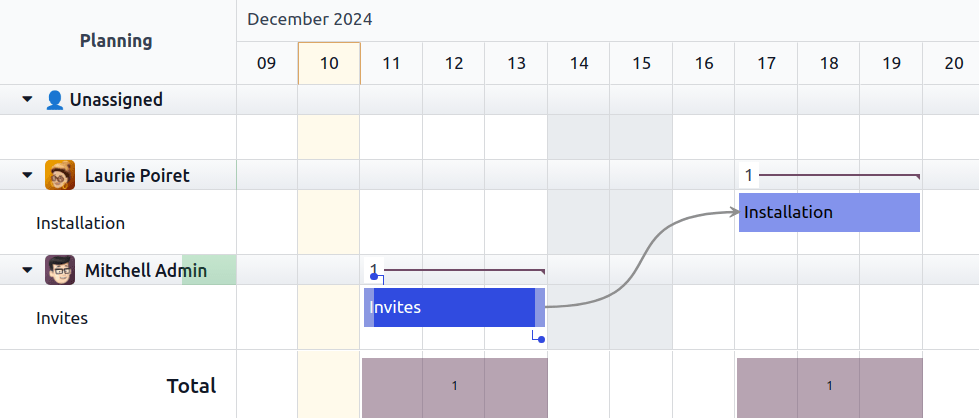
Odoo automatically manages task progress based on their dependency. Successor tasks are assigned the Waiting status and cannot be moved to In Progress until their predecessor task(s) are marked as Approved, Cancelled, or Done.
Remove dependencies
To remove a task dependency, proceed as follows:
From the task form, go to the Blocked by tab and click the (times) button.
From the Gantt view, click the red (times) button that appears at the center of the arrow when you hover your mouse over it.
