认证
当职位需要特定的知识时,需要追踪员工认证,以确保所需知识及认证已就位。
当工作需要特定知识时,可追踪员工的认证(如课程、测试、研讨会),以验证所需技能。Odoo 不受限制地接受任何认证类型。
Important
要在员工档案中添加证书并访问*员工证书*报告,必须安装**网上调查**应用程序。
查看证书
要查看所有员工证书的完整列表,请导航至:。
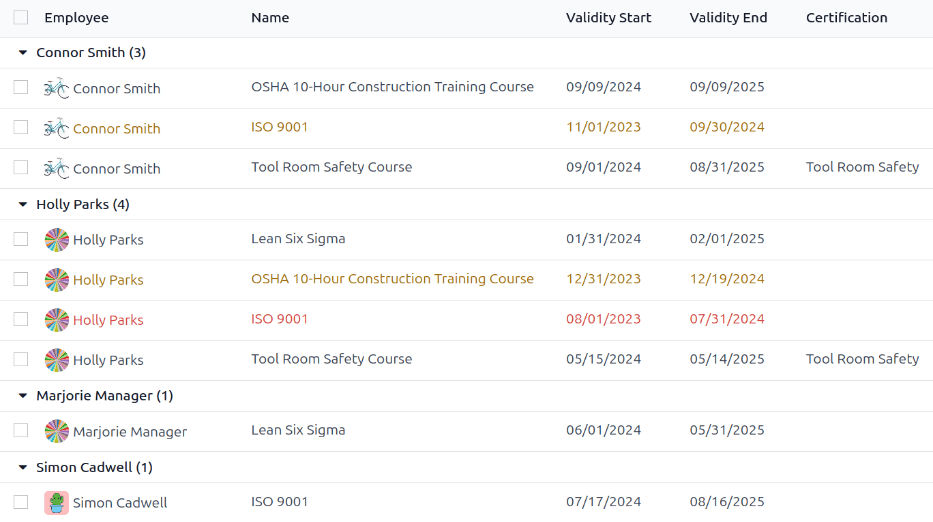
All certifications appear in a list view, grouped by employee. Each certification entry displays the following:
Employee: the employee’s name, along with their avatar image.
Name: the title of the certification.
Validity Start: when the employee received the certification.
Validity End: when the certification expires.
Certification: the corresponding course in the Surveys app that was completed by the employee, if applicable.
The entries are also color-coded. Current certifications that are still valid appear in black, expired certifications appear in red, and certifications that are going to expire within the next 90 days appear in orange.
View certifications by expiration status
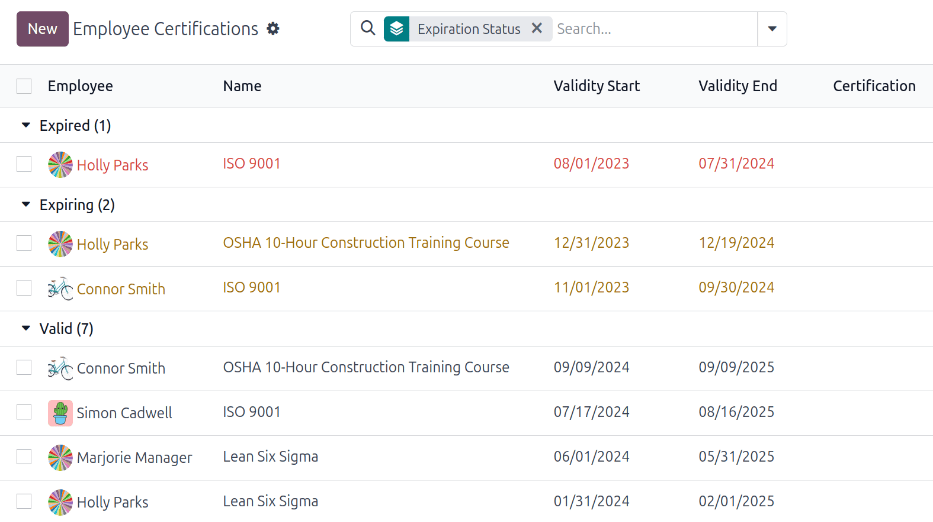
When managing a large number of employees with a variety of certifications, it can be difficult to determine which employees need to keep necessary certifications current in the default list view. In this scenario, it is beneficial to view the certifications by expiration status.
要执行此操作,请前往:menuselection:员工应用程序 --> 报告 --> 认证 。接下来,点击搜索栏中的:icon:fa-caret-down(Toggle Search Panel)`图标,然后点击 :guilabel:`添加自定义分组 ,会显示一个下拉菜单。点击 到期状态 ,然后在下拉菜单外点击一下以关闭它。
After doing so, all the certifications are organized by status, starting with Expired certifications, then certifications that are Expiring soon (within the next 90 days), and lastly, certifications that are still Valid.
按到期状态筛选认证,以找出即将到期的认证,并确定必须更新认证的员工。
Log a certification
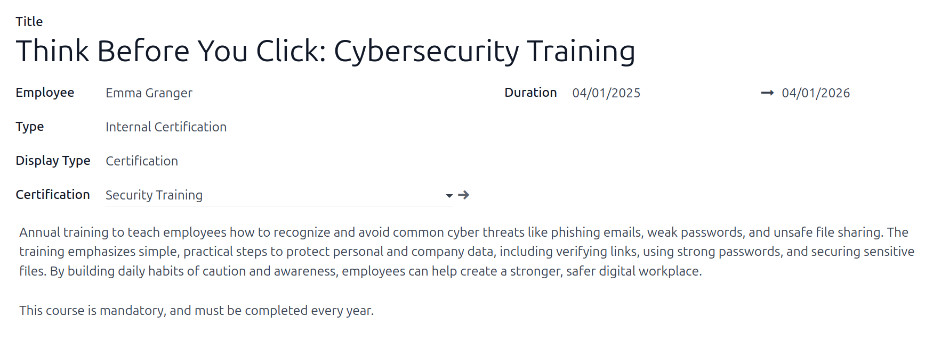
To log a certification for an employee, navigate to . Click New, and a blank certification form loads. Enter the following information on the form:
Title: Enter a short description for the certification in this field.
Employee: Using the drop-down menu, select the employee who received the certification.
类型 :使用下拉菜单选择所获证书的类型。此字段将决定证书在员工简历中的显示位置。要创建新的 类型 ,请在字段中输入类型,然后点击 创建[类型] 。
The default options are:
经验 :选择此项,认证将出现在:doc:
员工表单 <new_employee>上*简历*标签页的*经验*部分。经验条目通常是以前的工作或实习经历。Education: Select this option to have the certification appear in the Education section of the Resume tab on the employee form.
社交媒体 `:选择此项,认证将出现在:doc:`员工表单 <new_employee> 上*简历*标签页的*社交媒体*部分。社交媒体条目通常与数字营销、社交媒体管理以及来自社交媒体平台的特定培训相关的认证有关。
内部认证 :选择此项,认证将出现在 员工表单 上*简历*标签页的*内部认证*部分。内部认证条目与公司创建的、完成后会有关联认证的课程、培训或项目挂钩。
已完成的内部培训 :选择此项,认证将出现在:doc:
员工表单 <new_employee>上*简历*标签页的*已完成的内部培训*部分。已完成的内部培训条目通常与公司为特定流程创建的培训相关。这些培训不会产生任何认证,但会被记录在员工档案中以表明已完成培训。
显示类型: 选择该字段中认证的可见性。默认选项为:
Classic: Select this option to have the certification appear in the Resume section of the employee form, and not appear on the Employee Certifications report.
证书 :选择此选项可使证书显示在员工表单的*简历*部分,并**显示在*员工证书*报告中。选择此选项后, :guilabel:`显示类型` 字段下方会出现一个 :guilabel:`认证` 字段。使用下拉菜单,选择相应的**网上调查**应用程序认证。只有安装了 **网上调查 应用程序,才会出现此字段。
课程 :选择此选项可使认证显示在员工表单的*简历*部分,而**不**显示在*员工认证*报告中。选择此选项后, 显示类型 字段下方会出现一个 课程 字段。使用下拉菜单,选择员工参加的相应 在线学习 。只有安装了**在线学习**应用程序,才会出现此字段。
描述: 在此字段中输入认证描述。
Duration: Click into the first field, and a calendar pop-over window appears. Click on the start and end dates for the certification validity period. When the correct dates are selected, click Apply, and both fields are populated.
Note
一旦记录了员工的认证,就可直接在员工表单中添加*相同类型*的新认证(即 教育 或 内部认证 ),而不是在 员工认证 仪表板中添加。
在**员工**应用程序主仪表板中,点击员工档案以打开其员工表。在 简历 标签页中,点击相应认证行末尾的 添加 按钮。
此 添加 按钮**只**出现在已有认证的员工档案中。
