基于历史自动建议采购量
为了实现一个主动的推送式补货策略,*建议*功能基于历史需求建议采购量。
关键参数
补货: 预测覆盖窗口(天).
基于 : 定义历史需求的期间: 上7天、30天、3个月、12个月、或去年同月或去年同季度。
因子 : 成长或下降因子(默认100%)。根据期间,将历史需求乘以此百分比,以确定应补货多少需求。(例如,输入`120%`,如果销售预计比上一个期间增长20%)
需求计算
为了估计需求,Odoo 将所有 已验证的出库 , 组件消耗在制造订单中 (MOs)或使用来自指定仓库的 补货子供应商 ,来自 Based on 期间的仓库。平均每日需求 是此出库或消耗项目的和除以 Based on 期间中的天数,乘以 Factor。估计需求 是 平均每日需求 乘以 Replenish For 天数。
Note
仅 已分配 或 已确认 的出库项目被用于计算平均每日需求,销售报价或制造订单在 草稿 状态下不会被考虑,直到被验证。
Tip
在多仓库设置中,内部出库项目也会被用于需求估计。在中央仓库向单个商店分发产品时,中央仓库的 平均每日需求 将包括内部转移至单个商店。
推荐数量
要确定建议数量,Odoo 将 估计需求 减去当前可用库存数量和所有ingoing出库项目。
Example
In example 1, Odoo recommends 19 units to
Replenish for 14 days Based on the past month’s 40 delivered units.
Prerequisite setup
Purchase and Inventory apps must be installed.
Validate at least one delivery order for each product.
Ensures there is a past delivery record so the system can calculate average daily demand.
Add a vendor to the vendor pricelist with a purchase price for each product.
The Suggest feature is vendor-specific, so each product needs a matching vendor for accurate purchase quantity and price calculations.
Set the Product Type to Goods and ensure the product is Tracked by quantity.
Ensures the system can manage stock levels and calculate recommended replenishment quantities for tangible items.
Suggest quantities to order
To suggest quantities based on past sales, navigate to the app. Create a New RFQ or select an existing one.
In the RFQ, set the Vendor field to the chosen supplier.
In the Products tab, click the Catalog button to view that vendor’s items.
Important
Verify that each product in the catalog is configured with the chosen vendor and that the Purchase Order is in the RFQ stage
Tip
By default, products listed in the product catalog are filtered by vendor.
Remove the filter in the search bar to view all items or use the built-in Group By for Product Category.
Inside the Catalog, toggle Suggest in the left sidebar to activate the feature. Complete its fields as follows:
Replenish for: Number of days intended to stock products.
Based on: There are two inputs:
Period: select the time frame that represents historical demand (e.g., Last 30 Days, April 2024).
Growth factor %: scale the demand up or down (e.g., 120% for 20% growth, 30% for 70% drop).
The total in the bottom shows the order value. Odoo multiplies the vendor’s Unit Price by the suggested quantity.
Once the parameters are confirmed, click Add All to add all suggestions to the order. Adjust amounts if needed, then click Back to Quotation to confirm the final numbers on the RFQ.
Example Workflow
Recommend at 100% growth
A company needs to replenish orchids for 14 days, referencing the last 30 days of historical data, assuming the revenue growth is the same this month, at 100%.
Delivered/consumed within the period:
20 units delivered 15 days ago in a
WH/OUToperation.20 units delivered 1 day ago
Total: 40 units in the last 30 days
Variables
Replenish for: 14 days
Based on: 30 days
total delivered/consumed in the period: 40 units
Factor: 100%
Suggested quantity
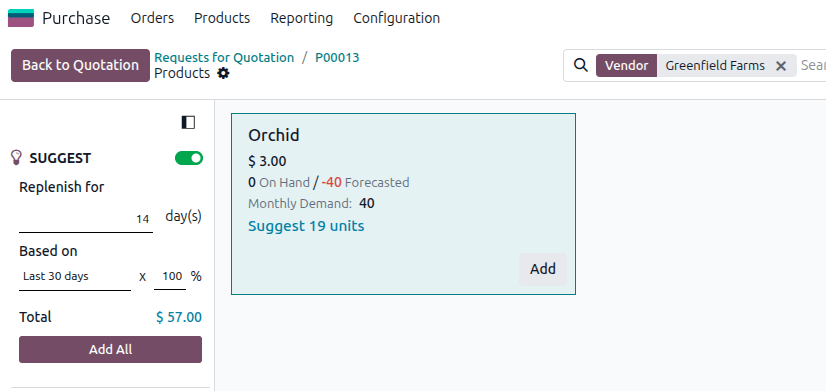
Suggestion to purchase 19 orchids. Since the Unit Price is $3, \($3 \times 19 = $57\), which is the total amount displayed.
Planning for Mother’s Day
To better plan for the upcoming Mother’s day week, the company changes Based on to the same month last year (May 2024). As the business has grown since then, they also decide to add a 120% growth factor.
Variables
Replenish for 7 days
Based on: May 2024,
total delivered/consumed in the entire May 2024 month: 361 units
Factor: 120%
Suggested quantity
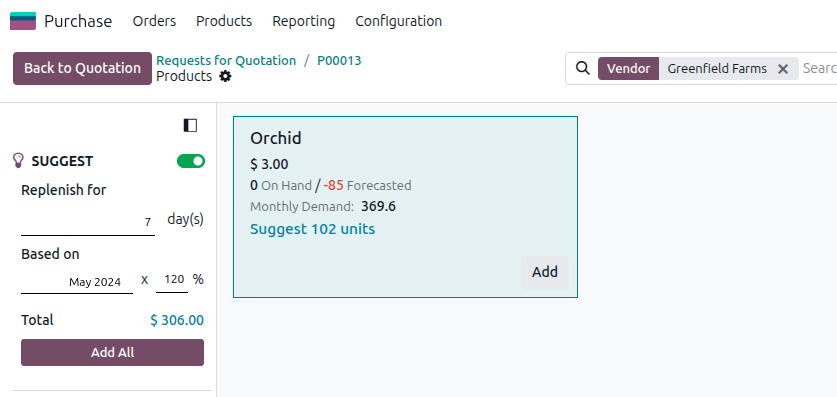
Suggestion to purchase 102 orchids. Each orchid costs $3 with the chosen vendor, so \($3 \times 102 = $306\).
Best practices
Validate historical data
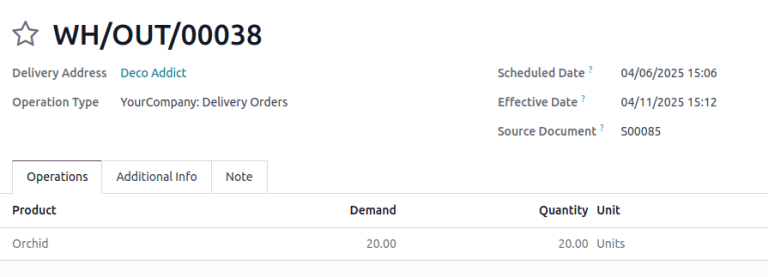
Forecasts are based on validated delivery orders, manufacturing orders, and other inventory actions that consume quantities. For delivery orders, the Effective Date field is considered the date the quantities were consumed.
Maintain accurate vendor pricelists
Review and update vendor pricelists to reflect the latest pricing and supplier information to ensure correct suggestions.
Test sales projections based on seasonality
Reference prior months or quarters to capture seasonal fluctuations and experiment with growth and decline factors to project sales.
Review suggestions critically
Although the tool provides a baseline recommendation, always apply business judgment. Market changes, promotions, and upcoming events can affect actual demand.
