费用类别
Odoo 费用 简化了支出管理。员工在 Odoo 中提交费用后,管理和会计团队会对其进行审核。一旦获得 批准 ,便可处理付款,并将 款项返还员工 完成报销流程。
更多内容
查看费用类别
追踪费用支出的第一步是为公司配置不同类型的费用(在 Odoo 中作为 费用类别 进行管理)。每个类别可根据需要具体或概括。同时,费用类别也可以配置为根据特定价格进行报销,或者允许使用特定价格来生成费用报告。
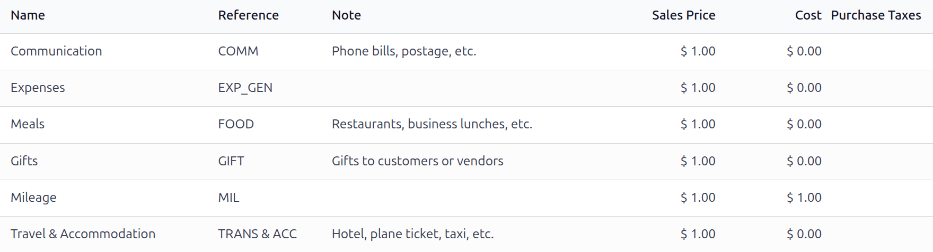
要查看默认费用类别,请导航至 。
默认的费用类别允许为常见的费用创建支出,包括通讯费、餐费、礼品、行驶里程以及其他旅行费用。对于这些默认类别之外的费用,可以使用通用费用类别 EXP_GEN 。如果公司有特定的常见报销费用,并希望单独跟踪它们,可以 创建新的费用类别 或修改现有的费用类别。
创建新的费用类别
某些公司需要更多的费用类别, 费用报销 模块包括此功能。对于其它情况,新的费用类别可以创建。
Example
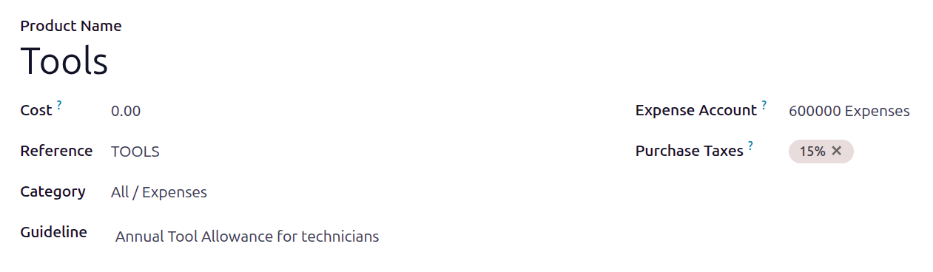
A company that trains car mechanics allows its technicians to purchase $500 worth of tools in a
year. In this situation, the company creates a new category called TOOLS to track all tool
expenses.
To create a new expense category, navigate to . Click New, and a new expense category form loads.
Note
Expense categories are managed like products in Odoo. The expense category form follows the standard product form in Odoo, and the information entered is similar. Expense products are referred to as expense categories throughout this document since the main menu refers to these as Expense Categories.
Enter the following fields on the form:
Product Name: Enter a name for the category that is short and informative.
Cost: If employees can report the actual cost of an expense, and are reimbursed the reported amount, leave the field set to
0.00. If the expense should always be reimbursed for a specific price, enter the amount in this field. If a price is entered, a per field appears with Unit populated by default. Unit covers most expense situations, but if the reimbursement is based on weight, length, volume, etc., choose the corresponding type of unit using the drop-down menu.Example
下面是一些示例,说明何时应在产品上设置特定的 成本 而不是将 成本 设置为
0.00:Meals: If employees are reimbursed for their full meal cost, set the Cost to
0.00. When an employee logs an expense for a meal, they enter the actual amount of the bill and are reimbursed for that amount. An expense for a meal costing $95.23 would equal a reimbursement of $95.23.Mileage: If employees receive a flat rate for each mile they drive, set the Cost to
1.00. When an employee logs an expense for the miles driven, they enter the number of miles driven in the Quantity field, and are reimbursed $1.00 per mile they reported. An expense for 100 miles would equal a reimbursement of $100.00.Per Diem: If employees receive a daily flat rate of $125.00 when traveling, set the Cost to
125.00. An expense for three days of per diem costs (meals, incidentals, taxi fare, etc.) would equal a reimbursement of $375.00.
Note
在费用类别表单中, 成本 字段始终可见,但只有在 重新开具发票费用 部分下选择了 销售价格 时, 销售价格 字段*才*可见。否则, 销售价格 字段将被隐藏。
Reference: Enter a short reference for the expense, such as
FOODorTRAVEL. This reference is used when emailing expenses.Category: Using the drop-down menu, select the category the expense falls under. It is recommended to use the default category
All / Expenses, but another category can be selected if the accounting department requires it.Company: If in a multi-company database, select the company the expense category applies to. If the expense category applies to all companies, leave this field blank.
Guideline: Enter some rules or important information for the expense category. This is visible in the Note column on the Expense Category dashboard.
Example
An expense category for expenses related to working from home may have a Name of
WFH, and the Guideline may sayMonitors, Chairs, & Other Home Working Costs.Expense Account: If using the Odoo Accounting app, select the CoA the expense should be logged on.
Important
Check with the accounting department to determine the correct account to reference in this field as it affects various reports.
Purchase Taxes and Sales Taxes: Enter the default taxes that are applied when purchasing or selling this product, if applicable.
Note
The Sales Taxes field is only visible if the Sales app is installed, and either the At cost or Sales Price options are selected in the invoicing section.
Tip
It is considered good practice to use a tax that is configured with Tax Included in Price. Taxes are automatically configured if these are set.
开票部分
If the Sales app is installed, an invoicing section is visible. This section allows the expense to be reinvoiced to customers on sales orders.
If the expense cannot be reinvoiced, enable the No option. If the expense category can be reinvoiced, enable either of these options:
At cost: Select this option to have the expense item reinvoiced at the price set in the Cost field.
Sales Price: Select this option to have the expense item reinvoiced at the sales price. When enabled, a Sales Price field appears beneath the Product Name field. Enter the sales price in the new field.
Example
A heating and cooling company offers at-home repairs on the furnaces and central air units it sells. Their technicians are sub-contracted, and use their own vans, tools, and parts.
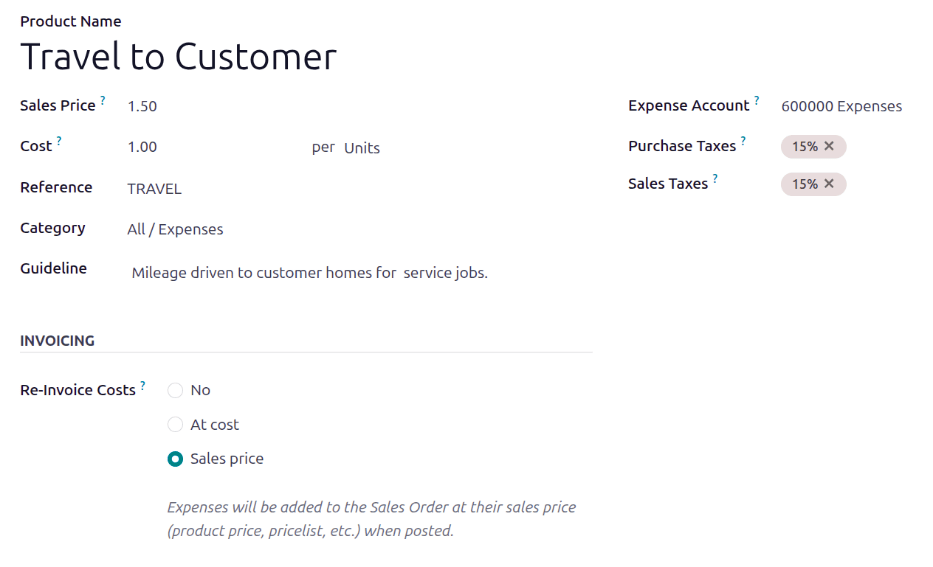
As part of their contracts, technicians are reimbursed for their travel. They receive $1.00 for every mile they drive. Additionally, the customer must pay for the travel as part of their service contract. The customer pays $1.50 for every mile the technician drives to their location.
To configure this expense, the Sales Price is set to
1.50and the Cost is set to1.00.