页面
Odoo允许您为您的网站创建页面,并根据您的需要自定义其内容和外观。
静态 页面,例如主页或任何 自定义创建的页面 `,包含固定的内容,不会动态变化。您可以手动创建这些页面,定义它们的 URL,并根据需要调整它们的 :ref:`属性 ` 。 另一方面, **动态** 页面是动态生成的。例如,当您安装一个应用程序或模块(如 `/shop 或 /blog )或发布新产品或 博客文章 时,Odoo 自动生成的所有页面都是动态页面,因此管理方式不同。
页面创建
可以从 前端 和 后端 创建网站页面。要创建新的网站页面,请执行以下操作:
打开 网站 应用程序,单击右上角的 + 新建 ,然后选择 页面 ;
或者转到 并点击 新建 。
In the New Page selection menu, click on a template. They are sorted by type:
Basic: Multi-purpose page. A blank page is also available to start from scratch.
About: Information about your brand.
Landing Pages: Summary of company content and info.
Gallery: Photos and media showcase.
Services: Focus on what you’re selling and contact.
Pricing Plans: Highlight on subscription and prices.
团队 :您公司背后的团队。
自定义 :选择自定义模板。要在此类别中添加模板,请打开要保存为模板的页面,然后转到 ,输入 页面标题 , 编辑页面属性 ,启用 是模板 ,然后点击 保存 。
Enter a Page Title; this title is used in the menu and the page’s URL.
点击 创建 。
If needed, customize the page’s content and appearance using the website editor, then click Save.
发布 页面。
Tip
禁用 添加到菜单 ,如果页面不应出现在菜单中。
页面管理
发布/取消发布页面
页面需要发布才能让网站访客看到。要发布或取消发布页面,请访问该页面并切换右上角的开关,从 未发布 切换到 已发布 ,反之亦然。

Note
也可以:
从 页面属性 中发布/取消发布页面,您可以在其中定义发布日期和/或根据需要限制页面的可见性;
同时发布/取消发布多个页面:进入 ,选择页面,然后点击 操作 并选择 发布 或 未发布 。
或者,您可以通过 将任何 静态页面 定义为您的主页。选择 发布 选项卡并启用 用作主页 。
页面属性
要修改 静态页面的 属性,请访问要修改的页面,然后转到 ,在这里可以修改以下属性:
页面 URL:在字段中修改页面 URL。在这种情况下,您可以根据需要将旧 URL 重定向到新 URL。为此,请启用 重定向旧 URL ,然后选择 重定向 的 类型 :
301 Moved permanently: to redirect the page permanently.
302 Moved temporarily: to redirect the page temporarily.
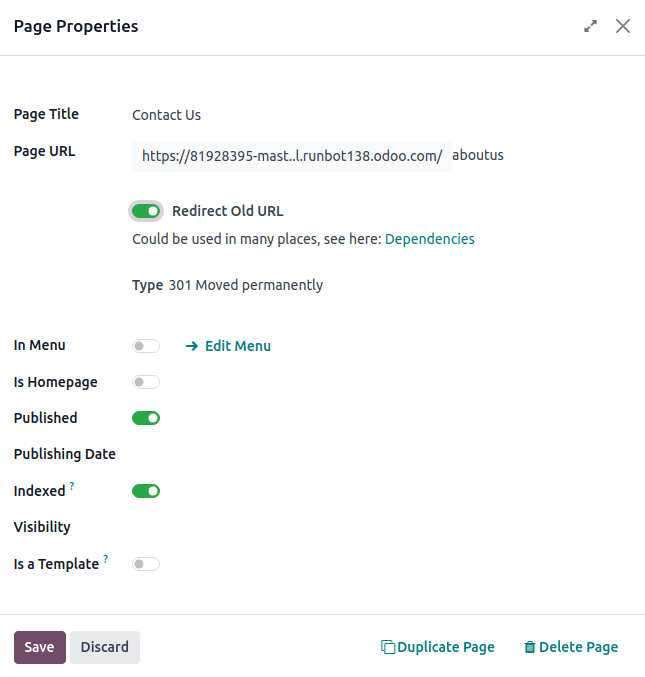
In Menu: Disable if you don’t want the page to appear in the menu.
Is Homepage: Enable if you want the page to be the homepage of your website.
已发布 :启用发布页面。
发布日期 :要在特定日期和时间发布页面,请点击该字段,设置日期和时间,然后按 回车 或点击 应用 以验证您的选择。
索引 :如果不希望页面出现在搜索引擎结果中,请禁用。
Visibility: Select who can access the page:
公开 :每个人都可以访问该页面。
已登录 :只有已登录的用户才能访问该页面。
Restricted Group: Select the user access group(s) in the Authorized group field.
With Password:在 密码 字段中输入访问页面所需的密码。
是模板 :切换开关以将页面保存为模板并添加到 定制 类别。
Tip
这些属性中的*部分*也可以通过 批量修改。
复制页面
To duplicate a page, access the page, then go to , and click Duplicate Page. Enter a Page Name, then click OK. By default, the new page is added after the duplicated page in the menu, but you can remove it from the menu or change its position using the menu editor.
删除页面
要删除页面,请执行以下操作:
URL redirect mapping
URL redirect mapping consists in sending visitors and search engines to a URL different from the one they initially requested. This technique is used, for example, to prevent broken links when you delete a page, modify its URL, or migrate your site from another platform to an Odoo domain. It can also be used to improve SEO全球获客.
要访问现有的 URL 重定向并创建新的重定向, 激活开发人员模式 并转到 。
要创建新的重定向,请单击 新建 按钮,然后填写以下字段:
Name: Enter a name to identify the redirect.
Action: Select the type of redirection:
URL 来自:输入要重定向的 URL(例如,
/about-the-company)或搜索所需的 动态页面 并从列表中选择。URL to: For 301, 302, and 308 redirects, enter the URL to be redirected to. If you want to redirect to an external URL, include the protocol (e.g.,
https://).Website: Select a specific website.
Sequence: To define the order in which redirections are performed, e.g., in the case of redirect chains (i.e., a series of redirects where one URL is redirected to another one, which is itself further redirected to another URL).
切换 激活 开关以停用重定向。
Important
404, 301, and 302 redirections are meant to migrate traffic from unpublished or deleted pages to new pages, while the 308 redirect is used for permanent redirections of existing pages.
更多内容
“关于重定向和搜索 <https://developers.google.com/search/docs/crawling-indexing/301-redirects>的谷歌文档”_
