会员续订
会员续订是客户自愿选择继续订阅产品的服务。订阅者根据合同约定的时间间隔(每周、每月、每年等)选择续订。大多数公司喜欢自动化的续订流程,但某些情况下也使用手动的续订。
公司可以使用Odoo的 会员订阅 应用程序来管理其所有会员订阅。续订可以自动或手动处理,每个续订订单都可以包含额外的产品或 upsell,续订订单也可以批量查看以查找需要续订的会员。
手动创建一个续订
为续订创建手动quotation,订阅必须满足 certain prerequisites。
确认一个带有订阅产品的报价quotation。
配置的 订阅计划 必须被选择。
为初始订阅的顾客付款必须开票并登记。
To check if an existing subscription quotation meets the prerequisites, navigate to and select the desired quotation from the list. Properly configured subscriptions show as being in the Sales Order stage, have an In Progress tag, and have the Renew button in the row of buttons directly above the order form.
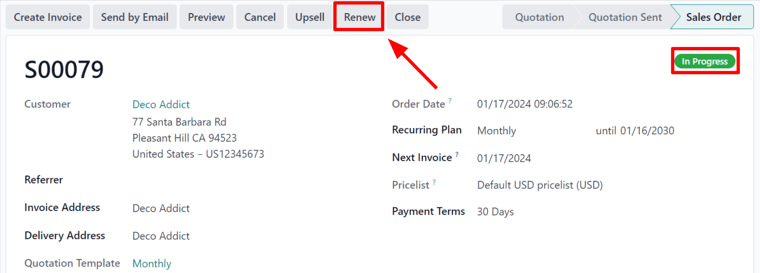
When the Renew button is clicked, Odoo instantly presents a new renewal quotation, complete with a Renewal Quotation tag. Important reference information like the start date and next invoice date are automatically added to the renewal quotation’s chatter.
From here, follow the standard sales flow to confirm the quotation, invoice the order, and register payment.
Once the renewal quotation is confirmed, it becomes a sales order and a Sales History smart button appears at the top of the page. When the Sales History smart button is clicked, Odoo loads a new page showcasing the different sales orders attached to this subscription, along with their individual Subscription Status.

