企业食堂
Odoo中的 午餐 应用允许用户直接从数据库方便地订餐和支付餐费。
在员工可以使用 午餐 应用之前,需要进行多项配置:设置 、供应商 、地点 、产品 和 产品类别 。创建并配置好这些项目后,员工便可以查看菜单并订餐。
设置
在 设置 菜单中,只需配置两个项目:透支设置和通知。要访问设置,请前往 。
配置以下项目:
Lunch Overdraft: enter the maximum overdraft amount for employees. The currency format is determined by the localization setting of the company.
送达通知 :设置当餐食送达时,用户通过**内部讨论**应用收到的消息。该字段默认填充消息`您的午餐已送达,请慢用!` ,但可根据需要进行修改。
Tip
如果数据库安装了多种语言,**午餐**应用中的许多表单都提供了为不同字段输入翻译的选项。
If translations are available to be configured, a language code appears next to a translatable field on a form. To add translations for that field, click the two letter language code (for example, EN for English) and a translation pop-up window appears.
The following is an example for the Reception notification field in the settings menu:
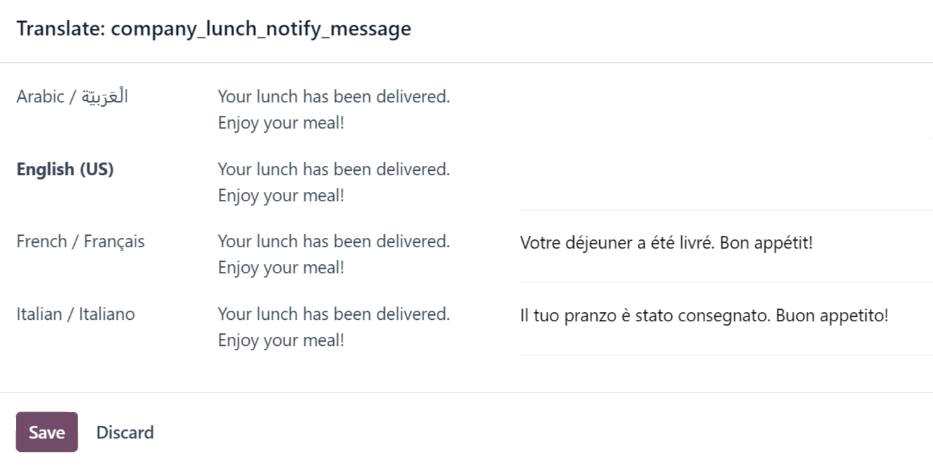
前往 。点击 送达通知 部分下方文本框右上角的 EN 。系统会加载一个 翻译:company_lunch_notify_message 弹出窗口,其中提供了为数据库使用的其他语言输入翻译的选项。
The first column lists the different languages in alphabetical order, with the currently selected language in bold. The second column has the currently configured message in each column. The last column in the far-right provides a text box to type in a translation for each language.
Enter the text that should appear for each language, then click Save.
地点
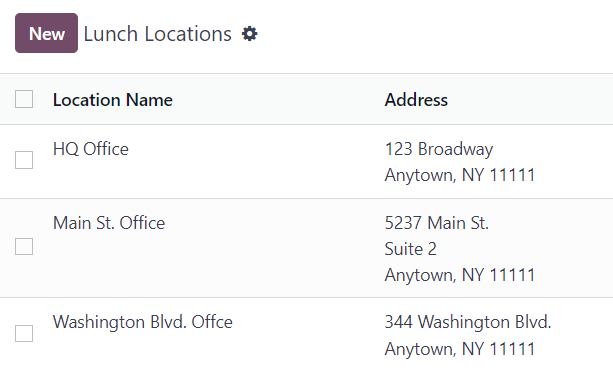
默认情况下,安装**午餐**应用后,Odoo会创建一个名为`总部办公室`的地点。如果公司有多个办公地点,则必须对这些地点进行配置。
要添加地点,请前往 。当前已配置的地点会以列表视图显示。点击左上角的 新建 按钮,列表中的最后一个地点下方会出现一个空白行。
在该字段中输入位置名称。然后,点击名称右侧的 地址 字段,输入地点的地址。可以在地址栏中输入多行。
对所有需要添加的位置重复此操作。
警告
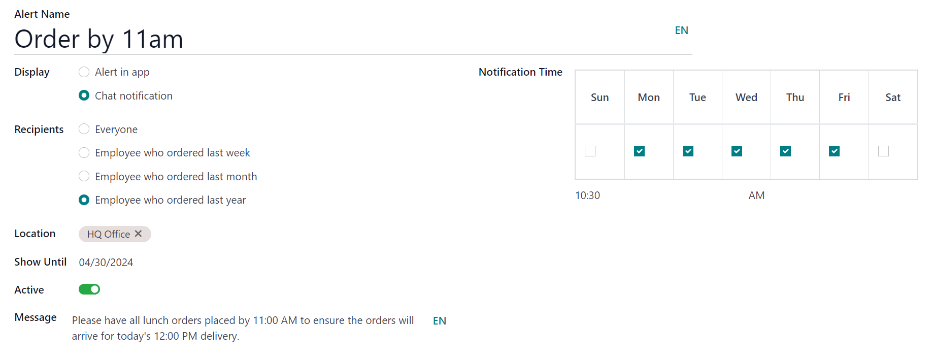
可以设置提醒,这些提醒既可以显示在**午餐**应用中,也可以通过**内部讨论**应用发送给特定员工。
默认情况下,系统未预先配置任何提醒。要设置提醒,请前往 。点击左上角的 新建 按钮,系统会加载一个空白的午餐提醒表单。在表单上输入以下信息:
提醒名称 :为提醒输入一个名称。名称应简短且具描述性,例如新午餐供应商或上午11点前下单。此字段为**必填项**。
显示方式 :选择提醒是显示在**午餐**应用中( 应用内提醒 ),还是通过**内部讨论**应用的聊天窗口发送给员工( 聊天通知 )。
收件人: 此字段仅在 聊天通知 被选中为 显示 选项时才会出现。选择接收聊天提示的对象。选项包括: 所有人 、 上周订购的员工 、 上月订购的员工 或 去年订购的员工 。
位置: 从下拉菜单中选择警报应出现的位置。可选择多个地点。此字段为**必填**,因此,如果警报适用于所有地点,请从下拉菜单中选择所有地点。
Show Until: if the alert should expire on a specific date, select the date from the calendar picker.
Active: this option is on (appears green) by default. To turn off the alert, click the toggle so that it no longer appears green.
Message: Enter the alert message in this field. This field is required.
Notification Time: select the days of the week the alert should be sent. By default, all seven days are active. Click on a checkbox to change the setting from active to inactive.
如果 显示 选项中选择了 聊天通知 ,则还会出现 时间 字段。输入发送聊天信息的时间。然后,使用 时间 字段右侧的下拉菜单选择时间是 上午 还是 下午 。