费用统计分析
公司的一项重要任务是跟踪费用,以便了解费用情况并识别趋势。费用报告允许获得详细的信息,例如哪个费用类别被报销最多,哪个员工报销最多,以及是否有任何时间段所花费的更多费用。
查看费用统计分析报告
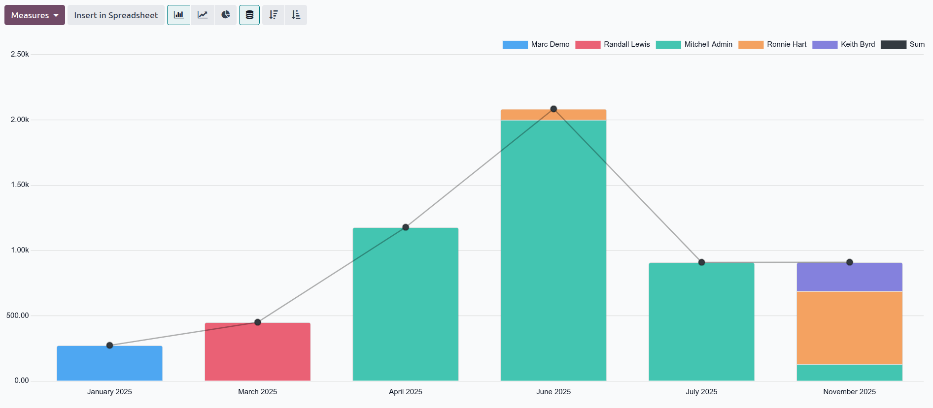
要查看默认的 费用分析 报表,请导航至 。 费用分析 报表显示当前年的所有费用,以堆叠条形图显示,按月分组。
查看员工费用
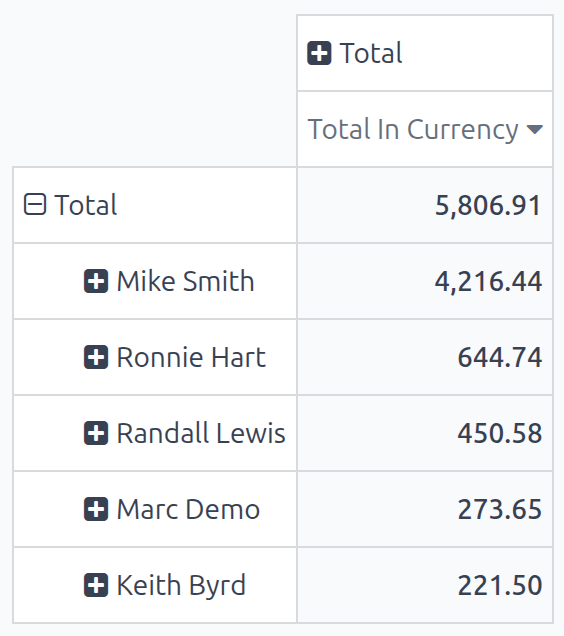
It is possible to view the data so that the total cost of expenses by employee is visible. To view the report in this way, navigate to . Next, click the (Pivot) icon to view the data in a pivot table.
This presents the data with the employees populating the rows, and the total monthly expenses populate the columns. Next, click Total at the top of the monthly columns to hide the individual monthly totals, and present only the total amount for the year.
To present the data in either ascending or descending total, click the Total In Currency box, and the information is organized first in ascending order, starting with the smallest amount. Click Total In Currency again to reverse the order, and present the highest amount first.
Example
In this example it can be determined that Mike Smith has the highest amount of expenses, totaling 4,216.44. This is almost seven times higher than Ronnie Hart, who has the second highest expenses, with a total of 644.74.
查看费用类别
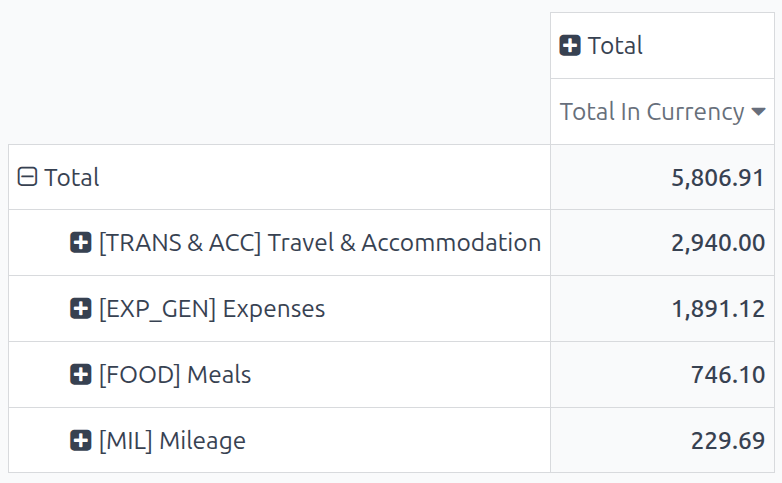
It is possible to view the data so that the total cost of expenses by category is visible. To view the report in this way, navigate to . Next, click the (Pivot) icon to view the data in a pivot table.
This presents the data with the employees populating the rows, and the total monthly expenses populate the columns. Next, click Total at the top of the employees column. Click Total that appears in place of Total, revealing a drop-down menu of options. Click Category, and the expense categories now populate the rows.
Next, click Total at the top of the months column to hide the individual months, and only show the annual total for each category.
To present the data in either ascending or descending total, click the Total In Currency box, and the information is organized first in ascending order, starting with the smallest amount. Click Total In Currency again to reverse the order, and present the highest amount first.
Example
In this example, it can be determined that the company spent the most on travel expenses, with the expense category [TRANS & ACC] Travel & Accommodation incurring 2,940.00 of expenses for the year. The company reimbursed mileage the least, with only 229.69 in [MIL] Mileage expenses.