Adyen
通过连接 Adyen支付终端,您可以为客户提供流畅的支付流,同时简化收银员的工作。
Important
配置
首先在 Adyen网站 创建您的Adyen账户。然后,按照终端屏幕上描述的步骤登录终端。
生成Adyen API密钥
Adyen API 密钥 用于验证来自您的 Adyen 终端的请求。要生成 API 密钥,请转至您的 ,然后 创建 新凭证或选择 现有 凭据。点击 生成 API 密钥 并保存密钥,将其粘贴到 创建付款方式 中的 Odoo Adyen API 密钥 字段。
更多内容
找到Adyen终端标识符
Adyen 终端标识符 是终端的序列号,用于识别硬件。
要找到此编号,请转到您的 ,选择要关联的终端,并保存其序列号,将其粘贴到 Odoo Adyen 终端标识符 字段中的 创建付款方式 。
设置活动 URL
要让 Odoo 知道何时付款,您必须配置终端 活动 URL 。要执行此操作,
登录 Adyen 网站 ;
进入 并选择已关联的终端;
在终端设置中,点击 整合 ;
将 切换到解密模式以编辑此设置 字段设置为 解密 ;
点击 铅笔图标 按钮,然后在 活动 URL 字段中输入您的服务器地址,然后输入
/pos_adyen/notification;点击屏幕底部的 保存 ,以保存更改。
配置支付方式
请在 应用设置 中启用支付终端,并 创建相关的支付方式 。将日记账类型设置为 银行 ,并在 使用支付终端 字段中选择 Adyen 。
最后,在必填字段中填写您的 Adyen API 密钥 、Adyen 终端标识符 和 Adyen 商户账户 。
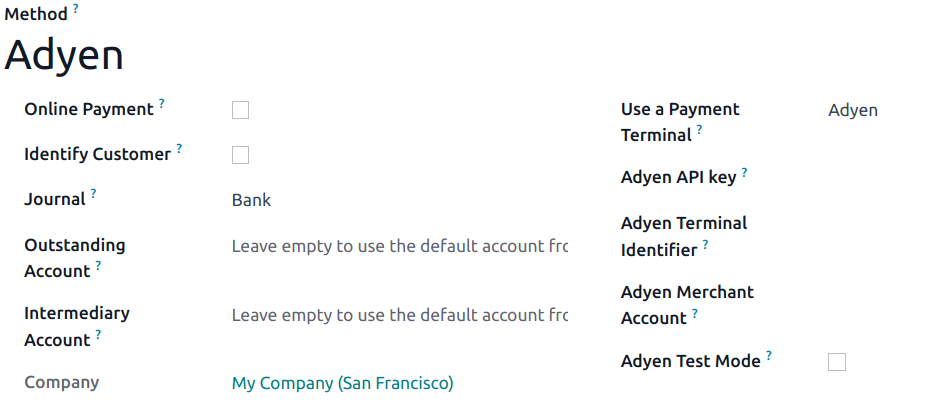
创建了付款方式后,您就可以在 POS 设置中选择它。为此,请进入 POS 设置 ,点击 编辑 ,然后在 付款 部分添加付款方式。