翻译模块
本节说明如何为您的模块提供翻译能力。
注解
如果您想参与 Odoo 本身的翻译工作,请参阅 Odoo Wiki 页面。
导出可翻译术语
模块中的许多术语都是隐式可翻译的。因此,即使您没有为翻译做任何专门的工作,也可以导出模块的可翻译术语,并可能找到可以处理的内容。
翻译导出通过管理界面进行:登录后端界面并打开
将语言保留为默认值(新语言/空模板)
选择 PO File 格式
选择您的模块
点击 导出 并下载该文件
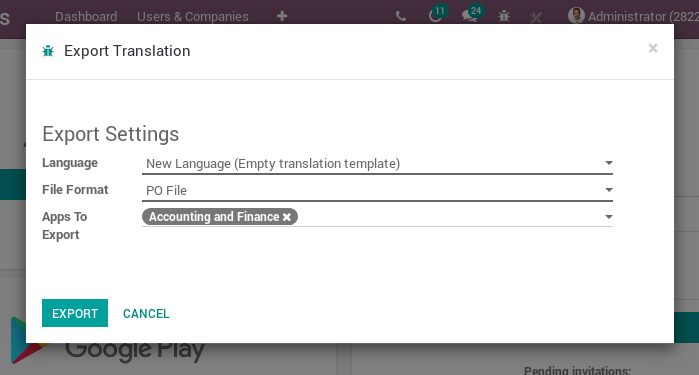
这样会得到一个名为 yourmodule.pot 的文件,应将其移动到 yourmodule/i18n/ 目录中。该文件是一个 PO 模板,仅列出可翻译的字符串,可据此创建实际的翻译(PO 文件)。PO 文件可以使用 msginit 创建,也可以使用 POEdit 等专用翻译工具创建,或者直接将模板复制为名为 language.po 的新文件。翻译文件应放在 yourmodule/i18n/ 中,与 yourmodule.pot 放在一起,Odoo 会在安装相应语言时自动加载它们,安装语言可前往 。
注解
安装或更新模块时,也会一并安装或更新所有已加载语言的翻译
隐式导出
Odoo 会自动从“数据”类型的内容中导出可翻译字符串:
在非 QWeb 视图中,所有文本节点都会被导出,
string、help、sum、confirm和placeholder属性的内容也会被导出QWeb 模板(服务器端和客户端)中,除
t-translation="off"块内部之外,所有文本节点都会被导出,title、alt、label和placeholder属性的内容也会被导出对于
Field,除非其模型标记了_translate = False:其
string和help属性会被导出如果存在
selection且为列表(或元组),则会被导出如果其
translate属性设置为True,则会导出其所有现有值(跨所有记录)
显式导出
在 Python 代码或 JavaScript 代码中遇到更“命令式”的情况时,Odoo 无法自动导出可翻译术语,因此必须显式标记为导出。具体做法是将字面量字符串包裹在函数调用中。
在 Python 中,包裹函数是 odoo.api.Environment._() 和 odoo.tools.translate._():
title = self.env._("Bank Accounts")

# old API for backward-compatibility
from odoo.tools import _
title = _("Bank Accounts")
在 JavaScript 中,包裹函数通常是 odoo.web._t():
title = _t("Bank Accounts");
警告
只有字面量字符串可以标记为导出,表达式或变量则不行。对于字符串需要格式化的情形,这意味着必须标记格式字符串,而不是格式化后的字符串
_ 和 _t 的惰性版本分别是 Python 中的 odoo.tools.translate.LazyTranslate 工厂和 JavaScript 中的 odoo.web._lt()。翻译查找仅在渲染时执行,可用于在全局变量的类方法中声明可翻译属性。
from odoo.tools import LazyTranslate
_lt = LazyTranslate(__name__)
LAZY_TEXT = _lt("some text")
注解
默认情况下,模块的翻译 不会 暴露给前端,因此无法从 JavaScript 访问。为此,模块名必须以 website 为前缀(就像 website_sale、website_event 等),或通过为 ir.http 模型实现 _get_translation_frontend_modules_name() 来显式注册。
示例如下:
from odoo import models

class IrHttp(models.AbstractModel):
    _inherit = ['ir.http']

    @classmethod
    def _get_translation_frontend_modules_name(cls):
        modules = super()._get_translation_frontend_modules_name()
        return modules + ['your_module']
上下文
进行翻译时,翻译函数需要知道 语言 和 模块 名称。使用 Environment._ 时语言是已知的,您可以将模块名作为参数传入,否则将从调用方提取。
对于 odoo.tools.translate._,语言和模块是从上下文中提取的。为此,我们会检查调用方的局部变量。这种方法的缺点是容易出错:我们会尝试查找上下文变量或 self.env,但如果您在模型方法之外使用翻译,这些内容可能并不存在;也就是说,它在普通函数或 Python 推导式中无法工作。
延迟翻译在创建时即绑定到模块,并在通过 str() 求值时解析语言。请注意,也可以将延迟翻译传给 Environment._,以便在不进行任何隐式语言解析的情况下翻译它。
变量
不要 这样做:提取可能会成功,但无法正确翻译文本:
_("Scheduled meeting with %s" % invitee.name)
应该 将动态变量作为翻译查找的参数(如果翻译中缺少占位符,则会回退到源文本):
_("Scheduled meeting with %s", invitee.name)
代码块
不要 将翻译拆分成多个块或多行:
# bad, trailing spaces, blocks out of context
_("You have ") + len(invoices) + _(" invoices waiting")
_t("You have ") + invoices.length + _t(" invoices waiting");

# bad, multiple small translations
_("Reference of the document that generated ") + \
_("this sales order request.")
应该 保持在一个块中,为译者提供完整的上下文:
# good, allow to change position of the number in the translation
_("You have %s invoices waiting") % len(invoices)
_.str.sprintf(_t("You have %s invoices waiting"), invoices.length);

# good, full sentence is understandable
_("Reference of the document that generated " + \
  "this sales order request.")
复数
不要 按英语的方式处理复数:
msg = _("You have %(count)s invoice", count=invoice_count)
if invoice_count > 1:
  msg += _("s")
应该 记住每种语言都有不同的复数形式:
if invoice_count > 1:
  msg = _("You have %(count)s invoices", count=invoice_count)
else:
  msg = _("You have one invoice")
读取时与运行时
不要 在服务器启动时调用翻译查找:
ERROR_MESSAGE = {
  # bad, evaluated at server launch with no user language
  'access_error': _('Access Error'),
  'missing_error': _('Missing Record'),
}

class Record(models.Model):

  def _raise_error(self, code):
    raise UserError(ERROR_MESSAGE[code])
不要 在读取 JavaScript 文件时调用翻译查找:
# bad, js _t is evaluated too early
var core = require('web.core');
var _t = core._t;
var map_title = {
    access_error: _t('Access Error'),
    missing_error: _t('Missing Record'),
};
应该 使用惰性翻译查找方法:
ERROR_MESSAGE = {
  'access_error': _lt('Access Error'),
  'missing_error': _lt('Missing Record'),
}

class Record(models.Model):

  def _raise_error(self, code):
    # translation lookup executed at error rendering
    raise UserError(ERROR_MESSAGE[code])
或者 应该 动态求值可翻译内容:
# good, evaluated at run time
def _get_error_message(self):
  return {
    access_error: _('Access Error'),
    missing_error: _('Missing Record'),
  }
应该 这样做:如果翻译查找是在 JS 文件被 读取 时进行的,则使用 _lt 而不是 _t,以便在该术语被 使用 时进行翻译:
# good, js _lt is evaluated lazily
var core = require('web.core');
var _lt = core._lt;
var map_title = {
    access_error: _lt('Access Error'),
    missing_error: _lt('Missing Record'),
};